An audio file format decides how a recording sits on your disk: every sample kept as uncompressed audio, packed smaller with lossless compression, or trimmed with lossy compression. The audio coding format inside sets the file's size, sound quality and the players that open it.
The file extension is only a label, and the codec behind it does the work, so one extension can hide two codecs. One minute of CD-quality sound fills 10.6 MB as WAV but 0.96 MB as a 128 kbps MP3. The 11 formats compared below each link to their own guide; video containers such as MP4 and MKV live in the video file format guide.
What Is an Audio File Format?
An audio file format is a file format for storing digital audio on a computer. It fixes two layers: the audio coding format, which says how the sound data is coded, and the packing of that data in the file, often inside a container that also carries metadata.
The format you pick sets three things you notice straight away: the file size, the sound quality and which devices play the file. Files, CDs and streams carry the same coding formats; an audio CD, for example, stores uncompressed LPCM.
What Are the Types of Audio File Formats?
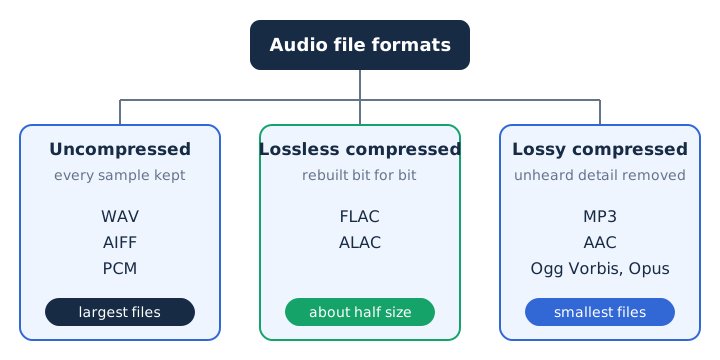
There are three types of audio file formats: uncompressed, lossless compressed and lossy compressed. Each group sets its own trade between file size and how much of the original recording survives. PCM samples are the raw material all three start from.
The groups differ in one thing only, which is what happens to the samples.
- Uncompressed audio keeps every PCM sample exactly as recorded, as WAV and AIFF files do.
- Lossless compression packs samples into about half the space, then rebuilds them exactly (FLAC, ALAC).
- Lossy compression removes detail hearing is least likely to notice (MP3, AAC, Ogg Vorbis, Opus).
What Is an Uncompressed Audio Format?
An uncompressed audio format stores every PCM sample exactly as recorded, so a minute of silence takes as much space as a minute of music. CD audio uses a 44.1 kHz sample rate, 16 bits per sample and 2 channels, which comes to 1,411.2 kbps and about 10.6 MB per minute.
The audio CD carries LPCM, and computers usually keep LPCM in one of two files. WAV, from IBM and Microsoft, arrived in August 1991 and is built on RIFF. AIFF, from Apple, dates from 1988 and is built on IFF. Both can hold other codecs too, though most WAV and AIFF files carry plain PCM.
WAV and AIFF suit storing and archiving an original recording. The WAV file and AIFF file guides cover each format in depth.
What Is a Lossless Compressed Audio Format?
A lossless compressed audio format packs PCM audio into less space and lets the player rebuild the original data exactly. Lossless codecs reach a compression ratio of about 2:1, so the file takes roughly half the space of the same PCM audio. Packing shrinks silence and repeated patterns to almost nothing, and that is where the saving comes from.
FLAC, the Free Lossless Audio Codec, comes from the Xiph.Org Foundation. It is non-proprietary, free of patents and formally specified in RFC 9639 since 19 December 2024. ALAC, the Apple Lossless Audio Codec, comes from Apple, became open source in 2011 and usually sits inside an .m4a file; Apple Music uses it for lossless audio.
What lossless means for streaming and headphones is covered in the lossless audio guide. The FLAC file and ALAC guides go deeper on each codec.
What Is a Lossy Compressed Audio Format?
A lossy compressed audio format removes the sound detail that hearing is least likely to notice, and the removed data never comes back. Psychoacoustics picks what goes. The bitrate sets the trade: a lower bitrate gives a smaller file and a bigger loss, as the bitrate guide shows in numbers. One minute of 128 kbps MP3 takes 0.96 MB, against 10.6 MB for CD audio.
Four lossy codecs cover most files you meet. MP3, first released as a standard in 1991, runs from 32 to 320 kbps. AAC, designed as the successor to MP3, sounds better than MP3 at the same bitrate. Vorbis, a royalty-free codec from Xiph.Org, usually travels in an .ogg file. Opus, standardised by the IETF as RFC 6716 in 2012, runs from 6 to 510 kbps and handles speech and music for streaming over the internet.
What Is the Difference Between a Codec, a Container and an Audio File Extension?
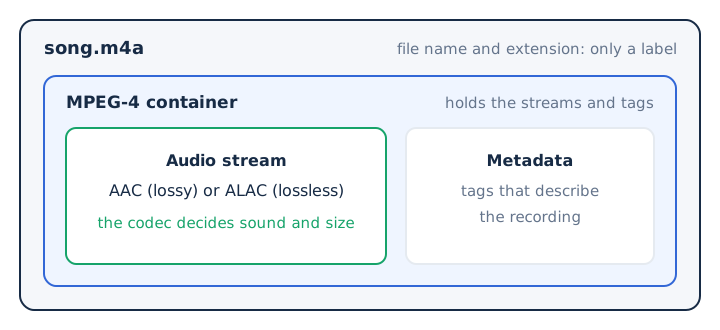
A codec encodes and decodes the sound, a container holds the encoded stream with its metadata, and the file extension is only the label at the end of the file name. The codec determines quality and size, while the container carries tags beside the sound. Most audio container formats hold one kind of coded audio, while a multimedia container such as Matroska can hold several audio and video streams.
Four common extensions show where the label and the codec part ways.
| Extension | Container | Codecs it can hold | What that means |
|---|---|---|---|
| .m4a | MPEG-4 | AAC or ALAC | Same name, lossy or lossless |
| .ogg | Ogg | Vorbis, or Opus | Two codecs under one label |
| .wav | RIFF | Usually PCM, also MP3 or ADPCM | Mostly uncompressed, not always |
| .mp3 | None | MP3 frames plus ID3 tags | One codec, no container |
ID3 tags store the title, artist and album inside an MP3 file. The audio codec guide explains codecs in depth, and video container formats such as MP4 and MKV belong to the video file formats guide linked above.
What Are the Most Common Audio File Formats?
The most common audio file formats are MP3, AAC, M4A, WAV, FLAC, ALAC, Ogg Vorbis, Opus, AIFF, AMR and E-AC-3, and each one belongs to one of the three groups.
Eleven formats appear here, sorted by group and by the job each one does.
| Format | Group | Extension | Typical use |
|---|---|---|---|
| MP3 | Lossy | .mp3 | Plays on almost any player |
| AAC | Lossy | .aac or .m4a | Apple files, Spotify web player |
| M4A | Container | .m4a | Holds AAC or ALAC audio |
| WAV | Uncompressed | .wav | Original recordings on Windows |
| FLAC | Lossless | .flac | Spotify Lossless, music archives |
| ALAC | Lossless | .m4a | Apple Music lossless |
| Ogg Vorbis | Lossy | .ogg | Open, royalty-free music files |
| Opus | Lossy | .opus | Speech and music over the internet |
| AIFF | Uncompressed | .aif or .aiff | Audio on a Mac |
| AMR | Lossy speech | .amr | Phone voice recordings |
| E-AC-3 | Lossy surround | Inside video files | Home theater and TV sound |
- MP3
- The best-known lossy format, MPEG-1 Audio Layer III, developed largely at Fraunhofer and read by almost every player; see the MP3 guide.
- AAC
- The lossy successor to MP3, sounding better at the same bitrate and topping out at 512 kbps for stereo; see the AAC guide.
- M4A
- An audio-only MPEG-4 file that holds lossy AAC or lossless ALAC under one extension; the M4A file guide explains both.
- WAV
- Uncompressed PCM in a RIFF file from IBM and Microsoft, the usual home of CD-quality audio on Windows computers; see the WAV file guide.
- FLAC
- The free, patent-free lossless codec from Xiph.Org, which Spotify uses for its Lossless setting at up to 24-bit/44.1 kHz.
- ALAC
- Apple's lossless codec, open source since 2011, stored in .m4a files and used by Apple Music for lossless audio.
- Ogg Vorbis
- A royalty-free lossy codec from Xiph.Org, frozen in May 2000 and coded at 16 to 128 kbps per channel; see the OGG file guide.
- Opus
- The open, royalty-free codec from IETF RFC 6716, running from 6 to 510 kbps for speech and music online; see the Opus guide.
- AIFF
- Apple's uncompressed format from 1988, built on IFF and used mostly on Mac computers to store PCM audio.
- AMR
- A 3GPP speech codec from 1999 that phones use for short voice recordings at 4.75 to 12.2 kbps; see the AMR guide.
- E-AC-3
- Dolby Digital Plus, the successor to Dolby Digital (AC-3), carrying up to 7.1 surround channels for home theater and TV; see the E-AC-3 guide.
WMA, a Windows format, also exists in lossy and lossless versions.
How Do Audio File Formats Differ in File Size?
One minute of stereo audio fills about 10.6 MB as WAV or AIFF, about 5.3 MB as FLAC or ALAC, 2.4 MB as a 320 kbps MP3 and 0.96 MB as a 128 kbps MP3. A mono AMR voice clip at 12.2 kbps needs only 0.09 MB for the same minute.
The same minute of sound shrinks by more than a hundred times from the top bar to the bottom one.
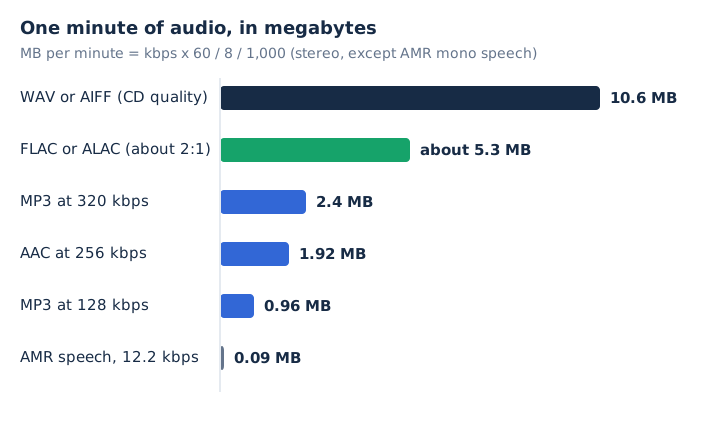
The bitrate sets each fixed-rate size through one formula: kbps x 60 / 8 / 1,000 gives megabytes per minute. FLAC size depends on the music, so 5.3 MB is an estimate from the 2:1 compression ratio. CD quality therefore takes about 11 times the file size of a 128 kbps MP3. Making a file smaller on purpose is covered in the guide to compressing audio files.
Which Audio File Format Should You Use for Each Task?
Use WAV or AIFF to record and edit, FLAC or ALAC to archive music without loss, and MP3 to share files that play on almost any player.
The job, not a ranking, picks the format.
| Task | Format to pick | Why |
|---|---|---|
| Recording and editing | WAV or AIFF | Keeps the original recording whole |
| Archiving a CD collection | FLAC or ALAC | Half the size, an exact copy |
| Playing on any device | MP3 | Almost every player reads it |
| Apple devices and apps | AAC or ALAC in .m4a | Apple's own lossy and lossless codecs |
| Voice notes and calls | Opus or AMR | Tiny files built for speech |
| Movies and TV surround | E-AC-3 | Up to 7.1 surround sound channels |
Opus also covers music streaming over the internet, from 6 kbps speech up to 510 kbps stereo. Which format sounds best is a separate question, answered in the best audio format guide.
How Can You Tell Which Format an Audio File Uses?
You tell which format an audio file uses by showing its file name extension first, then checking the codec when that extension can hold two, as .m4a and .ogg can.
Two checks settle most files.
- Show the file name extension: in Windows File Explorer, choose View, then Show, then File name extensions; on a Mac, choose Finder, Settings, Advanced, then Show all filename extensions.
- For a stereo .m4a, read the bitrate: anything above 512 kbps must be ALAC, because 512 kbps is the highest rate AAC allows for stereo.
On a Mac, File, then Get Info shows the name and extension of a single file, and the extension tells you what type of file it is.
How Do You Convert an Audio File to Another Format?
You convert an audio file by decoding it and encoding the sound again with the target codec, which writes a new file with a new extension. mp4tomp3.io runs that audio converter in your browser: its encoder writes MP3, WAV or WebM, and the file never leaves your device.
The tool reads MP4, MOV, M4V, WebM and MKV video plus M4A, MP3, WAV, OGG, Opus, AAC and FLAC audio. It does not read AMR, AIFF or WMA files. Convert from the best source you have, because a lossy step never restores detail an earlier encode removed.
Can You Change an Audio Format by Renaming the File Extension?
No, renaming song.m4a to song.mp3 changes only the label; the AAC or ALAC data inside stays the same, so the file is still an M4A. The file extension never rewrites the audio. A real change needs a converter that re-encodes the audio with a new codec. The M4A file guide shows what sits behind that extension.
Does Converting One Lossy Format to Another Lower the Quality?
Yes, converting AAC, Ogg Vorbis or Opus to MP3 decodes the file and runs a second lossy encode, which removes more detail on top of the first. This generation loss is permanent, since no lossy codec can rebuild what an earlier encode threw away. Pick 256 kbps or 320 kbps for the new MP3 so the second step costs as little as possible; the AAC to MP3 converter offers both.
Can You Extract the Audio Track From a Video File?
Yes, a video file such as MP4, MOV, WebM or MKV carries its sound as a separate audio stream, and mp4tomp3.io saves that stream as MP3 or WAV without uploading the video. The extract audio from video tool handles all four containers. Some film and TV soundtracks use E-AC-3 (Dolby Digital Plus) surround, and playback errors with it have their own EAC3 not supported guide.
Can You Convert an Audio File Without Uploading It?
Yes, mp4tomp3.io converts WAV, FLAC, M4A, OGG, Opus and AAC files to MP3 inside the browser, so the audio never reaches a server. The same tool writes WAV as 16-bit PCM and can trim a clip before you save it. Start with the WAV to MP3 converter, which accepts the other formats too.