Lossless audio keeps every bit of the original recording, so a player rebuilds it exactly after compression. The term names a storage method, and a lossless codec packs samples with a reversible algorithm. Lossy files differ because they throw data away to cut file size.
FLAC, ALAC, WAV and AIFF are the four lossless formats. CD quality runs at 1,411.2 kbps, or 10.6 MB per minute, against 2.4 MB for a 320 kbps MP3. Apple Music, Spotify Premium and four other streaming services offer lossless.
Standard Bluetooth can't carry it, so hearing it takes a wired chain from file to ears. No converter turns a lossy file back into a lossless one. For containers and codecs in general, start with the audio file format guide.
What Is Lossless Audio?
Lossless audio is digital audio stored so that every bit of the original recording is kept, either as uncompressed audio or with reversible compression that a player undoes exactly. Apple defines lossless compression as shrinking a song's file while preserving all of the data perfectly.
A file earns the label at 16-bit/44.1 kHz or higher, stored in a lossless format or on a compact disc, according to WIRED. Apple Music and Amazon Music both set their lossless floor at CD quality, the same 16-bit/44.1 kHz level.
"Lossless" describes how the data is stored, not a sound style or a genre of music. A lossless copy matches its source bit-for-bit, so lossless music sounds exactly like the master it came from.
How Does Lossless Audio Work?
Lossless audio works by storing the samples as they are, or by packing them with a reversible algorithm that a player unpacks back to identical samples. The two routes split the formats in half.
- Uncompressed lossless
- WAV and AIFF store every PCM sample exactly as it was recorded.
- Compressed lossless
- FLAC and ALAC pack the samples into a smaller file and lose nothing.
A lossless codec uses the redundancy in the sample stream, the way a ZIP archive shrinks a text document. Xiph.Org, which maintains FLAC, says FLAC beats Zip on audio because it was built for audio.
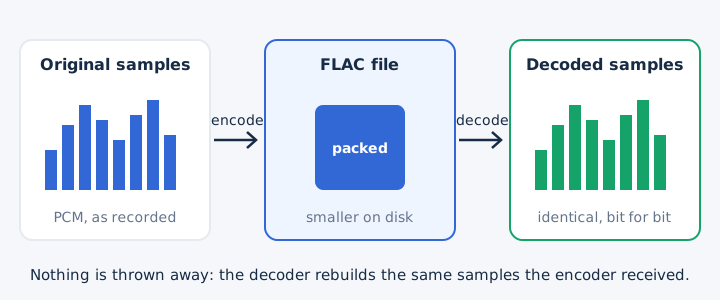
The decoder in your player reverses every packing step, so the samples coming out equal the samples that went in. Xiph.Org states that decoded FLAC audio is bit-for-bit identical to what entered the encoder. Each FLAC file also stores an MD5 signature of the original audio, so a player can check the copy.
What Is the Difference Between Lossless and Lossy Audio?
Lossless audio keeps all of the original data, while lossy audio such as MP3 and AAC deletes the parts a psychoacoustic model judges hard to hear, which makes files much smaller. The two families part ways on four practical points.
| Point | Lossless | Lossy |
|---|---|---|
| Data kept | Every bit of the original recording | Only what the psychoacoustic model judges audible |
| Typical formats | FLAC, ALAC, WAV and AIFF files | MP3 and AAC, the two most common choices |
| Size per minute | 10.6 MB for CD-quality WAV, less as FLAC | 2.4 MB for a 320 kbps MP3 |
| Can be converted back without loss | Yes, any lossless format converts exactly to another | No, deleted data never returns to the file |
File size is lossy audio's one big advantage: a 320 kbps MP3 needs less than a quarter of the space of CD-quality WAV. Denon points out that the audible gap is often subtle, because it depends on the recording as much as on the playback system. Whether the upgrade is worth paying for is a separate question with its own answer.
Which Audio Formats Are Lossless?
The main lossless audio formats are FLAC, ALAC, WAV and AIFF. They share one promise, every original sample kept, and they differ in whether they compress. Two of these formats compress the samples, and two store raw PCM. Apple Music and Spotify use the compressed pair for streaming.
- FLAC: open, compressed lossless format, and the codec behind Spotify Lossless.
- ALAC: Apple's compressed lossless codec, used for every Apple Music lossless stream.
- WAV: uncompressed PCM audio and the standard file type for editing.
- AIFF: Apple's uncompressed PCM format, the Mac counterpart of WAV.
Each of the four formats has its own guide, and a separate page compares the lossless formats side by side.
What Is the Bitrate of Lossless Audio?
Lossless audio at CD quality runs at 1,411.2 kbps, and higher resolutions run higher: 24-bit/192 kHz stereo reaches 9,216 kbps. One formula sets every figure: sample rate x bit depth x channels. A CD gives 44,100 x 16 x 2, which is 1,411,200 bits per second.
Resolution sets the bitrate, and the bitrate sets the file size, as the five rows below show for stereo audio.
| Resolution | Bitrate (kbps) | Size per minute | Where you meet it |
|---|---|---|---|
| 16-bit/44.1 kHz | 1,411.2 | 10.6 MB | CD audio, the floor of every lossless tier |
| 24-bit/48 kHz | 2,304 | 17.3 MB | Apple Music Lossless at its top setting |
| 24-bit/96 kHz | 4,608 | 34.6 MB | Hi-res files; a 14-inch MacBook Pro plays them natively |
| 24-bit/192 kHz | 9,216 | 69.1 MB | Apple Music Hi-Res Lossless at its top setting |
| 320 kbps MP3 | 320 | 2.4 MB | Lossy reference at the MP3 maximum |
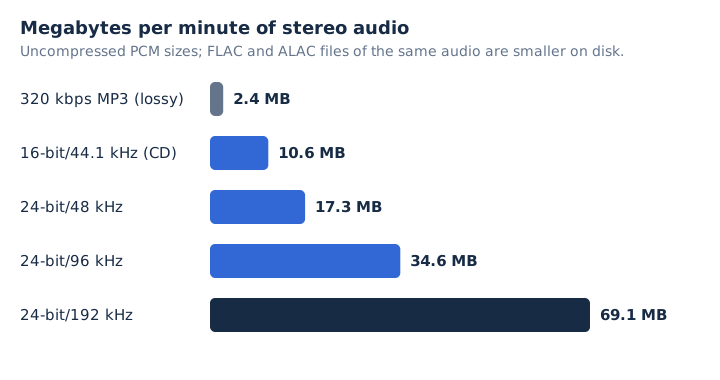
These are uncompressed PCM rates. FLAC and ALAC files sit smaller on disk, then decode back to the same bitrate during playback.
Doubling the sample rate doubles the bitrate, as the 48 kHz and 96 kHz rows show. The RIAA counts music as hi-res when it is lossless and mastered at 48 kHz/20-bit or higher, and the hi-res audio guide covers the tiers.
Which Streaming Services Offer Lossless Audio?
Apple Music, Spotify Premium, Amazon Music, Tidal, Qobuz and Deezer all offer lossless audio. Each service caps lossless at its own resolution, and four of them publish the exact limit and price terms.
| Service | Lossless codec | Highest resolution | Extra cost |
|---|---|---|---|
| Apple Music | ALAC | 24-bit/192 kHz (Hi-Res Lossless) | None, included in the plan |
| Spotify Premium | FLAC | 24-bit/44.1 kHz | None, part of Premium |
| Qobuz | FLAC | 24-bit/192 kHz (Hi-Res) | Hi-Res needs a Studio Premier or Sublime plan |
| Deezer | FLAC | 24-bit/192 kHz (Hi-Fi) | None on paid plans; Deezer Free lacks Hi-Fi |
Amazon Music sells lossless in two tiers, HD and Ultra HD, and Tidal has offered lossless since its launch.
Spotify audio is truly lossless at its Lossless setting, which streams FLAC at up to 24-bit/44.1 kHz. Spotify's Very high setting is a different thing: a lossy stream of about 320 kbps. Spotify recommends a steady 1.5 to 2 Mbps connection for lossless playback, and Deezer asks for at least 5 Mb/s for Hi-Fi. Apple warns that Lossless and Hi-Res Lossless files use far more bandwidth and storage than standard AAC files, so lossless downloads fill a phone fast.
Can You Play Lossless Audio Over Bluetooth?
No, standard Bluetooth cannot carry lossless audio; wireless headphones such as AirPods re-encode the stream to a lossy codec like the AAC codec. Apple states that Bluetooth connections are not lossless, and most Beats models follow the same rule.
Two exceptions exist. Qualcomm's aptX Lossless streams lossless over Bluetooth, but only when the phone and the headphones both support it. AirPods Max (USB-C) play lossless too, though only through the USB-C cable.
Wi-Fi carries the bandwidth that lossless needs and Bluetooth lacks. The Connect versions of apps such as Spotify and Qobuz stream lossless tracks straight to compatible speakers over Wi-Fi.
What Do You Need to Listen to Lossless Audio?
You need a lossless source, a device that plays it, and a wired path to headphones or speakers. Above 48 kHz, an iPhone or iPad also needs an external DAC. Every link in the chain has to pass the full signal, in this order.
- Lossless file or stream: a FLAC, ALAC or WAV file, or a lossless tier from your streaming service.
- Player app with lossless turned on: Apple Music puts the switch in Settings, then Music, then Audio Quality.
- DAC (built in, or external above 48 kHz): the digital-to-analog converter turns digital samples into an analog signal.
- Wired headphones or speakers: a cable or USB-C link keeps the signal lossless, since standard Bluetooth re-encodes it.
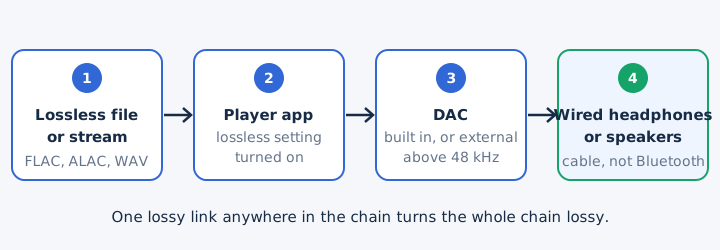
A built-in DAC handles the sample rate of CD-quality and 48 kHz audio on an iPhone. The 14-inch and 16-inch MacBook Pro go further and play up to 96 kHz natively. The player app setting costs nothing extra, because Apple Music and Spotify Premium both include lossless in the plan.
Can You Make a Lossy File Lossless?
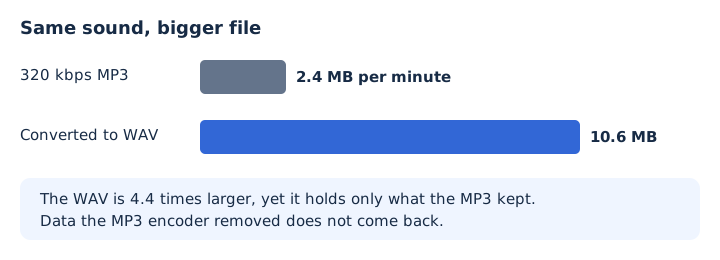
No, converting a lossy file such as an MP3 to a lossless format keeps the same sound and adds no lost detail back. The only route to lossless is a lossless source, such as the CD or a lossless download. A lossy source has already lost its data, and re-encoding cannot rebuild it.
Two real fixes exist. CD ripping copies the disc's 16-bit samples into a lossless file, and buying or streaming the lossless release gives you the original data directly.
WAV output from a lossy file still has uses. An audio editor or a device that only reads WAV accepts it, and editing a WAV adds no generation loss on the next save.
Does Converting MP3 to WAV Make It Lossless?
No, an MP3 converted to WAV sounds the same as the MP3; the WAV only stops further loss from later edits. The WAV stores the MP3's decoded audio as PCM, so the file grows from 2.4 MB to 10.6 MB per minute for a 320 kbps source. That is 4.4 times the size for identical sound. Use the MP3 to WAV converter when an editor needs WAV, not to upgrade quality.
Is Converting FLAC to MP3 Lossy?
Yes, converting FLAC to MP3 is lossy, because the MP3 encoder removes data the FLAC file kept. The trade is size and reach: a 320 kbps MP3 is about 2.4 MB per minute against 10.6 MB for CD-quality PCM, and it plays on more devices. Keep the FLAC as your master copy. The FLAC to MP3 converter on mp4tomp3.io converts the file in your browser, and the FLAC is never uploaded to a server.
Should You Re-Rip Your CDs to Get Lossless Audio?
Yes, re-ripping a CD to FLAC, ALAC or WAV keeps every bit of the 16-bit/44.1 kHz original, which is the surest way to replace an old MP3 with a lossless copy. CD ripping to WAV takes about 10.6 MB per minute, so a 45-minute album needs roughly 477 MB. FLAC and ALAC files come out smaller than the WAV, and the free FLAC tools from Xiph.Org rip CDs straight to FLAC.
Should You Try AI Upscaling Tools on an MP3?
No, not if you want a lossless copy: an AI upscaler adds estimated detail to an MP3, while lossless means the original data rebuilt bit for bit, and that data is gone. AI upscaling of a lossy source can make a file sound fuller. The result is still a new guess, not a lossless copy of the recording. Only a lossless source provides the original data again.