MP3 shrinks a song to about a tenth of its CD size by dropping sounds the ear masks, and that trade made it the most widely distributed audio coding format for music. The name stands for MPEG-1 Audio Layer III. Its lossy compression works frame by frame on a model of human hearing.
MP3 supports 14 bitrates from 32 to 320 kbps, so file size runs from 0.96 MB per minute at 128 kbps to 2.4 MB at 320 kbps. Each file is a chain of frames plus tags for the title and cover art. MPEG released the standard in 1991, and the US patents expired in 2017, so the format is free.
MP3 gives up a little quality for near-universal playback, sits between uncompressed WAV and newer AAC, opens in every major browser, and is made by recording, ripping or converting. It belongs to the wider family of audio file formats.
What Is MP3?
MP3 is a lossy audio coding format, and the .mp3 file format that uses it, built to store sound in far less space. To most listeners, an MP3 still sounds like a faithful copy of the original. The Fraunhofer Society in Germany developed most of the format under the lead of Karlheinz Brandenburg. MP3 support became near-universal on players and smartphones, and the format remains a de facto standard for digital audio.
On a computer, an MP3 is an audio file with the .mp3 extension. Its MIME type, audio/mpeg, tells a web browser what kind of data the file holds.
MP3 is the most common format for music, and Apple Podcasts accepts MP3 for podcast episodes. People also use MP3 for songs ripped from a CD, for recordings exported from an audio editor, and for the soundtrack pulled out of a video clip.
What Does MP3 Stand For?
MP3 stands for MPEG-1 Audio Layer III, or MPEG-2 Audio Layer III for its later extension. MPEG is the Moving Picture Experts Group, the committee that designed MP3 as part of its MPEG-1 standard. The 3 points to Layer III, one of the three audio codecs in MPEG-1, next to Layer I and Layer II.
MP3 isn't MPEG-3, an abandoned plan for a separate group of standards. It isn't MP4 either: MP4 is a container that can hold video and sound together, and it has its own MP4 file guide on this site.
Two ISO documents define the format: ISO/IEC 11172-3 covers the MPEG-1 version, and ISO/IEC 13818-3 covers the MPEG-2 version.
How Does MP3 Compression Work?
MP3 compression works by removing the parts of a sound that human hearing masks or cannot pick up, then packing what is left efficiently. This lossy step cuts CD-quality audio by 75 to 95%, depending on the bitrate. An MP3 encoder runs the same four steps on every short slice of sound.
- Split the audio into frames of 1,152 samples, so the encoder works on short, fixed slices of sound.
- Split each frame into frequency bands, so low, middle and high sounds are judged one band at a time.
- Apply a psychoacoustic model to find masked sounds, the details a listener's ear never notices anyway.
- Spend the bitrate's bits on the audible parts and pack them into one compact frame of data.
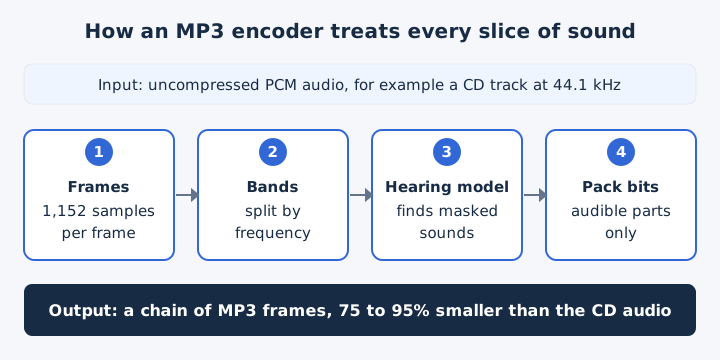
Auditory masking is the effect behind the savings. A loud tone can make a quieter tone close to it in frequency inaudible, so the psychoacoustic model marks the quiet one as safe to drop. Each frequency band then gets only as many bits as its audible content needs. On playback, the decoder in your player rebuilds an approximation of the sound from the stored bands. The removed detail never comes back, which is why MP3 counts as lossy.
What Bitrates and Sample Rates Does MP3 Support?
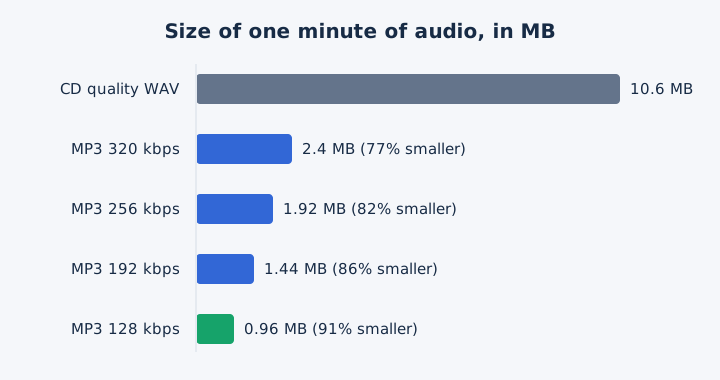
MP3 supports 14 bitrates from 32 to 320 kbps at sample rates of 32, 44.1 and 48 kHz, and MPEG-2 adds lower rates that suit speech. The four rates most people choose translate into the file sizes and savings in this table.
| Bitrate | Typical use | Size per minute | Saving vs CD |
|---|---|---|---|
| 128 kbps | Everyday listening | 0.96 MB | 91% |
| 192 kbps | Medium quality | 1.44 MB | 86% |
| 256 kbps | High quality | 1.92 MB | 82% |
| 320 kbps | Highest MP3 allows | 2.4 MB | 77% |
The full MPEG-1 ladder runs 32, 40, 48, 56, 64, 80, 96, 112, 128, 160, 192, 224, 256 and 320 kbps. MPEG-2 Audio Layer III adds rates from 8 to 160 kbps at a sample rate of 16, 22.05 or 24 kHz. CD audio uses 44.1 kHz at 16 bits in stereo. A CD-quality WAV therefore fills 10.6 MB per minute, and the saving column compares each MP3 against that figure.
An MP3 encoder writes either a constant bitrate (CBR) or a variable bitrate (VBR), which changes the rate through the file to match how complex the sound is. Choosing the right rate for a song or a podcast is the subject of the MP3 bitrate guide, and the general meaning of kbps is explained in the bitrate guide.
How Is an MP3 File Structured?
An MP3 file is a chain of frames, each with a header and a block of compressed audio. Optional ID3 tags at the start or end hold the title, artist, album and cover art. The tags sit apart from the frame data, which carries the sound.
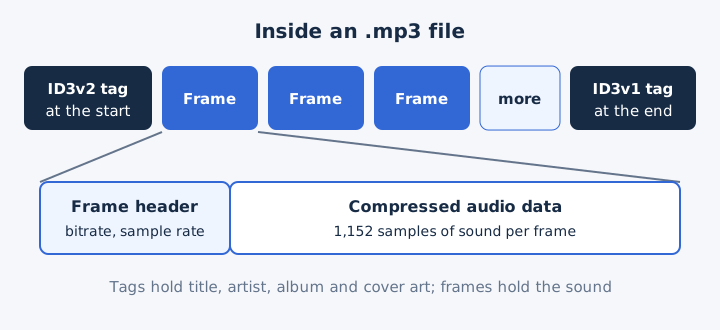
Every frame header tells the player the bitrate and sample rate of that frame. Because each frame carries its own header, MP3 allows the bitrate to switch from frame to frame, and that is how a VBR file works.
ID3v1 is the older tag: a 128-byte block at the end of the file with short text fields. ID3v2 sits at the start, uses an extensible set of fields and can embed an album cover. APEv2 is a newer alternative tag format.
When Was MP3 Invented?
MP3 was first released as a standard on 6 December 1991, and the .mp3 file extension was chosen on 14 July 1995. Six milestones took the format from a German research lab to a player in your pocket.
| Date | Event |
|---|---|
| 6 December 1991 | MPEG releases the first MP3 audio standard |
| 7 July 1994 | Fraunhofer ships l3enc, the first software MP3 encoder |
| 14 July 1995 | The .mp3 extension replaces the older .bit name |
| 9 September 1995 | WinPlay3 arrives as the first real-time MP3 player |
| 1997 | Nullsoft releases Winamp, and MP3 use grows fast |
| 1998 | MPMan goes on sale as the first portable MP3 player |
An MP3 player is a device named after the format, and the whole category uses that name. MPMan, released in 1998, was the first portable solid-state MP3 player.
Is MP3 Free to Use?
Yes, MP3 is free to use: its patents expired in the European Union by 2012 and in the United States on 16 April 2017. Before then, patent holders required licensing fees for Layer III encoders and decoders, so nobody could build one royalty-free. Today the format is royalty-free, and the end of the patents removed most licensing concerns for apps and websites that use MP3. Fraunhofer, which developed the format, no longer controls who may encode it.
What Are the Pros and Cons of MP3?
MP3's strengths are small files and near-universal playback; its main downside is that lost data never comes back, and newer codecs such as AAC sound better at the same bitrate. The format gives up a little quality to save a lot of space, and the table sets each gain against a cost.
| Pros | Cons |
|---|---|
| Plays on almost every device and app | Lossy: removed detail cannot be restored later |
| Files 75 to 95% smaller than CD audio | AAC and Opus beat it at the same bitrate |
| Free of patents in the US since 2017 | Re-encoding adds more loss with every save |
| Tags hold title, artist and cover art | Standard MP3 has no lossless mode, unlike FLAC |
The downside that hurts most in daily use is generation loss. Every encode or re-encode of an MP3 adds new artifacts, so a copy of a copy sounds worse than the first file. Compatibility keeps MP3 in use anyway, because it remains the de facto standard for digital audio even after AAC and FLAC arrived.
How Does MP3 Compare With Other Audio Formats?
MP3 is smaller than uncompressed WAV and lossless FLAC, slightly less efficient than AAC, and audio-only, unlike the MP4 container. Each pairing has its own full comparison page, so this table keeps to one short line per format.
| Format | Type | Versus MP3 |
|---|---|---|
| WAV | Uncompressed | About 4.4 times a 320 kbps MP3 |
| FLAC | Lossless, compressed | Bigger, but keeps every detail |
| AAC / M4A | Lossy | Better sound at the same bitrate |
| MP4 | Container | Can hold MP3 or AAC audio |
AAC was designed as the successor to MP3, and an M4A file holds AAC or ALAC audio. Other containers, such as MP4, Matroska, AVI and WAV, accept MP3 audio as well. Each matchup has its own page: MP3 vs WAV, FLAC vs MP3, AAC vs MP3 and M4A vs MP3.
The container question is covered in MP3 vs MP4.
How Do You Play an MP3 File?
You play an MP3 file by opening it in a built-in player or a web browser, because Windows, Android, iPhone and every major web browser support MP3 without extra software. The built-in option differs from one system to the next.
- Windows: Windows Media Player lists .mp3 among its supported file types.
- Mac: Safari plays it, with MP3 support since Safari 3.1.
- Android: the platform decodes MP3, so music and Files apps play it.
- iPhone: MP3 is a supported playback format, so the Files app opens it.
- Any device: Chrome, Edge, Firefox, Safari or VLC plays the file.
Adding MP3 songs to the iPhone Music library is a separate job, and the guide to playing MP3 on iPhone covers it step by step.
How Do You Make an MP3 File?
You make an MP3 file by encoding audio with an MP3 encoder: record and export to MP3, rip a CD, or convert a video or audio file you already have. Recording, CD ripping and conversion all end at the same step, where the encoder compresses plain audio into MP3 frames.
Quality starts with the source, because converting to a higher bitrate restores none of the detail an earlier encode removed. For music, 256 kbps counts as high quality and 320 kbps is the highest bitrate MP3 allows. For speech, Apple Podcasts recommends 96 to 128 kbps for a mono MP3. A 4 minute song at 320 kbps takes 9.6 MB, while a 4 minute talk at 128 kbps takes 3.84 MB.
Can You Convert a Video to MP3 in the Browser?
Yes, mp4tomp3.io turns an MP4, MOV, WebM or MKV video into an MP3 at 128 to 320 kbps without uploading it. The converter keeps only the sound, so the MP3 comes out far smaller than the video file. Choose the MP3 bitrate before you convert: 320 kbps keeps the most detail, and 128 kbps makes the smallest file. Open the video to MP3 converter, drop in the clip, trim it if needed, and save the MP3.
Does Converting WAV to MP3 Reduce Quality?
Yes, converting WAV to MP3 is lossy, though at 320 kbps the MP3 still sounds like a faithful copy to most listeners while it shrinks from 10.6 to 2.4 MB per minute. That lossy compression is a one-way step, so keep the WAV if you'll edit the audio again. The WAV to MP3 converter converts a WAV to a 320 kbps MP3 in your browser without uploading the original.
Can You Record Music in MP3 Format?
Yes, audio editors such as Audacity export straight to MP3, though recording in WAV and exporting to MP3 keeps more options open. Every re-encode of an MP3 adds new artifacts, while uncompressed audio stays intact until the final export. Record in WAV, finish every edit in the audio editor, then export one MP3 as the last step. The same rule applies to a voice recorder: pick a WAV or other lossless setting when it offers one.
Can You Rip a CD to MP3 on a Computer?
Yes, Windows Media Player rips an audio CD to MP3, WAV or WMA, with the format and bitrate set in its Rip settings. Each song on the disc becomes its own file. The full walkthrough, from inserting the disc to checking the finished files, sits in the guide to ripping a CD to MP3.