Sample rate counts how many times each second an analog-to-digital converter measures a sound wave, and it caps the highest pitch an audio file can hold. Digital audio at 44.1 kHz takes 44,100 samples per second, a rate measured in hertz. Half that rate, the Nyquist frequency, sets the ceiling at 22.05 kHz, just above the 20 kHz limit of hearing.
One short formula explains every common rate, from 8 kHz phone audio to the CD's 44.1 kHz and video's 48 kHz. A missing filter causes aliasing: a 30 kHz tone sampled at 44.1 kHz turns into a false 14.1 kHz tone. Higher rates add file size more than sound, so the destination decides the rate, and resampling changes less than most people expect. This guide sits under the audio file format hub, next to the bit depth guide.
What Is Sample Rate?
Sample rate is the number of times per second an analog-to-digital converter measures an audio signal, given in hertz. A rate of 44.1 kHz means 44,100 measurements every second, so one kilohertz equals 1,000 hertz. MDN defines the sample rate as the inverse of the sampling period, the gap between two measurements. The US FADGI glossary treats sampling rate and sampling frequency as one quantity, and "sample rate" is the same term again.
Four terms describe every digital recording of an analog signal.
- Sample
- One measurement of the signal's voltage, stored as a number in the file at a fixed moment in time.
- Sample rate
- The count of samples per second, written in hertz (Hz) or kilohertz (kHz), such as 44.1 kHz for CDs.
- Sample period
- The time between two samples, equal to one divided by the sample rate, such as 22.7 microseconds.
- Nyquist frequency
- Half the sample rate and the highest frequency the file can hold, such as 22.05 kHz at 44.1 kHz.
How Does Audio Sampling Work?
Audio sampling works by filtering the analog signal, measuring its voltage at fixed intervals and storing each measurement as a number, and a playback converter turns those numbers back into a smooth wave. The ADC handles the first three jobs on the way in. A reconstruction filter handles the last one on the way out.
Four steps carry a sound wave into a file and back out again.
- Low-pass filter: the converter removes content above the Nyquist frequency before any measurement happens.
- Sampling: the ADC measures the voltage once at each tick of the sample rate clock.
- Quantization: each measurement is rounded to the nearest level the bit depth allows, then stored.
- Reconstruction: on playback, the reconstruction filter rebuilds a continuous waveform from the stored samples.
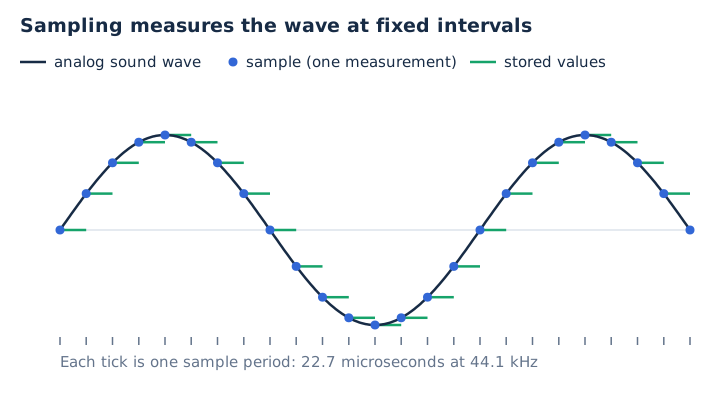
Sample rate sets how often the wave is measured, while bit depth sets how finely each measurement is stored. The bit depth guide covers the second half.
How Do You Calculate Sample Rate?
Sample rate equals the number of samples divided by the seconds they cover, which is the same as one divided by the sample period. So 44,100 samples in one second gives 44.1 kHz, one sample every 22.7 microseconds. The unit is samples per second, written Hz or kHz.
Higher rates leave less time between samples, as the five rates below show.
| Sample rate | Sample period | Samples per minute (one channel) |
|---|---|---|
| 8 kHz | 125 microseconds | 480,000 |
| 44.1 kHz | 22.7 microseconds | 2,646,000 |
| 48 kHz | 20.8 microseconds | 2,880,000 |
| 96 kHz | 10.4 microseconds | 5,760,000 |
| 192 kHz | 5.2 microseconds | 11,520,000 |
What Is the Nyquist Theorem?
The Nyquist theorem says a sample rate must be more than twice the highest frequency in a signal to rebuild it exactly. Half the sample rate, the Nyquist frequency, is the highest pitch a file can hold. The Nyquist-Shannon sampling theorem sits behind every rate on this page.
Human hearing spans about 20 Hz to 20 kHz, so full-range audio needs a rate above 40 kHz, per the Audacity manual and FADGI. That 20 kHz bandwidth is generous for adults: the Audacity manual notes that many older listeners hear nothing above about 14.5 kHz.
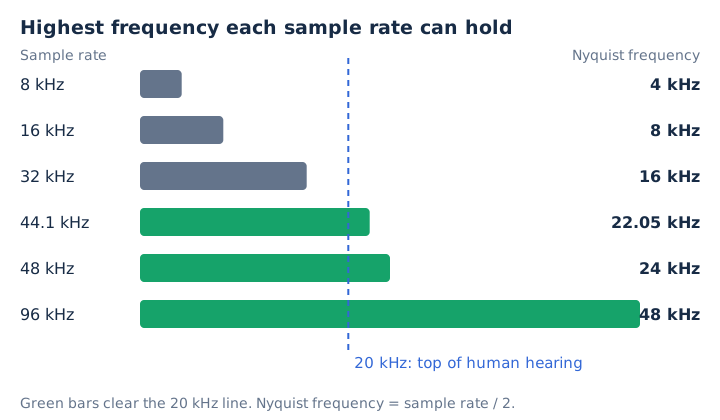
Each common rate brings its own ceiling, and only three of these six clear 20 kHz.
| Sample rate | Nyquist frequency | Covers 20 kHz hearing? |
|---|---|---|
| 8 kHz | 4 kHz | No |
| 16 kHz | 8 kHz | No |
| 32 kHz | 16 kHz | No |
| 44.1 kHz | 22.05 kHz | Yes |
| 48 kHz | 24 kHz | Yes |
| 96 kHz | 48 kHz | Yes |
How Do Sample Rates Cause Aliasing?
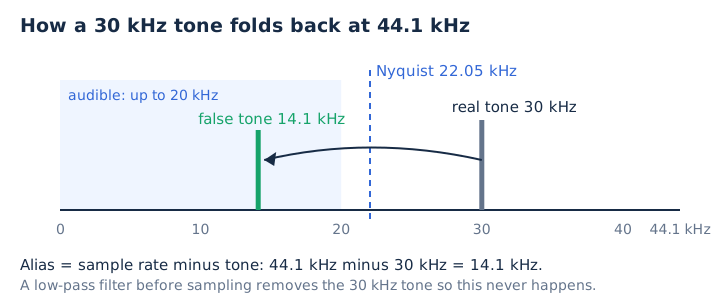
A sample rate causes aliasing when a frequency above its Nyquist frequency reaches the converter. The samples then fit a slower, false wave. A 30 kHz tone sampled at 44.1 kHz with no filter lands at 14.1 kHz, right inside the range you hear.
Converters block this with an anti-aliasing filter, a low-pass filter placed before sampling. MDN explains that a perfect brick-wall filter can't be built, so every real filter needs a transition band. That band is 2.05 kHz wide at 44.1 kHz and 4 kHz wide at 48 kHz.
The folding rule is simple for tones between the Nyquist frequency and the sample rate: the alias equals the sample rate minus the tone. A 25 kHz tone at 44.1 kHz therefore folds down to 19.1 kHz.
What Are the Common Audio Sample Rates?
The common audio sample rates start with 8 kHz for phone calls and 16 kHz for wideband voice, while 32 kHz suits speech and FM-quality audio. CDs and most music files use 44.1 kHz, video uses 48 kHz, and high-resolution masters use 96 or 192 kHz. Everyday audio normally runs at 44.1 kHz or 48 kHz.
Each rate grew up around one job, from phone lines to studio masters.
| Sample rate | Typical use |
|---|---|
| 8 kHz | Telephone calls (G.711) |
| 16 kHz | Wideband voice and speech apps |
| 22.05 kHz | Older low-bitrate MP3s |
| 32 kHz | Speech, FM-quality audio |
| 44.1 kHz | Audio CDs, most music files |
| 48 kHz | DVD, video and web audio |
| 96 kHz | High-resolution recording |
| 192 kHz | Ultra high-resolution masters |
Why Is CD Audio 44.1 kHz?
CD audio uses 44.1 kHz because that rate covers the 20 kHz top of hearing with a 2.05 kHz margin for the anti-aliasing filter, and because early digital recorders stored audio on video tape. Those PCM adaptor machines wrote 3 samples per video line, and the line counts of both TV systems multiply out to exactly 44,100.
The compact disc pairs 44.1 kHz with 16-bit stereo, and that combination runs at 1,411.2 kbps. Is 44,100 Hz still a good sample rate? Yes, for listening it holds everything up to 22.05 kHz.
What Is the Difference Between 44.1 kHz and 48 kHz?
44.1 kHz is the CD and music rate, and 48 kHz is the DVD and video rate. 48 kHz stores about 9% more samples, raises the Nyquist frequency from 22.05 to 24 kHz and widens the filter margin from 2.05 to 4 kHz. No listener hears that gain, because it all sits above 20 kHz.
The two everyday rates differ in five numbers.
| Attribute | 44.1 kHz | 48 kHz |
|---|---|---|
| Main use | CD, music | DVD, video, web |
| Nyquist frequency | 22.05 kHz | 24 kHz |
| Filter margin | 2.05 kHz | 4 kHz |
| 16-bit stereo bitrate | 1,411.2 kbps | 1,536 kbps |
| Size per minute | 10.6 MB | 11.5 MB |
Is Spotify 44.1 or 48 kHz? Spotify's lossless music streaming tops out at 24-bit/44.1 kHz FLAC, and Spotify upconverts tracks delivered below 44.1 kHz to that rate. YouTube recommends 48 kHz for uploads, so video audio usually lands at 48 kHz. Apple Podcasts accepts MP3 at either rate.
Is a Higher Sample Rate Better?
No, not for listening. A 44.1 or 48 kHz file already holds every frequency people hear, and higher rates add only content above 22 to 24 kHz plus a bigger file. MDN calls 96 kHz and 192 kHz technically unnecessary for sounds humans can perceive.
High rates still earn their place in production. They allow gentler filters, they keep detail that becomes audible when audio is slowed down or used for pitch shifting, and studios use them for mastering before a final downsample.
Should you record at 48 kHz or 96 kHz? Pick 48 kHz for video and most recording. Pick 96 kHz for sound design that slows audio down. Apple Music labels 48 to 192 kHz as Hi-Res Lossless, and an iPhone needs an external DAC to play anything above 48 kHz. High-resolution audio gets its own guide on this site.
How Does Sample Rate Affect File Size?
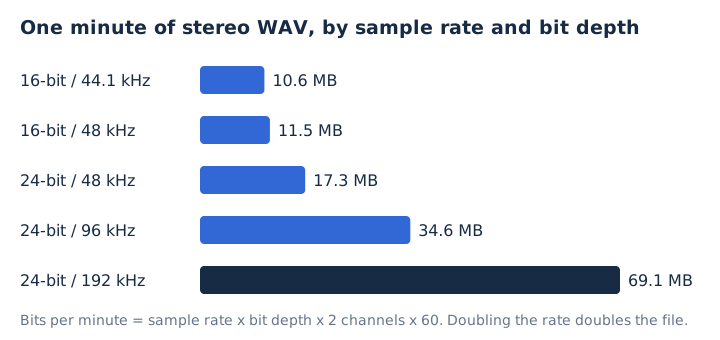
Sample rate scales an uncompressed file in direct proportion: bitrate equals sample rate times bit depth times channels. Doubling 48 kHz to 96 kHz therefore doubles a 24-bit WAV from 17.3 to 34.6 megabytes per minute.
One minute of stereo PCM at five settings shows how fast the file size climbs.
| Setting | Bitrate | Size per minute |
|---|---|---|
| 16-bit / 44.1 kHz | 1,411.2 kbps | 10.6 MB |
| 16-bit / 48 kHz | 1,536 kbps | 11.5 MB |
| 24-bit / 48 kHz | 2,304 kbps | 17.3 MB |
| 24-bit / 96 kHz | 4,608 kbps | 34.6 MB |
| 24-bit / 192 kHz | 9,216 kbps | 69.1 MB |
Sample rate and bitrate are different numbers. Sample rate counts samples per second, while bitrate counts bits per second. An MP3 encoder sets its bitrate separately from the sample rate, which the MP3 bitrate guide explains in depth.
Which Sample Rate Should You Use?
Use 44.1 kHz for music, 48 kHz for anything tied to video, 16 kHz or more for voice apps, and 96 kHz only when you'll slow the audio down or want room for heavy editing. The best sample rate for audio is the one your final destination expects.
Match the rate to where the recording ends up.
| Task | Sample rate | Why |
|---|---|---|
| Music for streaming or CD | 44.1 kHz | CD and Spotify rate |
| Video, YouTube | 48 kHz | Video standard |
| Podcast | 44.1 or 48 kHz | Apple Podcasts spec |
| Voice notes, speech apps | 16 to 32 kHz | Speech range |
| Sound design, slowed audio | 96 kHz | Keeps ultrasonic detail |
Keep one project sample rate from first take to export. Audacity converts any track whose rate differs from the project rate, so a mixed video project or podcast picks up extra conversion steps.
How Do Upsampling and Downsampling Change Audio?
Upsampling and downsampling change audio by recalculating every sample at a new rate, a process called resampling or sample rate conversion. Downsampling first filters out everything above the new Nyquist frequency. Upsampling adds samples but no new sound.
The everyday case is 48 kHz to 44.1 kHz. That conversion uses a 147/160 ratio, so the new samples fall between the old ones and interpolation calculates their values. Only content above 22.05 kHz is lost.
Editors resample whenever a track's rate differs from the project rate. Audacity's sample rate converter defaults to "Best Quality (Slowest)" for exports, and that slowest setting gives the cleanest result.
Does Upsampling to 96 kHz Improve Sound Quality?
No, upsampling a 44.1 kHz file to 96 kHz adds samples but no sound above 22.05 kHz, so it plays the same while growing 2.18 times larger. A 44.1 kHz source holds nothing above its Nyquist frequency, so the upsampled file inherits the same 22.05 kHz ceiling. True hi-res audio starts from a high-resolution recording, not a converted file.
Does Compressing an MP3 to 64 or 96 kbps Lower Its Sample Rate?
Yes, mp4tomp3.io resamples to 32 kHz before a 96 kbps MP3 and to 24 kHz before a 64 kbps MP3, which keeps everything up to about 16 kHz and 12 kHz, while 128 and 192 kbps keep the original rate. The encoder spends its smaller bit budget on the sound people hear, and voices sit well below 12 kHz. The MP3 compressor does this inside your browser, so the file never leaves your device.
Does Every Audio Format Support Every Sample Rate?
No, each format has its own range: MP3 allows 16 to 48 kHz, AAC 8 to 96 kHz, Opus works at 48 kHz, while FLAC and ALAC reach far higher, so converting to MP3 can force a resample. Browsers must handle 8 to 96 kHz in the Web Audio API. The audio file formats guide compares each format's limits.
Does Resampling Change the Bit Depth?
No, resampling changes how many samples a second the file holds, while bit depth, the precision of each sample, stays as it was unless you also convert the sample format. Both settings together set the size of a PCM file, as the bit depth guide shows.
Does Lowering the Sample Rate Lower the Bitrate?
Yes, for WAV and other PCM audio, where halving 48 kHz to 24 kHz halves 1,536 kbps to 768 kbps; no for MP3, whose bitrate is a separate encoder setting. That split is why a 64 kbps MP3 can still use a 24 or 32 kHz rate. The bitrate guide covers the kbps side.