Compressing an audio file re-encodes its sound with fewer bits per second, so the same minutes take less space. The bitrate sets the file size: a CD-quality WAV fills 10.6 MB a minute, while a 96 kbps MP3 needs 0.72 MB. That gap explains why audio gets large, which steps shrink it and how much each lower rate saves.
An MP3 shrinks through re-encoding at a lower rate, and a WAV shrinks by turning into FLAC or MP3, online or on a Windows PC or Mac. A 30-minute talk fits Gmail's 25 MB at 96 kbps, yet a 60-minute one needs 48 kbps. Lossy compression always costs some sound. Every format here belongs to the wider family of audio file formats.
What Does It Mean to Compress an Audio File?
Compressing an audio file means storing the same recording in fewer bytes. A lossy format such as MP3 does it by re-encoding at a lower bitrate, and a lossless format such as FLAC does it by packing the data without loss.
Lossy compression removes sound data for good, and the lower the bitrate, the more it removes. Lossless compression rebuilds every bit of the original, and Xiph.Org, which maintains FLAC, says the decoded audio is bit-for-bit identical while the file takes about half the space.
One word causes confusion here. An audio compressor effect evens out loud and quiet parts by narrowing the dynamic range, and it leaves the file size unchanged.
Why Is an Audio File So Large?
An audio file grows large when it stores many bits per second for many seconds: uncompressed WAV at CD quality runs at 1,411.2 kbps, about 10.6 MB per minute, while a 128 kbps MP3 uses 0.96 MB. File size equals bitrate times length. For uncompressed audio, the bitrate equals sample rate times bit depth times channels, so CD audio works out as 44,100 x 16 x 2.
The same minute of sound costs very different amounts of space, as these five common settings show.
| Format and setting | Bitrate | Size per minute | Size per hour |
|---|---|---|---|
| WAV, 16-bit / 44.1 kHz stereo | 1,411.2 kbps | 10.6 MB | 635 MB |
| FLAC (lossless, about 2:1) | about 706 kbps | about 5.3 MB | about 318 MB |
| MP3 320 kbps | 320 kbps | 2.4 MB | 144 MB |
| MP3 128 kbps | 128 kbps | 0.96 MB | 57.6 MB |
| MP3 64 kbps | 64 kbps | 0.48 MB | 28.8 MB |
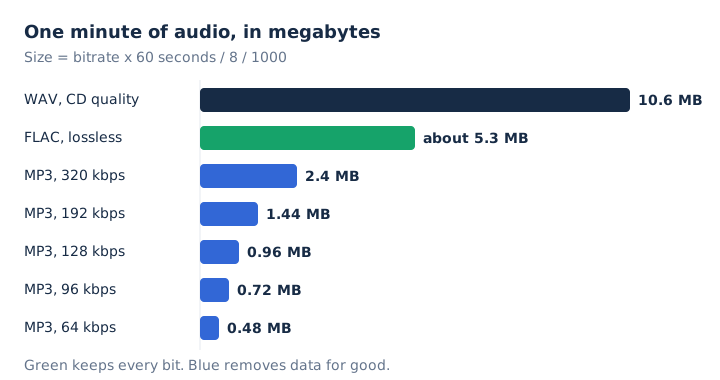
One hour of MP3 takes 57.6 MB at 128 kbps and 144 MB at 320 kbps, so even the largest MP3 setting stays far below 1 GB an hour. The same hour as CD-quality WAV fills about 635 MB. The WAV file guide covers how that uncompressed audio is stored inside the file.
How Do You Compress an Audio File?
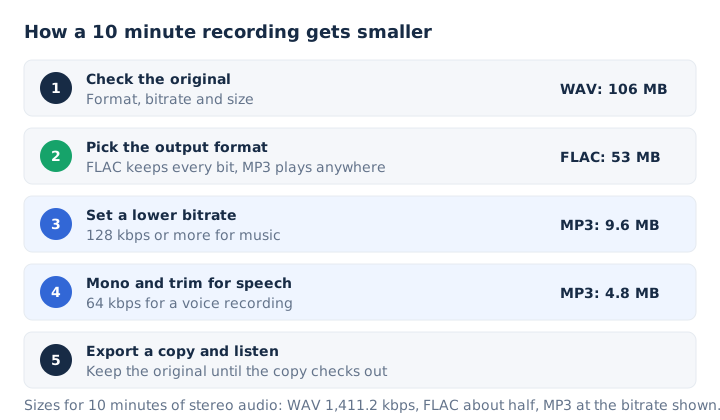
You compress an audio file by re-encoding it at a lower bitrate, in an efficient output format, in mono for speech and shorter where parts are not needed. Five moves cover nearly every case, and they work best in this order.
- Check the format, bitrate and size of the original, so you know which setting will make it smaller.
- Pick the output format: MP3 plays on almost any player, while FLAC keeps every bit at half size.
- Set a lower bitrate: 64 to 96 kbps for speech, and 128 kbps or more for music.
- Mix speech down to mono, and trim silence or any part of the recording you do not need.
- Export a copy, compare the two sizes and listen to it before you delete the original file.
MP3 is not the most efficient output format. AAC gives better sound than MP3 at the same bitrate, and Opus handles clear speech at 16 to 40 kbps. MP3 still wins on reach, because almost all players support it. Keep the original file until the new copy checks out, since Apple Support notes that data lost in compression can't be brought back.
How Much Can a Lower Bitrate Reduce Audio File Size?
A lower bitrate shrinks the file in direct proportion: saving a 320 kbps MP3 at 96 kbps makes it about 70% smaller, and turning a CD-quality WAV into a 128 kbps MP3 makes it about 91% smaller. Each bitrate trades a known amount of space for a known kind of use.
| MP3 bitrate | Size per minute | Saved against WAV | Good for |
|---|---|---|---|
| 64 kbps | 0.48 MB | 95% | Speech and voice recordings |
| 96 kbps | 0.72 MB | 93% | Speech and mono podcasts |
| 128 kbps | 0.96 MB | 91% | Music when size matters |
| 192 kbps | 1.44 MB | 86% | Music at medium quality |
| 320 kbps | 2.4 MB | 77% | The largest, most detailed MP3 |
Each kbps step maps to a fixed number of MB per minute, so a 30-minute MP3 takes 14.4 MB at 64 kbps, 28.8 MB at 128 kbps and 72 MB at 320 kbps. Wikipedia's MP3 entry puts MP3's saving against CD audio at 75 to 95%, the same span the table shows. The bitrate guide explains what the number itself measures.
How Do You Reduce the Size of an MP3 File?
You reduce the size of an MP3 by saving it again at a lower bitrate than it already has, or by trimming it. A 96 kbps MP3 saved at 96 kbps or higher comes out the same size or bigger. Read the current MP3 bitrate in the file properties first, then pick a lower rate. Three settings decide how small the new MP3 gets.
- Bitrate: halve it and the file halves; the MP3 compressor takes 128 kbps to 64 kbps for 50% off.
- Channels: mix spoken word to mono, so the same bits carry one voice track and sound cleaner.
- Length: trim silence, long intros and any part you do not need, since every minute costs space.
Every re-encode loses a little detail through generation loss, so compress once, from the best copy you have. For speech, 64 kbps is the usual recommended MP3 rate. For music, 96 kbps is about as low as most listeners will want to go.
How Do You Compress a WAV File?
You compress a WAV file by converting it to FLAC, to MP3, or to a smaller WAV. FLAC halves it without losing a bit, MP3 cuts it by 77 to 95%, and a 16-bit mono WAV takes half the space of stereo. Three routes trade size against what the file must still do.
| Route | Size per minute | Quality | Best when |
|---|---|---|---|
| WAV to FLAC | about 5.3 MB | Identical to the original | You will edit or archive it |
| WAV to MP3 at 128 kbps | 0.96 MB | Lossy, data removed for good | You will share or play it |
| Smaller WAV, 16-bit mono at 44.1 kHz | about 5.3 MB | Lower, loses the stereo image | An app accepts only WAV files |
The MP3 route is the one most people want, and the WAV to MP3 converter does it in the browser.
Inside the WAV format itself, three settings set the size. Dropping the bit depth from 24-bit to 16-bit cuts a third, mono halves the file, and halving the sample rate halves it again. A 24-bit, 48 kHz stereo WAV fills 17.3 MB a minute, while a 16-bit mono WAV at 44.1 kHz fills 5.3 MB.
Audacity exports 16-bit PCM at 44,100 Hz by default. So yes, you can reduce the size of a WAV file and keep it a WAV, though FLAC gets the same saving with no loss at all.
How Do You Compress an Audio File Online?
You compress an audio file online by choosing it in a browser compressor, picking a lower bitrate and downloading the smaller copy. The MP3 compressor on mp4tomp3.io does all of this inside the browser, so the file is never sent to a server. The compressor works in three moves.
- Choose the file: drop it on the page, tap Choose a File or paste a direct link.
- Pick 64, 96, 128 or 192 kbps; each option shows about how big the new MP3 will be.
- Press Convert to MP3, compare the new size, play the preview and download the smaller file.
The page selects 96 kbps by default. It also takes M4A, WAV and other audio files and saves each one as an MP3, and its Trim switch cuts the length as well. Once loaded, the page keeps working offline. It writes MP3 only and sets the size by bitrate, not by a target in MB. Many online compressors start with an upload step; this one reads the file on your device instead.
How Do You Compress Audio on a Windows PC or Mac?
On a Windows PC or Mac you compress audio by exporting it at a lower bitrate in Audacity, creating an AAC or MP3 version in the Apple Music app, or running one FFmpeg command. Audacity and FFmpeg run on both systems, while the Music app route works on a Mac only. Each desktop route comes with its exact menu or option.
- Audacity: choose File > Export Audio and pick MP3. Constant bit rate gives a predictable size, variable bit rate gives better sound per MB, and 128 kbps fills about 1 MB a minute.
- Apple Music app on Mac: open Settings > Files > Import Settings and pick AAC or MP3 under Import Using. Then choose File > Convert > Create MP3 Version; originals stay.
- FFmpeg: run
ffmpeg -i input.wav -b:a 96k output.mp3to write a 96 kbps MP3. Add-ac 1for mono, or-vnto drop the video.
To compress a WAV file in Audacity, open the WAV and export it the same way: the export dialog sets the folder, file name, format and encoding options. The Audacity manual lists Preset, Variable, Average and Constant bit rate modes, and only Constant makes the size completely predictable.
How Do You Send an Audio File That Is Too Large to Email?
Divide the limit by the length: the highest bitrate in kbps equals the limit in MB x 8,000, divided by the seconds. Then pick the next MP3 bitrate below that figure. A 30-minute talk fits Gmail's 25 MB attachment limit at 96 kbps. Length, not format, decides which bitrate still fits.
| Length | Gmail (25 MB) | Discord free (20 MB) |
|---|---|---|
| 10 minutes | 320 kbps (24.0 MB) | 256 kbps (19.2 MB) |
| 20 minutes | 160 kbps (24.0 MB) | 128 kbps (19.2 MB) |
| 30 minutes | 96 kbps (21.6 MB) | 80 kbps (18.0 MB) |
| 45 minutes | 64 kbps (21.6 MB) | 56 kbps (18.9 MB) |
| 60 minutes | 48 kbps (21.6 MB) | 40 kbps (18.0 MB) |
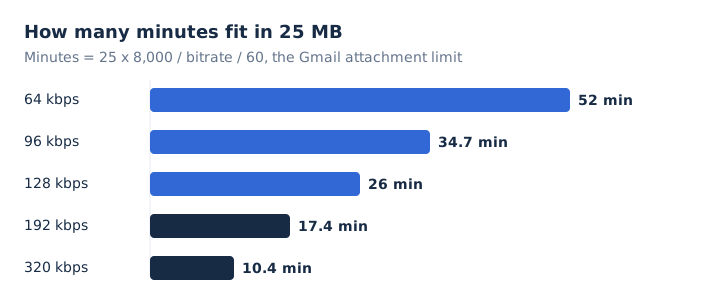
Here is a worked example. A 45-minute lecture saved as a 192 kbps MP3 weighs 64.8 MB. Re-encoded at 64 kbps, it drops to 21.6 MB and fits under Gmail's limit with room to spare.
Gmail turns attachments that add up to more than 25 MB into a Google Drive link instead of refusing them. Discord's free upload limit rose from 10 MB to 20 MB in August 2026.
The same formula works for any other cap: 16 MB for a 30-minute file gives 71 kbps, so 64 kbps fits. The compressor's lowest option is 64 kbps, so a recording length past about 52 minutes needs Trim, a split or a lower rate in Audacity or FFmpeg. Tags and cover art add size too, so leave a little room under the limit.
Does Compressing an Audio File Reduce Its Quality?
Yes, lossy compression to MP3, AAC or Opus removes sound data for good, and lower bitrates remove more. Lossless compression to FLAC removes nothing, but it only halves the size. Apple Support notes you might not hear a difference between compressed and uncompressed songs, depending on the song and your listening gear.
Speech stays clear even at 64 kbps, while music starts to sound duller below 96 kbps. Compression is also one-way: converting a compressed song back to an uncompressed format doesn't improve its sound quality, it only takes more disk space.
Can You Compress Audio Without Losing Quality?
Yes, FLAC or ALAC compress audio without losing a single bit, but they shrink a WAV to only about half its size, about 5.3 MB per CD-quality minute. A FLAC decoder converts the file back into the original samples exactly. Every MP3 setting, even 320 kbps, removes data, as the lossless audio guide explains.
Can MP3 Files Be Compressed Further?
Yes, but only to a lower bitrate than the original bitrate: 320 to 96 kbps cuts about 70%, while the same or a higher bitrate gives a file as big or bigger. Each re-encode loses a little detail through generation loss, so compress once, from the best copy, with the MP3 compressor.
Does Switching to Mono Halve an MP3's File Size?
No, an MP3 at a constant bit rate of 128 kbps fills about 1 MB per minute in mono or stereo, because bitrate and length alone set its size. Mono does halve a WAV, and it lets an MP3 spend all its bits on one channel instead of two, which suits speech. The bitrate guide explains how that number drives size.
Can You Compress WAV Files With Zip?
Yes, a Zip archive packs a WAV without losing a bit, but Xiph.Org says FLAC works like Zip and compresses audio much better because it is built for sound. Use a FLAC file for a lossless copy and a lower MP3 bitrate for a small one, since an MP3 is already compressed.
Does an Audio Compressor Effect Reduce File Size?
No, a compressor effect such as Audacity's Compressor narrows the gap between loud and quiet parts, and the exported file keeps the same size at the same bitrate. The Audacity manual says the effect reduces dynamic range so the audio can be made louder, and Audacity describes it as a way to even out volume levels. Bitrate and length still set the size of the exported file.