Audio quality measures how closely a file or a playback system keeps the sound of the original sound source. High fidelity means little gets lost on the way from the recording to your ears. Measured accuracy and heard sound quality are separate ideas. A chain of stages decides the result: the recording, the sample rate, bit depth and bitrate, lossy or lossless compression, the playback gear and the room.
Instruments and blind listening tests judge that result, and everyday files sit on a ladder from 64 kbps speech to 24-bit hi-res. The weakest stage sets the ceiling, so a 128 kbps MP3 stays a 128 kbps encode after any conversion. Better results start at the microphone and end with one careful export, a rule that holds across all audio file formats.
What Is Audio Quality?
Audio quality is how accurately the sound coming out of a system or file matches the original sound the source produced, leaving aside changes an engineer made on purpose. Yamaha's audio quality white paper builds its definition on that accuracy test. It also lets you state audio quality as physical numbers, such as frequency range, noise and distortion, checked against ISO, AES or IEC specifications.
The range that matters is human hearing. The cochlea responds from about 20 Hz to 20 kHz, it hears best near 3 kHz, and the top end drops with age. A file that keeps the original signal across 20 Hz to 20 kHz without added noise has high audio quality.
What Is the Difference Between Audio Quality and Sound Quality?
Audio quality is measured accuracy against the source signal, while sound quality is how one listener hears and judges the result. A file can measure well and still be disliked, or measure poorly and still please. Everyday speech mixes the two words, and this guide uses audio quality for the measurable part.
The two terms answer different questions about the same sound.
- Audio quality
- How closely the output signal matches the source, measured with meters and analyzers.
- Sound quality
- How the hearing sensation meets a listener's expectations, a matter of listener preference and perception.
- Intended change
- A change made on purpose, such as an engineer's equalization, which audio quality sets aside.
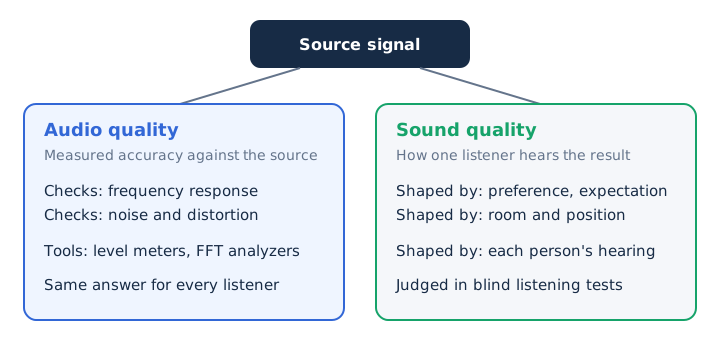
A warmer bass added on purpose can lift sound quality for one listener. The same change lowers measured audio quality, because the output now differs from the source.
What Affects Audio Quality?
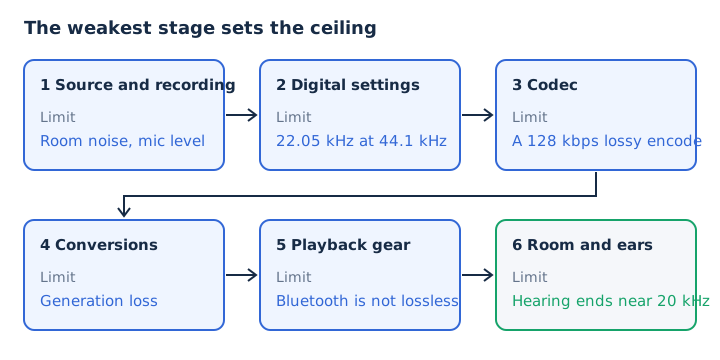
A chain of six stages decides audio quality, from the source and recording through the digital settings and codec to the playback gear and the room. Each stage can only keep or lose detail that reached it.
Sound passes through these stages in order, and each one has its own limit.
- Source and recording: the microphone, room noise and recording level set how clean the first signal is.
- Digital settings: sample rate, bit depth and bitrate fix how much of that signal the file can store.
- Codec and compression: a lossless codec keeps every sample, while a lossy codec and its encoder decide what goes.
- Conversions: every lossy re-encode adds new artifacts on top of the losses from the encode before it.
- Playback gear: the DAC, amplifier, headphones or speakers, and any Bluetooth link set the limit on your side.
- Room and listener: room acoustics, your listening position and your own hearing shape what finally reaches you.
Denon makes the same point about lossy and lossless files: the gap depends on the original recording, the playback system and the listener's hearing.
How Do Bitrate, Sample Rate and Bit Depth Shape Audio Quality?
Three numbers describe a digital file: sample rate sets the highest frequency it can hold, bit depth sets its dynamic range, and bitrate sets how much data per second it keeps. CD audio uses 44.1 kHz, 16-bit and 1,411.2 kbps.
Each number controls a different part of the sound, and CD audio gives a fixed reference point.
| Setting | What it controls | CD value | Common lossy value |
|---|---|---|---|
| Sample rate | Highest frequency, half the rate | 44.1 kHz, up to 22.05 kHz | 44.1 or 48 kHz |
| Bit depth | Dynamic range, 6.02 dB per bit | 16-bit, 96.3 dB | Set by the decoder |
| Bitrate | Data per second | 1,411.2 kbps | 128 to 320 kbps MP3 |
The Nyquist rule explains the first row: a file holds frequencies up to half its sample rate. For uncompressed PCM, bitrate equals sample rate x bit depth x channels, so 44,100 x 16 x 2 gives 1,411.2 kbps. A lossy encoder picks its bitrate instead, from 32 to 320 kbps for MP3.
The bitrate guide covers data rates. The sample rate guide covers the frequency limit, and the bit depth guide covers noise and range.
How Do Lossy and Lossless Compression Change Audio Quality?
Lossless compression keeps every bit, so a FLAC file decodes to exactly the original audio at about half the size of a WAV. Lossy compression removes the sound the ear is least likely to notice, using auditory masking. MP3 cuts size by 75 to 95% compared with CD audio.
Three storage types trade file size against how much of the recording they keep.
| Type | Examples | What it keeps | Stereo minute |
|---|---|---|---|
| Uncompressed | WAV, AIFF | Every sample | 10.6 MB |
| Lossless | FLAC, ALAC | Every sample, rebuilt bit for bit | About 5.3 MB |
| Lossy | MP3, AAC, Opus | What masking does not hide | 0.96 to 2.4 MB |
The codec matters at the same bitrate. AAC generally beats MP3 at an equal bitrate. In a HydrogenAudio listening test that the Opus developers report, Opus at 96 kbps outscored an MP3 encoder at 136 kbps.
A 320 kbps MP3 keeps 23% of the CD data rate and relies on masking for the rest. The lossless audio guide shows how FLAC and ALAC rebuild the original.
How Is Audio Quality Measured?
Audio quality is measured in two ways: objectively, with instruments that read frequency response, noise and distortion, and subjectively, with controlled listening tests. ITU-R recommendations set the formal test methods.
Five methods cover the job, and each answers a different question about the same sound.
| Method | What it checks | Example |
|---|---|---|
| Electronic measurement | Frequency response, signal-to-noise ratio, distortion | FFT analyzer, level meter |
| Small-impairment test | Tiny differences between near-perfect systems | ITU-R BS.1116 |
| Intermediate-quality test | Clearly audible quality differences | ITU-R BS.1534 |
| Perceptual model | A computed score of perceived quality | ITU-R BS.1387 |
| ABX test | Whether a listener can tell A from B | Repeated blind trials |
Two rules make a listening test fair. The listener doesn't know which version is playing, so the test is blind. Both versions are matched in loudness within 0.5 dB, because the louder one usually sounds better and the ear detects level gaps down to 0.5 dB.
You can run the same check at home. Match the two files' loudness, hide the labels, and repeat the ABX test until you reach a clear score. Training changes the results too, so a single casual listen proves little.
What Are the Common Audio Quality Levels?
Everyday audio sits on a ladder from telephone speech at 8 kHz, through MP3 at 64 to 320 kbps and CD-quality lossless, up to 24-bit hi-res. Each step up uses more data per minute.
Each rung pairs a typical setting with its size in megabytes per stereo minute and the place you meet it.
| Level | Typical setting | Stereo minute | Where you meet it |
|---|---|---|---|
| Telephone | 8 kHz, 8-bit G.711 | Speech only | Phone calls |
| Speech MP3 | 64 kbps | 0.48 MB | Voice notes, talk |
| Mid-range MP3 | 128 kbps | 0.96 MB | Everyday listening, podcasts |
| High MP3 | 320 kbps | 2.4 MB | Spotify Very high |
| CD quality | 16-bit/44.1 kHz | 10.6 MB WAV, 5.3 MB FLAC | CDs, lossless streaming |
| Hi-res | 24-bit/96 kHz | 34.6 MB | Studio masters before mastering |
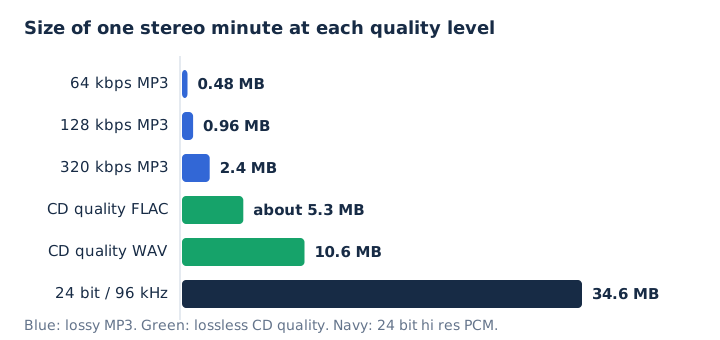
Telephone audio carries speech up to about 3,400 Hz, enough to understand words. Apple Podcasts recommends stereo MP3 at 128 to 256 kbps. Spotify follows a similar ladder: Low about 24 kbps, Normal about 96, High about 160, Very high about 320 kbps, and Lossless up to 24-bit/44.1 kHz FLAC.
Hi-res audio starts above CD quality, at 48 kHz/20-bit or higher under the RIAA definition, and it has its own guide.
Which Link in the Audio Chain Limits Quality the Most?
The weakest link in the chain sets the ceiling for everything after it, because no later stage can add back detail an earlier stage removed. A 128 kbps MP3 stays a 128 kbps encode whether you save it again at 320 kbps or as WAV.
Four ceilings show how one stage caps the rest.
- Sample rate: a 44.1 kHz file holds nothing above 22.05 kHz, on any speaker or headphone you play it through.
- Bit depth: a 16-bit file keeps its 96.3 dB of range even after you save it in a 24-bit container.
- Lossy encode: re-encoding a 128 kbps MP3 at 320 kbps makes the file 2.5 times larger, not better.
- Playback link: a lossless file sent over standard Bluetooth reaches your headphones as a lossy stream.
Generation loss adds a fifth trap. Every lossy re-encoding step adds new artifacts, so encode to MP3 or AAC once, from the best source you have. Apple states the upconversion rule plainly: converting compressed audio to an uncompressed format doesn't improve its quality, and the file only takes more space.
How Can You Improve Audio Quality?
Audio quality improves most at the start of the chain: a clean recording at the right level, then a lossless master, then one lossy encode at a high bitrate, and wired playback where lossless matters.
These steps follow the chain from the microphone to your ears.
- Record in a quiet room, away from noise sources such as fans and AC units.
- Keep the mic 3 to 5 inches from your mouth and make a test recording first.
- Set the recording level to about -12 dBFS on average, with peaks below -6 dBFS.
- Clean up the take with equalization, noise reduction and normalization in an audio editor.
- Keep a WAV or FLAC master file of the finished audio before any lossy export.
- Encode to MP3 or AAC once, at 256 or 320 kbps for music.
- Play lossless files over a wired connection, because Bluetooth links are not lossless.
Spoken audio gains the most from a better recording. The University of Pittsburgh's teaching center names intelligibility as the key test of quality for speech, and it advises keeping low points above -24 dBFS.
How Do You Get the Best Audio Quality From a File?
The best audio quality comes from starting with the best source file you have and converting it only once. Choose WAV output when you will edit, or the highest MP3 bitrate, 320 kbps, when you need a small file. No converter can raise the quality of its source.
The file's history matters as much as its label. An MP4's sound track is usually AAC, which is already a lossy source, so saving it as WAV keeps that AAC quality inside a larger file.
Does the File Format Alone Decide Audio Quality?
No, the format sets the kind of compression, but the bitrate, the encoder and the source decide the result, so a 128 kbps MP3 and a 320 kbps MP3 share one format and differ in quality. A full file format ranking lives in the guide on which audio format is best quality.
Is CD Quality Good Enough for Listening?
Yes, CD quality (16-bit/44.1 kHz) holds frequencies up to 22.05 kHz, above the 20 kHz limit of hearing, and 96.3 dB of dynamic range. MDN calls 96 kHz and 192 kHz unnecessary for reconstructing sounds people can perceive. Xiph.Org adds that 24-bit/192 kHz files take about 6 times the space of 16-bit at 44.1 kHz, and the hi-res audio guide covers where higher rates still help.
Can Headphones or Bluetooth Limit the Quality of a Good File?
Yes, the playback chain sets its own ceiling: Apple notes that Bluetooth connections are not lossless, and AirPods use the AAC Bluetooth codec. That AAC codec is the same lossy format described in the AAC audio guide. A wired connection keeps a lossless file lossless, and on iPhone songs above 48 kHz also need an external DAC.
Can an Audio Enhancer Fix a Poor Recording?
Yes, partly: noise reduction, equalization and normalization make speech clearer, but no tool restores data a lossy encode removed. Normalization raises the volume to a set peak target. An audio enhancer works only on what the file still holds, the same limit that applies to audio compression. When you can record again, a new take at -12 dBFS in a quiet room fixes the problem at its source.
Can You Keep the Audio Quality When You Extract Sound From a Video?
Yes, mp4tomp3.io saves a video's sound as 16-bit PCM WAV or as MP3 up to 320 kbps inside the browser, without uploading the file.
The 16-bit PCM WAV keeps the decoded track as it is, while MP3 adds one more lossy step, so pick the 320 kbps MP3 setting. Open the extract audio from video tool, drop in the file, and choose the output; the tool converts it on your device and offers Trim to cut it shorter.