AAC packs a song into about a tenth of its CD size and still sounds clean at 128 kbps. The name stands for Advanced Audio Coding, an audio format built as the MP3 successor, and it uses lossy compression to cut file size. This page covers AAC the sound format, not Augmentative and Alternative Communication, the speech-support method that shares the initials.
Below, you'll see what AAC stands for, how its encoder works, its profiles from AAC-LC to xHE-AAC, and how a .aac file differs from an .m4a. Then come bitrates, quality, pros and cons, where AAC plays, Bluetooth, licensing, opening and converting. AAC sits in the wider family of audio file formats.
What Is AAC?
AAC is a lossy audio coding standard that Dolby, AT&T, Fraunhofer and Sony built as the successor to MP3, and it usually sounds better than MP3 at the same bitrate. Microsoft's Windows Media Player documentation defines AAC the same way.
AAC is a codec: it defines how the sound gets compressed. A file with AAC inside can end in .aac, .m4a or .mp4, so the extension tells you the wrapper, not the codec. The general idea of a codec has its own audio codec guide.
In music, AAC carries songs from the iTunes Store and the streams in Spotify's web player. On a computer, AAC is the sound inside many video files, and YouTube lists AAC-LC as a recommended codec for upload audio.
What Does AAC Stand For?
AAC stands for Advanced Audio Coding. The Moving Picture Experts Group (MPEG) declared it an international standard in 1997.
Two documents define it. MPEG-2 Part 7, published as ISO/IEC 13818-7 in 1997, introduced the format. MPEG-4 Part 3, published as ISO/IEC 14496-3 in 1999, absorbed and extended it, and its current edition dates from 2019.
In speech therapy, AAC means Augmentative and Alternative Communication, a separate subject about devices that help people with speech or language impairments communicate.
How Does AAC Work?
AAC works by turning sound into frequency data, dropping what your ear won't notice, and packing the rest. The encoder uses the modified discrete cosine transform (MDCT) and a psychoacoustic model, the same idea behind MP3 with sharper tools. An AAC encoder makes the same four moves on every block of sound.
- Cut the audio into blocks of 1,024 samples, or 128 samples when a sudden sound arrives.
- Turn each block into frequency data with the MDCT, so bass, voice and treble separate cleanly.
- Run a psychoacoustic model that marks quiet or masked sounds a listener will not notice.
- Quantize and pack the audible part into the bitstream, spending bits only where they count.
Quantization is the lossy step: it rounds the frequency values coarsely where the model says nobody will hear the error.
AAC beats MP3 on three design points. AAC uses a pure MDCT, while MP3 mixes the MDCT with an FFT. AAC's long block size is 1,024 samples against MP3's 576, which codes steady tones more efficiently. AAC's short blocks hold 128 samples against MP3's 192, which keeps drum hits and other transients sharper.
What Are the Profiles of AAC?
AAC comes as a family of profiles: AAC-LC for everyday audio, HE-AAC and HE-AAC v2 for low-bitrate streams, AAC-LD for calls, and xHE-AAC for 12 to 300 kbps. Each profile trades bitrate, delay and processing load in its own way.
| Profile | Added | Built for |
|---|---|---|
| AAC-LC (Low Complexity) | 1997 | General music and video |
| AAC Main and AAC-SSR | 1997 | The other original MPEG-2 profiles |
| AAC-LTP | 1999 | Prediction with lower complexity |
| AAC-LD (Low Delay) | 2000 | Real-time conversation |
| HE-AAC (AAC+) | 2003 | Low bitrates |
| HE-AAC v2 | 2004 and 2006 | Even lower bitrates |
| xHE-AAC | Later extension | The 12 to 300 kbps range |
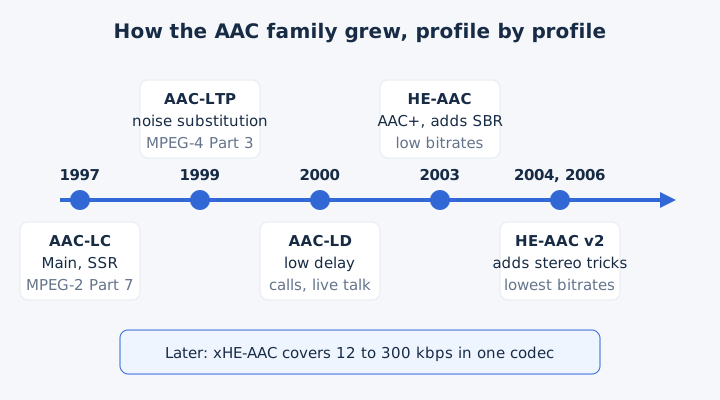
AAC-LD isn't AAC-LC. LD means Low Delay and serves live conversation, while LC means Low Complexity and covers ordinary music files. HE-AAC adds spectral band replication on top of AAC-LC, and HE-AAC v2 adds parametric stereo on top of HE-AAC. Android lists AAC ELD, an enhanced low-delay version, and decodes xHE-AAC from Android 9.
What Is an AAC File?
An AAC file is any file that holds AAC-encoded sound, but the .aac extension has a narrower meaning. A .aac file holds the bare AAC stream in ADTS or ADIF form. An .m4a or .mp4 file wraps the same AAC sound in an MP4 container.
ADTS chains frames together, and each frame carries its own header, so a player can join a stream midway. ADIF uses one header at the start, followed by raw AAC data.
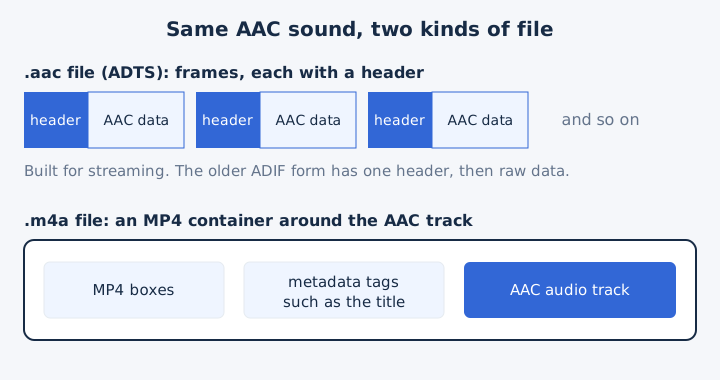
The MP4 family adds four more file extensions. An .m4b file holds an audiobook, an .m4p file is a protected iTunes song, an .m4r file is an iPhone ringtone, and a .3gp file uses the 3GPP mobile format. Most AAC music sits in an m4a file, which has its own guide.
What Bitrate Should You Use for AAC?
Use 128 kbps AAC for transparent stereo music, 96 kbps when space is tight, and 256 kbps for headroom. AAC allows up to 512 kbps for stereo, at sample rates from 8 to 96 kHz. These rates come from the standard and from services that publish their settings.
| Bitrate | Where it is used | Size per minute |
|---|---|---|
| 96 kbps | MDN's recommended stereo minimum | 0.72 MB |
| 128 kbps | ITU-transparent stereo, Spotify free web player | 0.96 MB |
| 192 kbps | Android's HD recording profile | 1.44 MB |
| 256 kbps | iTunes Plus, Spotify Premium web player | 1.92 MB |
| 384 kbps | YouTube's recommended stereo upload | 2.88 MB |
| 512 kbps | AAC stereo maximum | 3.84 MB |
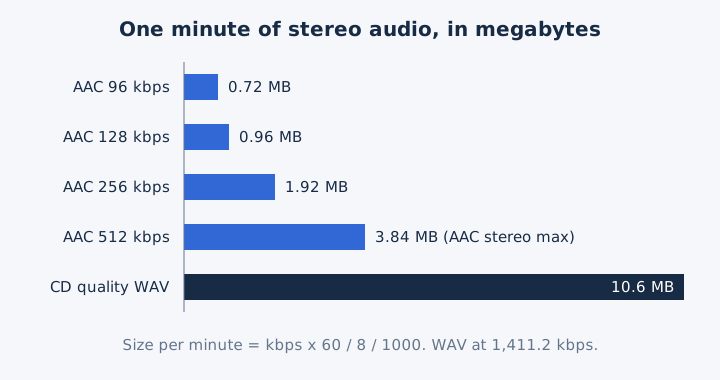
A 128 kbps AAC file is about 91% smaller than CD audio, which runs at 1,411.2 kbps. Hi-fi transparency needs at least 128 kbps in variable bitrate (VBR) mode, and YouTube asks for upload audio at 48 kHz. AAC also handles up to 48 full-range channels, where MP3 in MPEG-1 mode handles 2. For bitrate in general, see the guide to audio bitrate.
Is AAC Good Audio Quality?
Yes, AAC gives good quality for its size. MPEG-4 listening tests found stereo AAC transparent at 128 kbps, which means most listeners can't tell it from the source. AAC stays lossy, though, so it never matches the CD bit for bit.
At 96 kbps in joint stereo, AAC is satisfactory for modest listening. For 5.1 surround, AAC reached transparency at 384 kbps in the same tests.
FLAC beats AAC on fidelity because FLAC keeps every bit, which is the whole point of lossless audio. Against MP3, AAC wins at the same bitrate; the AAC vs MP3 comparison covers that match in full.
What Are the Pros and Cons of AAC?
AAC wins on efficiency and compatibility, and loses a little on openness. It sounds better than MP3 at the same bitrate and plays on almost every phone and service, but it still discards detail, and codec makers pay patent licences.
| Pros | Cons |
|---|---|
| Better than MP3 at the same bitrate | Lossy: removed detail never returns |
| Plays on iPhone, Android, Windows and car stereos | Codec makers pay patent licences until 2028 |
| Multichannel sound: up to 48 channels at 96 kHz | Firefox relies on the operating system for AAC |
| Free to stream and distribute | Android cannot open the older ADIF form of .aac |
AAC is a standard audio format for Blu-ray and HDTV. Patent terms once led free projects such as FFmpeg to ship their AAC code only as source code. Opus is the other codec YouTube accepts for upload audio, and the Opus audio format has its own page.
Where Is AAC Audio Used?
AAC is the sound inside most music stores, streams and phone videos. By 2017 it had become the de facto industry standard for lossy audio. You meet AAC in five places every day.
- Music stores and streaming: the iTunes Store, Apple Music and Spotify's web player all deliver AAC audio.
- Online video: YouTube recommends AAC-LC at 48 kHz for the audio track of every upload.
- Phones: Android records and plays AAC, and iPhone and iPod play it natively.
- Game consoles: Nintendo's Wii, DSi and 3DS and Sony's PlayStation 3 use AAC by default.
- TV and discs: Blu-ray discs and HDTV broadcasts carry AAC as a standard audio format.
Video files carry AAC too: AAC tops the list of audio codecs an MP4 file widely supports.
How Does Bluetooth Use AAC Audio?
Bluetooth uses AAC as an optional codec of the A2DP audio profile: your phone compresses the music to AAC before it sends the stream to the earbuds. Every A2DP device must also support SBC, the basic Bluetooth codec.
Apple builds AAC into its headphones. AirPods 3 or earlier, AirPods Pro 1, AirPods Max and most Beats wireless headphones use the Apple AAC Bluetooth codec. Apple also states that Bluetooth connections aren't lossless.
AAC and SBC are both lossy Bluetooth codecs. A2DP also allows MP3, ATRAC and vendor codecs such as aptX and LDAC, so your earbuds and phone settle on a codec they both support.
Is AAC Free to Use?
Yes for listeners and publishers: no licence or payment is needed to stream or distribute AAC audio, so a podcast or radio stream owes no royalty. Companies that build AAC encoders or decoders need a patent licence, which MDN says comes through VIA Licensing.
The patents have an end date. The last baseline AAC patent expires in 2028, and the last patent for the listed extensions expires in 2031. MP3 got there first: its US patents expired on 16 April 2017.
How Do You Open an AAC File?
You open an AAC file with the media app your system already has. Windows Media Player reads .aac, .adt and .adts files, Android plays .aac and .m4a, and iPhone plays AAC natively. Most devices need no extra app.
- Windows: Windows Media Player opens .aac, .adt, .adts and .m4a files.
- Android: the built-in player handles ADTS .aac, .m4a, .mp4 and .3gp.
- iPhone and iPod: both play AAC, the iTunes Store's own format, with no extra app.
- Any computer: the free VLC media player opens AAC files.
Android can play AAC files as long as they use ADTS; an ADIF .aac file won't open there. Firefox plays AAC only when the operating system supplies an AAC decoder.
How Do You Convert AAC Files to Other Formats?
You convert an AAC file by decoding it and encoding it again in the new format, so every AAC conversion is a re-encoding. mp4tomp3.io does this in the browser and writes MP3 at 128 to 320 kbps or WAV, without uploading the file. AAC to MP3 is a second lossy step, so pick an MP3 bitrate at least as high as the AAC bitrate.
Can You Convert an AAC File to MP3 in the Browser?
Yes, mp4tomp3.io converts an AAC file to MP3 at 128, 192, 256 or 320 kbps inside the browser, and the file never leaves your device. The AAC to MP3 converter suggests an MP3 bitrate of 192 kbps for most AAC music files.
Does Converting AAC to MP3 Lose Quality?
Yes, converting AAC to MP3 loses a little more detail, because both formats are lossy and AAC sounds better than MP3 at the same bitrate. Each lossy pass discards more data, so match or exceed the AAC bitrate: a 256 kbps AAC suits a 256 or 320 kbps MP3. The MP3 format guide explains that codec's generation loss.
Can You Convert AAC to WAV?
Yes, mp4tomp3.io decodes AAC to WAV (16-bit PCM), the uncompressed format audio editors use, but the WAV cannot bring back detail the AAC encoder removed. One minute grows from 0.96 MB at 128 kbps to about 10.6 MB as a CD-quality WAV file.
Is an AAC File the Same as an MP4 File?
No, AAC is an audio codec and MP4 is a container, though AAC is the main audio codec MP4 files carry. MP4 video stores its sound as a separate track, and mp4tomp3.io can pull that audio track out of an MP4 file and save it as MP3.