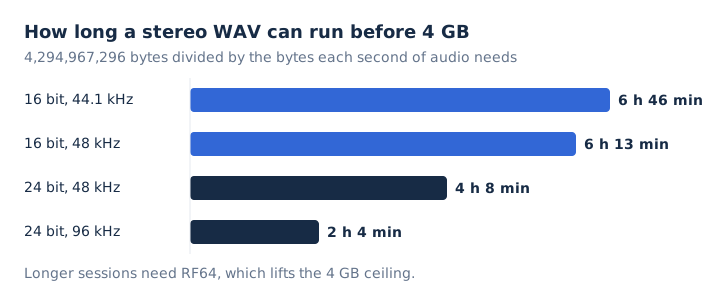
A WAV file stores sound as raw waveform samples, usually PCM, inside a RIFF container that Microsoft and IBM published in 1991 as the Waveform Audio File Format. That uncompressed audio costs space: one CD-quality minute fills about 10.6 MB, and a single file stops at 4 GB, close to 6 hours 46 minutes of stereo.
Three chunks inside the file describe the audio, and a code in one of them reveals whether the samples are PCM or a compressed codec. Windows, Mac, Android and VLC all open WAV, and Audacity, iTunes or a browser converter make one. WAV sits in the uncompressed branch of the audio file formats family.
What Is a WAV File?
A WAV file is an audio file in the Waveform Audio File Format, a RIFF container that usually holds uncompressed PCM samples. Microsoft and IBM defined it for Windows, and it needs no license to use. PCM keeps every sample the recorder captured, so a WAV plays back exactly like its source.
That uncompressed audio is also why the file is large. "WAV format" and "WAV file format" both name the specification. A ".wav file" is any single file that carries the .wav extension. A WAV holds sound only, so it is never a video file.
What Does WAV Stand For?
WAV stands for Waveform Audio File Format, also written WAVE, because the file records sound as a sampled waveform. Windows uses the format to store sounds as waveforms, and Microsoft calls it Wave Form Audio. Four labels describe the same format, and each one points to a different part of its identity.
- WAV / WAVE
- The short name for Waveform Audio File Format, Microsoft and IBM's audio standard.
- .wav
- The filename extension on nearly every file; the longer .wave appears only rarely.
- RIFF
- Resource Interchange File Format, the tagged wrapper that every WAV file is built on.
- Windows 3.1, August 1991
- The release that brought the format, published jointly by Microsoft and IBM.
No license is required to read or write WAV files. Apple's counterpart for Mac users is AIFF, a separate format with a similar job.
How Is a WAV File Structured?
A WAV file is one RIFF chunk tagged WAVE that holds a fmt chunk describing the audio and a data chunk holding the samples. For PCM audio, the header before the samples takes exactly 44 bytes: 12 for the RIFF header, 24 for the fmt chunk and 8 for the data chunk header. The table maps each part to the job it does.
| Chunk | Size | What it records |
|---|---|---|
| RIFF header | 12 bytes | The RIFF tag, total file size and the WAVE tag |
| fmt | 24 bytes for PCM | Format code, channels, sample rate and bits per sample |
| data | 8 bytes plus samples | The data tag, then the audio itself |
| LIST INFO (optional) | Varies | Title, artist and other text tags |
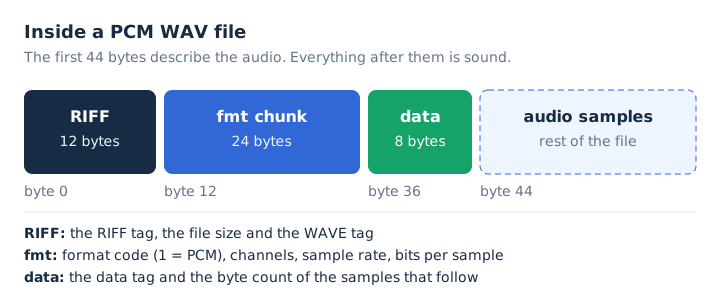
Every number in the header is stored little-endian, with the low byte first. The fmt chunk's format code tells a player how to read the samples: code 1 means integer PCM and code 3 means floating point. Text tags sit in the INFO chunk, and Broadcast WAV adds a bext chunk for production metadata.
Which Audio Codecs Can a WAV File Hold?
Most WAV files hold uncompressed PCM, but the container also accepts compressed codecs such as ADPCM, mu-law, A-law, GSM and even MP3, all behind the same .wav extension. Microsoft describes WAV as only a file container, and the fmt chunk's format code names the codec inside.
| Codec | Compressed? | Where you meet it |
|---|---|---|
| PCM (format code 1) | No | Music, recordings and CD rips |
| IEEE float (code 3) | No | Floating-point samples instead of integers |
| ADPCM | Yes | Many Windows .wav files (MS ADPCM) |
| mu-law and A-law (codes 7 and 6) | Yes | 8-bit ITU-T G.711 audio |
| MP3 or GSM inside WAV | Yes | Low-bitrate files, such as 16 kbps at 8 kHz |
You can spot the codec from the bitrate shown in any file info panel. A PCM WAV always runs at sample rate x bit depth x channels, which gives 1,411 kbps for CD quality. A .wav file that shows something far lower, such as 16 kbps, carries a compressed codec. Windows Media Player plays that compressed WAV only when the matching codec is installed.
How Big Is a WAV File?
A CD-quality stereo WAV, 16-bit at 44.1 kHz, runs at 1,411.2 kbps and fills about 10.6 MB per minute, so a 4-minute song takes about 42 MB. The sum is simple: sample rate x bit depth x channels gives the bitrate, and the file size follows from it. Each step up in sample rate or bit depth grows the file by the same ratio.
| Quality | Bitrate | MB per minute | 4-minute song |
|---|---|---|---|
| 16-bit / 44.1 kHz | 1,411.2 kbps | 10.6 MB | 42.3 MB |
| 16-bit / 48 kHz | 1,536 kbps | 11.5 MB | 46.1 MB |
| 24-bit / 48 kHz | 2,304 kbps | 17.3 MB | 69.1 MB |
| 24-bit / 96 kHz | 4,608 kbps | 34.6 MB | 138.2 MB |
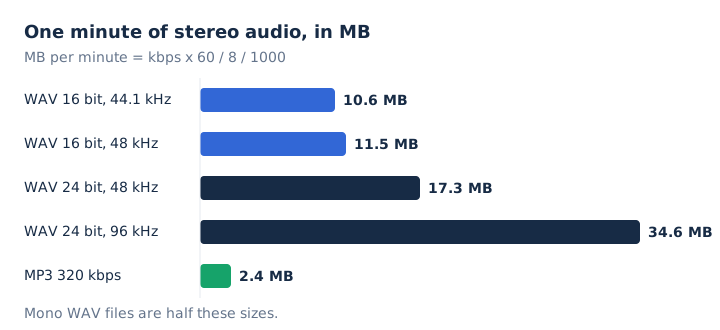
Microsoft puts one minute of PCM WAV anywhere from 644 KB to 27 MB, depending on the sample rate, the bit depth and mono or stereo. A mono file halves every figure in the table. For scale, a 320 kbps MP3 needs only 2.4 MB per minute, so CD quality in stereo costs about 4.4 times the space.
What Are the Advantages and Disadvantages of WAV Files?
WAV keeps every sample, needs no license and opens on every major system, but its file size runs about 4.4 times a 320 kbps MP3 and a single file stops at 4 GB. The trade-offs weigh quality and simplicity against storage.
| Advantages | Disadvantages |
|---|---|
| Removes no audio data when it holds PCM | Large files, about 10.6 MB per CD minute |
| Stores plain samples that editors read directly | A 4 GB limit on every single file |
| Free to use, with no license fee | Metadata split across INFO, bext and other chunks |
| Plays on Windows, Mac, Android and VLC | The .wav extension hides which codec is inside |
Where Are WAV Files Used?
WAV files sit wherever audio must stay untouched: editing, archiving, broadcast and full-quality CD imports. Four jobs keep the format in daily use.
- Audio editing: Audacity and other editors export WAV, by default as 16-bit PCM at 44,100 Hz for CD quality.
- Archiving: The Library of Congress lists WAVE as a preferred audio format, and the Macaulay Library records in WAV.
- Broadcast production: Broadcast WAV adds a bext chunk that stores production metadata alongside the uncompressed audio samples.
- CD imports: iTunes and the Music app include a WAV Encoder that rips CDs to uncompressed, full-size files.
WAV files still exist in large numbers. The Library of Congress held over 176 TB of .wav files as of April 2024, and archives such as NARA and Library and Archives Canada prefer WAVE with PCM for long-term archiving.
How Do You Open a WAV File?
You open a WAV file in the player your system already ships with: Windows Media Player, the Music app on a Mac, Android's media framework, or VLC on any computer. Each of the four handles PCM WAV without extra software.
- Windows: Windows Media Player lists Audio for Windows (.wav) among its supported file types.
- Mac: The Music app reads WAV and can even create WAV copies of songs.
- Android: The built-in media framework decodes 8-bit and 16-bit PCM WAV files.
- Any system: VLC media player opens WAV, including WAV files carrying DTS audio.
How Do You Make a WAV File?
You make a WAV file by exporting it from an editor such as Audacity, by importing a CD with the WAV Encoder in iTunes or Music, or by converting another file to WAV. Each of the three routes ends in a standard .wav file.
- Export from Audacity: choose File, Export, then WAV; Audacity writes Signed 16-bit PCM at 44,100 Hz by default.
- Import with iTunes or Music: open the import settings, set Import Using to WAV Encoder, then import or convert your songs.
- Convert in the browser: load an audio or video file in mp4tomp3.io and save it as a 16-bit PCM WAV.
On a Mac, the path is Music, Settings, Files, Import Settings; in iTunes on Windows it is Edit, Preferences, General, Import Settings. Converting an MP3 to WAV gives you a WAV file, but Apple notes the quality doesn't improve; the file only takes more disk space.
How Do You Convert a WAV File?
You convert a WAV file by decoding its samples and re-encoding them in another format: MP3 to save space, FLAC to save space without loss, or a 16-bit PCM WAV for wider playback. mp4tomp3.io handles WAV to MP3 and any supported file to WAV inside your browser, with no upload.
Going from WAV to MP3 removes data for good, and turning that MP3 back into a WAV only makes it bigger. Any WAV file converter follows those same two rules.
Can You Convert WAV to MP3 Without Uploading It?
Yes, mp4tomp3.io converts WAV to MP3 at 128, 192, 256 or 320 kbps inside the browser, so the file never leaves your device. Pick the MP3 bitrate before you convert: 320 kbps keeps the most detail at 2.4 MB per minute. Open the WAV to MP3 converter to start.
Can You Convert an MP3 Back to WAV?
Yes, an MP3 converts back to WAV, which some audio editors need, but the WAV keeps the MP3's quality inside a file about 4.4 times bigger. The new PCM samples rebuild only what the MP3 kept. Use the MP3 to WAV converter when a program needs WAV, and see the lossless audio guide for why the lost detail never returns.
Can You Save a Video's Sound as a WAV File?
Yes, mp4tomp3.io takes the soundtrack from an MP4, MOV, WebM or MKV video and saves it as a 16-bit PCM WAV, with trim when you need only part of it. Audacity uses the same 16-bit PCM encoding by default for WAV. Use the video to WAV converter for the job.
Is a WAV File Always Bigger Than an MP3?
Yes, a PCM WAV at CD quality fills 10.6 MB per minute against 2.4 MB for a 320 kbps MP3. Converting the WAV to MP3 therefore cuts its file size by about 77%. A WAV that carries MP3 audio inside stays about as small as the MP3 itself. Which of the two files to keep is the subject of the MP3 vs WAV comparison.
Does Converting WAV to FLAC Lose Quality?
No, FLAC packs a WAV without loss to about half its size, roughly 5.3 MB per CD-quality minute, and decodes back to the same samples. Lossless compression shrinks the file size without changing a single sample. The full FLAC vs WAV comparison covers when each one fits better.