An M4A file stores only sound inside the same MPEG-4 container that MP4 video uses. The letters stand for MPEG-4 Audio. Inside sits one of two codecs: AAC, which is lossy, or ALAC, Apple's lossless codec. The container wraps that single stream with tags and album art.
M4A isn't MP3, and AAC generally beats MP3 on quality at the same bitrate, though a player that decodes only MP3 can't open it. Apple's iTunes Plus songs and iPhone voice memos arrive as M4A, and Windows, Mac, iPhone and Android all play it. Here's the quick codec check: a stereo M4A above 512 kbps can't be AAC.
Converting turns this audio-only file into MP3 or WAV. M4A is one of the formats in our audio file formats guide.
What Is an M4A File?
An M4A file is an audio-only MPEG-4 file, the same container as MP4 but with no video track. The MPEG-4 standard itself defines only the .mp4 extension, and software uses .m4a to signal that a file carries sound alone.
Apple's iTunes Store sells its unprotected iTunes Plus songs as .m4a files. The iPhone Voice Memos app, Apple's built-in voice recorder, shares its recordings as .m4a files too.
As a file type, M4A is listed as MPEG-4 Audio, and Windows names it an MP4 Audio file. AAC audio in an M4A uses the MIME type audio/mp4.
What Does M4A Stand For?
M4A stands for MPEG-4 Audio, the name for an MPEG-4 Part 14 file that holds sound only. The "4" points to the MPEG-4 standard, and the "A" marks audio.
Apple uses three sibling extensions for special jobs inside the same family. An M4B file holds an audiobook or podcast and carries chapter markers, so you can jump between parts. An M4R file is an iPhone ringtone. An M4P file is an iTunes Store song locked with Apple's FairPlay encryption.
All four extensions share one container design, and the MP4 file format guide explains the full MPEG-4 extension family.
Which Codecs Does an M4A File Use?
An M4A file uses one of two codecs: AAC, which is lossy and small, or ALAC (Apple Lossless), which keeps every bit of the original. Advanced Audio Coding applies lossy compression, so the encoder discards some audio data for good. Apple Lossless applies lossless compression, so the decoded audio matches the source exactly.
Same extension, two very different kinds of audio, and the table sets them side by side.
| Codec | Type | Typical bitrate (stereo) | Size per minute | Where you meet it |
|---|---|---|---|---|
| AAC | Lossy | 128 to 256 kbps | 0.96 to 1.92 MB | Spotify web player, iTunes Plus songs, iPhone voice memos |
| ALAC | Lossless | Above 512 kbps for CD-quality music | Larger, but under 10.6 MB of CD-quality WAV | Apple Music lossless, CD rips |
The extension never tells you which codec is inside, so check the bitrate with this three-step test.
- Open the file's details: Properties > Details on Windows, or Get Info on a Mac.
- Find the bit rate, shown in kbps; Windows lists it among the audio details.
- Apply the rule: stereo above 512 kbps means ALAC, 96 to 320 kbps means AAC.
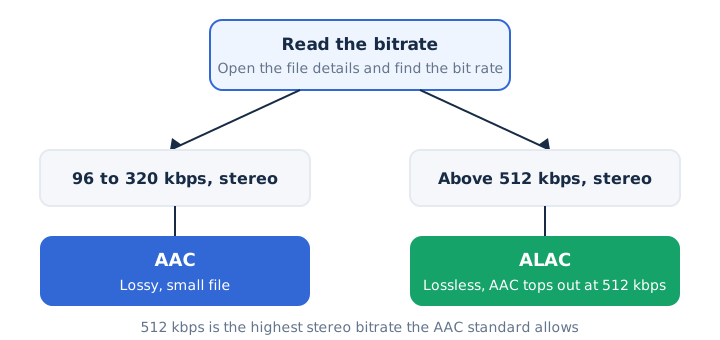
The test works because the AAC standard tops out at 512 kbps for stereo audio. CD-quality ALAC runs above that rate and below the 1,411.2 kbps of uncompressed CD audio.
Dolby, AT&T, Fraunhofer and Sony developed AAC as the successor to MP3. Apple released ALAC in 2004 and made it open source and royalty-free in 2011. ALAC isn't uncompressed: it shrinks the file without losing any data.
How Is the M4A File Format Built?
The M4A file format is an MPEG-4 Part 14 container that wraps one audio stream plus metadata such as title, artist, album art and, for audiobooks, chapter markers. The audio stream is either AAC or ALAC.
M4A and MP4 share the same container. Only the extension signals that the file holds audio and nothing else, which is why Windows calls an M4A file an "MP4 Audio file".
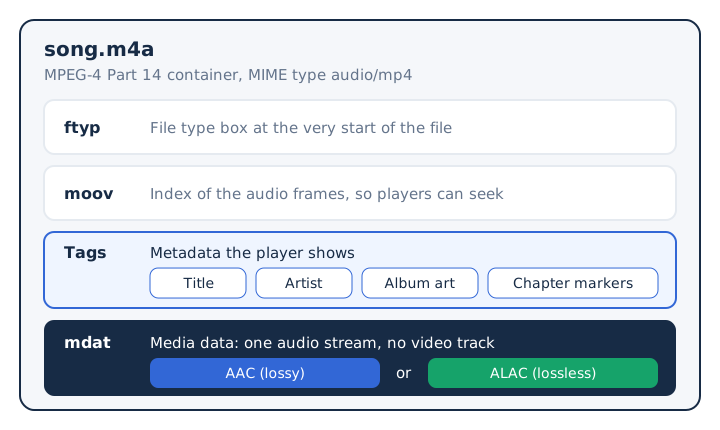
Inside, the file uses the same box structure as an MP4 video, and every piece of data sits in a box. An ftyp box opens the file and names its type, a moov box holds the index of the audio frames, and an mdat box holds the media data itself. The MIME type audio/mp4 tells a browser to treat the whole package as sound.
Is M4A the Same as MP3?
No, M4A and MP3 are different formats: M4A is an MPEG-4 container usually holding AAC, and MP3 is an older audio coding format. Most M4A files use AAC, which generally delivers better sound quality than MP3 at the same bitrate.
Four differences decide which file you keep.
| Point | M4A | MP3 |
|---|---|---|
| What it is | An MPEG-4 container that wraps one audio stream | An audio coding format and file type in one |
| Codec | AAC in most files, ALAC for lossless copies | MP3 audio only, which is always lossy |
| Quality at the same bitrate | AAC generally sounds better than MP3 at equal bitrate | Generally below AAC at the same bitrate |
| Compatibility | Plays on Windows, Mac, iPhone, Android and VLC | Plays on the same systems, plus MP3-only players |
The question of whether M4A is better than MP3 for your own library gets its own M4A vs MP3 comparison.
What Are the Advantages and Disadvantages of M4A?
M4A gives you better sound than MP3 at the same size and an optional lossless mode, but a car stereo or player that decodes only MP3 can't play it. Most M4A files use AAC, so sound quality and rich metadata are the main gains, while compatibility is the main cost.
The trade-offs fit in one table.
| Advantages | Disadvantages |
|---|---|
| Better sound than MP3 at the same bitrate, thanks to AAC | Won't play on hardware that decodes only MP3 |
| Lossless option: ALAC fits inside the same .m4a extension | The extension never shows whether the codec is AAC or ALAC |
| Rich metadata, including title, artist, album art and chapters | Protected iTunes purchases use .m4p with DRM and can't be converted |
| Native playback on Mac and iPhone, Apple Lossless included |
When Should You Use an M4A File?
Use M4A for music libraries on Apple devices, voice recordings and podcasts, and use ALAC in M4A when you want lossless files that iPhones play natively.
M4A earns its place in these four jobs.
- Music library in Apple Music or iTunes: AAC files stay small and carry full album art.
- Voice memos and phone recordings: the iPhone Voice Memos app shares recordings as M4A.
- Podcasts and audiobooks (.m4b): the .m4b file keeps chapter markers for skipping between parts.
- Lossless archive for Apple devices (ALAC): iPhones play Apple Lossless natively, with no extra app.
Pick MP3 instead when the file must play on a car stereo or player that decodes MP3 alone.
How Do You Open an M4A File?
You open an M4A file with the default player on Windows, macOS, iPhone and Android, or with VLC on any system. Ordinary AAC files need no extra codec pack.
Most devices open M4A without extra software.
- Windows: Windows Media Player 12 lists .m4a among supported files.
- Mac and iPhone: the Music app, or QuickTime Player on a Mac.
- Android: the built-in player, since Android supports AAC in .m4a.
- Any system: VLC, the free player, decodes AAC in MP4 files.
Android supports M4A natively, so a file copied to the phone plays without a new app. When an M4A refuses to open anywhere, check the extension: it may be a FairPlay-protected .m4p purchase.
How Do You Convert an M4A File?
You convert an M4A file by decoding its AAC or ALAC audio and writing it in another format, most often MP3 for compatibility or WAV for editing. The converter first runs the decoding step, then performs re-encoding into the target format.
Quality depends on the source codec. Apple warns that converting between compressed formats can reduce quality, and AAC to MP3 is exactly that second lossy step, so pick 256 to 320 kbps. A CD-quality ALAC file turns into WAV without losing anything.
Protected M4P files can't be converted by any browser tool. Apple states that its older Protected AAC purchases can't be converted at all.
Can You Convert M4A to MP3 Without Uploading the File?
Yes, mp4tomp3.io converts M4A to MP3 inside the browser, so the file stays on your device. Open the M4A to MP3 converter, drop the file in, and the browser does the work locally.
Set the MP3 bitrate to 256 or 320 kbps, because AAC to MP3 is a second lossy step. Apple Lossless M4A files convert in Safari only.
Can You Convert M4A to WAV?
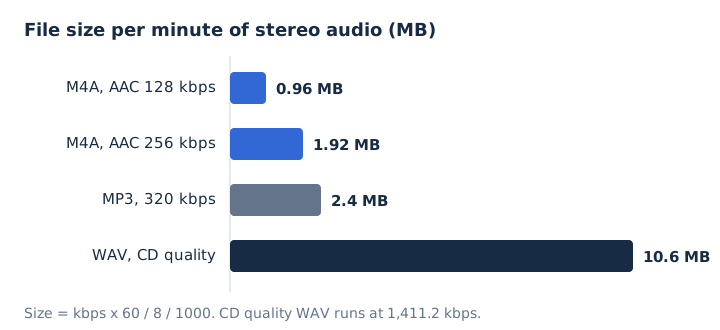
Yes, M4A converts to WAV, which editors and some hardware need; the WAV is about 10.6 MB per minute. The M4A to WAV converter writes 16-bit PCM audio, the plain sample format of CD-quality WAV. The WAV then opens in an audio editor that doesn't read M4A.
A CD-quality ALAC M4A turns into WAV with no loss. The 10.6 MB figure applies to CD-quality stereo, so a mono voice memo makes a smaller WAV. An AAC M4A keeps its AAC quality inside a much bigger file, because WAV can't restore data the AAC encoder removed.
Can You Convert an M4A File to MP4?
Yes, an M4A already uses the MP4 container, so a tool can save it as .mp4 by rewrapping the audio without re-encoding; the result is still audio-only. Only the file extension changes, and the sound stays identical.
The new file is an audio-only MP4 with no picture. Adding a cover image or a video track is video editing, which falls outside what this site covers.
Is M4A Lossless?
No, most M4A files are lossy AAC; an M4A is lossless only when it holds ALAC. The bitrate test in the codec section above tells the two apart in seconds.
A stereo M4A above 512 kbps is ALAC and therefore lossless. The guide on lossless M4A covers the full answer.