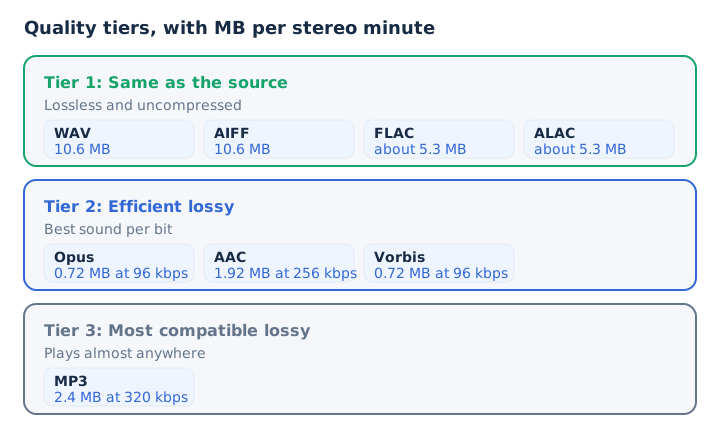
The best audio format keeps every sample of the source when you store or edit a recording, and it spends the fewest bits when you only need to play it. Lossless FLAC and ALAC tie with uncompressed WAV and AIFF for the highest quality, because all four decode to the same samples.
Below that tier, a 2014 blind listening test ranks the lossy codecs: Opus first, then AAC, then Vorbis, with MP3 needing a higher bitrate to match Vorbis. File size and compatibility then decide the pick for each job. FLAC suits a library, WAV suits editing, AAC suits phones, and Opus suits voice. This ranking builds on how audio quality is measured.
Which Audio Format Is the Highest Quality?
The highest quality audio format is any lossless or uncompressed format: WAV, AIFF, FLAC or ALAC. FLAC is the best single pick for most people, because it matches WAV's sound at about half the size. All four keep every sample of the source.
WAV and AIFF store PCM audio as it is, with no compression. Xiph.Org sets a strict rule for FLAC: a decoded file matches its input bit for bit. FLAC and ALAC pack the same PCM samples and rebuild them bit for bit on playback, as Xiph.Org and Apple both state for their codecs.
A format never adds resolution the source lacks. A FLAC ripped from a 16-bit, 44.1 kHz disc holds CD quality, which decodes to 1,411.2 kbps of PCM, and no more.
Lossy MP3, AAC, Opus and Vorbis rank below this tier, because each one removes sound the ear is least likely to notice in order to cut the file size.
Why Do Uncompressed and Lossless Formats Tie for Top Quality?
WAV and AIFF keep the samples untouched, while FLAC and ALAC compress the same samples and rebuild them bit for bit, so all four play identical audio from one master. They differ only in file size, tags and device support.
Each top-tier format stores the same sound in its own way.
- WAV
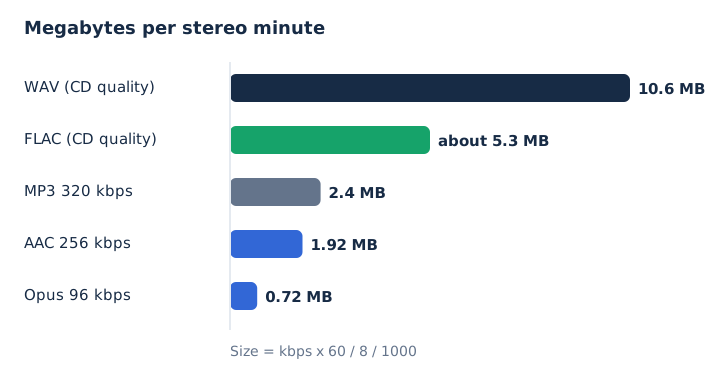
- Uncompressed PCM inside a RIFF file from Microsoft and IBM, at 10.6 MB per stereo minute.
- AIFF
- Apple's uncompressed PCM file format from 1988, also 10.6 MB per stereo minute.
- FLAC
- An open lossless codec that decodes bit for bit, at about 5.3 MB per minute.
- ALAC
- Apple Lossless, which also decodes bit for bit, at about 5.3 MB per minute.
FLAC adds a safeguard of its own. Every FLAC frame carries a CRC, and the file header stores an MD5 checksum of the original audio, so a player can detect damage. Lossless compression therefore wins on storage, and the sound stays equal. The FLAC vs WAV comparison covers the trade in detail.
How Do the Common Audio Formats Rank for Quality?
The common audio formats fall into three tiers: lossless and uncompressed first, efficient lossy second, and MP3 last. WAV, AIFF, FLAC and ALAC tie at the top, and Opus, AAC and Vorbis follow. MP3 ranks last because it needs more bits for the same score. The ranking below keeps the lossless tier as a tie and orders the lossy codecs by the 2014 test.
Each row lists the type, the megabytes per minute at a typical setting, and the job the format suits.
| Rank | Format | Type | Stereo minute | Best for |
|---|---|---|---|---|
| 1 (tie) | WAV | Uncompressed | 10.6 MB | Recording and editing |
| 1 (tie) | AIFF | Uncompressed | 10.6 MB | Editing on a Mac |
| 1 (tie) | FLAC | Lossless | About 5.3 MB | Archive and home listening |
| 1 (tie) | ALAC | Lossless | About 5.3 MB | Apple music library |
| 2 | Opus | Lossy | 0.72 MB at 96 kbps | Voice and streaming |
| 3 | AAC | Lossy | 1.92 MB at 256 kbps | Phones and Apple devices |
| 4 | Vorbis | Lossy | 0.72 MB at 96 kbps | Open web audio |
| 5 | MP3 | Lossy | 2.4 MB at 320 kbps | Playing anywhere |
The lossy order holds at the same bitrate only. A lossy codec at a high bitrate keeps more of the source than a better codec at a low one, so a 320 kbps MP3 keeps more than a 96 kbps Opus file. Note that 320 kbps is the highest bitrate the MP3 standard allows, while Opus runs up to 510 kbps.
Which Lossy Format Sounds Best at a Low Bitrate?
Opus sounds best among the lossy formats at a low bitrate. In a 2014 public listening test of 40 tracks with 38 listeners, Opus at 96 kbps scored 4.65 out of 5, AAC scored 4.40, Vorbis 4.24, and MP3 needed 136 kbps to reach 4.24.
The listeners rated each codec with the labels hidden, so the scores reflect sound alone.
| Codec | Setting (actual) | Mean score |
|---|---|---|
| Opus 1.1 | 96 kbps (107 actual) | 4.65 |
| Apple AAC | 96 kbps (104 actual) | 4.40 |
| Ogg Vorbis | 96 kbps (106 actual) | 4.24 |
| LAME MP3 | 128 kbps (136 actual) | 4.24 |
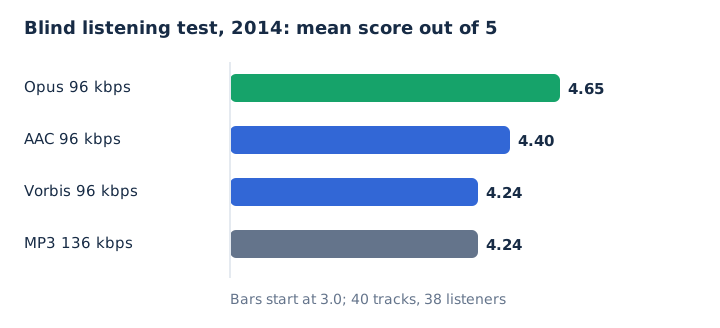
The LAME MP3 encoder used about 27% more bits than Opus and still scored lower. AAC was designed as the successor to MP3, beats it at the same bitrate, and reaches hi-fi transparency from about 128 kbps. The AAC vs MP3 guide compares that pair on its own.
The test has limits. It measured one low bitrate with 2014 encoders, so its ranking matters most when you need a small file.
Which Audio Format Is Best for Each Job?
The best audio format depends on the job you give the file. FLAC wins for a music library and archive, and WAV wins for recording and editing. AAC or MP3 at a high bitrate suits phones, Opus or mono MP3 suits voice, and MP3 covers players you can't check. Each pick below carries its setting and a runner-up. Opus also beat AAC in the 2014 blind test, which puts it first for low-bitrate voice.
| Job | Best pick and setting | Runner-up |
|---|---|---|
| Music library | FLAC, CD quality or better | ALAC on Apple |
| Archive | FLAC | WAV (Broadcast Wave) |
| Recording and editing | WAV, 16-bit 44.1 kHz or higher | AIFF |
| Phones and streaming | AAC 256 kbps | MP3 320 kbps |
| Podcast | MP3 96 to 128 kbps mono | AAC, same rates |
| Voice call and chat | Opus 28 to 40 kbps | AAC |
| Car stereo and DJ gear | MP3 320 kbps or WAV | FLAC where listed |
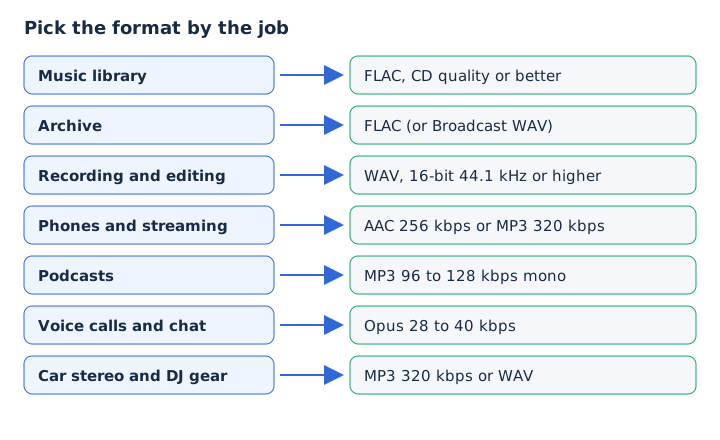
The audio file format hub lists formats by task. This table adds the quality setting for every job, and the sections below explain each choice.
Which Audio Format Is Best for Music Listening?
FLAC is the best audio format for listening to a music collection at home, because it keeps CD quality or better at about 5.3 MB per minute. Apple users get the same sound from ALAC, the lossless codec Apple Music uses.
Your playback setup decides which of three picks fits.
- Home or wired listening: play FLAC, or ALAC on Apple, through wired headphones or speakers at CD quality or better.
- Apple Music and iPhone: use ALAC, since Apple Music's Lossless tier starts at 16-bit, 44.1 kHz and plays natively.
- Wireless headphones: pick AAC at 256 kbps or MP3 at 320 kbps, because a Bluetooth connection is not lossless anyway.
Spotify Lossless streams FLAC up to 24-bit, 44.1 kHz on Premium. Bandcamp sells downloads as FLAC, ALAC, WAV, AIFF and MP3 320, so a buyer can pick lossless directly. The FLAC vs MP3 comparison weighs storage against sound for a whole library. ALAC suits an Apple setup, and the ALAC vs FLAC guide compares the two lossless codecs.
Which Audio Format Is Best for Archiving Music?
FLAC is the best audio format for archiving music, because it rebuilds the source bit for bit and checks itself with an MD5 signature. It also stores tags and cover art in about half the space of WAV. The US National Archives lists FLAC among its preferred formats for digital audio.
An archive format earns its place on five points.
| Point | FLAC | WAV |
|---|---|---|
| Audio kept | Every sample | Every sample |
| Self-check | CRC per frame, MD5 | No checksum chunk listed |
| Tags and art | Vorbis comments, pictures | INFO or bext chunk |
| Stereo minute | About 5.3 MB | 10.6 MB |
| Archive status | National Archives preferred | Library of Congress preferred |
WAV keeps its place in archives too. The Library of Congress lists WAVE as a preferred format, and Broadcast Wave sits next to FLAC on the National Archives list.
A good archive keeps the lossless master and makes every lossy copy from it, so no copy inherits generation loss from another. ALAC suits an archive that only Apple devices read. Outside Apple, MDN rates FLAC as the better lossless choice.
Which Audio Format Is Best for Recording and Editing?
WAV is the best audio format for recording and editing, because it stores PCM audio with no decode step between edits. Audacity exports WAV by default as 16-bit audio at 44,100 Hz. AIFF does the same job on a Mac.
Three working habits keep an edit at full quality.
- Record and edit in WAV or AIFF, never in a lossy format like MP3.
- Keep the WAV master file untouched until the final export of the project.
- Encode to MP3 or AAC once, at the end, at a high bitrate.
Xiph built FLAC as a playback format that trades ease of editing for robust transport, so WAV stays the working format for edits. Each lossy re-encoding adds fresh artifacts, which is why one final encode beats several rounds. WAV covers the format's limits, and the MP3 vs WAV comparison shows what the final encode costs.
Which Audio Format Is Best for Phones and Streaming?
AAC at 256 kbps is the best audio format for most phones and streaming, because it beats MP3 at the same bitrate and plays on both iPhone and Android. MP3 at 320 kbps is the safe second pick, and FLAC fits phones with storage space to spare.
Storage space sets how many 4-minute songs each format fits on 64 GB.
| Format | 4-minute song | Songs on 64 GB |
|---|---|---|
| FLAC (CD quality) | About 21 MB | About 3,000 |
| MP3 320 kbps | 9.6 MB | About 6,600 |
| AAC 256 kbps | 7.7 MB | About 8,300 |
| MP3 128 kbps | 3.8 MB | About 16,600 |
Device support differs by platform. The iPhone 16 plays AAC, MP3, Apple Lossless and FLAC. Android lists FLAC up to 48 kHz, MP3, AAC and Opus, but its format page doesn't list ALAC.
Streaming services settle on the same codecs. Spotify's web player streams AAC at 256 kbps on Premium, and YouTube takes uploads in AAC-LC or Opus. Over Bluetooth, a lossless file reaches your ears lossy, so AirPods turn even FLAC into an AAC stream.
Which Audio Format Is Best for Podcasts and Voice?
MP3 at 96 to 128 kbps mono is the best format for a published podcast, because Apple Podcasts accepts MP3 or AAC and recommends those rates. Opus is the best format for live voice: it codes fullband speech at 28 to 40 kbps, and every WebRTC app must support it.
Speech needs far fewer bits than music, so each voice job gets a lean setting.
- Published podcast: export MP3 or AAC at mono 96 to 128 kbps, or stereo at 128 to 256 kbps.
- Calls and voice chat: use Opus at 28 to 40 kbps, the fullband speech range RFC 6716 names.
- Recording the episode: capture WAV first, then make one MP3 export for the feed and listeners.
One hour of 96 kbps mono MP3 takes 43.2 MB, and 128 kbps stereo takes 57.6 MB. The same hour of speech as 32 kbps Opus takes 14.4 MB.
Which Audio Format Is Best for Car Stereos and DJ Gear?
MP3 at 320 kbps is the safest format for a car stereo or DJ deck, because MP3 support is near-universal across players. WAV is the lossless choice on DJ gear: every listed Pioneer DJ unit plays MP3 and WAV, while FLAC and Apple Lossless support varies by model.
The player's format list decides the pick, so check it in the manual first.
- Car stereo with a format list: copy FLAC to the USB drive if the list names it, else MP3 320 kbps.
- Unknown or older car stereo: use MP3 at 320 kbps, the highest MP3 bitrate, for the widest playback.
- DJ decks: load WAV for lossless sound, or MP3 at 320 kbps for a smaller library in rekordbox.
Xiph notes that FLAC plays in a car or home stereo just like an MP3, once the player supports it.
How Do You Choose the Best Audio Format for Your Own Files?
You choose the best audio format by starting from the best source file you have, keeping it lossless if you'll edit or archive it, and making one lossy copy at the bitrate your device allows. No format adds quality the source never had.
Four questions settle the choice in order.
- Is the source lossless? Keep it as a FLAC or WAV lossless master.
- Will you edit it? Work in WAV until the final export.
- Where will it play? Check device support in the player's format list.
- How much space is free? Pick the bitrate: AAC 256, MP3 320 or 128.
A video file needs one extra thought. An MP4's sound is usually AAC, which is already lossy, so its best copy is WAV for editing or MP3 at 320 kbps for playback.
Can Saving an MP3 as FLAC or WAV Raise Its Quality?
No, a lossless format keeps only what reaches it, so an MP3 saved as FLAC or WAV holds the same sound in a larger file. Apple confirms that converting compressed audio to an uncompressed format doesn't improve its quality. An upconversion only raises the file size: a 320 kbps MP3 at 2.4 MB per minute becomes a 10.6 MB WAV minute with nothing added from the lossy source. Keep your lossless audio copies from a lossless original instead.
Is DSD a Higher Quality Format Than FLAC?
No, not for everyday playback: DSD stores 1-bit samples at 2.8224 MHz for SACD, a different encoding that the iPhone 16 playback list leaves out, while a hi-res FLAC already holds better than CD quality. Xiph.Org and MDN both see no playback gain from 24-bit, 192 kHz files, which take about 6 times the space of 16-bit, 44.1 kHz audio. The hi-res audio guide covers where those formats make sense.
Is MP3 the Best Audio Format for Compatibility?
Yes, MP3 is the most widely supported audio format: every major browser, the iPhone, Android phones and every listed DJ deck play it.
MP3 at 320 kbps is therefore the pick when you can't check the player. The MP3 standard sets 320 kbps as its maximum, which costs 2.4 MB per minute, which keeps device support wide at a modest size. MP3 dominates because portable players and smartphones made its support near-universal. The guide to what MP3 is explains how the format works.
Is WAV the Best Format When You Extract Audio From a Video?
Yes, when you will edit the sound: mp4tomp3.io saves a video file's audio as 16-bit PCM WAV in the browser without uploading it, so no second lossy step is added. For listening, MP3 at 320 kbps gives a much smaller file. The WAV keeps the video's AAC track as decoded and does not raise it to lossless quality. You can convert MP4 to WAV for an edit-ready copy.