An audio codec packs sound into a small stream and unpacks it again for playback. The name stands for coder-decoder: the encoder writes the stream once, and the decoder rebuilds the sound every time you press play.
A lossless codec such as FLAC gives back every bit, while a lossy codec such as MP3 trades detail for a file up to 95 percent smaller. Nine common codecs run from AMR speech at 4.75 kbps to CD audio at 1,411.2 kbps. A Bluetooth codec carries the sound to your headphones, and browsers decode only some codecs. The audio file formats guide shows where each codec sits inside a file.
What Is an Audio Codec?
An audio codec is a program or chip that encodes digital audio into a compact stream and decodes that stream back into playable sound. MDN, Mozilla's web developer reference, spells the word out as COder/DECoder, so every codec is a coder-decoder that names both halves of the job.
The encoder runs once, when someone makes the file or starts a call. The decoder runs on every playback, so a player only needs the decoder to play a song. The compressed stream that sits between them is what a file stores and what a network sends.
The codec is not the file itself. A container such as MP4 or Ogg holds the coded stream together with tags and cover art, and the codec, container and extension split is explained on the audio file formats hub.
How Does an Audio Codec Work?
An audio codec works in two halves: the encoder turns PCM samples into compact frames, and the decoder turns those frames back into PCM samples for the speaker. A lossless encoder removes only redundancy, while a lossy encoder also drops sound the ear is unlikely to notice. Five steps carry a sound from a microphone to your ears.
- Capture. An ADC, the analog-to-digital converter, measures the microphone signal and stores it as PCM, which runs at 1,411.2 kbps for CD audio.
- Analyse. A lossless encoder such as FLAC predicts each sample and keeps only the error, while a lossy encoder applies a psychoacoustic model of human hearing.
- Pack. The encoder writes the result as frames at a set bit rate; an MP3 frame, for example, carries 1,152 samples of sound plus a header.
- Store or send. The frames go into a container file such as an .m4a, or travel as a live stream over a network call.
- Rebuild. The decoder turns each frame back into PCM samples, and a DAC, the digital-to-analog converter, drives the speaker or headphones.
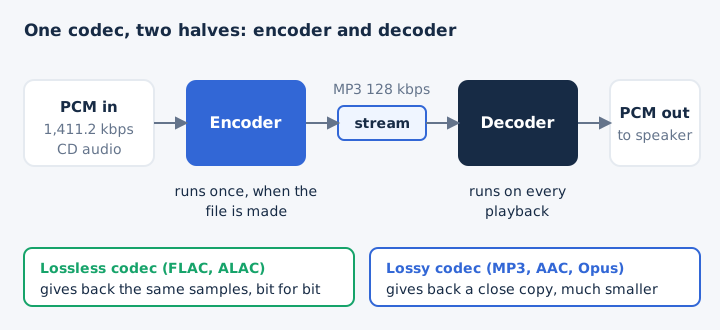
Lossy and lossless codecs share these steps. They differ only in what the decoder gives back: the same samples, or a close copy.
How Is a Hardware Audio Codec Different From a Software Codec?
A software codec is code, such as the MP3 decoder inside a browser or a media player. A hardware audio codec is a chip that joins an analog-to-digital converter and a digital-to-analog converter in one part.
Texas Instruments, for example, builds its TLV320AIC3204 audio codec IC around a stereo ADC and a stereo DAC that each run at 8 to 192 ksps. The chip connects to a phone or headset processor over I2S, the digital audio link, and takes its settings over I2C.
File formats such as MP3 and FLAC belong to the software sense of the word, and the rest of this page uses that sense.
What Are the Types of Audio Codecs?
Audio codecs fall into three types by what the decoder gives back. Uncompressed PCM keeps every sample, lossless compression rebuilds the samples bit for bit, and lossy compression returns a close copy in far less space.
| Type | What the decoder returns | Typical size | Examples |
|---|---|---|---|
| Uncompressed | Every original sample | 1,411.2 kbps for CD audio | PCM in WAV or AIFF |
| Lossless | The same samples, bit for bit | About half of PCM | FLAC, ALAC |
| Lossy | A close copy of the sound | Up to 80 to 95 percent smaller | MP3, AAC, Opus, Vorbis |
MDN puts lossless compression at no more than about 40 to 50 percent, which matches the 2:1 ratio of FLAC. Lossy compression goes much further because it throws data away for good.
A second split runs by purpose. General codecs handle music and speech alike, while a speech codec such as AMR, G.711 or G.722 keeps only the band that carries words. The lossless audio guide covers bit-perfect playback, and the audio compression guide covers how files shrink.
Which Audio Codecs Are Most Common?
Nine codecs are the ones worth knowing first: MP3, AAC, Opus, Vorbis, FLAC, ALAC, AC-3 with E-AC-3, AMR and plain PCM. Each one below gets one line and a link to its own guide.
- MP3
- A lossy codec from 1991 that runs at 32 to 320 kbps and plays in every major browser; see what is MP3.
- AAC
- The MPEG successor to MP3, sounding better at the same bit rate, up to 512 kbps in stereo; see what is AAC.
- Opus
- An open lossy codec from the IETF that runs from 6 to 510 kbps and is required in WebRTC calls; see the Opus audio format.
- Vorbis
- A royalty-free lossy codec from Xiph.Org that usually sits inside an .ogg file; see the OGG file guide.
- FLAC
- An open, patent-free lossless codec whose decoder returns the original audio bit for bit; see the FLAC file guide.
- ALAC
- Apple's lossless codec, open source since 2011, usually stored in an .m4a file; see the ALAC guide.
- AC-3 and E-AC-3
- Dolby's surround codecs, carrying 5.1 channels at up to 640 kbps and 7.1 channels in E-AC-3; see the EAC3 audio format.
- AMR
- The 3GPP speech codec that phones use for voice notes at 4.75 to 12.2 kbps; see the AMR file guide.
- PCM
- Uncompressed samples, normally stored in a WAV file or an AIFF file, at 1,411.2 kbps for CD audio.
WAV and AIFF are containers, not codecs. A WAV file usually holds PCM, but it can also hold ADPCM, A-law or mu-law audio. G.711 and G.722 are two more codecs you meet in phone calls, and the speech section below covers them.
How Do the Main Audio Codecs Compare on Bitrate, Latency and Channels?
The main codecs differ most in bit rate range, delay and channel count. AMR tops out at 12.2 kbps, while Opus reaches 510 kbps and CD PCM runs at 1,411.2 kbps. Opus starts at 5 ms of delay, MP3 and Vorbis need at least 100 ms, and channel limits run from 1 for AMR to 255 for Opus.
| Codec | Bit rate | Latency | Max channels |
|---|---|---|---|
| MP3 | 32 to 320 kbps | At least 100 ms | 2 |
| AAC | Up to 512 kbps stereo | 20 to 405 ms | 48 plus 16 LFE |
| Opus | 6 to 510 kbps | 5 to 65.2 ms | 255 |
| Vorbis | About 45 to 500 kbps | At least 100 ms | 255 |
| FLAC | No bit rate setting | 4.3 to 92 ms | 8 |
| AC-3 | 32 to 640 kbps | 32 ms frames | 6 (5.1) |
| AMR | 4.75 to 12.2 kbps | 25 ms | 1 |
| G.722 | 64 kbps | 4 ms | 2 |
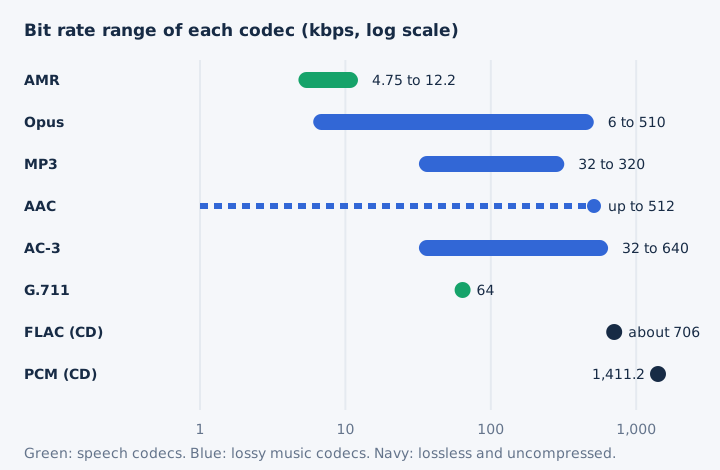
An LFE channel is the low-frequency effects channel that feeds a subwoofer, the ".1" in 5.1. The kbps figure sets file size directly: one minute of CD PCM fills 10.6 MB, an MP3 at 320 kbps fills 2.4 MB, and Opus at 64 kbps fills 0.48 MB. Vorbis has no fixed bit rate ladder, because it uses a variable bit rate by design.
Which Settings Affect a Codec's Quality and Size?
Five encoder settings shape what a codec writes: bit rate, constant or variable bit rate, sample rate, channel count and, for PCM and lossless codecs, bit depth. Each setting trades file size against fidelity in its own way.
- Bit rate: A higher bitrate gives larger files and allows higher quality, because the encoder keeps more data each second.
- CBR or VBR: A constant bit rate keeps one rate throughout; a variable bit rate spends more bits on complex passages.
- Sample rate: A higher sample rate stores more samples per second, which raises both fidelity and the size of the file.
- Channels: Each extra channel, from mono to stereo to 5.1 surround, can add substantial size to the encoded file.
- Bit depth: The bit depth fixes how precisely each PCM or lossless sample is stored, such as 16-bit or 24-bit.
AAC and Vorbis support variable bit rate, while FLAC, ALAC and AMR do not. Stereo coding matters too: simple and mid-side joint stereo keep quality, while intensity stereo loses some detail.
Which Audio Codecs Are Built for Speech and Calls?
Speech codecs keep only the band that carries words, about 300 to 3,400 Hz for narrowband speech. AMR codes that band at 4.75 to 12.2 kbps on phones, G.711 at 64 kbps on telephone networks, G.722 widens it to 50 to 7,000 Hz, and Opus handles speech and music alike. Four codecs carry most voice traffic.
| Codec | Band | Bit rate | Where it runs |
|---|---|---|---|
| AMR | 200 to 3,400 Hz | 4.75 to 12.2 kbps | Mobile phones, voice notes |
| G.711 | 300 to 3,400 Hz | 64 kbps | Telephony, voicemail, WebRTC |
| G.722 | 50 to 7,000 Hz | 64 kbps | Wideband WebRTC calls |
| Opus | Narrowband to fullband | 6 to 510 kbps | WebRTC and Discord voice |
G.711 dates from 1972 and still carries much telephone traffic and voicemail. WebRTC, the standard behind browser video calls, requires every endpoint to support Opus and G.711. Speech codecs fail on music, and MDN warns that even a singing voice sounds poor through them.
Which Codecs Do Bluetooth Headphones Use?
Every Bluetooth A2DP device must support SBC, the one mandatory codec. AAC is an optional A2DP codec that Apple's AirPods use, while aptX, LDAC and the LE Audio codec LC3 add faster or more efficient links when both ends support them. Your phone and headphones settle on a codec they both know.
| Codec | Owner | Top bit rate | Note |
|---|---|---|---|
| SBC | Bluetooth SIG | 328 kbps (345 at 48 kHz) | Mandatory in A2DP |
| AAC | MPEG | No single figure | Optional, used by AirPods |
| aptX | Qualcomm | 352 kbps | 16-bit audio |
| aptX HD | Qualcomm | 576 kbps | 24-bit audio |
| aptX Adaptive | Qualcomm | 279 to 420 kbps typical | Adapts to the radio link |
| LDAC | Sony | 330, 660 or 990 kbps | In Android's open source code |
| LC3 | Bluetooth SIG | Beats SBC at half the rate | LE Audio codec |
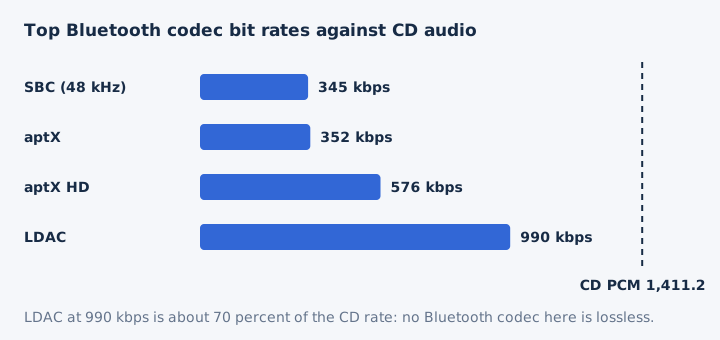
LDAC carries about three times the data of SBC, 990 kbps against 328 kbps, but only when both the phone and the headphones support it. AAC is the codec AirPods use, so the better choice depends on the pair of devices you own. None of these codecs is lossless over Bluetooth, which the lossless audio guide explains in full.
Which Audio Codecs Do Web Browsers Support?
MP3, AAC in MP4, Opus and FLAC play in all major browsers. Vorbis plays in Chrome, Microsoft Edge and Firefox, and in Safari from version 18.4 inside Ogg; ALAC plays only in Safari; AMR plays in neither Chrome nor Firefox. MDN's compatibility rows reduce to this grid.
| Codec | Chrome and Edge | Firefox | Safari |
|---|---|---|---|
| MP3 | Yes | Yes | Yes |
| AAC | Yes, in MP4 | Through the operating system | Yes |
| Opus | Yes | Yes | Yes, Ogg from 18.4 |
| Vorbis | Yes | Yes | From 18.4, in Ogg |
| FLAC | Yes | Yes | Yes |
| ALAC | No | No | Yes |
| AMR | Chrome no, Edge unknown | No | Unknown in MDN |
MDN notes that each browser can support more or fewer codecs than its list, so the audio element plays only what that browser decodes. That limit matters for any tool that converts in the browser: mp4tomp3.io decodes your file with the browser, so a codec the browser cannot decode cannot be converted there.
How Do You Choose an Audio Codec for a Task?
Choose the codec by the job: AAC or MP3 for music that must play everywhere, Opus for calls, FLAC for archiving and anything you will edit again. MDN's guidance points each common job to a codec.
- Music streaming: AAC in MP4 plays in every major browser, and MP3 at 192 kbps or more works almost everywhere.
- Downloads: Offer 128 kbps MP3, 256 kbps AAC or FLAC, and let each listener choose the size they want.
- Voice calls: Use Opus for low delay, or G.722 when bandwidth is ample and the call needs wideband speech.
- Editing and archiving: Keep FLAC or PCM, because every re-encoding of a lossy file removes more detail.
- Video uploads: YouTube recommends AAC-LC or Opus at 48 kHz for the audio track of an uploaded video.
MDN lists four questions to settle before any of these picks: playback support, the kind of content, the delay you can accept and how much compression you need. The question of which format sounds best is answered in which audio format is best quality.
How Do You Find Which Codec an Audio File Uses?
Open the file in a media inspector: MediaInfo shows the audio format and codec ID, and ffprobe prints the format of every stream. The file extension alone can mislead, because .m4a, .ogg and .wav each hold more than one codec. Two free tools answer the question in seconds.
- MediaInfo. Open the file in MediaInfo, which displays the format, codec ID, sample rate, channels and bit rate in its Audio section.
- ffprobe. Run
ffprobe -show_streams -select_streams aon the file, and FFmpeg's tool lists only its audio streams with their codec. - Bit rate clue. Check a stereo .m4a's bit rate: above 512 kbps it holds lossless ALAC, because AAC stops at 512 kbps.
Each audio stream in a video gets its own entry, and ffprobe uses one block per stream, so a movie with two language tracks shows two audio entries. The audio file formats hub shows how to read the extension first.
Why Does a Player Need the Right Codec to Play a File?
A player plays a file only when it has a decoder for the codec inside. Without one it shows a playback error such as "A codec is required to play this file", or it plays a video's picture with no sound, even when it opens the container.
You fix it in one of two ways. Use a media player that carries the decoder, or convert the audio to a codec your device already decodes. Codec support differs by device, app and browser, so a file with E-AC-3 sound can play in VLC and fail in Chrome. A full guide to the "audio codec not supported" error is planned.
Do You Need to Install a Codec Pack to Play Common Audio Files?
No, a modern player such as VLC carries its own decoders, so common audio plays without a codec pack. VideoLAN says VLC plays most codecs with no codec packs needed, on Windows, macOS, Linux, Android and iOS. Browsers have a built-in decoder for MP3, AAC, Opus and FLAC as well. The audio file formats guide lists which codec each common format uses.
Can a Video Play Without Sound Because of Its Audio Codec?
Yes, a video plays in silence when the player decodes the video codec but not the audio codec, which happens with E-AC-3 sound on players that lack its decoder. The audio track needs its own decoder, and a standard AC-3 decoder cannot decode E-AC-3. The EAC3 audio format not supported guide walks through the fixes for that case.
Can a Browser Converter Decode Every Audio Codec?
No, mp4tomp3.io decodes each file with your browser decoder, so AMR, AC-3, E-AC-3 or DTS sound usually stops with an error instead of producing a silent file. Files with MP3, AAC, Opus, Vorbis, FLAC or PCM sound convert on your device, and nothing is uploaded. To pull the sound out of a video, use the extract audio from video tool, which writes MP3, WAV or WebM.
Does Converting Audio to MP3 Make It Play on Almost Any Device?
Yes, MP3 plays in Chrome, Edge, Firefox, Opera and Safari, and Android phones and iPhones play it too, so it is the safest target when a codec will not play. Android decodes MP3 at 8 to 320 kbps in mono or stereo. The conversion is a lossy re-encode, so choose 256 or 320 kbps when the source is already lossy. The video to MP3 converter converts the sound in your browser at 128 to 320 kbps.