High-resolution audio carries more samples per second, more bits per sample, or both, than the 16-bit/44.1 kHz of CD quality, and it keeps every one of those bits. The music industry's own rule sets the floor at lossless masters of 48 kHz/20-bit or higher. A device needs a 96 kHz/24-bit chain to earn the Japan Audio Society logo.
So the sample rate and bit depth decide whether a file counts, and lossless storage keeps it that way. Those numbers also set file size, which streaming tiers qualify, and what gear you need to hear the result. Hi-res sits with codecs and bitrate among the audio file formats basics.
What Is Hi-Res Audio?
Hi-res audio is lossless digital audio with a higher sample rate, a higher bit depth, or both, than CD audio at 16-bit/44.1 kHz. The music industry's definition starts at sources of 48 kHz/20-bit. You'll also see it called high-resolution audio, Hi-Res, Hi-Res Music, or Hi-Res Lossless, which is Apple Music's name for its top tier.
Most hi-res files you'll meet are 24-bit at 96 kHz or 192 kHz, and Apple Music labels its top tier Hi-Res Lossless. Qobuz streams 24-bit FLAC up to 192 kHz, and Apple Music's Hi-Res Lossless runs from 48 kHz to 192 kHz.
Who Defines Hi-Res Audio?
Two bodies set the rules, and they cover different things. The Recording Industry Association of America (RIAA) defines Hi-Res Music for recordings, together with the Consumer Electronics Association, the Digital Entertainment Group and the Recording Academy's Producers & Engineers Wing. The Japan Audio Society (JAS) sets the Hi-Res AUDIO logo rules for devices.
The groups agreed the music definition in 2014, and the RIAA's release of June 23, 2015 spells it out: lossless audio from masters "better than CD quality (48kHz/20-bit or higher)". The JAS rules rest on a JEITA announcement of March 26, 2014.
The music label and the device logo ask for different things.
| Definition | Who sets it | Covers | Threshold |
|---|---|---|---|
| Hi-Res MUSIC | RIAA with the CEA, DEG and Recording Academy | Recordings sold or streamed | Lossless, from 48 kHz/20-bit masters or higher |
| Hi-Res AUDIO logo | Japan Audio Society, from JEITA (2014) | Players, DACs, headphones | 96 kHz/24-bit digital chain, 40 kHz analog parts, FLAC and WAV playback |
| Hi-Res AUDIO Wireless | Japan Audio Society (2018) | Wireless products | A JAS-certified codec such as LDAC or LC3plus |
How Does Hi-Res Audio Compare With CD Quality?
CD audio stores 16 bits per sample at 44,100 samples per second, the Red Book standard, which comes to 1,411.2 kbps for stereo. Hi-res tiers raise one or both numbers. A higher sample rate lifts the Nyquist frequency, the highest tone a file can hold. More bits widen the dynamic range. Both push the data rate up.
Each step up the ladder doubles one of the two numbers or adds bits.
| Tier | Highest frequency (Nyquist) | Dynamic range | Stereo bitrate |
|---|---|---|---|
| CD 16-bit/44.1 kHz | 22.05 kHz | 96.3 dB | 1,411.2 kbps |
| RIAA floor 20-bit/48 kHz | 24 kHz | 120.4 dB | 1,920 kbps |
| 24-bit/96 kHz | 48 kHz | 144.5 dB | 4,608 kbps |
| 24-bit/192 kHz | 96 kHz | 144.5 dB | 9,216 kbps |
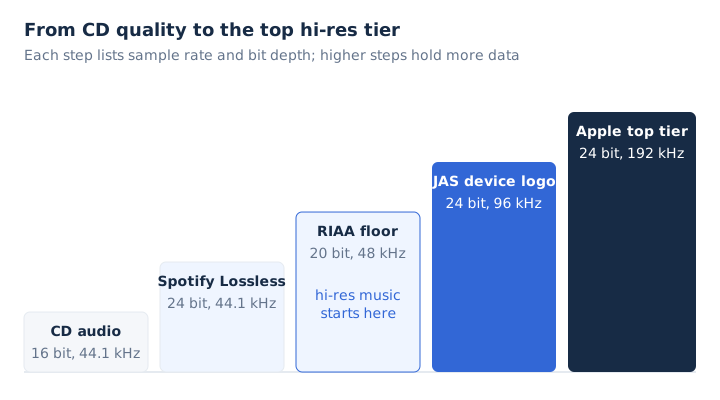
The human hearing range is usually given as 20 Hz to 20 kHz, per Xiph.Org. That upper limit already sits below the 22.05 kHz that 16-bit CD audio can carry.
What Is 24-Bit 192 kHz Hi-Res Audio?
24-bit/192 kHz audio takes 192,000 samples per second per channel and stores each level in 24 bits. That pairing gives 144.5 dB of dynamic range and a 96 kHz frequency ceiling.
The two numbers answer two separate questions.
- 24-bit
- The bit depth, or bits per sample, that set each level and push the noise floor down.
- 192 kHz
- The sample rate, counted in samples per second, that sets the highest frequency a file can hold.
The bit depth guide explains the 6.02 dB per bit behind the range figure. The sample rate guide covers the Nyquist rule behind the frequency ceiling. Rates of 88.2 kHz and 176.4 kHz are 2 and 4 times 44.1 kHz, while 96 kHz and 192 kHz are 2 and 4 times 48 kHz. MDN notes that 96 kHz and 192 kHz are generally used in mastering.
Which Audio Formats Can Store Hi-Res Audio?
FLAC, ALAC, WAV, AIFF and DSD can all hold hi-res audio. MP3 can't, and AAC stays lossy even at its 96 kHz top rate.
Five formats carry hi-res sound without throwing data away, and MP3 shows the contrast.
| Format | Type | Hi-res range |
|---|---|---|
| FLAC | Lossless compressed | 4 to 32-bit, up to 1,048,575 Hz |
| ALAC | Lossless compressed | 16, 20, 24 or 32-bit; Apple Music goes to 192 kHz |
| WAV | Uncompressed PCM | Bit depth and rate set in the file header |
| AIFF | Uncompressed PCM | Apple's format since 1988 |
| DSD | 1-bit stream | 2.8224 MHz, the Super Audio CD format |
| MP3 | Lossy | 32 to 320 kbps, 48 kHz at most, not hi-res |
The JAS device logo requires a player to handle both FLAC and WAV files. Direct Stream Digital takes a different route from PCM: it stores 1 bit at 64 times the CD rate, per the Library of Congress. The FLAC file guide covers the most common hi-res download format, and the ALAC guide covers Apple's lossless codec.
Is Hi-Res Audio Always Lossless?
The music definition requires lossless audio, but wireless hi-res isn't lossless. The JAS Hi-Res Audio Wireless logo certifies a codec because a wireless link lacks the bandwidth to carry the full data.
JAS lists 7 certified codecs: LDAC, LHDC, SCL6, LC3plus, SHDC, aptX Adaptive and Opus HD. Each one encodes the signal to fit the link's bandwidth.
Lossless audio decodes to the source bit for bit, a topic the lossless audio guide covers in depth. The reverse also holds. A 16-bit/44.1 kHz FLAC file is lossless but not hi-res, because it matches CD resolution.
How Big Are Hi-Res Audio Files?
One stereo minute takes 34.6 MB at 24-bit/96 kHz and 69.1 MB at 24-bit/192 kHz as uncompressed PCM. The same minute is 10.6 MB at CD quality and 2.4 MB as a 320 kbps MP3.
A single four-minute song shows how fast the file size climbs.
| Resolution | MB per minute | 4-minute song |
|---|---|---|
| MP3 320 kbps | 2.4 MB | 9.6 MB |
| CD 16-bit/44.1 kHz | 10.6 MB | 42.3 MB |
| 24-bit/48 kHz | 17.3 MB | 69.1 MB |
| 24-bit/96 kHz | 34.6 MB | 138.2 MB |
| 24-bit/192 kHz | 69.1 MB | 276.5 MB |
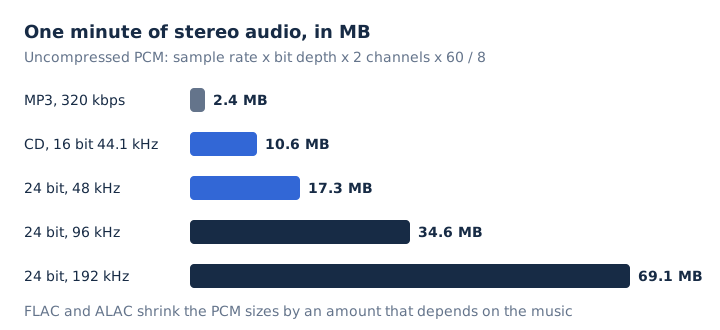
FLAC and ALAC shrink these megabytes, but the saving depends on the music, so no fixed figure applies. Apple warns that Lossless and Hi-Res Lossless files use much more bandwidth and storage than standard AAC files.
Where Can You Stream or Download Hi-Res Audio?
Apple Music, Qobuz and Deezer stream lossless audio up to 24-bit/192 kHz. Spotify Lossless reaches 24-bit/44.1 kHz, and Qobuz also runs a download store for hi-res albums.
Each service names its top tier differently, and three of them deliver FLAC.
| Service | Hi-res tier | Top resolution | Format |
|---|---|---|---|
| Apple Music | Hi-Res Lossless | 24-bit/192 kHz | ALAC |
| Qobuz | Hi-Res (Studio plans) | 24-bit/192 kHz | FLAC |
| Deezer | Hi-Fi | 24-bit/192 kHz | FLAC |
| Spotify | Lossless | 24-bit/44.1 kHz | FLAC |
Amazon Music offers lossless in two tiers, Amazon Music HD and Amazon Music Ultra HD. Spotify Lossless keeps CD's 44.1 kHz sample rate and adds 8 bits per sample. Qobuz holds Hi-Res certification from the Japan Audio Society.
What Do You Need to Play Hi-Res Audio?
Every link in the chain must pass the higher resolution: a hi-res source, a player that decodes it, a digital-to-analog converter, and a wired path to your headphones or speakers.
The chain runs in this order.
- Source: pick a hi-res file or stream, such as Apple Music Hi-Res Lossless or Qobuz Hi-Res.
- Player: set the app to its hi-res tier; Apple Music keeps it under Settings, Music, Audio Quality.
- DAC: use a built-in or USB DAC; iPhone and iPad need an external one above 48 kHz.
- Connection: run a cable from DAC to headphones, because Apple says Bluetooth connections aren't lossless.
- Headphones or speakers: choose wired headphones or speakers; the JAS logo asks for 40 kHz response.
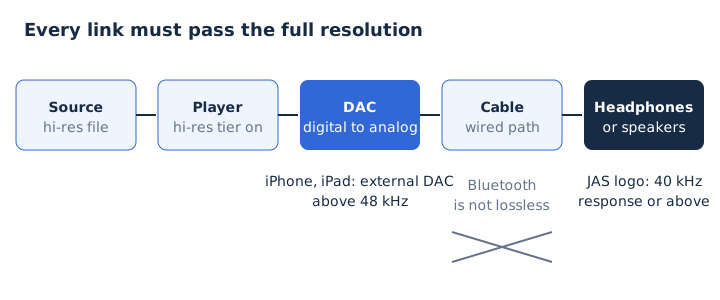
Apple says the 14-inch and 16-inch MacBook Pro play up to 96 kHz natively, while other Macs need an external DAC above 48 kHz. Hi-Res Lossless on a TV needs an Apple TV 4K (3rd generation or later).
Is Hi-Res Audio Worth It?
Hi-res audio is worth it for recording, mixing and archiving, and for listeners with wired gear and room for big files. For playback alone, Xiph.Org argues that 16-bit/44.1 kHz already covers human hearing. It also notes that 24/192 files take about 6 times the space; the arithmetic gives 6.5 times.
MDN calls 96 kHz and 192 kHz technically unnecessary for rebuilding what people hear, but useful in mastering. Xiph.Org warns that ultrasonic content can cause intermodulation distortion in the audible band on gear that isn't linear above 20 kHz.
The master matters too. Xiph.Org notes that hi-res releases are sometimes made from a different studio master, which can change the sound more than the resolution does.
Does Bluetooth Carry Hi-Res Audio Losslessly?
No, Apple states that Bluetooth connections are not lossless, and Qobuz says Bluetooth isn't a viable Hi-Res option because the audio is compressed first. AirPods and most Beats headphones use the AAC Bluetooth codec.
AirPods Max (USB-C) and AirPods Max 2 play lossless only over the USB-C cable. JAS-certified codecs such as LDAC carry a compressed hi-res signal instead. The lossless audio guide explains what a wired connection keeps.
Is Dolby Atmos the Same as Hi-Res Audio?
No, Dolby Atmos describes multidimensional, spatial sound, while hi-res describes the resolution of the audio data. Apple Music lists Spatial Audio with Dolby Atmos and lossless audio as separate features.
Apple Music offers a song in either form, so the choice is spatial placement against resolution.
Is a 320 kbps MP3 Hi-Res Audio?
No, a 320 kbps MP3 is lossy, and MP3 stops at 48 kHz, while hi-res needs lossless audio from masters of 48 kHz/20-bit or higher. Lossy compression permanently removes part of the audio data.
MP3 tops out at 320 kbps, while a 24-bit/192 kHz stream carries 9,216 kbps, 28.8 times as much data. Converting that MP3 to FLAC or WAV won't make it hi-res, because the removed data never comes back. The what is MP3 guide covers the format's limits.
Do You Need Hi-Res Audio Headphones?
No, any good wired headphones play a hi-res file. The Hi-Res AUDIO logo marks headphones whose response reaches 40 kHz or above, far past the 20 kHz usually given for human hearing.
A capable DAC and a cable decide whether the full resolution reaches your wired headphones.
Can You Convert a Hi-Res FLAC File to MP3?
Yes, mp4tomp3.io converts a FLAC file to MP3 at up to 320 kbps inside your browser, without uploading it. Use the FLAC to MP3 converter when a phone or car stereo needs a smaller copy.
The MP3 is no longer hi-res, but it takes about 2.4 MB per minute instead of 69.1 MB at 24-bit/192 kHz. Keep the FLAC as your master copy.