Bitrate counts how many bits an audio file or video stream uses every second, and that number sets both quality and file size. The two-word spelling, bit rate, means the same thing. Audio rates run in kbps, while video rates run in Mbps.
In an audio file, bitrate comes from sample rate, bit depth and channels, or from the encoder setting. A 1080p video needs about 25 to 60 times more bits than an MP3. CBR, VBR and ABR are three ways an encoder spends those bits.
A 320 kbps MP3 fills 2.4 MB per minute, and re-encoding a 128 kbps file at 320 kbps only makes it 2.5 times bigger. Bandwidth and baud rate measure different things. Choosing a bitrate starts with what the file is for. This guide sits under the audio file formats hub on mp4tomp3.io.
What Is Bitrate?
Bitrate is the number of bits a file or connection carries or processes per second. Its standard unit is bits per second, and telecom texts write it with the symbol R. Each bit holds a single 0 or 1.
Bitrate and bit rate are one term with two spellings. Both name the same data rate, and software menus, spec sheets and file properties use either form.
In a media file, bitrate sets how much data describes each second of sound or picture. A higher rate gives the encoder more room to keep detail. A lower rate forces the encoder to throw more detail away.
You meet bitrate in two settings. A media file stores a fixed amount of data for each second of playback. A network stream delivers its data live, so the connection has to keep pace with the bitrate.
How Is Bitrate Measured?
Bitrate is measured in bits per second (bit/s or bps), and larger rates use kilobits (kbps) and megabits (Mbps) per second. Each row in the table below is 1,000 times the row above it.
| Unit | Symbol | Bits per second | Typical use |
|---|---|---|---|
| bit per second | bit/s | 1 | The base unit that every larger rate builds on |
| kilobit per second | kbps | 1,000 | Audio files such as MP3, AAC and Opus tracks |
| megabit per second | Mbps | 1,000,000 | Video files, video streams and internet connection speeds |
| gigabit per second | Gbit/s | 1,000,000,000 | Fast network links such as fiber lines and office networks |
Bitrate uses decimal SI prefix steps, so 1 kbps equals 1,000 bit/s, not 1,024. A kilobit is also not a kilobyte. The label kbps counts kilobits, while kBps or KB/s counts kilobytes, and one byte holds 8 bits. Divide by 8 to turn a bitrate into bytes: a 320 kbps MP3 reads 40 kilobytes every second.
How Does Bitrate Work in Audio Files?
In an audio file, bitrate is the number of bits stored for each second of sound. Uncompressed audio gets its bitrate from three settings multiplied together: sample rate, bit depth and the number of audio channels.
CD-DA, the Compact Disc audio standard, shows the math in one line: 44,100 samples × 16 bits × 2 channels = 1,411,200 bit/s, or 1,411.2 kbps.
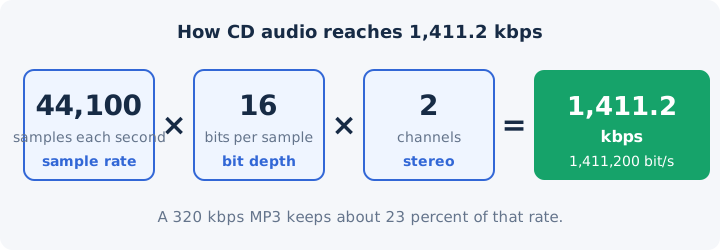
A WAV file of CD audio keeps that full rate as lossless audio. MP3 and AAC compress it to a fraction of the size. MP3 bitrates climb in fixed steps, and each step has a typical job.
- 32 kbps: acceptable for speech only, because music loses too much detail.
- 64 kbps: the usual recommendation for speech, such as podcasts and voice notes.
- 96 kbps: speech or low-quality streaming where saving data matters most.
- 128 kbps: mid-range music quality that suits casual listening on phones.
- 192 kbps: medium quality, a clear step up for music you play often.
- 256 kbps: a commonly used high-quality setting for music.
- 320 kbps: the highest bitrate the MP3 standard allows.
Other codecs use other ranges. AAC reaches 512 kbps for stereo, and Opus works as low as 6 kbps. The audio bitrate guide lists settings per format. Spotify streams at about 24, 96, 160 and 320 kbps, depending on the quality setting you pick.
What Is Video Bitrate?
Video bitrate is the amount of picture data a video stores or streams each second, and it's usually given in Mbps. A sharp, smooth picture needs far more bits than sound does, and the video bitrate guide covers settings per resolution.
Resolution and frame rate raise the bitrate a video needs. YouTube recommends 8 Mbps for a 1080p upload and 35 to 45 Mbps for 4K at 24 to 30 frames per second. A 1080p Blu-ray disc tops out at 40 Mbps.
A video file also carries a separate audio track with its own bitrate. YouTube recommends 384 kbps for stereo audio in an upload. That audio track is the part a video to MP3 converter keeps.
An 8 Mbps video runs about 25 to 60 times the rate of a 128 to 320 kbps MP3. Extracting only the audio track therefore produces a much smaller file than the original video. Platform settings and streaming rates belong to a separate video bitrate guide.
What Are CBR, VBR and ABR?
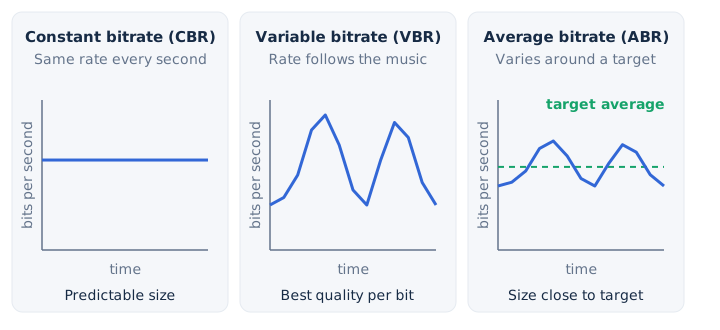
CBR, VBR and ABR are the three ways an encoder spends bits over time: the same rate throughout, a rate that follows the content, or a varying rate that aims at an average. The three modes trade a predictable file size against quality per bit.
| Mode | How it spends bits | Strength | Weakness | Where you meet it |
|---|---|---|---|---|
| Constant bitrate (CBR) | Spends the same number of bits on every second of the file | File size and stream load are easy to predict in advance | Wastes bits on silence and starves busy, complex passages of detail | Fixed MP3 settings such as 128 or 320 kbps, and live broadcasts |
| Variable bitrate (VBR) | Spends more bits on complex passages and fewer on simple ones | Gives the best quality for each bit the file stores | Final file size is hard to predict before encoding finishes | Music encoders and quality presets such as the MP3 V0 setting |
| Average bitrate (ABR) | Varies the rate moment to moment but holds an overall target | Keeps a roughly known file size with some variable quality gains | Matches neither the strict size of CBR nor the efficiency of VBR | Encoders that let you pick a target kbps with variable output |
Adaptive bitrate streaming is a different idea. Adaptive bitrate streaming uses several encoded copies of one video and switches between them to match your connection. MP3 V0 is a common variable bitrate setting, and its comparison with 320 kbps CBR is a topic of its own.
How Does Bitrate Affect Quality and File Size?
A higher bitrate keeps more detail and makes a bigger file, because file size equals bitrate × duration ÷ 8. One minute of audio at each common bitrate weighs this much.
| Bitrate | Format | Size per minute | Size of a 4-minute song |
|---|---|---|---|
| 64 kbps | MP3 | 0.48 MB | 1.92 MB |
| 96 kbps | MP3 | 0.72 MB | 2.88 MB |
| 128 kbps | MP3 | 0.96 MB | 3.84 MB |
| 160 kbps | MP3 | 1.2 MB | 4.8 MB |
| 192 kbps | MP3 | 1.44 MB | 5.76 MB |
| 256 kbps | MP3 | 1.92 MB | 7.68 MB |
| 320 kbps | MP3 | 2.4 MB | 9.6 MB |
| 1,411.2 kbps | WAV (CD quality) | 10.6 MB | 42.3 MB |
The 320 kbps row works out like this: 320,000 bits × 60 seconds ÷ 8 = 2,400,000 bytes, or 2.4 megabyte units of 1,000,000 bytes each. An 80-minute CD holds about 847 MB of uncompressed audio by the same rule.
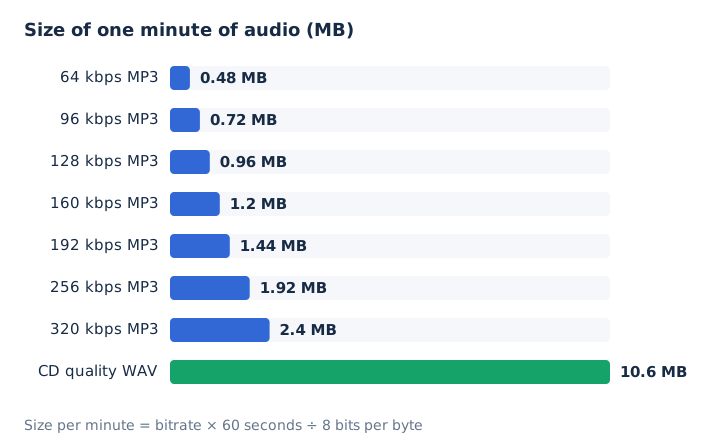
Quality gains shrink as bitrate rises, a pattern of diminishing returns. On the MP3 ladder, 64 kbps suits only speech and 128 kbps reaches mid-range music, yet 256 and 320 kbps both sit at the high-quality end. The codec matters as much as the number. AAC and Opus use smarter compression than MP3, so they sound better at the same bitrate.
How Is Bitrate Different From Bandwidth and Baud Rate?
Bitrate is the data actually sent each second, bandwidth is the most a channel can carry each second, and baud rate counts signal changes per second. The three terms sound alike but measure different things.
| Term | What it measures | Unit | Example |
|---|---|---|---|
| Bitrate | The amount of data a file or stream actually uses each second | Bits per second, written as bit/s, kbps or Mbps on labels | A 320 kbps MP3 uses 320,000 bits for every second of playback |
| Bandwidth | The largest amount of data a channel can carry each second | Bits per second, in the same units that a bitrate uses | A line rated 8 Mbps carries at most 8,000,000 bits each second |
| Baud rate | The number of signal changes, or symbols, sent each second | Baud, where one baud equals one symbol sent each second | A 1,000 baud signal carrying 4 bits per symbol moves 4,000 bit/s |
Baud rate is also called symbol rate. Bit rate equals baud rate × bits per symbol, so one signal change can carry several bits. A stream needs internet speed above its bitrate to play without buffering.
Which Bitrate Should You Choose for an Audio File?
Choose by use: 64 to 96 kbps for speech, 128 kbps for everyday listening, 192 to 256 kbps for music you care about, 320 kbps when the source is high quality, and WAV when you need no loss at all. Match the bitrate to the job the file has to do.
- Podcast or voice note: a 64 kbps MP3 keeps speech clear, and 96 kbps adds room for intro music.
- Everyday music on a phone: a 128 kbps MP3 suits earphones and keeps a 4-minute song near 3.8 MB.
- Music library: 192 to 256 kbps MP3 files keep more detail for songs you replay on better speakers.
- High-quality source or archive: a 320 kbps MP3 fits when the source file is lossless or already high bitrate.
- Editing or further processing: WAV keeps every sample, so later edits and exports start from full-quality data.
Never pick a bitrate higher than the source file's own audio bitrate. A higher setting adds size, not quality, for the reason the answers below explain.
Is 320 kbps the Highest MP3 Bitrate?
Yes, 320 kbps is the highest bitrate the MP3 standard supports. A 320 kbps MP3 fills 2.4 MB per minute, about 9.6 MB for a 4-minute song. AAC goes further and reaches 512 kbps for stereo. The 320 kbps guide on this site covers when that top MP3 setting pays off.
Is 128 kbps Good Enough for Music?
Yes, 128 kbps is a mid-range MP3 bitrate that suits everyday listening on phones and earphones. Spotify's free web player uses AAC at 128 kbps. A 4-minute song at 128 kbps takes about 3.8 MB. On good headphones, cymbals and reverb tails are the first details to lose clarity at this rate.
Can a Higher Bitrate Fix a Low-Quality File?
No, re-encoding a file at a higher bitrate cannot bring back detail an earlier lossy encode removed. Lossy compression deletes audio data for good, and a 128 kbps encode sets a ceiling that no later setting raises. A 128 kbps MP3 converted to 320 kbps grows from 0.96 MB to 2.4 MB per minute, yet it sounds the same or slightly worse. Each extra lossy pass adds generation loss. Check the source bitrate first, then keep the output at or below it.
Can You Change the Bitrate of an Audio File?
Yes, a converter re-encodes an audio file at a new bitrate. The MP4 to MP3 converter on mp4tomp3.io offers 128, 192, 256 or 320 kbps, or WAV, inside your browser, and the file never uploads. Its MP3 compressor also writes 64 or 96 kbps. Pick the bitrate setting before you convert. A lower bitrate saves space, while re-encoding at a higher one adds no quality.