An AIFF file stores CD-quality sound on a Mac without compressing a single sample. Apple named it the Audio Interchange File Format and released it in 1988, built on an Electronic Arts file standard. Inside, a 54-byte header of chunks leads straight into raw PCM samples, and the AIFF-C variant adds compression.
The .aif and .aiff extensions mark it, and uncompressed audio costs 10.6 MB per CD-quality minute. Text chunks carry the metadata. Next to an MP3, it trades size for quality, so studios, CD burners and archives use it.
Apple apps open it, and converting means a program that reads AIFF. For how AIFF fits beside WAV, FLAC and MP3, see the audio file formats guide.
What Is an AIFF File?
An AIFF file is an audio file in Apple's Audio Interchange File Format, a chunk-based container that usually holds uncompressed PCM sound at CD quality or higher. Apple's own specification shortens the name to Audio IFF, and the .aif or .aiff file type is the result.
AIFF keeps every sample the recorder captured, so the sound is lossless. Apple's Final Cut Pro guide calls AIFF a cross-platform audio file format, and the Library of Congress lists it as a fully documented Apple format with no known licensing.
AIFF is Apple's counterpart to WAV, the RIFF-based format from Microsoft and IBM, and the Library of Congress calls the two functionally equivalent, which our AIFF vs WAV comparison covers in full.
What Is the History of the AIFF Format?
Apple published AIFF in January 1988, built it on Electronic Arts' EA IFF 85 standard, and froze it at version 1.3 in January 1989. A 1991 draft called AIFF-C added compressed audio. Apple wrote the format with music developers over ten months of meetings in 1987 and 1988.
The whole life of the format fits into four dated steps.
- January 21, 1988: Apple releases AIFF version 1.1, the original standard for sampled sound files.
- June 17, 1988: version 1.2 corrects a single typographical error in one of the spec's illustrations.
- January 4, 1989: version 1.3 adds Apple II changes and becomes the version still in use.
- 1991: Apple's AIFF-C draft extends the format so files can store compressed audio data too.
The Library of Congress names Electronic Arts' IFF of 1985 as the parent format. That shared parent explains the chunk design described in the next section.
What Are the Technical Specifications of AIFF?
An AIFF file is one FORM chunk of type "AIFF" that holds a required Common Chunk and a Sound Data Chunk with the samples, all stored big-endian. Every chunk opens with a four-letter chunk ID and a size, then its data. Apple's spec allows the chunks to appear in any order.
| Chunk ID | Name | Holds |
|---|---|---|
| FORM | Container | Type "AIFF" and every other chunk |
| COMM | Common Chunk (required) | Channels, sample frames, sample size, sample rate |
| SSND | Sound Data Chunk | The sample frames |
| MARK | Marker Chunk | Named positions in the sound |
| INST | Instrument Chunk | Base note, key range, sustain and release loops |
| COMT | Comments Chunk | Time-stamped comments |
| NAME, AUTH, (c), ANNO | Text chunks | Name, author, copyright, annotation |
| MIDI, AESD, APPL | Other chunks | MIDI data, AES channel status, app data |
The Common Chunk defines the sound with four fields.
- numChannels
- The channel count, where 1 means mono and 2 means stereo; the spec allows any number.
- numSampleFrames
- The count of sample frames, where one frame holds one sample from every channel.
- sampleSize
- The bit depth of each sample, anywhere from 1 to 32 bits.
- sampleRate
- The sample rate in frames per second, stored as an 80-bit extended number.
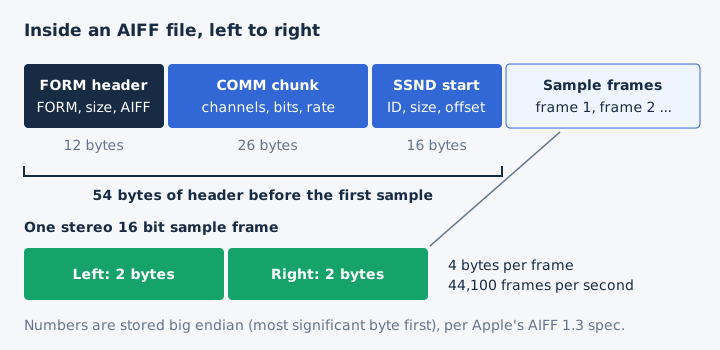
Each sample frame interleaves one sample per channel, so a stereo 16-bit frame takes 4 bytes. Apple's Core Audio documentation lists AIFF data as big-endian integer PCM at 8, 16, 24 or 32 bits.
What Is the Difference Between AIFF and AIFF-C?
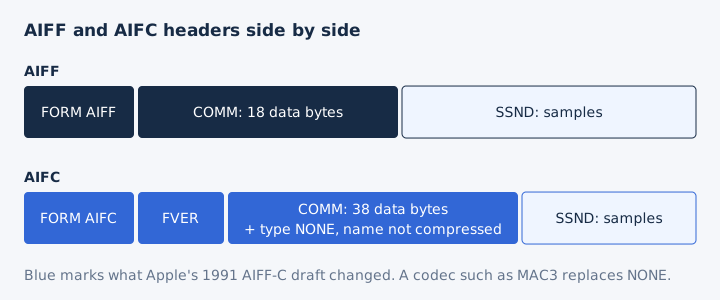
AIFF-C, also written AIFC, is Apple's 1991 extension of AIFF that can hold compressed audio. Its FORM type reads "AIFC", and its Common Chunk names a compression type. The type "NONE" keeps the audio uncompressed, so not every AIFF-C file is smaller. Apple's draft listed five compression types at the start.
| Compression type | Name | Ratio |
|---|---|---|
| NONE | not compressed | 1 to 1 |
| ACE2 | ACE 2-to-1 (Apple IIGS) | 2 to 1 |
| ACE8 | ACE 8-to-3 (Apple IIGS) | 8 to 3 |
| MAC3 | MACE 3-to-1 (Macintosh) | 3 to 1 |
| MAC6 | MACE 6-to-1 (Macintosh) | 6 to 1 |
AIFF-C also adds a Format Version Chunk (FVER) and a compressionName text field. Apple later let AIFC carry 32-bit and 64-bit floating point data, u-law, A-law, IMA and other codecs, while plain AIFF carries integer PCM only. MACE and IMA shrink the samples the way any audio compression codec does, while float and NONE store full PCM.
Which File Extensions Does AIFF Use?
AIFF files carry the file extension .aif or .aiff, and AIFF-C files usually end in .aifc. Every one of them begins with the four bytes "FORM". Three extensions and two media types point to the same family.
| Extension | Holds | Note |
|---|---|---|
| .aif | AIFF | Apple's spec recommends it; most widely used |
| .aiff | AIFF | The long form; also listed by the Library of Congress |
| .aifc | AIFF-C | Windows Media Player lists it |
The media type is audio/aiff or audio/x-aiff, and IANA has not registered either one. The Mac file type is "AIFF" for plain files and "AIFC" for compressed ones. Apple's 1991 draft suggested .afc for AIFF-C, but Microsoft and Apple's Core Audio list .aifc today, never .aiffc.
How Big Is an AIFF File?
One minute of CD-quality stereo AIFF (16-bit, 44.1 kHz) takes 10.6 MB, because 1,411.2 kbit/s of samples sit on disk with no compression. A 4-minute song therefore needs about 42.3 MB. File size grows with sample rate, bit depth and channels, and nothing else changes it.
| Format | Bitrate | Per minute |
|---|---|---|
| AIFF 24-bit 96 kHz | 4,608 kbps | 34.6 MB |
| AIFF 24-bit 48 kHz | 2,304 kbps | 17.3 MB |
| AIFF 16-bit 44.1 kHz | 1,411.2 kbps | 10.6 MB |
| FLAC or ALAC (about 2:1) | about 706 kbps | about 5.3 MB |
| MP3 320 kbps | 320 kbps | 2.4 MB |
| MP3 128 kbps | 128 kbps | 0.96 MB |
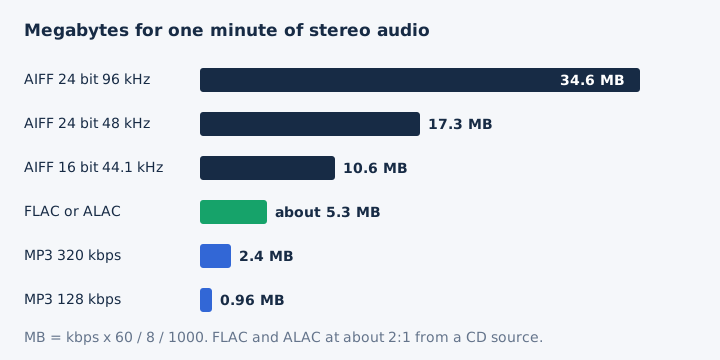
The formula is sample rate x bit depth x channels, which gives the bitrate; divide by 8 for bytes per second. The 54-byte header adds almost nothing. Audacity's manual caps WAV and AIFF files at 4 GB, so very long recordings need another format. The MP3 bitrate guide shows how compressed files get so much smaller in megabytes per minute.
What Metadata Can an AIFF File Store?
Apple's spec gives AIFF text chunks for name, author, copyright and annotation, plus comments, markers and sampler data. It defines no field for album art. Five kinds of extra data can ride along with the samples.
- Text chunks: NAME, AUTH, (c) and ANNO store a title, an author, a copyright line and free notes.
- Comments Chunk: COMT stores comments with a time stamp, and each comment can point to a marker.
- Marker Chunk: MARK names exact positions in the sound, counted in sample frames from the start.
- Instrument Chunk: INST gives a sampler its base note, key range, velocity range, gain and two sampler loops.
- MIDI and AES data: MIDI chunks store sequence data, and AESD keeps 24 bytes of recording status.
Album art and modern music tags in AIFF depend on the app that wrote the file and the app that reads it. The 1989 chunk list has no artwork chunk, so artwork support varies from app to app. Microsoft's player page notes that AIFF can store musical instrument information, which the Instrument Chunk provides.
Is AIFF Better Than MP3?
AIFF is better for quality and editing, because it keeps every sample, while MP3 is better for size. MP3 uses lossy compression and throws some audio away for good. A 320 kbps MP3 is less than a quarter the size of a CD-quality AIFF. The choice comes down to four trade-offs.
| Point | AIFF | MP3 |
|---|---|---|
| Compression | None (PCM) | Lossy |
| Size per minute (CD source) | 10.6 MB | 2.4 MB at 320 kbps |
| Re-editing | No generation loss | Each re-encode loses more |
| Best for | Recording, editing, CD burning | Sharing and phones |
FLAC and ALAC keep the same lossless audio at about half the size of AIFF, a trade our AIFF vs FLAC comparison covers. Keep AIFF for masters and sessions, and make an MP3 copy when a file has to travel.
What Are the Common Uses of AIFF?
AIFF is used for audio editing on Macs, CD burning, samplers, lossless music downloads and archive masters. The Library of Congress says AIFF is widely adopted by Apple users in professional audio, while most Windows users pick WAV. Five jobs keep AIFF in use today.
- Mac audio editing: Audacity's uncompressed export defaults to AIFF signed 16-bit PCM when it runs on a Mac.
- CD burning: Apple recommends the AIFF Encoder in iTunes for burning high-quality CDs without losing audio quality.
- Sampler instruments: the Instrument Chunk stores sustain loops, release loops and key ranges that a sampler plays.
- Music downloads: Bandcamp offers AIFF beside FLAC, ALAC, WAV and MP3 among its purchase download formats.
- Archive master files: Harvard University Library's audio reformatting work uses AIFF with LPCM audio as its archive master.
How Do You Open an AIFF File?
The Apple Music app opens AIFF on a Mac, Windows Media Player 12 plays .aif, .aifc and .aiff on Windows, and Audacity and FFmpeg open AIFF on Windows, Mac and Linux. Each program below uses its own decoder, and all five read plain PCM AIFF.
| Program | Platform | Opens AIFF |
|---|---|---|
| Apple Music app | Mac | Yes, imports and converts it |
| iTunes | Windows | Yes, has an AIFF Encoder |
| Windows Media Player 12 | Windows | Yes, lists .aif, .aifc, .aiff |
| Audacity | Windows, Mac, Linux | Yes, imports all PCM AIFF |
| FFmpeg | Windows, Mac, Linux | Yes, reads and writes AIFF |
How Do You Convert an AIFF File?
You convert an AIFF file by opening it in a program that reads AIFF, such as the Apple Music app, iTunes, Audacity or FFmpeg, and saving it as MP3, AAC or WAV. In the Music app, set MP3 as the import setting, then choose File, Convert, Create MP3 Version.
mp4tomp3.io has no AIFF input today, so the first step happens in one of those programs, and a dedicated AIFF to MP3 converter page doesn't exist yet. Pick MP3 for sharing and phones, and WAV for editing on Windows.
Can mp4tomp3.io Convert an AIFF File?
No, mp4tomp3.io does not list AIFF among its inputs, so don't count on it for .aif or .aiff files.
Its upload field accepts MP4, MOV, WebM, MKV, M4A, WAV, FLAC and other formats, but it skips .aif and .aiff. The working route takes two steps. First, export the AIFF as WAV in Audacity or the Music app. Then run that WAV through our WAV to MP3 converter, a browser converter that never uploads the file.
Does Converting AIFF to MP3 Reduce Quality?
Yes, MP3 is lossy, so the MP3 drops audio data the AIFF kept, although a 320 kbps MP3 cuts a CD-quality minute from 10.6 MB to 2.4 MB. The MP3 encoder uses lossy compression, and Apple notes that data lost this way never comes back. Keep the AIFF as your master and make MP3 copies for sharing. Our guide to what MP3 is explains what the encoder removes.
Does Converting an MP3 to AIFF Improve Its Quality?
No, an MP3 converted to AIFF takes much more space but sounds the same as the MP3. Apple's support page uses that exact MP3 to AIFF case as its example. Only a fresh import from the original source, such as the CD, gives true AIFF quality, because an uncompressed format can't restore data the MP3 discarded. Our page on lossless audio explains why.
Can You Convert AIFF to WAV Without Losing Quality?
Yes, both formats store the same PCM samples, so a converter only flips the byte order from big-endian to little-endian and rewrites the header. Text chunks and sampler loops may not survive the trip, because WAV uses different chunks. The WAV file guide explains how WAV stores its data.