The "EAC3 audio format not supported" message tells you the player found a Dolby Digital Plus sound track and has no decoder for it. The picture plays, the sound does not, and the file is usually fine.
The decoder can be missing in four places: the app, the system, the TV or the browser. MX Player's own support pages give three fixes.
Windows 11 version 24H2 dropped the AC-3 codec, Android lists no EAC3 decoder, and LG smart TV tables show which files carry DD+. Plex transcodes the track itself, while Chrome cannot decode it. Converting the track is the last resort, not the first. This guide sits under our EAC3 audio format guide, which explains the codec itself.
What Does the EAC3 Audio Format Not Supported Error Mean?
The message means the app found an EAC3 sound track and has no decoder for it. The video then plays without sound, or the app refuses the track. The file itself is usually fine.
The wording changes from app to app. In MX Player the message usually reads "This audio format (EAC3) is not supported", and short forms such as "audio format EAC3 not supported" appear elsewhere. Three terms explain what the message is about.
- EAC3
- The Dolby Digital Plus codec, also written E-AC-3, that compresses the film's surround sound track.
- Decoder
- The code inside an app or system that turns the compressed EAC3 track back into sound.
- Container
- The MKV, MP4 or TS video file that holds the EAC3 track next to the picture.
LG's support page puts the test simply: when one video file fails and other files play, a codec inside that one file is the cause, not the device.
Why Is the EAC3 Audio Format Not Supported?
EAC3 fails for one of four reasons: the app, the operating system, older hardware or the browser lacks a decoder. A Dolby license, a dropped Windows codec or an AC-3 decoder that predates EAC3 sits behind each case. Each cause sits at a different link of the playback chain.
- License: MX Player ships without AC3 and DTS decoders because of license terms, so its SW audio decoder skips them.
- Operating system: Windows 11 24H2 no longer includes the AC-3 codec, and Android's core format list has no E-AC-3.
- Older hardware: An A/V receiver with only an AC-3 decoder cannot decode EAC3, because the standard runs one way.
- Browser: Chromium, the engine behind Google Chrome, lists no AC-3 or E-AC-3 decoder among its audio codecs.
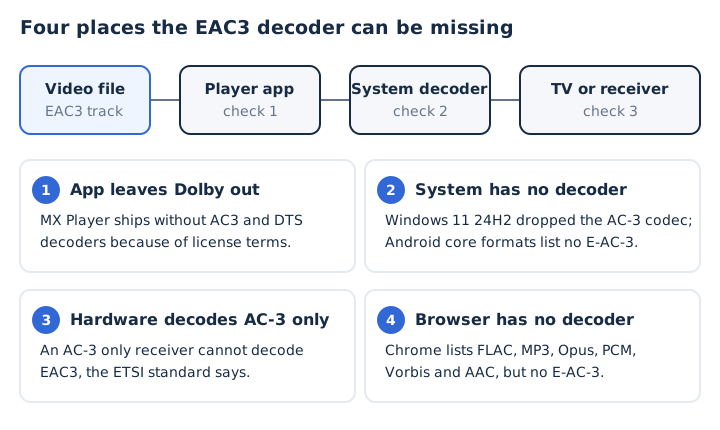
The ETSI TS 102 366 standard makes the hardware case strict. Every EAC3 decoder must also play AC-3, but an AC-3 decoder cannot decode EAC3.
What Are the Best Ways to Solve EAC3 Support Issues?
The fix depends on the device: change MX Player's decoder settings, use VLC on Android or Windows, get the PC maker's codec, pick the right file type for an LG TV, or let Plex transcode. Each row names the fix and the vendor page that documents it.
| Device or app | Fix | Documented by |
|---|---|---|
| MX Player (Android) | SW audio, HW+ setting or custom codec | MX Player support |
| Android phone | Play the file in VLC for Android | VideoLAN |
| Windows 11 PC | VLC, or the PC maker's AC-3 codec | Microsoft, VideoLAN |
| LG smart TV | Use an MP4, MKV or TS file, not AVI | LG support |
| Plex | Plex Media Server transcodes to AAC or AC3 | Plex support |
| Web browser | Play the file in VLC instead | Chromium, VideoLAN |
| Apple devices | Play DD+ natively, no fix needed | Apple, Dolby |
The list of apps and devices that support EAC3 lives in the EAC3 audio format guide. This table sticks to fixes for the error.
How Do You Fix EAC3 Not Supported in MX Player?
MX Player's support pages give three fixes: switch the track to SW audio, uncheck HW+ audio on SW video, or load a custom codec. The SW decoder leaves AC3 and DTS out for license reasons. With HW+ audio, the HW+ decoder setting hands codecs such as AC3, EAC3 and DTS to the phone's built-in decoder. Try the steps in this order, simplest first.
- Switch to SW audio: change the audio decoder for the playing track from HW to SW in the player.
- Turn off HW+ audio on SW video: open Settings, then Decoder, and uncheck it if EAC3 videos crash.
- Load a custom codec: open Settings, Decoder, Custom codec, and select the folder holding the codec files.
- Play the file again: reopen the same video and check that the EAC3 sound now comes through.
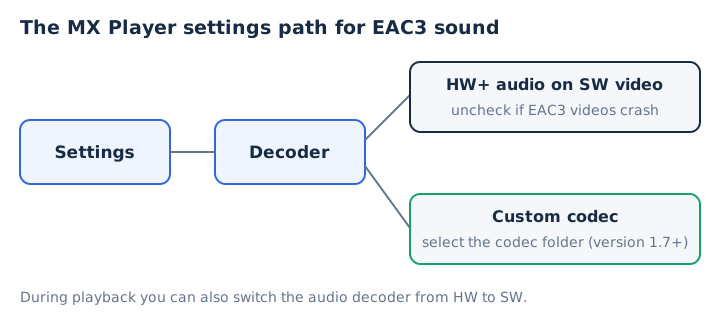
MX Player uses FFmpeg as its software codec. From version 1.7, a user-built FFmpeg codec can replace the default one. Codec files built for versions before 1.7, and libffmpeg.so files from other players, do not work. Codec zips on download sites come from third parties, not from MX Player's maker.
How Do You Play EAC3 Audio on Android?
Android plays EAC3 only where the phone maker added a Dolby decoder. Android's list of core media formats names 13 audio formats, from AAC LC to Vorbis, and AC-3 or E-AC-3 is not among them.
Android's AudioFormat class lists the format as ENCODING_E_AC3, added in API level 21. A second entry, ENCODING_E_AC3_JOC, arrived in API level 28 for Dolby Atmos tracks.
The quickest fix is a player that brings its own decoder. VideoLAN says VLC for Android plays all files, in all formats, like desktop VLC. That covers phones whose maker left Dolby out. MX Player users can try its decoder settings first.
How Do You Play EAC3 Audio on a Windows 11 PC?
Windows 11 version 24H2 and later no longer include the AC-3 codec, though Microsoft notes that many PC makers pre-install one. Open the video in VLC, which carries its own E-AC-3 decoder, or get the codec from the PC maker. Three checks clear most silent EAC3 videos on Windows.
- Open the file in VLC: VLC decodes E-AC-3 with its own decoder, so Windows codecs do not matter.
- Check the PC maker's support page: Microsoft says many device makers pre-install an AC-3 codec.
- Follow Microsoft's codec FAQ: look for the codec in Windows, in Microsoft Store codec extensions or from the codec provider.
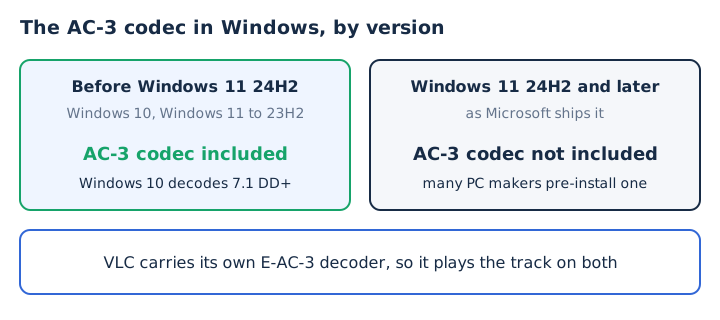
Microsoft documents one Dolby audio decoder in Media Foundation for both Dolby Digital (AC-3) and Dolby Digital Plus (E-AC-3). A 24H2 PC without the maker's codec can therefore play EAC3 video silently in apps that use the Windows decoder. Windows 10 keeps that decoder and plays 7.1 streams without a downmix. Dolby also lists Dolby Digital Plus as built into Microsoft Edge on Windows 10.
Why Is Dolby Digital Plus Audio Not Supported on a Smart TV?
A smart TV plays Dolby Digital Plus only in the file types its maker lists. LG's tables for its 2019 and 2020 LG OLED models list DD+ for MP4, MKV and TS files but not for AVI, and codec support differs by model. LG lists DD+ by container, so the file type decides the result.
| File type | Dolby Digital Plus on LG 2019/2020 OLED |
|---|---|
| MP4, M4V, MOV | Listed |
| MKV | Listed |
| TS, TRP, TP, MTS | Listed |
| AVI | Not listed (Dolby Digital only) |
A soundbar or A/V receiver adds a second limit, and LG adds that it does not supply encoding software. A unit that decodes only Dolby Digital cannot play EAC3. Dolby built EAC3 so it repackages as 640 kbps Dolby Digital without re-encoding, and Windows' Dolby decoder turns DD+ into Dolby Digital for S/PDIF output. LG's advice for an unsupported file is to encode it again on a PC.
Can a Web Browser Play EAC3 Audio?
No, not in Chrome: Chromium's codec list covers FLAC, MP3, Opus, PCM and Vorbis, Google Chrome adds AAC, and neither lists AC-3 or E-AC-3. Dolby names two exceptions. Microsoft Edge on Windows 10 has Dolby Digital Plus built in, and Apple's iOS, macOS and tvOS support it natively, though Dolby's page does not name Safari itself.
Our own converter runs into the same wall. Because the browser cannot decode EAC3, mp4tomp3.io usually cannot read a video whose sound is EAC3, and it shows an error instead of making a silent file. A desktop player such as VLC handles those files.
Should You Convert EAC3 Audio to Fix the Error?
Convert only when you cannot change the player. A player with its own EAC3 decoder keeps the original surround track, while every conversion adds a second lossy step. When you must convert, AAC keeps the channels and plays on almost every device. Browser converters, this site's included, usually cannot read EAC3 sound, so the conversion needs a desktop player or tool.
Does Plex Convert EAC3 Audio on Its Own?
Yes, Plex Media Server transcodes audio a client cannot play into AAC or AC3 (Dolby Digital), keeping the surround channels. Plex says that turning on multi-channel audio in the app's settings adds codec support during Direct Play and transcoding. Plex picks AAC or AC3 to preserve surround sound, and the EAC3 audio format guide explains why AC3 makes a safe fallback.
Can You Convert EAC3 Audio to Another Compatible Format?
Yes, a desktop tool can convert the EAC3 track to AAC, which carries up to 48 channels, so a 5.1 surround or 7.1 track keeps its channels, while MP3 folds it to 2 channels. AAC plays on phones, browsers and TVs where EAC3 fails, which makes it the safest target; see what AAC is for its limits.
Does Converting EAC3 Audio to Another Format Lower Quality?
Yes, a little, because EAC3 already uses lossy compression and re-encoding it to AAC or MP3 removes more data that no later step brings back. Converting to WAV or FLAC keeps what is left, but it does not restore the lost detail. Each lossy pass discards detail for good, and our guide to lossless audio explains why.
Can an Older Receiver Play AC-3 Audio Converted From EAC3?
Yes, once the EAC3 track becomes Dolby Digital (AC-3), an older AC-3 receiver plays it in 5.1. Dolby designed EAC3 to repackage as 640 kbps Dolby Digital, and Windows' Dolby decoder can make that change for S/PDIF output. Dolby Digital decoders accept that 640 kbps stream directly. AC-3 is one audio codec among many, each with its own device support.