Bit depth sets how many bits record the amplitude of each audio sample, and that count fixes how quiet a sound a PCM file can hold. A 16-bit sample picks from 65,536 levels, while a 24-bit sample picks from 16,777,216. Each extra bit adds 6.02 dB of dynamic range (20 x log10 2), so 16-bit reaches 96.3 dB and 24-bit reaches 144.5 dB.
Those bits per sample also set file size: a stereo minute grows from 10.6 MB at 16-bit to 15.9 MB at 24-bit. Rounding to the nearest level creates quantization noise, and dither smooths it when you lower the bit depth. This guide covers audio; photo bit depth is a separate idea. Bit depth sits beside codec and bitrate among the audio file formats basics.
What Is Bit Depth?
Bit depth is the number of bits that store each audio sample's amplitude in PCM audio, and 16 bits give 65,536 possible levels per sample. Audio engineers also call it bits per sample, sample size, resolution or word length. That one number is the audio bit depth of a file.
Sample rate decides how often a recorder measures the wave. Bit depth decides how finely each measurement is stored. The sample rate guide covers the timing side in full.
Photos use the same words differently. Color depth counts the bits per pixel channel, so an 8-bit image holds 256 values per channel.
How Does Bit Depth Work?
An A/D converter measures the signal's voltage at each sample and rounds it to the nearest of 2^n levels, where n is the bit depth. That rounding step is called quantization. Each extra bit doubles the number of levels, so the count grows fast as you add bits.
| Bit depth | Levels per sample | Signed range |
|---|---|---|
| 8-bit | 256 | -128 to +127 |
| 16-bit | 65,536 | -32,768 to +32,767 |
| 20-bit | 1,048,576 | -524,288 to +524,287 |
| 24-bit | 16,777,216 | -8,388,608 to +8,388,607 |
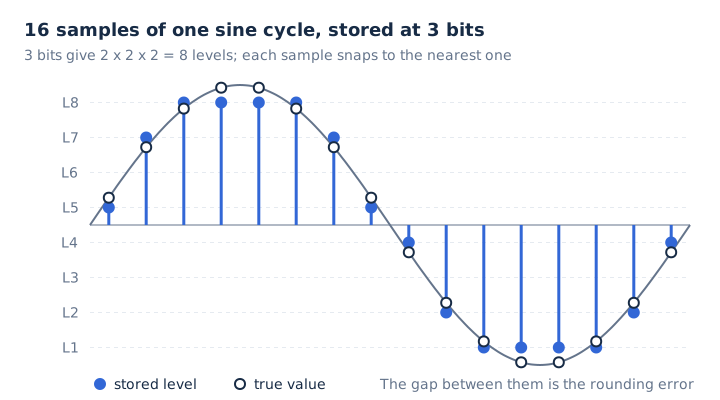
CD audio stores every sample as a signed 16-bit two's complement integer, from -32,768 to +32,767. Negative numbers carry the lower half of the wave, and positive numbers carry the upper half.
How Does Bit Depth Affect Dynamic Range?
Each bit adds about 6.02 dB of dynamic range, because one more bit doubles the ratio between the loudest level and the smallest step, and 20 x log10 2 equals 6.02. That gives 16-bit audio 96.3 dB and 24-bit audio 144.5 dB. The full formula is dynamic range = 20 x log10(2^n) decibels.
Every step up in bit depth pushes the noise floor down by the same fixed amount, as the second column shows.
| Bit depth | Dynamic range | Full-scale sine SNR |
|---|---|---|
| 8-bit | 48.2 dB | 49.9 dB |
| 16-bit | 96.3 dB | 98.1 dB |
| 20-bit | 120.4 dB | 122.2 dB |
| 24-bit | 144.5 dB | 146.3 dB |
| 32-bit integer | 192.7 dB | 194.4 dB |
Two figures appear for 16-bit because they measure different things. The 96.3 dB value is the plain level ratio. The 98.1 dB value is the signal-to-noise ratio of a full scale sine wave, which adds 1.76 dB.
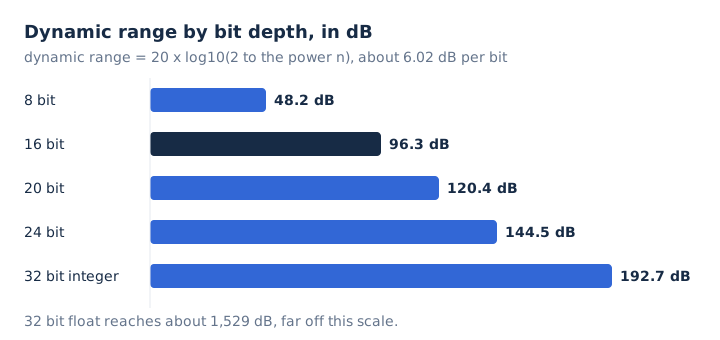
Recording below full scale leaves headroom, so a sudden peak doesn't clip. A 24-bit recording keeps 48.2 dB more room above its noise floor than a 16-bit one, which lets you set levels low and still catch quiet detail.
What Is Quantization Noise?
Quantization noise is the rounding error between the true analog level and the nearest stored level. It sits at a fixed level set by the bit depth, so fewer bits mean louder noise. In 16-bit audio, that noise floor sits about 96 dB below full scale.
You hear quantization error as a faint hiss. Without dither, it can turn into harsh, patterned distortion on quiet passages such as a fade-out. Bit depth controls this noise floor. It doesn't set the highest frequency a file can carry, because the sample rate decides that.
Every later rounding step adds its own small error. A volume change on 16-bit audio rounds each sample again. Audacity avoids that buildup by processing everything in 32-bit float.
What Are the Common Audio Bit Depths?
Three bit depths cover almost all audio: 16-bit for CDs and finished music, 24-bit for recording and lossless streaming, and 32-bit float for editing software. An older 8-bit format survives in telephone audio. Each depth has a job it is chosen for.
| Bit depth | Levels | Dynamic range | Where you meet it |
|---|---|---|---|
| 16-bit | 65,536 | 96.3 dB | CD audio, Audacity WAV export default |
| 24-bit | 16,777,216 | 144.5 dB | Studio masters, Spotify and Apple Music lossless |
| 32-bit float | 24-bit steps plus an exponent | About 1,529 dB | Audacity and DAW processing |
| 8-bit | 256 | 48.2 dB | Telephone audio, retro game sound |
Spotify and Apple Music both stream lossless at up to 24-bit. Spotify Lossless goes up to 24-bit/44.1 kHz FLAC, and Apple Music lossless goes up to 24-bit/192 kHz. The RIAA counts lossless music mastered at 20-bit/48 kHz or higher as hi-res, which the hi-res audio guide explains.
Formats differ in what they carry. FLAC stores integer PCM from 4 to 32 bits, ALAC handles 16 to 32 bits, and WAV holds integer or float samples.
What Is 32-Bit Float Audio?
32-bit float stores each sample as an IEEE 754 floating point number with 1 sign bit, 8 exponent bits and a 24-bit significand. It keeps 24-bit precision at any level, while the exponent slides that window across about 1,529 dB. Three fields share the 32 bits.
- Sign
- One bit that marks the sample as positive or negative.
- Exponent
- Eight bits that scale the value up or down by powers of two.
- Fraction
- Twenty-three stored bits plus one implicit bit, giving 24-bit precision.
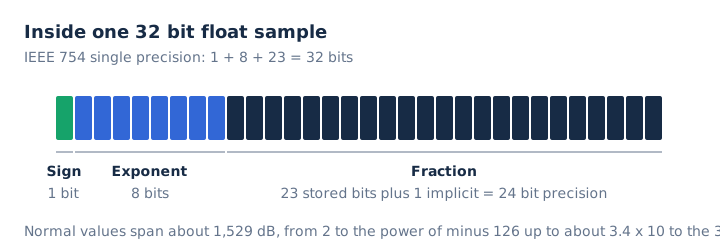
Float samples can rise above 0 dBFS inside the file without clipping, and you can pull the level down later. A fixed 16-bit or 24-bit file cuts those peaks off. A 32-bit file is twice the size of a 16-bit file, though, and audio interfaces play at 16-bit or 24-bit. That makes float a working format for editing, not a listening format.
Is 24-Bit Audio Better Than 16-Bit Audio?
24-bit audio holds 256 times more levels and 48.2 dB more dynamic range than 16-bit, and that extra range matters most while recording and editing. A finished 16-bit file still carries 96.3 dB, the CD standard. The gap between the two shows up in four places.
| Point | 16-bit | 24-bit |
|---|---|---|
| Levels per sample | 65,536 | 16,777,216 |
| Dynamic range | 96.3 dB | 144.5 dB |
| Stereo minute at 44.1 kHz | 10.6 MB | 15.9 MB |
| Typical use | CD and final playback | Recording and lossless masters |
Recording at 24-bit gives you headroom to set levels low without raising the noise. Spotify asks artists for a 24-bit master when that is the native version. It also tells them not to make a 16-bit copy of a 24-bit master for delivery.
How Does Bit Depth Affect File Size?
File size grows in step with bit depth, because uncompressed bitrate = sample rate x bit depth x channels. A stereo minute takes 10.6 MB at 16-bit/44.1 kHz and 15.9 MB at 24-bit/44.1 kHz. Here is what one stereo minute costs at each setting.
| Setting | Bitrate | MB per minute |
|---|---|---|
| 16-bit / 44.1 kHz | 1,411.2 kbps | 10.6 MB |
| 24-bit / 44.1 kHz | 2,116.8 kbps | 15.9 MB |
| 24-bit / 48 kHz | 2,304 kbps | 17.3 MB |
| 32-bit float / 48 kHz | 3,072 kbps | 23.0 MB |
| 320 kbps MP3 (for scale) | 320 kbps | 2.4 MB |
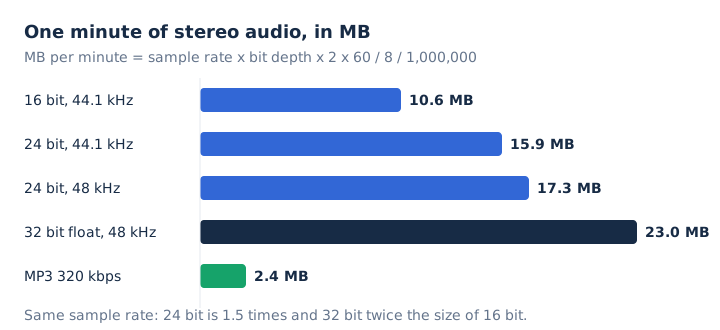
At the same sample rate, 24-bit audio is 1.5 times the size of 16-bit, and 32-bit is twice the size. The audio bitrate guide shows how kbps turns into megabytes for lossy files too.
What Is Dither?
Dither is a very low level of random noise added when audio drops to a lower bit depth, so rounding errors become a smooth hiss instead of patterned distortion. Audacity applies it only on that downward step. Four rules cover when dither belongs in the chain.
- Apply dither only when lowering bit depth, such as 24-bit or 32-bit float down to 16-bit.
- Apply dither at the final export, so the noise goes in only once.
- Expect a peak dither level near -80 dB at 16-bit and near -130 dB at 24-bit.
- Skip dither for 32-bit PCM or float exports, which need no rounding.
Audacity uses shaped dither by default, which pushes the noise into very high frequencies where it's harder to hear. Triangle and Rectangle are the two other options, and None turns dither off.
Which Bit Depth Should You Use?
Record and edit at 24-bit or 32-bit float, then deliver at the depth the destination asks for: 16-bit for CD, 24-bit for lossless masters, and a bitrate instead of a bit depth for MP3. In Audacity, the project depth lives under Default Sample Format in Preferences. The WAV export Encoding menu then sets the file's own depth, with Signed 16-bit PCM as the default. Add dither on that final step down to 16-bit, just before delivery.
Is CD Audio 16-Bit?
Yes, the Red Book CD standard stores two channels of 16-bit PCM at 44,100 samples per second, which comes to 1,411.2 kbps. A WAV ripped from a CD keeps the same 16-bit/44.1 kHz values and fills about 10.6 MB per minute. The WAV file guide explains how that format stores the samples.
Does Converting 16-Bit Audio to 24-Bit Improve Quality?
No, converting 16-bit audio to 24-bit adds 8 zero bits under each sample, so the file grows by half but keeps the same 65,536 levels and 96.3 dB of range. Any upconversion works the same way, including lossy audio saved in a lossless format. The lossless audio guide covers that case.
Do MP3 Files Have a Bit Depth?
No, an MP3 stores compressed audio described by its bitrate, from 32 to 320 kbps, and the decoder outputs PCM samples at a depth it chooses. Picking 24-bit before an MP3 export doesn't change the MP3's quality setting; the kbps value does. The MP3 format guide explains those bitrates.
Is Bit Depth the Same as Bitrate?
No, bit depth counts the bits in one sample, while bitrate counts the bits per second. For PCM audio, bitrate = sample rate x bit depth x channels. A CD works out to 44,100 x 16 x 2 = 1,411.2 kbps. The bitrate guide covers lossy rates too.
Does Converting MP4 to WAV Give You 16-Bit Audio?
Yes, mp4tomp3.io saves an MP4's sound as 16-bit PCM WAV inside the browser, without uploading the file. The MP4's AAC track was already lossy, so the WAV keeps that quality in a larger file. You can run it with the MP4 to WAV converter.