Opus squeezes voice calls and music into 6 to 510 kbps while adding only a few milliseconds of delay. This audio codec handles speech and music in one format, and the IETF published it as RFC 6716 in 2012, built on work from Skype and Xiph.Org. Its lossy compression fits a 128 kbps song into under 1 MB per minute.
An .opus file wraps that audio in an Ogg container. Opus switches between a speech mode and a music mode, covers sample rates up to 48 kHz, and adds as little as 5 ms of delay.
In a 2014 blind test, Opus at 96 kbps beat MP3 at 128 kbps. It costs nothing to use, carries WebRTC calls, plays on Android and current browsers, and converts to MP3 or WAV when a device refuses it. Opus is one entry in the wider family of audio file formats.
What Is the Opus Audio Format?
Opus is an open, royalty-free, lossy audio codec that the IETF standardized as RFC 6716 in September 2012. The Opus codec carries both speech and music over the internet with low delay, and it suits stored files and streams as well as live calls.
Opus joins two older codecs into one. Skype's SILK codec handles speech, and Xiph.Org's CELT codec handles music. RFC 8251 updated the decoder in October 2017.
- Opus codec
- The audio coding format itself, defined by RFC 6716.
- .opus file
- An audio file that stores Opus audio inside an Ogg container.
- libopus
- The reference encoder and decoder, released under a BSD license.
The word "opus" has an older meaning too. In music, an opus is a musical composition or set of compositions, usually numbered in order of publication. This page covers only the audio codec.
What Is an .opus File?
An .opus file is an Ogg container that holds Opus-encoded audio. RFC 7845 sets the rules: it recommends the .opus extension and the MIME type audio/ogg for these files.
Opus is the codec, and Ogg is the box around it. That makes the common description of an Opus file as "a container format" wrong: the container is Ogg. The first page of the file holds an ID header, the second holds a comment header with tags such as the title, and every later page carries Opus audio packets.
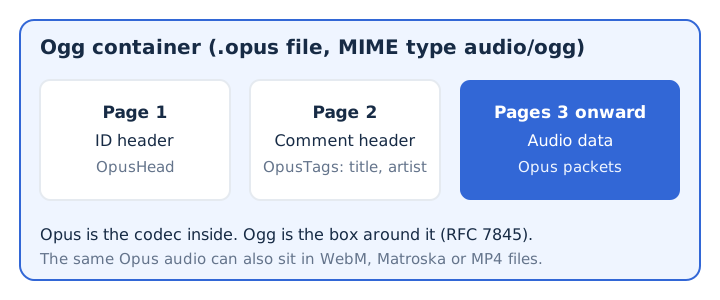
Opus audio also travels inside other containers. WebM files carry Opus or Vorbis sound, and Matroska and MP4 files can hold Opus too. A plain .ogg file, by contrast, usually holds Vorbis, which the OGG file guide explains.
Who Developed Opus and When?
Opus came out of the IETF codec working group, which merged Skype's SILK and Xiph.Org's CELT codecs and published the result as RFC 6716 in September 2012. Two of the RFC's authors worked at Mozilla and one at Skype. Five dates trace Opus from the first standard to the current reference library.
| Date | Event |
|---|---|
| September 2012 | RFC 6716 defines the Opus codec |
| April 2016 | RFC 7845 defines the Ogg Opus file |
| October 2017 | RFC 8251 updates the Opus decoder |
| December 2025 | libopus 1.6 adds Opus HD at 96 kHz |
| January 2026 | libopus 1.6.1 becomes the latest release |
The source code inside RFC 6716 sets the normative decoder, so every Opus player decodes the same way. The last two rows come from the libopus release notes on opus-codec.org, read on 6 November 2026. libopus 1.6 also added a bandwidth extension that rebuilds fullband sound from wideband audio.
How Does Opus Work?
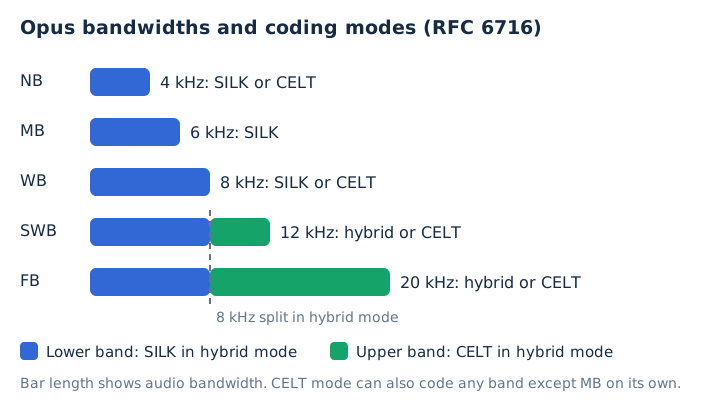
Opus works by switching, frame by frame, between a SILK speech layer, a CELT music layer and a hybrid of both, so one codec handles a phone call and a song. The speech layer uses linear prediction, a method that models the human voice. The music layer uses MDCT, the transform behind most music codecs. Each Opus mode suits a different kind of sound.
- SILK mode: codes speech with linear prediction at narrowband, medium-band or wideband, using frames of 10 to 60 ms.
- Hybrid mode: codes super-wideband and fullband speech with SILK below 8 kHz and CELT above it.
- CELT mode: codes music and low-delay audio with the MDCT, using short frames of 2.5 to 20 ms.
The frame size changes from one packet to the next, along with the bitrate and the bandwidth. Opus supports both constant and variable bitrate. Packet loss concealment fills short gaps when a network drops audio, so a call keeps going instead of cutting out.
What Bitrates and Sample Rates Does Opus Support?
Opus supports any bitrate from 6 to 510 kbps and five audio bandwidths, from narrowband at 4 kHz to fullband at 20 kHz. Each bandwidth has its own effective sample rate, from 8 kHz up to 48 kHz. RFC 6716 names the five bandwidths in one table.
| Bandwidth | Audio bandwidth | Effective sample rate |
|---|---|---|
| Narrowband (NB) | 4 kHz | 8 kHz |
| Medium-band (MB) | 6 kHz | 12 kHz |
| Wideband (WB) | 8 kHz | 16 kHz |
| Super-wideband (SWB) | 12 kHz | 24 kHz |
| Fullband (FB) | 20 kHz | 48 kHz |
Opus never codes sound above 20 kHz. An Ogg Opus file counts its samples at 48 kHz, even when the audio uses a narrower band. One Opus stream carries up to 255 channels, so surround sound fits as well as mono and stereo. libopus 1.6 added Opus HD, which supports 96 kHz audio. The general meaning of kbps, and how it sets file size for every format, lives in the bitrate guide.
Which Opus Bitrate Should You Use?
Use 64 to 128 kbps for stereo music, 48 to 64 kbps for mono music and 16 to 40 kbps for speech. RFC 6716 lists these as the sweet spots for 20 ms frames. Those sweet spots translate into very small files, as the size column shows.
| Content | Sweet spot | Size per minute, top rate |
|---|---|---|
| Narrowband speech | 8 to 12 kbps | 0.09 MB |
| Wideband speech | 16 to 20 kbps | 0.15 MB |
| Fullband speech | 28 to 40 kbps | 0.3 MB |
| Mono music | 48 to 64 kbps | 0.48 MB |
| Stereo music | 64 to 128 kbps | 0.96 MB |
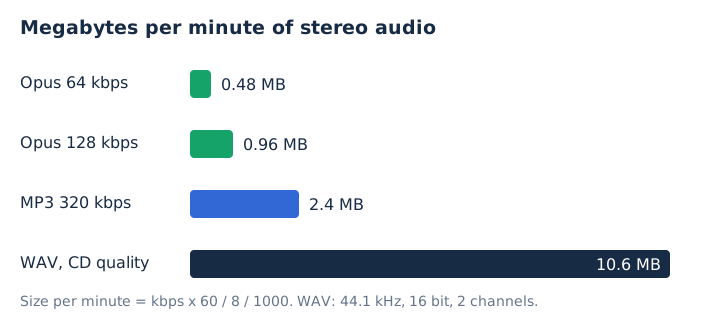
The file size follows a simple formula: kbps times 60, divided by 8, divided by 1,000, gives megabytes per minute. A 128 kbps Opus file takes 0.96 MB per minute. A 320 kbps MP3 takes 2.4 MB, and CD-quality WAV takes 10.6 MB. So the top Opus sweet spot for music is 40% of the biggest MP3 and 9% of the WAV.
Why Does Opus Have Such Low Latency?
Opus keeps latency low because it codes audio in frames as short as 2.5 ms and needs only a little look-ahead. Its algorithmic delay runs from 5 ms to 65.2 ms, and the usual 20 ms frames give 26.5 ms. That speed matters for real-time audio: calls, in-game chat and live music all need sound to arrive almost at once. RFC 7874 requires every WebRTC endpoint to support Opus.
Is Opus Better Than MP3?
Yes, Opus sounds better than MP3 even at a lower bitrate. In a public blind test in July 2014, Opus at 96 kbps scored 4.65 out of 5, while MP3 at a 128 kbps setting scored 4.24. Thirty-eight listeners rated 40 tracks against the original recordings.
| Codec | Bitrate | Mean score |
|---|---|---|
| Opus 1.1 | 96 kbps | 4.65 |
| AAC (Apple) | 96 kbps | 4.40 |
| Ogg Vorbis | 96 kbps | 4.24 |
| MP3 (LAME) | 128 kbps setting | 4.24 |
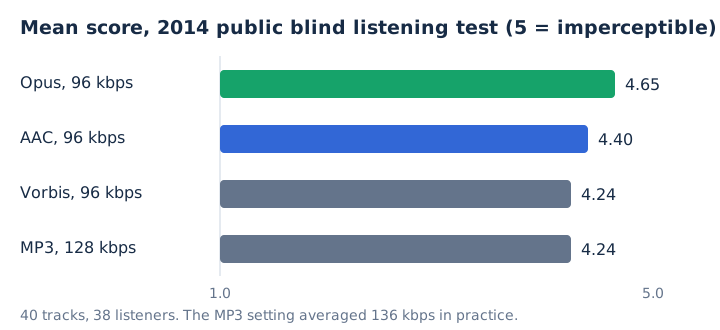
The listening test scored 5 as "imperceptible", meaning listeners could not tell the file from the original. The MP3 setting averaged 136 kbps in practice, yet it still only tied Vorbis for third place.
If you are choosing between Opus and M4A, read the AAC row, because an M4A file usually holds AAC audio. The AAC vs Opus comparison has its own page. MP3 keeps one practical edge: players built before Opus support cannot open an .opus file, which is the usual reason people convert one.
Is Opus Royalty-Free?
Yes, Opus is royalty-free for everyone. Its specification is free, the reference implementation carries a BSD license, and the Opus license terms grant the copyright and patent licenses to every user automatically. Anyone may encode, decode, ship or sell Opus software at no cost. The patent license ends only for someone who sues an Opus user over Opus patents. MDN lists Opus licensing as fully open and free, so Opus counts as an open format for any project.
Where Is Opus Used?
Opus carries the audio in WebRTC calls, WebM videos and Discord voice chat, and Android apps can record straight to it. Four common services carry Opus audio without showing its name.
- WebRTC browser calls: RFC 7874 requires every WebRTC endpoint to implement Opus, so browser video calls use it.
- WebM video files: WebM files carry their sound as Opus or Vorbis, beside VP8 or VP9 video.
- Discord voice chat: Discord's voice protocol sends speech as Opus frames and encrypts them end to end.
- Android apps: Android has included an Opus encoder since Android 10, so apps can save recordings as Opus.
Which Devices and Apps Play Opus Files?
Android 5.0 and later, Chrome, Edge, Firefox and Opera, and Apple devices from version 18.4 play Opus audio. Each platform sets its own starting version, so the version you run decides whether a file opens.
| Platform | Plays Opus from | Note |
|---|---|---|
| Android | Android 5.0 | Encoder from Android 10 |
| Chrome | Version 33 | Also WebM and MP4 |
| Edge | Version 14 | Web page audio |
| Firefox | Version 15 | Web page audio |
| Safari (Mac, iPhone, iPad) | Version 18.4 | Ogg container support |
On an iPhone, Safari added Ogg Opus with iOS 18.4, and on a Mac with macOS Sequoia 15.4. Android reads Opus in Ogg, MP4, Matroska and WebM files. Opera has played Opus since version 20.
When Should You Convert an Opus File?
Convert an Opus file only when the device, app or editor you need will not open it. Keep it as Opus when it plays, because Opus is already small and a second lossy format adds a second round of loss. For conversion, the target sets the choice: MP3 for the widest compatibility, WAV for editing.
Is Opus Good Enough for Music?
Yes, Opus handles music well: RFC 6716 puts stereo music at 64 to 128 kbps, and Opus at 96 kbps led a 2014 blind test of 40 tracks. Opus scored highest of the four codecs in that test, ahead of AAC, Vorbis and MP3, which makes it a strong pick among the audio file formats for music.
Is Opus Lossless?
No, Opus is lossy: it discards detail to reach 6 to 510 kbps, so an Opus file never matches its source bit for bit. Keep lossless audio such as FLAC for an archive. The Opus vs FLAC comparison covers that choice in full.
Is an .opus File the Same as an .ogg File?
No, both use the Ogg container, but .opus marks Opus audio while .ogg usually means Vorbis. A player that expects every file with the .ogg extension to hold Ogg Vorbis may not decode Opus at all. The OGG file guide covers the Ogg container and its other extensions.
Can You Convert Opus to MP3 Without Losing Quality?
No, Opus to MP3 is a second lossy step, but a high MP3 bitrate keeps the loss small. The Opus to MP3 converter on mp4tomp3.io writes MP3 at 128 to 320 kbps in the browser, and the file never leaves your device. Pick 256 kbps or 320 kbps as the MP3 bitrate. Expect the MP3 to be larger than the Opus file: 2.4 MB per minute at 320 kbps.
Does Converting Opus to WAV Bring Back the Lost Detail?
No, a WAV file made from Opus stores the decoded audio exactly, but the detail Opus dropped is already gone. The WAV only grows to about 10.6 MB per minute. WAV still helps when you edit, because it holds plain 16-bit PCM that an audio editor reads without decoding. mp4tomp3.io converts Opus to 16-bit PCM WAV in the browser. The WAV file guide explains the format.