An OGG file wraps compressed sound, most often Vorbis, in the Ogg container that the Xiph.Org Foundation built for streaming. Ogg is an open format, so anyone can write or play this audio file without paying a fee.
The extension tells you the codec: .ogg means Vorbis, while .opus, .oga and .ogv mark Opus, other audio and video. Inside, every file is a chain of pages that each start with the letters OggS, and the tags sit in plain text fields.
In a 2014 blind test, Vorbis at 96 kbps matched MP3 at 136 kbps. Godot and Wikimedia Commons still use Ogg, and Chrome, Firefox, VLC and Safari 18.4 play it. OGG is one entry in the wider family of audio file formats.
What Is an OGG File?
An OGG file is an audio file stored in Ogg, the open, royalty-free container format of the Xiph.Org Foundation. RFC 5334 reserves the .ogg file extension for files that hold Vorbis audio only.
Two layers make up every OGG file. The Ogg container is the box: it frames the data, marks positions for seeking and checks for damage. The Vorbis codec provides the compressed sound inside the box. The container itself is neither lossy nor lossless; the codec decides that. Xiph.Org designed Ogg to be free of patent claims, and libvorbis, its Vorbis library, ships under a BSD license.
- Ogg
- The container format, defined by RFC 3533.
- Vorbis
- The lossy audio codec most .ogg files carry.
- .ogg
- The file extension for an Ogg file that holds only Vorbis audio.
Which Codecs Can an OGG File Hold?
The Ogg container holds Vorbis, Opus, FLAC and Speex audio and Theora video, and each mix gets its own extension. Vorbis alone takes .ogg, Opus takes .opus and Speex takes .spx. Other audio takes .oga, video takes .ogv, and complex multiplexed files take .ogx. RFC 5334 ties each extension to what sits inside, along with its MIME type.
| Extension | MIME type | What it holds |
|---|---|---|
| .ogg | audio/ogg | Vorbis audio only |
| .oga | audio/ogg | Any Ogg audio, such as FLAC |
| .opus | audio/ogg | Opus audio (RFC 7845) |
| .spx | audio/ogg | Speex speech only |
| .ogv | video/ogg | Theora video with Vorbis sound |
| .ogx | application/ogg | Complex multiplexed streams |
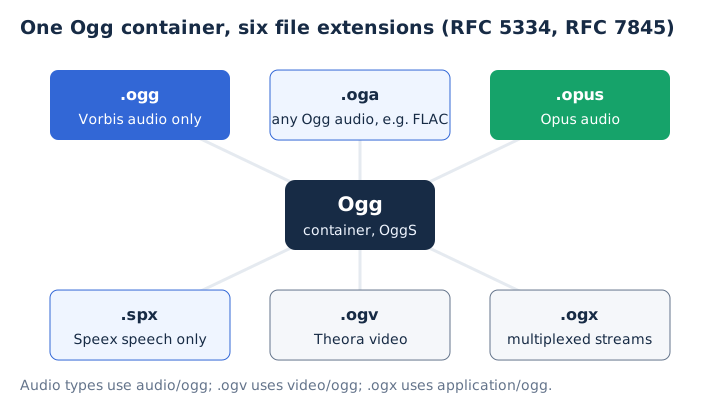
The .ogg name once covered any Ogg file. RFC 3534 used it that way, and RFC 5334 moved the general role to .ogx because many players expect an .ogg file to contain Vorbis.
Opus audio rides in the same container under the .opus name, which the Opus audio format guide covers in full. FLAC can sit inside Ogg too, as the same compressed data in a different box. An .ogv file is an Ogg video, not an MP4, so it needs a player that reads Ogg.
What Is Ogg Vorbis?
Ogg Vorbis is Vorbis audio inside an Ogg file. Vorbis is the open, patent-free and royalty-free lossy codec from Xiph.Org, and its Vorbis I bitstream format was frozen on 8 May 2000. Every stream encoded since then still plays on current decoders. Four traits define Vorbis as a codec.
- MDCT transform codec: Vorbis uses the Modified Discrete Cosine Transform and a perceptual model for lossy compression of music.
- Variable bitrate: Vorbis spends bits where the sound needs them, from 16 to 128 kbps per channel.
- Sample rate range: The Vorbis I specification covers every sample rate from 8 kHz telephony to 192 kHz masters.
- Channel layouts: One Vorbis stream carries mono, stereo, 5.1 surround, ambisonic sound or up to 255 discrete channels.
libvorbis is the BSD-licensed reference encoder and decoder, and the libvorbis 1.0 release dates from July 2002. MDN puts typical Vorbis output at about 45 to 500 kbps, depending on the quality setting the encoder uses. The general meaning of bitrate has its own guide on this site.
How Is an OGG File Structured?
An OGG file is a chain of pages, each opening with the 4-byte capture pattern OggS and a 27-byte page header, followed by up to 255 segments of codec data, for at most 65,307 bytes per page. RFC 3533 defines the same nine header fields for every Ogg page.
| Field | Size | What it does |
|---|---|---|
| Capture pattern | 4 bytes | Marks the page start with OggS |
| Version | 1 byte | Always 0 in this format |
| Header type | 1 byte | Flags continued, first or last page |
| Granule position | 8 bytes | Position the codec turns into time |
| Serial number | 4 bytes | Names the logical stream |
| Page sequence | 4 bytes | Reveals a lost page |
| CRC checksum | 4 bytes | Detects a corrupted page |
| Page segments | 1 byte | Counts the segments on the page |
| Segment table | 1 byte per segment | Lists each segment's size |
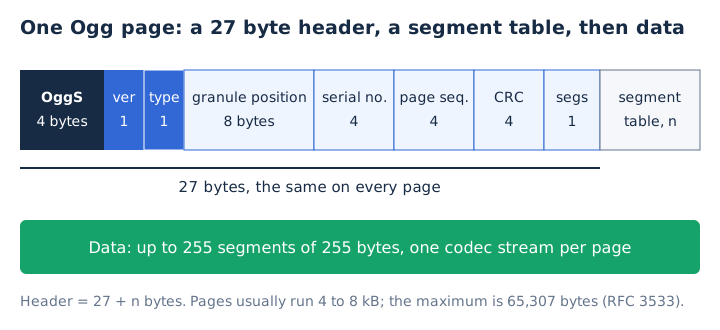
Ogg cuts each codec packet into 255-byte segments plus a shorter last one. Each logical bitstream starts with a bos (beginning of stream) page and ends with an eos (end of stream) page. The granule position carries no clock of its own; the codec converts it into playback time. A CRC checksum on every page lets a player skip damage and find the next OggS.
Ogg mixes streams in two ways. Grouping interleaves streams, such as video with sound, and chaining plays one stream after another. All this framing costs about 1 to 2% of the bitrate, and a program writes or reads the file in one pass, which suits live streaming. A Vorbis stream's first page starts with the byte 0x01 and the word vorbis.
How Does an OGG File Store Tags?
An OGG file stores tags as Vorbis comments: plain FIELD=value text pairs such as ARTIST=, TITLE= and ALBUM=. That metadata lives in the comment header, the second of the three header packets that open every Vorbis stream, in this order.
- Identification header: It names the Vorbis version and states the stream's sample rate and channel count.
- Comment header: It holds the vendor string, such as the libvorbis encoder name, and the FIELD=value tags.
- Setup header: It carries the codebooks and settings the decoder loads before it plays any audio.
Field names ignore case, so ARTIST and artist mean the same field, and every value is UTF-8 text. No field is mandatory. VLC reads Vorbis comments, and FLAC files use the same tag style, as the FLAC file guide shows.
Who Created the Ogg Format and When?
The Xiph.Org Foundation created Ogg as the home for its free codecs: Vorbis was frozen in May 2000, and RFC 3533 published the Ogg format itself in May 2003. Five dates trace Ogg from codec freeze to Opus support.
| Date | Event |
|---|---|
| May 2000 | Vorbis I bitstream format frozen |
| July 2002 | libvorbis 1.0 release ships the encoder |
| May 2003 | RFC 3533 defines the Ogg format |
| September 2008 | RFC 5334 sets .oga, .ogv and .ogx |
| April 2016 | RFC 7845 defines Ogg Opus files |
The Xiph.Org Foundation still sets the rules for changes to the Ogg media types. RFC 7845 added Opus, the newest Xiph.Org codec, to the container's standards in 2016.
Is OGG Better Than MP3?
Yes for size at the same quality, no for compatibility. In a 2014 blind listening test, Ogg Vorbis at 96 kbps scored 4.24 out of 5, the same as MP3 at a 128 kbps setting that averaged 136 kbps. Every major browser plays MP3, while Ogg support still has gaps. Thirty-eight listeners rated forty tracks against the lossless original.
| Point | OGG (Vorbis) | MP3 |
|---|---|---|
| Listening score | 4.24 at 96 kbps | 4.24 at 136 kbps |
| Bitrate for that score | 96 kbps | 136 kbps |
| Channels | Up to 255 | Mono or stereo |
| Browser support | No Safari before 18.4 | All major browsers |
| CPU to play | More | Less |
Sound quality is where Vorbis wins: it reached the MP3 score with about 40 kbps less bitrate. Compatibility is where MP3 wins. The Godot game engine notes that an MP3 of roughly equal quality is significantly larger than Ogg Vorbis, while MP3 needs less CPU to play. Opus beat both codecs in the same test with 4.65, as the Opus guide explains.
How Big Is an OGG File?
An OGG file at 128 kbps takes about 0.96 MB per minute, the same as a 128 kbps MP3 and about 9% of a CD-quality WAV at 10.6 MB per minute. File size follows bitrate, so the same arithmetic works for every codec.
| File | Bitrate | Size per minute | 4-minute song |
|---|---|---|---|
| Ogg Vorbis | 96 kbps | 0.72 MB | 2.9 MB |
| Ogg Vorbis | 128 kbps | 0.96 MB | 3.8 MB |
| Ogg Vorbis | 192 kbps | 1.44 MB | 5.8 MB |
| MP3 | 320 kbps | 2.4 MB | 9.6 MB |
| WAV (CD quality) | 1,411.2 kbps | 10.6 MB | 42.3 MB |
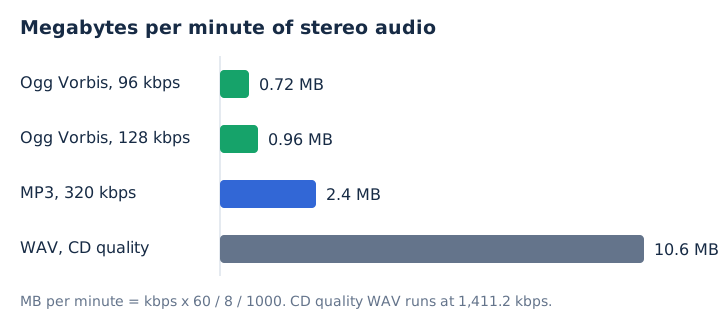
Vorbis uses variable bitrate, so real files land near these numbers rather than exactly on them. Godot's own table gives 16 KB per second for 128 kbps Vorbis, which matches 0.96 MB per minute. Shrinking audio files in general has its own guide on audio compression.
Is OGG Still Used?
Yes, OGG is still used in game audio, open media archives, web video and phones. Godot imports Ogg Vorbis for music and speech, and Wikimedia Commons stores audio as Ogg Opus, Vorbis or FLAC. WebM videos carry Vorbis or Opus sound, and Android decodes Vorbis in .ogg files. Four places keep Ogg audio in daily use.
- Game audio: The Godot documentation recommends Ogg Vorbis for music, speech and long sound effects in games.
- Wikimedia Commons: Commons prefers Ogg Opus for uploaded audio and keeps older Vorbis files unconverted.
- WebM video: Every WebM file carries its sound track as Vorbis or Opus, the two Xiph.Org codecs.
- Android: Android decodes Vorbis from .ogg files natively, and it also reads Vorbis in Matroska and WebM.
MDN notes that Ogg never gained the wide support to become a first-choice container. OGG therefore lives mostly where an open, royalty-free format matters more than reach.
How Do You Open an OGG File?
Open an OGG file in VLC on Windows, macOS, Linux or Android, or drag it into Chrome, Edge, Firefox or Opera. VLC lists OGG among its input formats. Safari plays Ogg Vorbis from version 18.4 on Mac, iPhone and iPad. Support arrived at a different version on each platform.
| Platform | Plays Ogg Vorbis from | Note |
|---|---|---|
| Chrome | Version 4 | Also plays WebM |
| Edge | Version 17 | Also plays WebM |
| Firefox | Version 3.5 | Also plays WebM |
| Safari (Mac, iPhone, iPad) | 18.4 | Added Ogg container support |
| Android | Built-in decoder | Also Matroska and WebM |
| VLC | All desktop and Android builds | Plays OGG and OGM |
An iPhone needs iOS 18.4 or later before Safari plays an Ogg file. Any free media player that reads Ogg, such as VLC, handles the rest. If a device or app still refuses the file, converting it is the next step.
When Should You Convert an OGG File?
Convert an OGG file when the device, app or editor you need won't open it, and keep it as OGG when it plays. Vorbis is already compact, and every extra lossy encode adds generation loss. For conversion, pick MP3 for the widest compatibility and WAV for editing.
Is OGG Lossless?
No, a standard .ogg file holds Vorbis, which is lossy. The Ogg container can carry lossless FLAC, but those Ogg FLAC files usually use the .oga extension. Keep FLAC or WAV for an archive, and read the lossless audio guide to see which formats rebuild a CD bit for bit.
Can an OGG File Contain Opus Audio?
Yes, Opus audio travels in the same Ogg container, but RFC 7845 assigns those Ogg Opus files the .opus extension. A player built only for .ogg Vorbis may not decode them. Wikimedia Commons now uses Opus as its preferred codec for new Ogg audio, and the Opus audio format guide explains why.
Does Converting OGG to MP3 Lower the Quality?
Yes, OGG to MP3 is a second lossy step, but a high MP3 bitrate keeps the loss small. The OGG to MP3 converter on mp4tomp3.io turns the file into MP3 at 128 to 320 kbps in your browser, without uploading it. Pick 256 or 320 kbps as the MP3 bitrate, and expect the MP3 to be larger than the OGG.
Should You Convert OGG to WAV for Editing?
Yes, convert to WAV if your audio editor won't import OGG. A 16-bit PCM WAV file stores the decoded audio exactly and adds no new loss, though it grows to about 10.6 MB per minute. The WAV can't restore detail that Vorbis already dropped. Our WAV file guide explains the format.