A FLAC file shrinks digital audio to about half the size of a WAV and gives back every original sample when it plays. FLAC stands for Free Lossless Audio Codec, and the Xiph.Org Foundation maintains it as an open format, written down in RFC 9639.
Lossless compression works on PCM audio, the same raw samples a CD or a WAV holds. A CD-quality minute takes about 5.3 MB as FLAC against 10.6 MB as WAV.
FLAC has no bitrate setting at all: its levels 0 to 8 change only file size and encoding time, never the sound. Every major phone and computer plays it, and it converts to MP3 or WAV whenever a device needs a smaller or simpler file. For how FLAC fits beside MP3, AAC and WAV, see the audio file formats guide.
What Is a FLAC File?
A FLAC file is an audio file in the Free Lossless Audio Codec format, which compresses PCM audio to about half its size and decodes it back bit for bit. Xiph.Org compares FLAC to Zip, except that FLAC packs sound far tighter because its design targets audio.
Lossless audio means the decoder returns every bit of the source. The FLAC format is the codec and its rules. The FLAC file format is how those rules lay out bytes on disk. A file with the .flac extension is one such file, and "FLAC audio" simply means music stored in it.
Is FLAC 100% lossless? Yes. The file header stores an MD5 signature of the original PCM, so any player or tool can prove the decoded audio is a bit-for-bit match.
What Does FLAC Stand For?
FLAC stands for Free Lossless Audio Codec, and "free" covers more than price. Xiph.Org publishes the specification for any use, knows of no patent on the format, and releases all of its code as open source. Six labels identify the format and the people who look after it.
- FLAC
- Free Lossless Audio Codec, the format and its reference software.
- .flac
- The filename extension that FLAC files carry on every system.
- audio/flac
- The registered media type for FLAC, replacing the older audio/x-flac alias.
- fLaC
- The four ASCII bytes that open every FLAC stream on disk.
- Xiph.Org Foundation
- The nonprofit that has maintained FLAC since the project joined it in 2003.
- RFC 9639
- The IETF specification for FLAC, published in December 2024.
Josh Coalson started FLAC in 2000, and the IETF turned his format into a formal standard 24 years later. The latest reference release, FLAC 1.5.0, arrived on 11 February 2025. Ogg FLAC (.oga) holds the same compressed data inside an Ogg container, and Xiph.Org confirms that one converts to the other without re-encoding.
How Does FLAC Compress Audio Without Losing Quality?
FLAC predicts each short block of samples with a small formula and stores only that formula plus the tiny errors, so the decoder rebuilds the exact samples. RFC 9639 describes the encoder as four stages that run on every block, in this order.
- Blocking: the encoder cuts the audio into short blocks, each holding the same number of samples per channel.
- Interchannel decorrelation: the encoder turns left and right into mid and side channels whenever that pair takes less space.
- Prediction: a predictor describes each block with a few numbers, usually through fixed polynomials or linear prediction.
- Residual coding: the encoder stores the leftover difference, called the residual, losslessly with Rice coding.
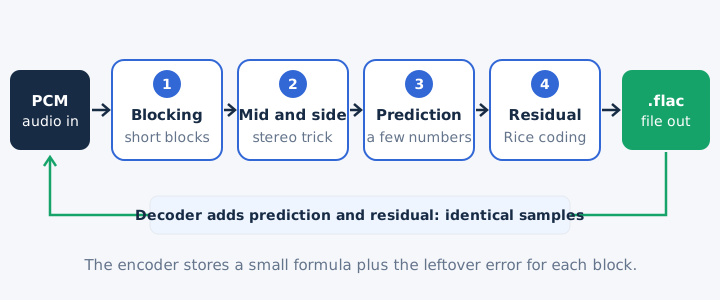
FLAC looks back at 32 samples at most, because neighbouring audio samples sit very close to each other. The decoder uses integer maths and only adds the prediction and the residual. That simple step keeps playback light, even on modest hardware such as portable players.
How Is a FLAC File Structured?
A FLAC file opens with the four bytes fLaC, then a mandatory STREAMINFO block, any other metadata blocks, and finally the audio frames. RFC 9639 leaves room for 127 metadata block types, and seven of them are defined today.
| Block | What it stores |
|---|---|
| STREAMINFO | Sample rate, channels, bit depth, total samples and the audio's MD5 |
| Padding | Empty space, so tags grow without rewriting the file |
| Application | Data written for one registered program |
| Seek table | Stored points that let players jump quickly |
| Vorbis comment | Text tags such as title, artist and album |
| Cuesheet | A CD's track and index points |
| Picture | Cover art, such as the album front |
RFC 9639 requires STREAMINFO as the first block, and every metadata block sits before the audio. Each audio frame carries its own header with a sync code, the block size, the sample rate, the channel count and an 8-bit CRC. A 16-bit CRC closes the frame.
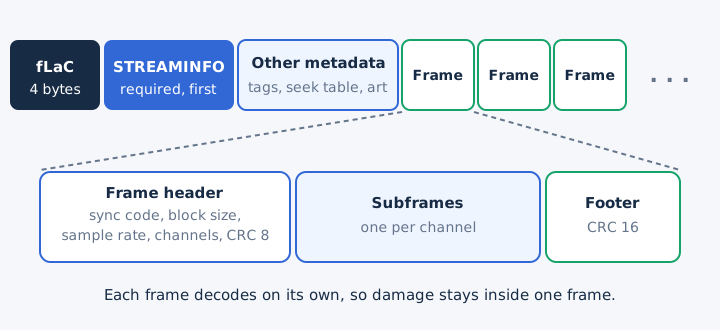
Every frame decodes on its own. A damaged frame therefore costs only a small fraction of a second of sound, while the rest of the file plays on.
What Bit Depth and Sample Rate Does FLAC Support?
FLAC stores integer PCM from 4 to 32 bits per sample, at 1 Hz to 1,048,575 Hz, with 1 to 8 channels. CD audio sits at the modest end of that range: 16-bit, 44.1 kHz, two channels. The specification allows far more than most players decode.
| Property | FLAC format limit | Common in practice |
|---|---|---|
| Bit depth | 4 to 32 bits | 16 or 24 bits |
| Sample rate | 1 to 1,048,575 Hz | 44.1 kHz to 192 kHz |
| Channels | 1 to 8 | Stereo, two channels |
| Sample type | Integer PCM only | No floating point |
Deezer and Qobuz stream 24-bit FLAC at up to 192 kHz, which counts as hi-res audio, a topic with its own guide. RFC 9639 notes that some decoders accept only 16-bit FLAC, and many stop at 24-bit. Android's built-in player handles FLAC up to a 48 kHz sample rate. The bit depth guide and the sample rate guide explain both settings in general.
How Big Is a FLAC File?
A CD-quality FLAC takes about 5.3 MB per minute, roughly half of the 10.6 MB a WAV needs, and about twice the size of a 320 kbps MP3. One song and one album make the gap concrete across the four common choices.
| Format | MB per minute | 4-minute song | 45-minute album |
|---|---|---|---|
| WAV (16-bit, 44.1 kHz) | 10.6 MB | 42.3 MB | 477 MB |
| FLAC (about 2:1) | About 5.3 MB | About 21 MB | About 239 MB |
| MP3 320 kbps | 2.4 MB | 9.6 MB | 108 MB |
| MP3 128 kbps | 0.96 MB | 3.8 MB | About 43 MB |
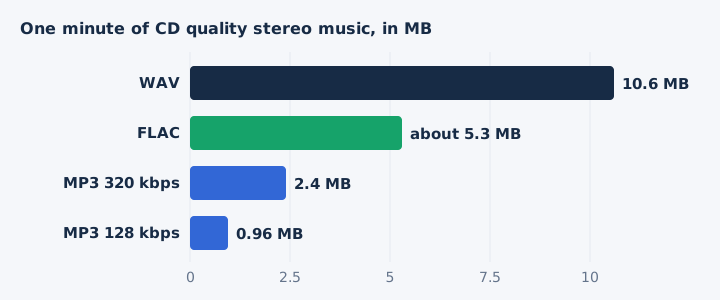
The compression ratio of about 2:1 is typical for music, not a fixed figure. Hi-res sources start much larger, since a 24-bit/96 kHz WAV fills 34.6 MB per minute before FLAC touches it. The audio bitrate guide shows how those rates are calculated.
What Are the Benefits and Limitations of FLAC?
FLAC keeps every sample at about half the size of WAV and stays free, open and well tagged. Its costs are a file about twice a 320 kbps MP3 and patchy support in some decoders and wireless links. Each strength comes with a matching trade-off.
| Benefits | Limitations |
|---|---|
| No audio data lost, checked by MD5 | About twice the size of 320 kbps MP3 |
| About half the size of WAV | Some decoders stop at 16 or 24 bits |
| Free, open and patent-free format | No floating-point samples for studio work |
| Tags, cover art and fast seeking | Bluetooth turns it lossy before playback |
| One bad frame never ruins the file | WAV chunks dropped unless you keep them |
The downsides of FLAC are mostly about reach, not sound. Decoder support varies, so an older player can reject a 24-bit file. Bluetooth links compress audio before the headphones receive it, so a wireless pair never plays FLAC losslessly. FLAC uses no floating point samples, which sets a hard limit for studio sessions recorded in float. Xiph.Org's error resistance design limits any stream error to the frame where it happens.
Where Are FLAC Files Used?
FLAC files are used to archive CDs and recordings without loss, to stream lossless music, and to keep a master copy for any future format. Four jobs keep FLAC in steady use.
- CD ripping: a ripper saves a whole disc as one FLAC with its cue sheet, so you can burn an exact copy later.
- Lossless streaming: Spotify, Deezer, Qobuz and Amazon Music all deliver their lossless tiers to listeners as FLAC files.
- Archives: the US National Archives lists FLAC among its preferred formats for digital audio, next to Broadcast Wave.
- Master copy: you keep the FLAC and convert to MP3 or AAC later, without generation loss in the master.
Apple Music is the main exception, because it streams its lossless catalogue as ALAC instead.
How Do You Play a FLAC File?
You play a FLAC file by opening it in the player your system already has: Windows Media Player, the Android player, the built-in playback on iPhone and Mac, or VLC on any of them. Every major system now reads FLAC without add-ons.
| Device | Built-in FLAC playback | Limit to know |
|---|---|---|
| Windows | Windows Media Player | None listed by Microsoft |
| Android | Since Android 3.1 | Stereo only, up to 48 kHz |
| iPhone | Listed in Apple's specs | None listed by Apple |
| Mac | Listed in Apple's specs | None listed by Apple |
| Any system | VLC media player | None listed by VideoLAN |
Windows Media Player accepts Free Lossless Audio Codec (.flac) files, according to Microsoft's list of supported file types. Can you play FLAC on Android? Yes, the Android platform has decoded FLAC since version 3.1, in mono or stereo.
How Do You Make a FLAC File?
You make a FLAC file by ripping a CD with a FLAC-capable CD ripper, or by encoding a WAV or AIFF file with the free flac command line tool. Xiph.Org's tool covers most needs with three commands.
- flac song.wav: encodes the WAV at the default compression level 5 and leaves the original file in place.
- flac -8 song.wav: uses the highest compression preset for a smaller file, a slower encode and identical sound.
- flac -V song.wav: runs the verify option, decoding every block during encoding and stopping on any mismatch.
The tool also reads Wave64 and RF64 files, and flac -d song.flac decodes a FLAC back to WAV. mp4tomp3.io reads FLAC but does not write it, so use the flac tool or a ripper to create one.
How Do You Convert a FLAC File?
You convert a FLAC file by decoding it and writing the samples in a new format: MP3 for phones and cars, WAV for editors and CD burning. mp4tomp3.io converts FLAC to MP3 at 128 to 320 kbps, or to a 16-bit WAV, inside your browser without uploading the file.
FLAC to WAV keeps every sample, because decoding is exact. FLAC to MP3 involves re-encoding with a lossy codec, which removes data for good. Keep the FLAC as your master and make copies from it. Any FLAC file converter follows the same rule: the output can only match or lose quality, never gain it.
Can You Convert FLAC to MP3 Without Uploading It?
Yes, mp4tomp3.io converts FLAC to MP3 at 128, 192, 256 or 320 kbps inside the browser, so the file never leaves your device. Pick 320 kbps as the MP3 bitrate when you want the most detail, at 2.4 MB per minute. The FLAC to MP3 converter runs the whole job on your own computer or phone.
Does Converting FLAC to MP3 Lose Quality?
Yes, MP3 is lossy, so the MP3 drops audio data the FLAC kept, although a 320 kbps file shrinks each CD-quality minute from about 5.3 MB to 2.4 MB. That smaller file size is the whole trade of lossy compression. The FLAC vs MP3 guide covers which of the two to keep.
Can a FLAC File Turn Back Into the Original WAV?
Yes, decoding a FLAC gives back the exact audio samples of the WAV it came from, checked against the stored MD5 signature. Only extra WAV chunks, such as broadcast metadata, need the --keep-foreign-metadata option. The WAV file guide explains what those chunks hold, and the FLAC vs WAV guide compares the two formats in full.
Do Apple Devices Need FLAC Converted to ALAC?
No, iPhone and Mac playback lists FLAC beside Apple Lossless, so a FLAC plays without conversion. Apple Music itself uses ALAC for its lossless streams, so Apple's catalogue never needs FLAC. The ALAC vs FLAC guide compares the two lossless codecs.
Is a FLAC Made From an MP3 Lossless?
No, a FLAC made from an MP3 stores the MP3's sound without further loss, but the data the MP3 encoder removed never comes back. The lossy source sets the ceiling, so the FLAC only takes more space than the MP3. A true lossless copy has to start from a CD or another lossless audio source.