ALAC shrinks a music file to about half its size and plays back every original bit. The name stands for Apple Lossless Audio Codec, and Apple Music streams its whole lossless catalog with it. Apple's encoder gets there in four steps, and it stores a frame raw when lossless compression would not make it smaller.
ALAC handles up to 32-bit audio at 384 kHz and usually sits in an M4A file, the same extension as AAC. A CD-quality minute takes about 5.3 MB.
Apple devices play it out of the box, while browsers other than Safari cannot decode it. Apple made the code open source under the Apache License in 2011, and free tools create, play or convert an ALAC file. For how ALAC fits beside MP3, FLAC and WAV, see the audio file formats guide.
What Is ALAC?
ALAC (Apple Lossless Audio Codec) is Apple's lossless audio codec, which compresses digital music to about half its size and decodes it back bit for bit. Apple deploys the codec on all of its platforms and devices, and Apple Music uses it for every lossless stream.
Apple Lossless works on PCM audio, the raw samples a CD or a WAV file holds. As a lossless codec, it removes no sound at all, which is what lossless audio means. Apple states that a decoded ALAC stream is bit-for-bit identical to the original uncompressed file, so the answer to "is ALAC truly lossless?" is yes.
The word "ALAC" names the codec. An ALAC file is any file that carries ALAC audio, the ALAC format is the coding method itself, and ALAC audio is music stored that way.
What Does ALAC Stand For?
ALAC stands for Apple Lossless Audio Codec. Apple also calls it Apple Lossless, and iTunes labels the encoder the Apple Lossless Encoder, so all three names point at one codec. Seven names and labels belong to that same codec, and each shows up in a different place.
- ALAC
- Apple Lossless Audio Codec, the full name Apple uses in its announcements.
- Apple Lossless
- Apple's everyday name for the codec in its apps and settings.
- Apple Lossless Encoder
- The encoder option you pick in iTunes and the Music app.
- .m4a
- The usual file extension for ALAC, shared with lossy AAC files.
- .caf
- Apple's Core Audio Format, the second container that holds ALAC audio.
- alacconvert
- Apple's open-source command line tool that encodes and decodes ALAC.
- Apache License 2.0
- The open-source licence that has covered the ALAC code since 2011.
Apple released ALAC in 2004 and kept it closed for 7 years. In 2011 Apple published the encoder, the decoder and alacconvert as open source, so other players and devices can add ALAC support without a fee.
How Does ALAC Work?
ALAC cuts audio into frames, predicts each frame with a small formula and stores only the formula plus the leftover error, so the decoder rebuilds the exact samples. Apple's open-source encoder runs four stages on every frame.
- Framing: the encoder takes 4,096 samples per frame by default, the size Apple recommends for the widest compatibility.
- Mid-side mix: a stereo pair turns into a sum and a difference signal, which the decoder reverses without losing anything.
- Dynamic prediction: a dynamic predictor estimates each new sample from earlier ones, so only small errors are left over.
- Adaptive Golomb coding: the encoder packs those small prediction errors into as few bits as the music allows.
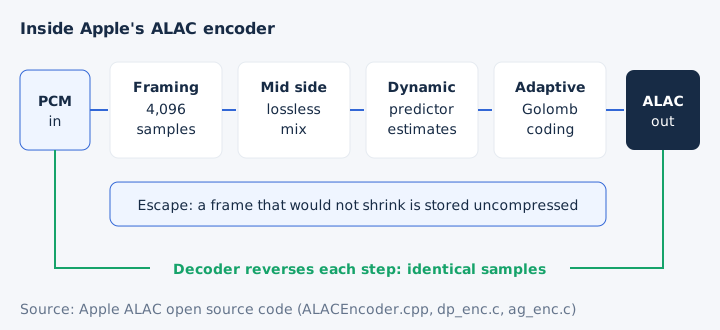
The decoder runs the same four stages backwards. Apple's source code names each one in its files (matrix, dynamic predictor and adaptive Golomb), so this process is documented, not guessed.
What Audio Resolutions Can ALAC Store?
ALAC stores 16, 20, 24 or 32-bit integer audio at any sample rate from 1 Hz to 384,000 Hz, with one to eight channels, according to Apple's ALAC documentation. The format allows far more than any Apple Music track uses.
| Property | ALAC limit | Apple Music maximum |
|---|---|---|
| Bit depth | 16, 20, 24 or 32 bits | 24 bits |
| Sample rate | 1 to 384,000 Hz | 192 kHz |
| Channels | 1 to 8 (up to 7.1 surround) | Stereo for lossless music |
| Sample type | Integer PCM | Integer PCM |
A 24-bit ALAC file at 384 kHz is legal, though no Apple Music tier goes past 24-bit at 192 kHz. Bit depth sets how finely each sample is measured, and sample rate sets how many samples arrive each second. Resolutions beyond CD quality belong to hi-res audio, which has its own guide.
Which File Extension Does ALAC Use?
ALAC audio usually sits in an MPEG-4 file with the .m4a extension, the same file extension that lossy AAC uses. Apple's Core Audio Format (.caf) is the other container, and no standard .alac file exists. Three containers can carry an ALAC stream.
| Extension | Container | Where you meet it |
|---|---|---|
| .m4a | MPEG-4 audio | Music libraries and Apple Music downloads |
| .caf | Core Audio Format | alacconvert and Apple developer tools |
| .mov | QuickTime | Listed by MDN, rare for music |
Every ALAC file carries a 24-byte "magic cookie" that tells the decoder the bit depth, channels and sample rate. Apple stores it in the MPEG-4 container's "stsd" box or in the Core Audio Format "kuki" chunk. The M4A file guide covers the container itself.
How Big Is an ALAC File?
A CD-quality ALAC file takes about 5.3 MB per minute, about half of a 10.6 MB WAV and about 2.8 times a 256 kbps AAC. That roughly 2:1 compression ratio matches FLAC, the other common lossless format. One four-minute song shows the spread.
| Format | MB per minute | 4-minute song |
|---|---|---|
| WAV or AIFF (16-bit, 44.1 kHz) | 10.6 MB | 42.3 MB |
| ALAC (about 2:1) | About 5.3 MB | About 21 MB |
| MP3 320 kbps | 2.4 MB | 9.6 MB |
| AAC 256 kbps | 1.92 MB | 7.7 MB |
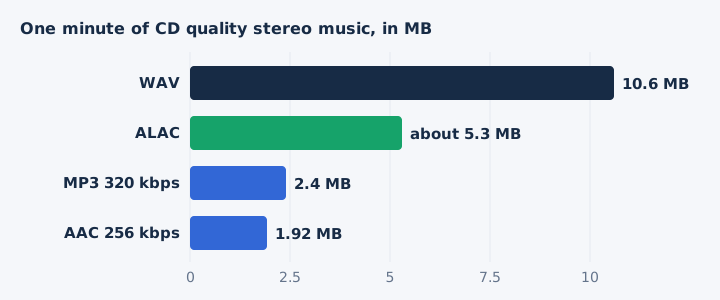
The Apple Lossless Encoder offers no bitrate menu, so the file size follows the music rather than a setting. Hi-res sources start larger: 24-bit audio at 48 kHz takes 17.3 MB per minute as uncompressed PCM before ALAC shrinks it. The bitrate guide explains how kbps turns into megabytes.
Is ALAC Better Than AAC?
ALAC keeps every bit of the recording, while AAC drops data to make files about a third the size. ALAC suits wired listening and archives; AAC suits phones, Bluetooth and small storage. The two Apple codecs split along four lines.
| Point | ALAC | AAC |
|---|---|---|
| Compression | Lossless | Lossy |
| Size per minute | About 5.3 MB | 1.92 MB at 256 kbps |
| Over Bluetooth AirPods | Sent as AAC | AAC |
| Best for | Archives and wired systems | Phones and streaming |
AAC uses lossy compression, so it has no lossless mode at any bitrate. The Bluetooth row decides it for many listeners: AirPods and most Beats use the Apple AAC Bluetooth Codec, so an ALAC file reaches those earbuds as AAC anyway. With wired headphones ALAC keeps its full detail, and storage is the price you pay.
ALAC is not a variant of AAC. The two codecs share only the .m4a container, and the AAC guide covers the lossy side.
Which Devices and Apps Play ALAC?
Every current Apple device plays ALAC natively. On Windows and Android you need an app such as Windows Media Player, VLC or Apple Music, and among web browsers only Safari decodes ALAC. Support is complete inside Apple's world and patchy outside it.
| Platform | Plays ALAC | How |
|---|---|---|
| iPhone and iPad | Yes | Built in |
| Mac | Yes | Built in |
| iPod | Most models | Built in |
| Windows | Yes | .m4a in Windows Media Player |
| Android | Through an app | Apple Music app |
| Any system | Yes | VLC media player |
| Web browsers | Safari only | Chrome, Edge, Firefox and Opera cannot |
| DJ players | Varies by model | Check the maker's list |
Apple lists Apple Lossless beside FLAC in the iPhone 16 and MacBook Air audio specs, and Apple's ALAC project names most iPod models too. Microsoft notes that an .m4a can hold Apple Lossless, and VideoLAN lists ALAC among VLC's audio codecs. Android's own media format list names FLAC but not ALAC, so Android relies on apps.
The browser gap matters for web tools. A converter page that decodes audio inside Chrome, Edge or Firefox cannot read ALAC, while the same page in Safari can.
How Does Apple Music Use ALAC?
Apple Music streams its lossless catalog as ALAC at no extra cost: Lossless runs from 16-bit/44.1 kHz to 24-bit/48 kHz, and Hi-Res Lossless goes up to 24-bit/192 kHz. Each tier asks for different hardware.
| Tier | Resolution | What you need |
|---|---|---|
| Lossless | 16-bit/44.1 kHz to 24-bit/48 kHz | Wired headphones or built-in speakers |
| Hi-Res Lossless | Above 48 kHz, up to 24-bit/192 kHz | External DAC on iPhone and most Macs |
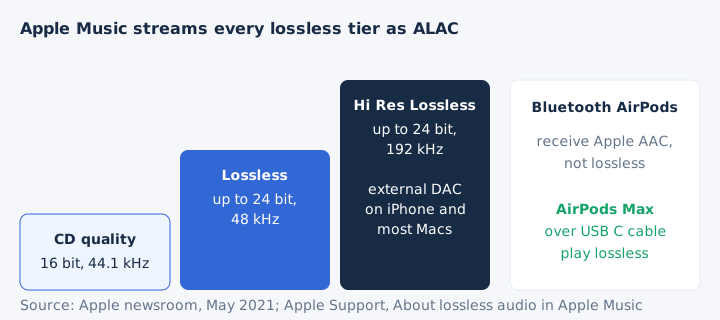
You turn lossless on under Settings > Apps > Music > Audio Quality. Above 48 kHz an iPhone, iPad or most Macs need an external digital-to-analog converter, while the 14-inch and 16-inch MacBook Pro play up to 96 kHz natively. Lossless streams use far more data, and downloads take far more space.
How Do You Make an ALAC File?
You make an ALAC file by importing a CD or converting a song with the Apple Lossless Encoder, or by encoding a WAV with Apple's free alacconvert tool. Three routes lead to an Apple Lossless file, and the Mac route has two steps.
- Music app on Mac: set Import Settings to the Apple Lossless Encoder under Music > Settings > Files.
- Convert a song: choose File > Convert > Create Apple Lossless Version for a track in your library.
- iTunes for Windows: open Edit > Preferences > General > Import Settings and pick Apple Lossless Encoder.
- alacconvert: run "alacconvert song.wav song.caf" after building Apple's open-source code to encode a WAV.
CD import with the Apple Lossless Encoder gives you a lossless library from your discs, and the encoder offers no bitrate setting because none applies. Bandcamp also sells albums as ALAC downloads. mp4tomp3.io reads ALAC but does not write it, and a FLAC to ALAC converter is not part of this site yet.
How Do You Convert an ALAC File?
You convert an ALAC file by decoding it and writing the samples in a new format: ALAC to WAV or FLAC keeps every bit, while ALAC to MP3 drops data for good. Decoding returns the original PCM, and re-encoding to MP3 applies lossy compression on top.
mp4tomp3.io converts an Apple Lossless .m4a to MP3 at 128 to 320 kbps or to WAV, inside Safari, without uploading the file. Keep the ALAC as your master copy and make lossy copies from it. ALAC to FLAC is lossless too, since both codecs rebuild the same samples.
Can You Convert ALAC to MP3 in a Browser?
Yes, mp4tomp3.io converts an Apple Lossless .m4a to MP3 at 128, 192, 256 or 320 kbps, but only in Safari, because Chrome, Edge and Firefox cannot decode ALAC. Open the M4A to MP3 converter in Safari on a Mac or iPhone, and the file never leaves your device. An MP3 bitrate of 320 kbps keeps the most detail at 2.4 MB per minute.
Does ALAC to WAV Keep Full Quality?
Yes, decoding ALAC to WAV gives back the exact samples, although mp4tomp3.io writes 16-bit WAV, so a 24-bit ALAC loses its extra bits there. The M4A to WAV converter writes 16-bit PCM, which matches CD-quality ALAC exactly. The WAV requires about twice the space of the ALAC, since it stores the samples uncompressed.
Can You Convert ALAC to FLAC Without Losing Quality?
Yes, ALAC and FLAC both rebuild the original samples bit for bit, so moving between them loses nothing. Each lossless decoder provides a bit-for-bit copy of the source. FLAC keeps wider support outside Apple, and the ALAC vs FLAC guide compares the two side by side.
Does Converting MP3 to ALAC Make It Lossless?
No, an ALAC made from an MP3 keeps the MP3's sound without further loss, but the data the MP3 encoder removed never comes back. Apple confirms that converting a compressed song to a bigger format does not improve its quality. The lossless copy grows to about twice a 320 kbps MP3 with no gain, because a lossy source stays lossy; lossless audio needs a lossless origin.