The Apple Lossless Audio Codec packs CD and hi-res audio into about half the space for Apple's apps and devices. The Free Lossless Audio Codec does the same job as an open format that almost every other player reads. Both use lossless compression, so they sound identical; we encoded one test signal both ways on a Mac, and both decoded back with the source's exact MD5 checksum.
The real split is device support. Current iPhones and Macs play both, Apple Music streams ALAC, and Android, browsers and archives favor FLAC. File sizes match within a percent or two, and WAV and AIFF take twice the room. A lossless conversion between the two keeps every sample, so the right choice follows your Apple ecosystem, or the lack of one.
Is ALAC the Same as FLAC?
No, ALAC and FLAC are two separate lossless codecs that do the same job. Each one shrinks PCM audio to about half its size and rebuilds every sample exactly on playback, so the result is the same even though the encoders differ.
ALAC is the Apple Lossless Audio Codec, which Apple released in 2004 and published as open source in 2011. Apple also calls it Apple Lossless. FLAC is the Free Lossless Audio Codec, which Josh Coalson created in 2000 and which Xiph.Org has maintained since 2003.
The two codecs also live in different files. ALAC sits inside an .m4a or .caf container, while FLAC uses its own .flac file. Each lossless codec has its own guide: the ALAC guide and the FLAC file guide.
What Is the Difference Between ALAC and FLAC?
ALAC and FLAC sound identical; they differ in where they play, which container holds them, how far their specifications reach, and how they store tags and checks. Nine attributes separate the two codecs in this comparison table, and sound is the one row where they match.
| Attribute | ALAC | FLAC |
|---|---|---|
| Maker | Apple, 2004 | Josh Coalson, then Xiph.Org, 2000 |
| License | Apache 2.0 since 2011 | Open, patent-free, BSD-style tools |
| Sound | Lossless, bit-for-bit | Lossless, bit-for-bit |
| Size per CD minute | About 5.3 MB | About 5.3 MB |
| Bit depth | 16, 20, 24 or 32 bit | 4 to 32 bit |
| Top sample rate | 384,000 Hz | 1,048,575 Hz |
| Container | .m4a or .caf | .flac, also Ogg |
| Integrity check | None in the codec | MD5 plus CRC per frame |
| Web browsers | Safari only | Chrome, Edge, Firefox, Opera, Safari |
Apple's ALAC README sets the ALAC column's sample rate and bit depth, and RFC 9639 sets FLAC's. ALAC stores its setup in a 24-byte magic cookie inside the container, while FLAC writes an MD5 signature of the audio into its own header. MDN supplies the browser row. Five rows need more than one cell, so each gets its own answer below.
How Big Are ALAC Files Compared With FLAC Files?
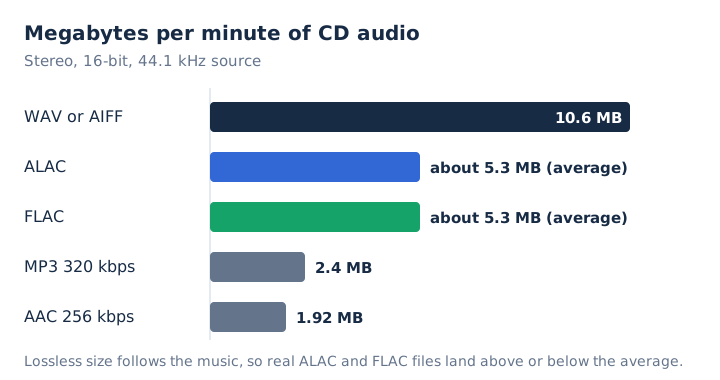
ALAC and FLAC files come out about the same size, about half of the uncompressed original, close to 5.3 MB per minute of CD audio. A full album shows the same pattern.
| Format | Per minute | 45-minute album |
|---|---|---|
| WAV or AIFF | 10.6 MB | 477 MB |
| ALAC | About 5.3 MB | About 239 MB |
| FLAC | About 5.3 MB | About 239 MB |
| MP3 320 kbps | 2.4 MB | 108 MB |
Our own test put a number on the gap. The same 20-second test signal came out at 2,703,866 bytes as FLAC and 2,723,607 bytes as ALAC, a file size difference of 0.7%. That test signal is tones plus noise, not music, so the gap proves no general rule.
FLAC offers compression levels 0 to 8, and decoding speed stays about the same at every level. Apple's iTunes encoder offers no size setting at all. For storage space, the codecs tie: a 1 TB drive holds about 4,200 CD albums either way, which puts both near 5.3 megabytes per minute. The audio compression guide explains how lossless and lossy compression differ.
Which Devices and Apps Play ALAC and Which Play FLAC?
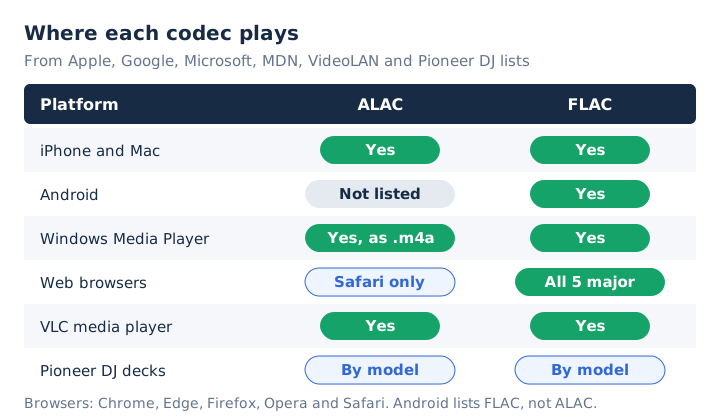
Apple hardware plays both, while ALAC support thins out quickly outside Apple: Android's format list and Chrome, Edge and Firefox leave it out, and all of them play FLAC. Support splits by platform, not by sound.
- iPhone and Mac: Apple's spec lists for iPhone 16 and MacBook Air name Apple Lossless and FLAC.
- Android: Google lists FLAC decoding since Android 3.1 and does not list ALAC.
- Windows: Windows Media Player lists .flac files and Apple Lossless audio inside M4A files.
- Web browsers: FLAC plays in all five major browsers, and ALAC plays in Safari only.
- VLC: VLC media player lists both ALAC and FLAC among its codecs.
- DJ decks: Pioneer's rekordbox list shows support for both varying by deck model.
ALAC files carry one trap: they use the same .m4a extension as lossy AAC, so the name alone tells you nothing. A stereo .m4a above 512 kbps holds ALAC, because 512 kbps is the AAC stereo ceiling. The M4A file guide shows how to check the codec inside.
Can ALAC Store the Same Hi-Res Audio as FLAC?
Yes, ALAC stores 16, 20, 24 or 32-bit audio at up to 384,000 Hz, which covers the 24-bit/192 kHz files Apple Music streams. FLAC reaches further on paper, 4 to 32 bits and a sample rate up to 1,048,575 Hz.
Some pages claim ALAC stops at 16 bits while FLAC goes to 24. Apple's own README contradicts that: ALAC handles 24-bit and 32-bit sources.
Real limits come from players, not the codecs. Android's list names FLAC up to 48 kHz, with 16-bit recommended, and some FLAC decoders stop at 16 or 24 bits. An iPhone needs an external DAC above 48 kHz. Neither codec stores floating-point samples. The bit depth guide explains what each bit depth buys you in hi-res audio.
How Do ALAC and FLAC Store Tags, Cover Art and Error Checks?
The two codecs use different designs: FLAC carries its own tag, cover art and checksum blocks inside the format. ALAC leaves tags and artwork to its M4A or CAF container and defines no checksum. Each name in this list is a slot where a file keeps its labels or its proof of integrity.
- Vorbis comments
- FLAC's own block for title, artist, album and track number, stored as text.
- Picture block
- FLAC's built-in slot for cover art, embedded inside the audio file.
- MD5 signature
- FLAC's fingerprint of the original audio, which a decoder checks against the result.
- Magic cookie
- ALAC's 24-byte setup block for the decoder, with no checksum field.
- M4A container
- The MP4 wrapper around ALAC that holds its tags and cover art.
FLAC adds a CRC to every frame as well, so damage stays local and shows up on a check. Running flac -t tests a FLAC file against its MD5 signature, which lets you prove a copy is still exact; ALAC has no equivalent built into the codec. The FLAC file guide covers the metadata blocks in detail.
Is ALAC as Open as FLAC?
Yes, in license terms: Apple published ALAC's encoder and decoder under the Apache License 2.0 in 2011, and FLAC has been open and patent-free since 2000. The difference is history and adoption, not the license.
The Apache License 2.0 makes Apple's open-source code free to use and royalty-free. FLAC has a formal IETF specification, RFC 9639, published in December 2024, while ALAC's reference remains Apple's code and README.
Openness shows up in support lists. Android, all five major browsers and the US National Archives support or list FLAC. ALAC plays in Safari only, and Android and the National Archives leave it out. The audio codec guide explains how codecs and containers fit together.
Does ALAC Sound Better Than FLAC?
No, ALAC and FLAC both decode to exactly the samples that went in, so the same source played through the same equipment sounds identical. Each codec restores the original bit-for-bit.
We checked that on a Mac. A 16-bit test signal went through afconvert, the converter built into macOS, once to ALAC and once to FLAC. Both decoded audio files carried the same MD5 checksum as the source, and a FLAC to ALAC chain matched too.
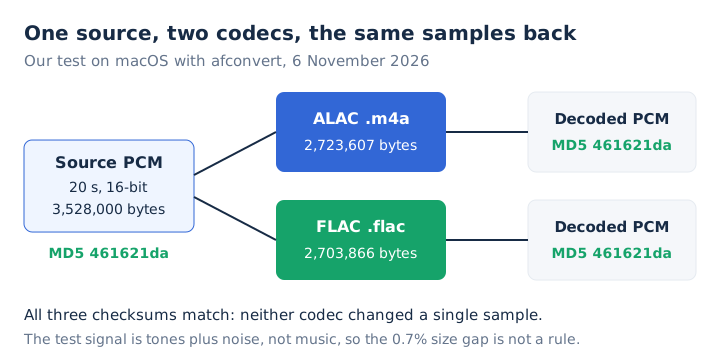
You can run the same check: decode both files to WAV and compare them, or run flac -t on the FLAC. A difference you hear points elsewhere, such as a different mastering, sample rate or playback volume, or a Bluetooth link, which is never lossless.
Can an iPhone Play FLAC Files?
Yes, Apple lists FLAC next to Apple Lossless in the iPhone 16 audio playback specs, and the MacBook Air spec lists both as well. Pages that say an iPhone or Mac can't play FLAC are out of date against Apple's current lists.
ALAC still wins inside Apple's own services. Apple Music streams in ALAC, and the CD import encoders in iTunes and the Music app offer Apple Lossless but not FLAC.
Lossless playback on an iPhone needs wired headphones or the built-in speakers, plus an external DAC above 48 kHz. AirPods use Apple's AAC Bluetooth codec over Bluetooth, and Apple states that Bluetooth connections are not lossless.
Which Streaming Services Use ALAC and Which Use FLAC?
Apple Music is the one major service built on ALAC; Spotify, Deezer, Qobuz and Amazon Music deliver lossless audio as FLAC. Apple Music uses ALAC, and every other service on this list uses FLAC for its lossless tier.
- Apple Music: ALAC from 16-bit/44.1 kHz up to 24-bit/192 kHz.
- Spotify Premium Lossless: FLAC streams reaching up to 24-bit/44.1 kHz.
- Deezer: FLAC streams on paid plans, up to 24-bit/192 kHz.
- Qobuz: 24-bit FLAC streams reaching up to 192 kHz.
- Amazon Music: FLAC delivery for its HD and Ultra HD tiers.
Download stores such as Bandcamp sell both ALAC and FLAC, so a buyer picks the one their player reads. The codec doesn't change what you hear on any of these services; the plan and the playback chain do.
Should You Keep Your Music Library in ALAC or FLAC?
Keep the master library in FLAC unless every device you own is Apple. FLAC plays on more platforms, carries its own MD5 check, and sits on the US National Archives' preferred list, while ALAC fits an Apple-only setup built on Apple Music and iTunes.
FLAC provides an MD5 proof that a backup still matches, which ALAC lacks. A two-copy approach also works: a FLAC master copy plus ALAC copies for Apple devices. That costs about twice the storage, about 478 MB per CD album instead of 239 MB, but loses nothing, since both are lossless.
A mixed music library plays fine in software that reads both, such as VLC. Syncing and tagging stay simpler with one format, though.
Where Do WAV and AIFF Fit Next to ALAC and FLAC?
WAV and AIFF hold the same audio as uncompressed PCM, at 1,411.2 kbps for CD sound. They take about twice the storage space of ALAC or FLAC, 10.6 MB per minute instead of about 5.3 MB, with no gain in quality.
Apple's import encoders list AIFF and WAV next to Apple Lossless, which makes ALAC the space-saving choice inside Apple's apps. Converting ALAC or FLAC to WAV adds no quality; the file only gets bigger. The FLAC vs WAV comparison covers that pairing in depth, and the AIFF file guide covers Apple's uncompressed format.
How Do ALAC and FLAC Compare With AAC and MP3?
AAC and MP3 use lossy compression and permanently remove audio data to cut size, while ALAC and FLAC keep every sample. A lossless file runs about 2.2 times the size of a 320 kbps MP3 and about 2.8 times a 256 kbps AAC per minute.
Converting an MP3 or AAC file into ALAC or FLAC restores nothing the lossy encoder removed. Apple's iTunes imports CDs as AAC by default, so an iTunes library is often lossy unless someone picked Apple Lossless. The FLAC vs MP3 comparison and the AAC vs MP3 comparison cover the lossy side.
How Do You Convert FLAC to ALAC or ALAC to FLAC?
Use a lossless converter in either direction. On a Mac, the built-in afconvert tool does it in one Terminal command, and the audio comes out identical. Three commands cover both directions and a final check.
- FLAC to ALAC: run
afconvert -f m4af -d alac/1 song.flac song.m4afor a 16-bit source. - ALAC to FLAC: run
afconvert -f flac -d flac song.m4a song.flacin Terminal. - Check the result: run
afinfo song.m4aand read the source bit depth line.
The /1 is a bit depth flag, and our test shows why it matters. Without it, afconvert wrote a 32-bit ALAC 2.3 times larger than needed, with the same audio inside. Use /3 for a 24-bit source.
Two other routes exist. The Music app's File > Convert command creates an Apple Lossless version of songs already in its library. The official flac tool can't read ALAC, so decode ALAC to WAV first on that route. Every one of these is a lossless conversion. mp4tomp3.io doesn't write ALAC or FLAC; it turns either into MP3 or WAV.
Is ALAC Better Than FLAC?
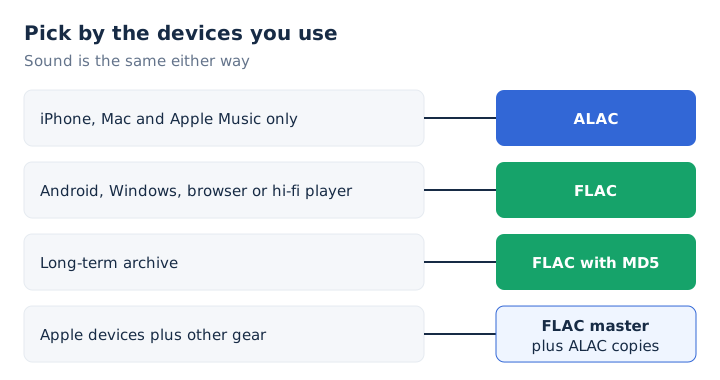
Neither sounds better; ALAC fits an all-Apple setup with Apple Music, and FLAC wins everywhere else. That includes Android and Windows, browsers, hi-fi players and archives. Pick by the devices you own, not by the sound.
- Choose ALAC: iPhone, Mac, Apple Music and iTunes, with no other platforms in your home.
- Choose FLAC: Android, Windows, web browsers, hi-fi players and any long-term archive you keep.
- Keep both: a FLAC master for cross-platform support, plus ALAC copies for Apple devices.
That verdict stays reversible. Both codecs are lossless, so a conversion between them keeps every sample, as our test showed. Switching later costs time, never quality. Your Apple ecosystem today decides the starting point, and the archive copy decides what survives a change of phone.
Is FLAC Better Than ALAC for Long-Term Archiving?
Yes, FLAC is the safer archive format: the US National Archives lists FLAC as a preferred format for digital audio and does not list ALAC. Every FLAC file also carries an MD5 signature that proves the audio is unchanged. ALAC files can still be archived, since they are lossless, but the codec has no built-in check. The lossless audio guide explains what that guarantee covers.
Should Apple Users Convert Their FLAC Files to ALAC?
No, not if the FLAC files already play: current iPhones and Macs list FLAC playback, so conversion only makes sense when one of the Apple apps you use needs ALAC. If you do convert, keep the FLAC originals and set the bit depth flag so the ALAC copies stay the right size. The ALAC guide covers Apple's codec on its own.
Do Audiophiles Prefer FLAC Over ALAC?
Yes, many do, for support and openness rather than sound: FLAC plays on most hi-fi players and Android devices, while both codecs reach hi-res levels of 24-bit/192 kHz. Hi-res audio still needs a hi-res source and a capable DAC, whichever codec holds it. The hi-res audio guide explains what counts as hi-res.
Can You Turn an ALAC or FLAC File Into a Smaller MP3?
Yes, mp4tomp3.io converts FLAC and ALAC files to MP3 at 128 to 320 kbps inside the browser, without uploading them. Apple Lossless .m4a files convert in Safari, since Chrome, Edge and Firefox can't decode ALAC. A 320 kbps MP3 takes about 2.4 MB per minute against about 5.3 MB for the lossless file. The MP3 step is lossy, so keep the original. Use the FLAC to MP3 converter for FLAC and the M4A to MP3 converter for ALAC.