WAV keeps every sample of a recording as uncompressed audio, while MP3 uses lossy compression to drop the sounds you hear least. That choice sets the file size: a CD-quality WAV takes 10.6 MB per minute, and a 320 kbps MP3 takes 2.4 MB. The sound quality gap shrinks as the MP3 bitrate rises, but audio editing still favors WAV, because every new MP3 encode adds loss.
Below, each format is defined, compared attribute by attribute and measured in megabytes at every bitrate from 64 to 320 kbps. Then come the listening question, the jobs that suit each format, how DJ players, Spotify and FLAC fit in, and a chart for picking one.
What Are WAV and MP3 Files?
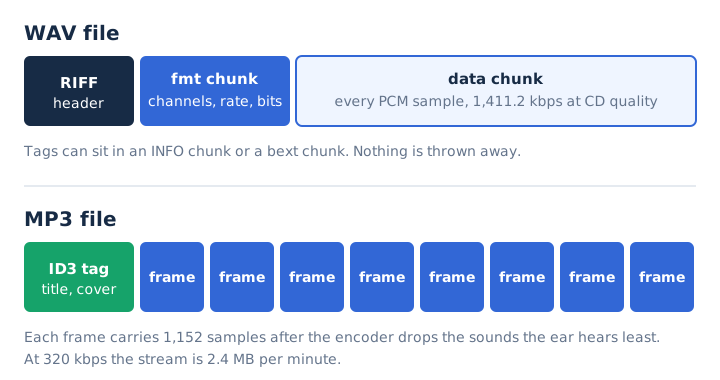
A WAV file stores sound as uncompressed PCM samples inside a RIFF container, and an MP3 file stores sound compressed by the MPEG Audio Layer III codec. The two definitions set the pattern for every difference that follows.
- WAV
- The Waveform Audio File Format, built by Microsoft and IBM on RIFF, usually holding linear PCM in a .wav file since 1991.
- MP3
- MPEG-1 Audio Layer III (or its MPEG-2 form), a lossy audio coding format developed largely by Fraunhofer, first released in 1991; its files end in .mp3.
Both formats date from 1991, and both are free to use today: WAV needs no license, and MP3 became substantially patent-free in the US in April 2017. The full story of the uncompressed format sits in the guide to what a WAV file is, and the compressed one has its own page on what MP3 is.
What Is the Difference Between MP3 and WAV?
WAV keeps the full PCM recording at about 10.6 MB per minute at CD quality, while MP3 removes the least audible parts and needs 2.4 MB per minute at its top setting of 320 kbps. A PCM WAV applies no compression at all, so calling it "low compression" misses the point. This comparison table lines up the eight attributes that separate the formats.
| Attribute | WAV | MP3 |
|---|---|---|
| Compression | None (PCM) | Lossy |
| Size per minute | 10.6 MB at CD quality | 0.96 to 2.4 MB |
| Bitrate | 1,411.2 kbps at CD quality | 32 to 320 kbps |
| Editing | No loss on re-save | Loss on every re-encode |
| Tags | INFO and bext chunks | ID3 tag with cover art |
| Longest file | About 6 h 46 min under the 4 GB limit | No practical limit |
| MIME type | audio/wave | audio/mpeg |
| Best for | Recording, editing, archiving | Listening, sharing, podcasts |
The 4 GB limit comes from the 32-bit size field in a WAV header, and the RF64 variant lifts it. The five questions below explain the attributes that matter most in daily use.
Do WAV Files Lose Quality the Way MP3 Files Do?
No, a PCM WAV file loses no quality: it stores every sample the recorder captured, while an MP3 encoder discards sound the ear is least likely to notice. That makes WAV lossless at the file level, while the MP3 encoder uses four steps to shrink the data.
- Framing: the encoder splits the audio into frames of 1,152 PCM samples each.
- Auditory masking: the encoder finds quiet sounds hidden behind louder sounds nearby.
- Perceptual coding: the encoder spends fewer bits on the masked sounds than on audible ones.
- Rate setting: the encoder writes the result at a fixed or variable bitrate.
The data reduction is large, but it isn't the same as losing the sound. A 128 kbps MP3 keeps about 9% of the WAV's data, so it drops about 91% of the bits, not 91% of what you hear. The lossless audio guide explains what keeping every bit means.
How Many Megabytes per Minute Do MP3 and WAV Use?
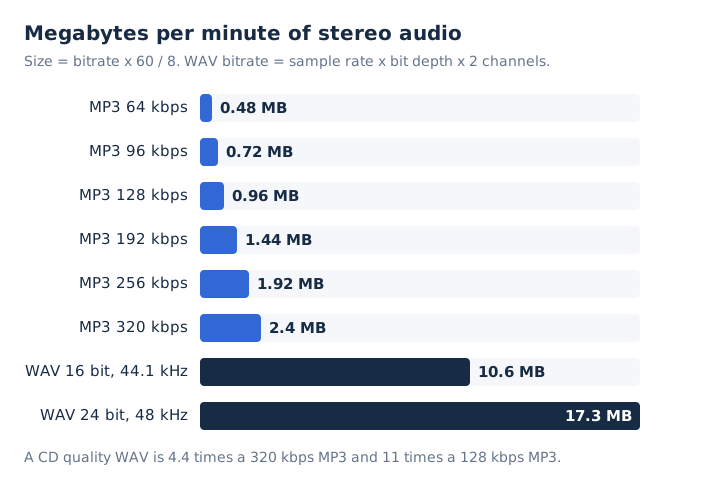
A CD-quality WAV uses 10.6 MB per minute, while an MP3 uses 0.48 MB at 64 kbps and climbs to 2.4 MB at 320 kbps. Each row in this table comes from the same arithmetic, with a 3-minute song added for scale.
| Format | Bitrate | Per minute | 3-minute song |
|---|---|---|---|
| MP3 64 kbps | 64 kbps | 0.48 MB | 1.4 MB |
| MP3 128 kbps | 128 kbps | 0.96 MB | 2.9 MB |
| MP3 192 kbps | 192 kbps | 1.44 MB | 4.3 MB |
| MP3 320 kbps | 320 kbps | 2.4 MB | 7.2 MB |
| WAV 16-bit/44.1 kHz | 1,411.2 kbps | 10.6 MB | 31.8 MB |
| WAV 24-bit/48 kHz | 2,304 kbps | 17.3 MB | 51.8 MB |
The arithmetic is short. A WAV's bitrate equals sample rate times bit depth times channels, so 44,100 x 16 x 2 gives 1,411.2 kbps. Megabytes per minute then equal kbps x 60 / 8 / 1,000. A 3-minute MP3 at a constant bitrate of 320 kbps is exactly 7.2 MB, not a loose "6 to 10 MB".
For storage, 1 GB holds about 94 minutes of WAV at CD quality, about 416 minutes of 320 kbps MP3 and about 1,041 minutes at 128 kbps. The bitrate guide covers the formula for every format.
Is WAV or MP3 Better for Editing and Mixing?
WAV is better for editing and mixing, because saving a PCM WAV again adds no loss, while each new MP3 encode adds artifacts. This stacking is called generation loss.
Decode an MP3, cut it, add effects and export it as MP3 again, and the re-encoding throws away a second layer of detail on top of the first. Keep the project in WAV until the final export, then make the MP3 once. Audacity uses 16-bit PCM at 44,100 Hz as its default WAV export, and it exports the finished MP3 at a constant, average or variable bitrate.
WAV also stores 24-bit and 32-bit float samples, which give a studio more headroom while it mixes. The bit depth guide explains what those extra bits buy.
How Do MP3 and WAV Store Tags and Cover Art?
An MP3 stores title, artist and cover art in ID3 tags, while a WAV stores text tags in an INFO chunk and broadcast details in a bext chunk. ID3v2 can embed an album cover through its picture frame, which is why music apps show artwork beside an MP3.
WAV metadata exists too. The Broadcast WAVE format adds the bext chunk for radio and TV, and iXML and CART chunks are defined as well. Media players read WAV tags less widely than ID3, so a WAV can show up in a library with a bare file name. The parent guide to the MP3 format covers ID3 in more depth.
Which Devices and Apps Play MP3 and WAV Files?
The common players open both formats: Windows Media Player, VLC, Android and every major web browser play MP3 and PCM WAV. Android accepts MP3 from 8 to 320 kbps and WAV as 8-bit or 16-bit PCM, and this table covers the rest.
| Player | MP3 | WAV |
|---|---|---|
| Windows Media Player | Yes | Yes |
| VLC | Yes | Yes |
| Android | 8 to 320 kbps | 8-bit and 16-bit PCM |
| Chrome, Edge, Firefox, Safari | Yes | PCM yes, other codecs sparse |
| Pioneer DJ CDJ players | Yes | Yes at 44.1/48 kHz |
Codec support is the catch on the WAV side. A .wav that carries ADPCM or MP3 data instead of PCM can fail in a browser that plays an ordinary PCM WAV without trouble.
How Do Sample Rate, Bit Depth and Bitrate Work in MP3 and WAV?
A WAV's bitrate follows from its sample rate, bit depth and channel count, so a CD-quality WAV always runs at 1,411.2 kbps. An MP3's bitrate is a setting from 32 to 320 kbps that doesn't depend on bit depth. Three numbers decide how much each format stores, and they behave differently in each one.
| Property | WAV | MP3 |
|---|---|---|
| Sample rate | Whatever the fmt chunk declares, 44.1 kHz on CD | 32, 44.1 or 48 kHz in MPEG-1 |
| Bit depth | 8, 16, 24 bit or 32-bit float | Not stored; the decoder outputs PCM |
| Bitrate | Sample rate x bit depth x channels | Chosen by the encoder, 32 to 320 kbps |
That difference gives you a quick codec check. Open a WAV's properties and read the bitrate: a CD-quality PCM file shows about 1,411 kbps. A .wav that reads far lower, such as 128 kbps, holds compressed data like MP3 or ADPCM inside the WAV wrapper.
Can You Hear the Difference Between MP3 and WAV?
You can sometimes hear it: the gap grows as the MP3 bitrate falls, and whether you notice it depends on the encoder, your equipment, the room and your training as a listener. Four conditions make the difference easier to hear.
- Low bitrate: an MP3 at 128 kbps or less keeps the least detail.
- Revealing gear: studio monitors or good headphones expose artifacts that phone speakers hide.
- Quiet room: a silent space and focused listening reveal small changes in sound.
- Repeated encodes: an MP3 encoded twice or more stacks one layer of loss onto another.
Transparency, the point where an MP3 sounds the same as its source, therefore has no single bitrate that fits every listener. Two MP3 encoders at the same bitrate can also sound different. Run a fair listening test at home: convert one WAV to MP3 at 128 and 320 kbps, have someone hide the file names, and compare each against the original.
When Should You Use WAV Over MP3?
Use WAV whenever the audio will be processed again or kept as a master, because PCM keeps every sample. These five jobs pay back WAV's extra megabytes.
- Recording: capture voice, instruments or field audio as a full-resolution master recording.
- Editing: cut, mix and complete mastering on WAV, so each save adds no loss.
- Collaboration: send stems to a mixer or producer as WAV for full flexibility.
- Delivery: hand a distributor or Spotify a WAV master, a format Spotify accepts.
- Archive: keep masters as WAV, a format the Library of Congress lists as preferred.
When Should You Use MP3 Over WAV?
Use MP3 when the file is for listening or sharing, because a 320 kbps MP3 is less than a quarter of a CD-quality WAV and plays on almost any device. MP3 wins every job where size and reach matter more than editing headroom.
- Phone music library: fit about 416 minutes of 320 kbps music into 1 GB.
- Podcasts and audiobooks: publish episodes as MP3, which Apple Podcasts accepts alongside AAC.
- Demos and previews: send a demo as a small email attachment or chat file.
- Voice notes and lectures: keep spoken recordings small, since speech needs fewer kbps than music.
- Website background music: load short loops fast on slow mobile connections.
Do DJs Use MP3 or WAV?
DJs use both, and club gear plays both: Pioneer DJ lists WAV and MP3 at 44.1 and 48 kHz as supported on every DJ unit in its rekordbox table, from the CDJ-3000 to older players. FLAC and Apple Lossless support varies by model, while WAV and MP3 both work on every unit in the table.
The trade-off is plain. WAV keeps full quality for a loud club system. MP3 at 320 kbps fits about 4.4 times as many tracks on the same USB stick.
Does Spotify Use WAV or MP3?
Spotify takes WAV or FLAC from artists, and its help pages name AAC and FLAC, not MP3, as listening formats. Spotify for Artists strongly prefers FLAC for audio delivery and accepts WAV that uses PCM format code 0x0001, 44.1 kHz or higher, and 24-bit when that is the native master. Spotify then converts each WAV losslessly to FLAC.
Listeners get AAC at 128 or 256 kbps in the web player, lossy streams of about 24 to 320 kbps in the apps, and FLAC up to 24-bit/44.1 kHz on Premium lossless. So the line that Spotify "uses MP3" doesn't match Spotify's own help pages.
Where Does FLAC Fit Between MP3 and WAV?
FLAC sits between the two: it keeps WAV's exact audio, bit for bit, at roughly half the size, while MP3 stays smaller but lossy. Per CD-quality minute, WAV takes 10.6 MB, FLAC about 5.3 MB and a 320 kbps MP3 2.4 MB.
Xiph.Org, which maintains FLAC, describes it as lossless compression whose decoded output matches the input exactly. The FLAC file guide covers the format, and separate comparisons pit FLAC against WAV and against MP3.
Which Is Better, MP3 or WAV?
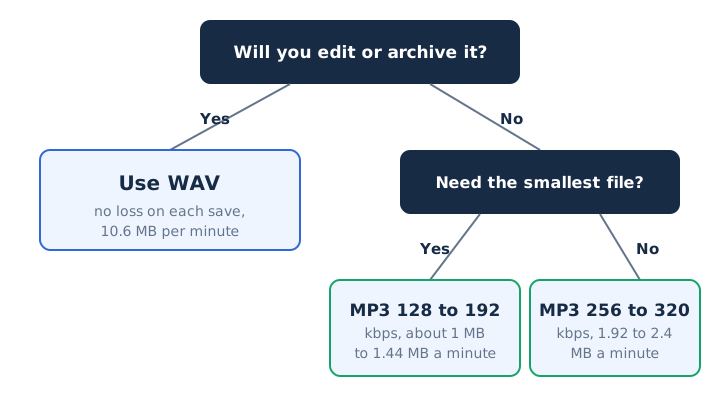
WAV is better for quality and editing, and MP3 is better for size and sharing. The better format is the one that fits the job: WAV while you record and edit, MP3 for the copy people listen to.
Three questions settle the decision. Will you edit the audio again? How much storage space or bandwidth do you have? Where will the file play?
If you answer yes to editing, WAV wins on sound quality and safety. If the file is only for listening, an MP3 at 256 or 320 kbps keeps the sharing easy at under a quarter of the size.
Does Converting MP3 to WAV Improve the Sound?
No, converting an MP3 to WAV does not improve the sound: the WAV grows to 10.6 MB per minute, 4.4 times a 320 kbps MP3, but carries only the MP3's audio. Apple says the same: a compressed song turned into an uncompressed one gains file size, not quality. Convert MP3 to WAV only when an editor or device demands WAV input. The MP3 to WAV converter writes 16-bit PCM in your browser.
Should You Keep the WAV After Making an MP3?
Yes, keep the WAV as your master file, because an MP3 can't give back the data it removed, and a fresh MP3 made from the WAV avoids a second round of loss. Export music at 256 or 320 kbps. The WAV to MP3 converter converts the file in your browser, so it never leaves your device.
Is MP3 Good Enough for Podcasts and Voice Recordings?
Yes, MP3 suits podcasts and speech: Apple Podcasts accepts MP3 and recommends 96 to 128 kbps for mono and 128 to 256 kbps for stereo. Record and edit each voice recording in WAV, then publish the MP3. A 96 kbps mono episode uses 0.72 MB per minute, and the MP3 compressor writes 64 or 96 kbps files.
Does Every WAV File Hold Uncompressed Audio?
No, not every WAV file holds uncompressed audio: nearly all use linear PCM, but a .wav can also carry ADPCM, GSM or even MP3 data. Check the bitrate in the file properties. A CD-quality PCM WAV reads about 1,411 kbps, and a much lower figure means compressed data that is no better than an MP3. The WAV file guide lists the codecs a .wav can hold.