WAV stores every sample of a recording as uncompressed PCM, while FLAC packs the same samples into about half the space through lossless compression and gives them back unchanged. Both formats keep the sound quality bit for bit, so the real gap is file size: about 5.3 MB against 10.6 MB per CD minute, with the exact saving set by the music.
FLAC adds richer metadata, cover art and an MD5 check. WAV keeps 32-bit float audio for recording and editing, but a basic WAV stops at 4 GiB, about 6 h 46 min of CD stereo. Those limits decide CD rips, DJ decks and music libraries, and a lossless converter moves files between the two at any time.
Are FLAC and WAV Both Lossless?
Yes, both FLAC and WAV keep every bit of the audio: a music WAV stores uncompressed PCM samples, and FLAC compresses those PCM samples losslessly. The decoded FLAC is bit-for-bit identical to the WAV it came from.
The Waveform Audio File Format (WAV) is a RIFF container that Microsoft and IBM published in 1991. The Free Lossless Audio Codec (FLAC) is an open codec that Josh Coalson released in 2000 and that Xiph.Org has maintained since 2003. Compression and loss are separate ideas: FLAC is compressed and lossless, and MP3 is compressed and lossy.
A .wav file can also hold compressed codecs such as ADPCM or mu-law, so a WAV is lossless only when it holds PCM. The FLAC file guide and the WAV file guide cover each format on its own.
What Is the Difference Between FLAC and WAV?
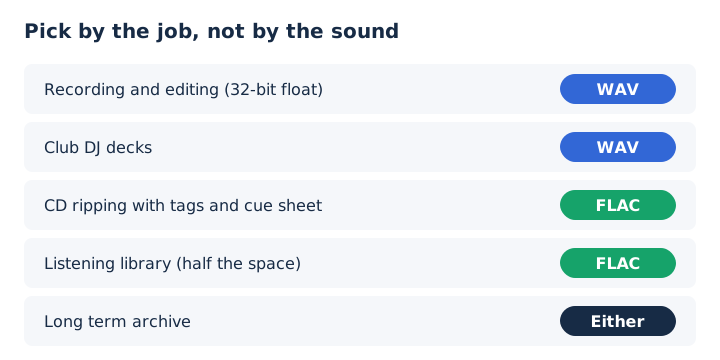
WAV keeps the samples uncompressed, while FLAC compresses the same samples into about half the space, with richer tags, a built-in MD5 signature and no 4 GiB size cap. FLAC avoids that cap because its header counts samples in a 36-bit field instead of bytes in a 32-bit one. Ten attributes separate the formats in this comparison table, and sound is the one row where they tie.
| Attribute | FLAC | WAV |
|---|---|---|
| Compression | Lossless, about 2:1 on music | None, plain PCM |
| Sound | Identical once decoded | Identical |
| Size per CD minute | About 5.3 MB | 10.6 MB |
| Sample format | 4 to 32 bit integer | Integer PCM or 32-bit float |
| Sample rate | 1 to 1,048,575 Hz | Any rate a 4-byte field holds |
| Tags | Vorbis comments and picture block | INFO chunk and bext chunk |
| Integrity check | MD5 signature plus CRC per frame | None in the format |
| Size limit | No 4 GiB cap | 4 GiB, lifted by RF64 |
| Licence | Open and patent-free | No licensing required |
| First release | 2000 | 1991 |
RFC 9639, the IETF specification for FLAC, sets the sample limits in the first column. The WAV column follows the WAVE specification and the Library of Congress format record. Four of these rows, size, tags, devices and sample formats, need more than one cell, so each gets its own answer below.
How Much Smaller Is a FLAC File Than a WAV?
A CD-quality FLAC is usually about half the size of the same WAV, about 5.3 MB per minute against 10.6 MB, but the exact saving depends on the music. Over a full album and a full drive, the gap looks like this.
| Length | WAV | FLAC |
|---|---|---|
| 1 minute | 10.6 MB | About 5.3 MB |
| 4-minute song | 42.3 MB | About 21 MB |
| 45-minute album | 477 MB | About 239 MB |
| Albums on 1 TB | About 2,100 | About 4,200 |
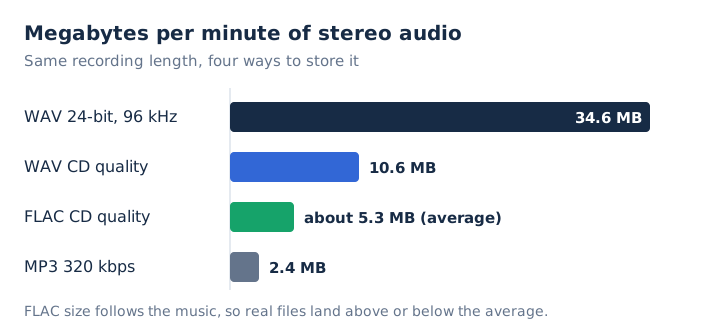
Pages that quote a fixed saving disagree, from 30% to 70%, and they disagree for a reason. Xiph explains that FLAC has no bitrate setting: its bitrate follows the information in the signal, from near 100% of the input for noise down to almost nothing for silence. So a dense, noisy master compresses less than a sparse, quiet one, and a 2:1 compression ratio is only the CD-music average.
The compression level, from 0 to 8, changes the result a little and decoding speed hardly at all. Storage space is the whole argument for FLAC here, measured in megabytes per minute at CD quality. The audio compression guide explains how lossless and lossy compression differ in general.
Which Holds Tags and Cover Art Better, FLAC or WAV?
FLAC does: its specification defines Vorbis comments for tags and a picture block for cover art, while WAV's standard text tags sit in an INFO chunk that players read less consistently. Each format files its labels in a different place.
- Vorbis comments
- FLAC's tag block, holding title, artist, album and track number as text.
- Picture block
- FLAC's built-in slot for cover art, embedded inside the audio file itself.
- Cue sheet
- FLAC's stored copy of a CD's track list and index points.
- INFO chunk
- WAV's LIST chunk of short text fields such as name and artist.
- Broadcast WAVE
- The WAV variant whose bext chunk carries broadcast and archive details.
Xiph warns that ID3 tags inside FLAC aren't reliably supported, so tag your FLAC files with Vorbis comments. The FLAC file guide lists all seven metadata block types the format defines.
Which Plays on More Devices, FLAC or WAV?
WAV plays on slightly more equipment, mainly DJ decks and older gear, while current phones, computers and browsers accept both. Support splits by device type.
- Browsers: Chrome, Edge, Firefox and Safari play FLAC files and PCM WAV files.
- Windows: Windows Media Player lists both .flac and .wav among its supported types.
- Android: Android decodes FLAC since 3.1 and 8-bit or 16-bit WAV since 4.1.
- iPhone and Mac: Apple's spec lists name FLAC playback, and VLC lists both formats as inputs.
- DJ decks: rekordbox lists WAV on every named Pioneer unit; FLAC support depends on model.
Chrome, Edge, Firefox and Safari all decode both formats, with one exception. A WAV that holds ADPCM or mu-law audio won't play in a web browser, because MDN marks those codecs inside WAV as unsupported. The WAV file guide shows how to tell which codec a .wav file holds.
What Sample Rates and Bit Depths Can FLAC and WAV Store?
The limits are as follows: FLAC stores integer samples from 4 to 32 bits at 1 to 1,048,575 Hz, while WAV stores integer PCM or 32-bit floating point samples at any sample rate its 4-byte field can name. Both cover every real format, from CD at 16-bit and 44.1 kHz to hi-res audio at 24-bit and 192 kHz.
The one real gap is floating point: FLAC has no float samples, which matters for studio work. Playback has narrower limits than the formats. Some FLAC decoders stop at 16 or 24 bits, and Android's platform list names only 8-bit and 16-bit PCM for WAV, so test 24-bit files on an Android phone before relying on them. The sample rate guide explains what those kHz figures mean for bit depth and sound.
Does WAV Sound Better Than FLAC?
No, a FLAC file decodes to exactly the samples of the WAV it was made from, and the MD5 signature in its header lets a player prove it. Identical samples sent to the same converter produce identical sound.
The usual counterclaim says the decoding work disturbs playback. Xiph answers that FLAC decoding uses only integer arithmetic and that real-time decoding is easy on modest hardware.
You can check any file yourself in two ways. Run flac -t song.flac, which decodes the file and tests the decoded audio against its stored MD5. Or decode it with flac -d and compare the new WAV with the original; the audio data will be bit-identical. When two copies of an album sound different, the cause usually lies in a different source, such as another master or sample rate, not the container.
What Are the Pros and Cons of FLAC and WAV?
The pros and cons line up as a trade, since each format wins what the other gives up: FLAC wins on storage space and tags, WAV wins on raw simplicity and float samples. Four strengths and one drawback mark each side, starting with FLAC.
- About half the space: a CD minute takes about 5.3 MB instead of 10.6 MB.
- Rich tags: Vorbis comments and embedded cover art travel inside every file.
- Built-in checks: MD5 and per-frame CRC give error resistance, so damage stays in one frame.
- Open and free: FLAC is patent-free, with an IETF specification, RFC 9639.
- Drawback: no floating point samples, and DJ deck support varies by model.
WAV's four strengths and one drawback mirror that list.
- No decoding step: samples sit in the file exactly as the recorder captured them.
- Float support: WAV stores 32-bit floating point audio for studio and mixing work.
- Widest gear support: every Pioneer DJ unit in the rekordbox list plays WAV.
- No licence needed: the RIFF-based format has been free to use since 1991.
- Drawback: double the size, weaker tags and a 4 GiB ceiling per file.
Should You Record and Edit in FLAC or WAV?
Record and edit in WAV, then save finished masters or listening copies as FLAC. Xiph designed FLAC as a consumer playback format and doesn't plan float support, while audio engineering relies on floating point, easy editing and speed. WAV stores 32-bit float audio through format code 0x0003 in its fmt chunk.
Audacity's default WAV export is 16-bit PCM at 44,100 Hz, and the Macaulay Library asks field recorders to deliver WAV. FLAC still supports fast, sample-accurate seeking, so editors can open a FLAC file for a quick trim.
Should You Rip CDs to FLAC or WAV?
Rip to FLAC when your ripper offers it: the copy is just as exact, half the size, and keeps track tags and the CD's cue sheet. FLAC's cuesheet block stores the disc's track and index points, so you can rip a whole CD to one file and burn an exact copy later. The Xiph FAQ points to a setup guide for Exact Audio Copy, which rips straight to FLAC.
Windows Media Player rips only to WMA, WAV or MP3, so in that app a WAV rip is the lossless choice. That's fine for CD ripping: the flac tool turns a WAV rip into FLAC later with no loss. A ripped FLAC can also become any other format in the future with no generation loss.
Is FLAC or WAV Better for DJs?
WAV is the safer choice for club decks: Pioneer's rekordbox FAQ lists WAV playback on every CDJ and XDJ unit it names, while FLAC support varies by model. The sound is identical, so the decision rests on the hardware at the venue.
Check the deck list before the gig, not after, if a USB stick holds FLAC files. WAV's weak tagging is the cost of that safety, and a DJ library covers it. Keep track names, keys and cue points in your rekordbox DJ library rather than in the WAV files' tags.
Is FLAC or WAV Better for a Music Library?
FLAC is better for a music library you listen to: the same sound in about half the space, with tags and cover art that players show. A 1 TB drive holds about 2,100 CD albums as WAV and about 4,200 as FLAC.
Both formats are safe for archives. The US National Archives lists FLAC and Broadcast Wave as preferred formats, and the Library of Congress lists WAVE as preferred and held over 176 TB of .wav files in April 2024.
Streaming points the same way. Spotify asks artists for FLAC and accepts WAV, and Spotify Lossless, Deezer and Qobuz stream FLAC. Apple Music uses ALAC instead, and the ALAC vs FLAC comparison weighs that codec against FLAC. AIFF, the Apple match for WAV, has its own AIFF guide.
How Do You Convert Between FLAC and WAV Without Losing Quality?
Use a lossless encoder such as the official flac command line tool: flac song.wav makes song.flac, and flac -d song.flac restores a WAV with identical audio. The round trip takes four short steps.
- Encode: run flac on the WAV file, which uses compression level 5 by default.
- Verify: add the -V option so the encoder checks every frame while it writes.
- Decode: run flac -d on the FLAC file to write a WAV back out.
- Keep extras: add --keep-foreign-metadata to carry the WAV header chunks across too.
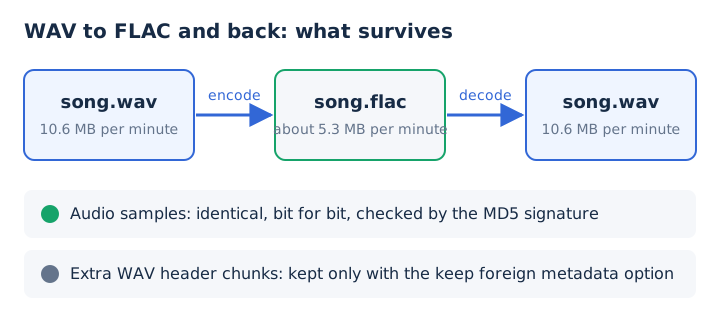
Converting FLAC to WAV adds no quality; it only doubles the size. One caution for browser tools: mp4tomp3.io writes WAV as 16-bit PCM, so a 24-bit FLAC loses its extra bits there. For a bit-exact lossless conversion, use the flac tool.
Is FLAC Better Than WAV?
For listening and storing music, yes: FLAC gives the same sound as WAV in about half the space, with proper tags and built-in error checking. For recording, editing and DJ decks, WAV stays the better tool, because float studio sessions need it and every listed club deck plays it. The job decides the format, since the sound never does.
- Choose FLAC: for a listening library, CD rips, phones and delivering tracks to streaming services.
- Choose WAV: for recording, editing, 32-bit float masters and playing from club DJ decks.
- Either works: for long-term archives, since both national archives list them as preferred formats.
FLAC halves the storage bill without touching the sound. The choice is never final. Both formats are lossless, so a WAV becomes a FLAC and a FLAC becomes a WAV again with nothing lost.
Is FLAC the Highest Audio Quality?
No, FLAC is not a quality level: a FLAC holds exactly the quality of its source recording, so a 24-bit/96 kHz master stays hi-res and a CD rip stays at CD quality. A WAV made from the same source has the same quality. The format that drops audio is MP3, a trade the FLAC vs MP3 comparison covers.
Can FLAC Hold 32-Bit Float Audio Like WAV?
No, FLAC stores only integer samples from 4 to 32 bits, while WAV can store 32-bit float audio. Xiph rules out native float support, because FLAC targets playback, so a float studio session uses WAV until the final integer export. The bit depth guide explains integer and float samples.
Does FLAC Take More Processing Power Than WAV?
Yes, slightly, because a player must decode FLAC, but the decoding uses only integer arithmetic and runs in real time on modest hardware. Xiph publishes no battery figures, but that light integer work keeps the extra load small on a battery-powered player. The compression level changes encoding time, not decoding time, so a level 8 file plays as easily as a level 0 file. The lossless audio guide covers the other lossless formats.
Can You Shrink a FLAC or WAV Into an MP3 for Your Phone?
Yes, mp4tomp3.io converts a FLAC or WAV to MP3 at 128 to 320 kbps inside the browser, without uploading the file. A 320 kbps MP3 takes about 2.4 MB per minute, while a CD-quality FLAC is about 2.2 times that size and a WAV about 4.4 times. The MP3 step is lossy, so keep the lossless original, and Bluetooth headphones re-compress the audio anyway. Use the FLAC to MP3 converter, or the WAV to MP3 converter for WAV files.