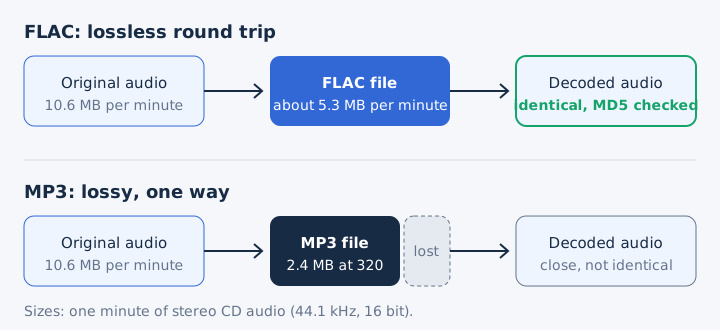
FLAC shrinks a recording and gives back every bit, while MP3 shrinks it further by throwing away sound the ear barely notices. That split between lossless compression and lossy compression shapes everything else. FLAC keeps the full sound quality of the source, and MP3 keeps a close copy at a much smaller file size.
The gap in size is smaller than many claims suggest. A CD-quality FLAC takes about 5.3 MB per minute, 2.2 times a 320 kbps MP3 and 5.5 times a 128 kbps MP3. Compatibility is close on current phones and browsers, while MP3 still wins on DJ decks and older hardware. Whether you hear a difference depends on your gear, FLAC suits archives, MP3 suits phones and podcasts, and real FLAC files come from CDs, stores or lossless streams.
Does FLAC Lose Quality Like MP3 Does?
No, FLAC loses nothing: decoded FLAC audio is bit-for-bit identical to the original, while MP3 permanently drops the sounds the ear hears least. FLAC, the Free Lossless Audio Codec, started with Josh Coalson in 2000 and now sits with the Xiph.Org Foundation. MP3, short for MPEG-1 Audio Layer III, came largely from the Fraunhofer Society and first shipped in 1991.
MP3 gets its small size from perceptual coding, a method that removes sound a louder sound nearby would hide. FLAC works more like a Zip file built for audio. Every FLAC file also stores an MD5 signature of the original audio, so a player can prove the decoded sound matches the source. The FLAC file guide and the MP3 format guide cover each format on its own.
What Is the Difference Between FLAC and MP3?
FLAC keeps all of the original audio in a file about half the size of a WAV, while MP3 discards some audio to make a file 4 to 11 times smaller than WAV. Nine attributes separate the two in the comparison table, with figures from the FLAC specification, RFC 9639, and from MDN's audio codec guide.
| Attribute | FLAC | MP3 |
|---|---|---|
| Compression | Lossless | Lossy |
| Size per minute | About 5.3 MB | 0.96 to 2.4 MB |
| Bitrate | Follows the music, about 706 kbps | You set 32 to 320 kbps |
| Bit depth | 4 to 32 bit | 16-bit samples |
| Sample rate | Up to 1,048,575 Hz | Up to 48 kHz |
| Channels | Up to 8 | 2, or 5.1 in MPEG-2 |
| Tags | Vorbis comments, picture block | ID3 tags with cover |
| Licence | Open, patent-free | Patent-free since 2017 |
| First release | 2000 | 1991 |
Both formats are free to use today. FLAC's specification is open and no known patent covers it, and MP3's patents expired in the US on 16 April 2017.
How Do FLAC and MP3 Differ in Sound Quality?
A FLAC file sounds exactly like its source, while an MP3 sounds close to its source and gets closer as its bitrate rises. MP3 removes sound that a louder sound at a nearby frequency hides, an effect called auditory masking. That removal is permanent, so a 320 kbps MP3 keeps more detail than a 128 kbps one but never all of it.
The source recording sets the ceiling for both formats. A FLAC copy of a CD equals the CD, yet a FLAC copy of an MP3 equals only that MP3. MP3 quality also depends on the encoder and its settings, not on bitrate alone. The audio compression guide shows how lossy and lossless methods shrink a file.
How Much Bigger Is a FLAC File Than an MP3?
A CD-quality FLAC is about 2.2 times the size of a 320 kbps MP3 and about 5.5 times the size of a 128 kbps MP3. One minute of the same CD track fills these amounts of space.
| Format | Bitrate | Per minute | 4-minute song |
|---|---|---|---|
| WAV | 1,411.2 kbps | 10.6 MB | 42.3 MB |
| FLAC | About 706 kbps | About 5.3 MB | About 21 MB |
| MP3 320 | 320 kbps | 2.4 MB | 9.6 MB |
| MP3 192 | 192 kbps | 1.44 MB | 5.8 MB |
| MP3 128 | 128 kbps | 0.96 MB | 3.8 MB |
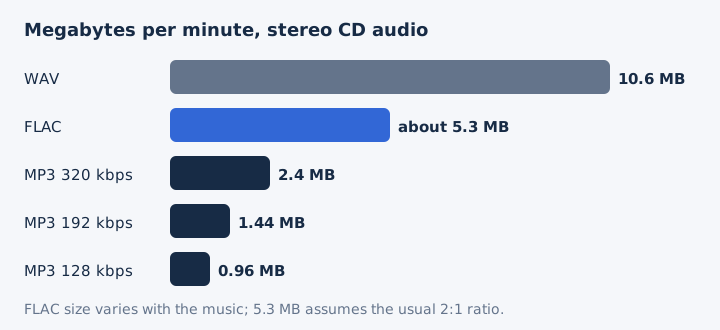
FLAC has no bitrate setting, so its size moves with the music. The 5.3 MB figure assumes FLAC's usual compression ratio of about 2:1, and dense recordings shrink less than quiet ones. The common line that a FLAC is 5 or 6 times bigger than an MP3 fits only the 128 kbps case. Megabytes per minute follow bitrate, which the MP3 bitrate guide works through. Our MP3 vs WAV and FLAC vs WAV comparisons cover the uncompressed side.
What Bitrate Do FLAC and MP3 Use?
The bitrates differ in who sets them: you choose an MP3's bitrate from 32 to 320 kbps, while a FLAC's bitrate follows the music and lands near 700 kbps for CD audio. Three numbers describe each file's resolution.
- Bitrate: An MP3 encoder writes 32 to 320 kbps, fixed at encoding, while FLAC has no setting and its compression level only trades speed for size.
- Sample rate: MP3 runs at 32, 44.1 or 48 kHz in MPEG-1 mode, while FLAC accepts up to 1,048,575 Hz and hi-res releases reach 192 kHz.
- Bit depth: MP3 decodes to 16-bit samples according to MDN, while FLAC stores 4 to 32 bits and most decoders handle up to 24-bit.
FLAC's compression level runs from 0 to 8, and the flac tool defaults to 5. Hi-res albums at 24-bit and 96 or 192 kHz stream as FLAC on Qobuz and Deezer, and no MP3 can carry them at full resolution. The bit depth guide explains what those extra bits record.
Can You Play FLAC Files Everywhere You Play MP3?
Almost: current phones, computers and browsers play both, but MP3 remains the de facto standard that every listed DJ deck accepts. Support splits by device type.
- Browsers: Chrome, Edge, Firefox, Opera and Safari 11 or later play both formats.
- Windows: Windows Media Player lists .flac and .mp3 among its supported file types.
- Android: Android has decoded FLAC since version 3.1 and plays MP3 natively.
- iPhone and Mac: Apple lists both FLAC and MP3 in its audio playback specs.
- DJ decks: Every listed Pioneer DJ unit plays MP3, while FLAC support depends on model.
VLC plays both formats on every desktop system. Xiph notes that FLAC plays in a car stereo just like an MP3 when the stereo supports it, so check the manual before you copy a library over. Apple Music streams its lossless tier in ALAC, not FLAC. The FLAC format page lists more ways to open a .flac file.
Which Handles Metadata and Errors Better, FLAC or MP3?
Both formats carry titles, artists and cover art, but FLAC adds cue sheets, seek tables, a CRC on every frame and an MD5 of the whole audio. FLAC stores tags as Vorbis comments and keeps artwork in a picture block. MP3 stores the same details in ID3 tags, and ID3v2 embeds an album cover through its APIC frame, so MP3 cover art works fine.
A FLAC cue sheet records a CD's track and index points, so one file can hold a whole disc. Each FLAC frame carries a CRC, which lets a player detect damage. FLAC detects that damage but does not repair it, and a broken frame costs only a fraction of a second because each frame decodes on its own.
Which Streaming Services Use FLAC Instead of MP3?
The lossless tiers do: Spotify Premium Lossless, Deezer Hi-Fi and Qobuz stream FLAC, while standard tiers stream lossy audio at about 320 kbps or less. Spotify Premium offers Lossless up to 24-bit/44.1 kHz FLAC next to its Very high setting of about 320 kbit/s. Deezer Hi-Fi reaches 24-bit/192 kHz FLAC on paid plans, and Qobuz streams Hi-Res as 24-bit FLAC up to 192 kHz.
Apple Music takes a different route, because its lossless tier uses ALAC, Apple's own lossless codec. Lossless streams cost more data: one hour at 320 kbps uses 144 MB, while CD-quality FLAC uses about 318 MB. Spotify asks for a steady 1.5 to 2 Mbps connection for lossless. The lossless audio guide compares the services that offer it.
Can You Hear the Difference Between FLAC and MP3?
Sometimes: the gap between FLAC and a high-bitrate MP3 is often subtle, and it depends on the recording, the playback system and your hearing, as Denon notes in its guide to lossless audio. A low MP3 bitrate, a weak encoder, a quiet room, good wired headphones and a trained listener all widen the gap.
Other conditions close it. Bluetooth re-compresses every track before your earbuds play it, so FLAC loses its edge there. Noisy places and small speakers hide fine detail too.
When Should You Use FLAC Instead of MP3?
Use FLAC when you want to keep the full recording, because every later copy can come from it without loss. FLAC earns its extra space in five jobs.
- Archiving ripped CDs: A FLAC cue sheet keeps the track layout, so you can burn an exact copy later.
- Master copy: A FLAC master copy converts to any format again with no generation loss.
- Hi-res downloads: FLAC holds 24-bit audio at 96 or 192 kHz, which no MP3 can carry.
- Home hi-fi: A wired digital audio player or home system gets every bit FLAC stores.
- Music distribution: Spotify strongly prefers FLAC when artists and labels deliver their audio for release.
FLAC also suits long-term keeping: the US National Archives lists it among its preferred formats for digital audio.
When Should You Choose MP3 Over FLAC?
Choose MP3 when the file must be small or must play on anything, which covers phones on mobile data, podcasts and shared clips. MP3 wins wherever space or reach matters more than the last detail.
- Phones with little storage: A 320 kbps MP3 takes less than half of FLAC's space.
- Podcasts: Apple Podcasts accepts MP3 audio for RSS feeds.
- Car stereos and older players: MP3 is the de facto standard that older hardware reads.
- DJ decks: Every listed Pioneer DJ unit reads MP3, while FLAC support varies by model.
- Chat and email: A smaller file sends faster and fits attachment limits.
For music, pick 256 or 320 kbps, since 320 kbps is the highest bitrate the MP3 standard allows. For mono speech, Apple Podcasts recommends 96 to 128 kbps.
Should You Put FLAC or MP3 on a Portable Player?
Put FLAC on a wired portable player with plenty of storage, and MP3 on a phone you use with Bluetooth earbuds, because Bluetooth re-compresses the sound anyway. Storage space decides how many songs fit, and 64 GB of free space holds these counts of 4-minute songs.
| Format | Songs on 64 GB |
|---|---|
| FLAC (CD quality) | About 3,000 |
| MP3 320 kbps | About 6,600 |
| MP3 128 kbps | About 16,600 |
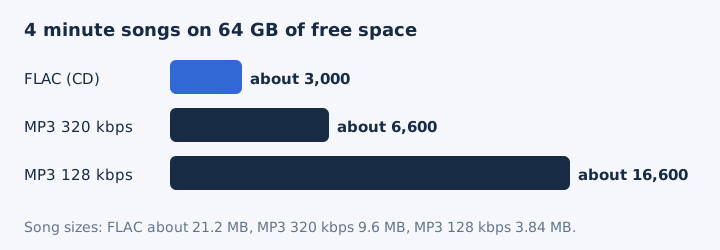
Wired headphones are where FLAC's extra bits reach your ears. On Android, the built-in decoder plays stereo FLAC up to 48 kHz, so 96 kHz or 192 kHz files need a dedicated player app.
Where Can You Get FLAC Files to Replace Your MP3s?
Get FLAC from the original source: rip your CDs, buy lossless downloads or stream a FLAC tier, and never convert your MP3s. Three sources give a true lossless copy.
- Rip your CDs: CD ripping with a FLAC-capable ripper copies every disc bit for bit into FLAC.
- Buy lossless downloads: Stores such as Bandcamp offer FLAC alongside MP3 for each purchase.
- Stream a lossless tier: A streaming tier on Spotify Premium, Deezer Hi-Fi or Qobuz delivers FLAC to subscribers.
Bandcamp lets buyers pick FLAC, ALAC, WAV or AIFF next to MP3 V0 and MP3 320 for each purchase, so one lossless download covers both needs. Ripping and buying both leave a FLAC file on your own drive.
Is FLAC Better Than MP3?
Yes for quality and archiving, because FLAC keeps every bit of the recording. No for size and reach, because a 320 kbps MP3 takes less than half the space, plays nearly everywhere and often sounds the same on everyday gear. The choice comes down to whether you will keep the file and what limits your listening.
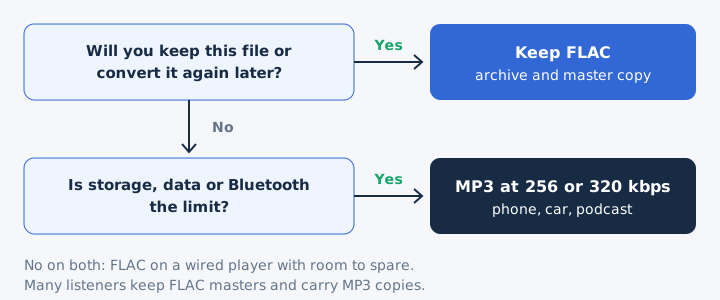
The practical answer for archiving and everyday listening is both. A FLAC master copy preserves the original recording, and an MP3 copy saves space on the phone.
Is FLAC a High Quality Format?
Yes, FLAC is a high quality format, because it stores the exact audio it was given at up to 32-bit and very high sample rates. Its lossless design means source quality sets the result, so a FLAC made from a 128 kbps MP3 still sounds like that MP3. Start from a CD or a lossless store, as the FLAC file guide explains.
Is FLAC Better Than a 320 kbps MP3?
Yes, on paper: a 320 kbps MP3 still discards sound, but on everyday headphones many listeners hear little or no difference. 320 kbps is the highest MP3 bitrate, and it takes 2.4 MB per minute against about 5.3 MB for FLAC. Our 320 kbps guide covers that setting in detail.
Does FLAC Sound Better Over Bluetooth Headphones?
No, not in most cases: Bluetooth re-compresses the audio before the headphones receive it, so a FLAC and a high-bitrate MP3 arrive in a similar lossy form. AirPods use the AAC Bluetooth codec, for example. The exception is aptX Lossless, which both the phone and the headphones must support.
Is MP3 Good Enough for Everyday Listening?
Yes, a 256 kbps or 320 kbps MP3 is good enough for most everyday listening on phones, earbuds and car stereos. MP3 plays in Chrome, Edge, Firefox, Opera and Safari, and the format remains the de facto standard for digital audio. The MP3 guide explains how the format works.
Should You Keep the FLAC After You Convert It to MP3?
Yes, keep the FLAC, because it is the only copy you can convert again later without stacking losses. mp4tomp3.io's FLAC to MP3 converter turns a FLAC into an MP3 at an MP3 bitrate of 128 to 320 kbps inside your browser, so the file never leaves your device. It can trim the track first, and it writes MP3 or WAV, not FLAC.