Audio bitrate sets how many kilobits per second describe your sound, and that one number fixes both the file size and the quality ceiling of a lossy file. The short answer: 64 to 96 kbps mono for voice, 128 to 256 kbps for a stereo podcast, and LAME's V0 to V3 presets (175 to 245 kbps) for MP3 music.
Streaming apps and YouTube publish their own rates. MP3 needs more bits than AAC or Opus for equal quality, and VBR usually beats CBR at the same size. Storage scales with the rate, MediaInfo reads it, lossless sits on top, and past transparency extra bits stop helping. The last section covers conversion. The general idea of bitrate has its own page.
What Does Audio Bitrate Measure?
Audio bitrate is the number of kilobits an audio stream uses for each second of sound, so a 128 kbps file spends 128,000 bits on every second. The unit kbps stands for kilobits per second, and 1 kbps equals 1,000 bits per second.
For uncompressed PCM, three settings multiply into the bitrate: sample rate, bit depth and the number of channels. CD audio at 44.1 kHz, 16-bit and 2 channels therefore runs at 1,411.2 kbps.
A lossy encoder such as MP3 or AAC works the other way round. You pick the bitrate, and the encoder decides what to keep inside that budget.
Which Audio Bitrates Suit Music, Podcasts and Voice?
A voice recording sounds clear at 64 to 96 kbps mono, a stereo podcast at 128 to 256 kbps, and music at about 175 to 245 kbps as MP3 VBR. AAC and Opus reach the same quality at lower rates. Every figure below comes from the encoder makers and platforms that publish it.
Each use sets its own floor, and the last column names who sets it.
| Use | MP3 bitrate | AAC or Opus | Source |
|---|---|---|---|
| Voice memo, lecture (mono) | 64 to 96 kbps CBR | AAC 32 kbps for talk | Audacity manual, Triton Digital |
| Podcast (stereo) | 128 to 256 kbps | AAC, same range | Apple Podcasts |
| Podcast (mono) | 64 to 128 kbps | AAC, same range | Apple Podcasts |
| Internet radio music | 96 kbps | AAC 64 kbps | Triton Digital |
| Music, portable or noisy places | V4 to V6, 115 to 160 kbps | Opus 64 to 128 kbps | LAME, Opus RFC 6716 |
| Music, home and hi-fi | V0 to V3, 175 to 245 kbps | AAC 128 kbps VBR | LAME, MPEG tests |
| Video soundtrack upload | Not on YouTube's list | 384 kbps stereo | YouTube Help |
| Editing and archiving | Keep it lossless | Keep it lossless | PCM 1,411.2 kbps or FLAC |
Apple Podcasts accepts MP3 or AAC in a feed and says AAC sounds better at the same bit rate. The Audacity manual rates 64 kbps mono as reasonable for voice and 96 kbps mono as excellent.
Record and edit music in a lossless format, then encode to a lossy bitrate once at the end. Each lossy encode discards data, and a later encode at a higher bitrate can't bring it back.
What Audio Bitrates Do Streaming Services Use?
Spotify streams music at about 24, 96, 160 or 320 kbps depending on the quality setting, plays podcasts at about 96 kbps, and its web player sends AAC at 128 kbps on the free plan or 256 kbps on Premium. Those are Spotify's own published numbers.
Here's what the services publish for their own apps.
| Service | Setting | Bitrate |
|---|---|---|
| Spotify | Low | About 24 kbps |
| Spotify | Normal | About 96 kbps |
| Spotify | High | About 160 kbps |
| Spotify | Very high (Premium) | About 320 kbps |
| Spotify | Lossless (Premium) | Up to 24-bit/44.1 kHz FLAC |
| Spotify web player | Free / Premium | AAC 128 / 256 kbps |
| Spotify podcasts | All apps | About 96 kbps |
| Apple Music | Lossless / Hi-Res Lossless | Up to 48 kHz / up to 192 kHz |
| Internet radio (Triton) | Standard music | AAC 64 or MP3 96 kbps |
Spotify's streaming quality setting decides the rate on desktop and mobile, while the web player can't be changed. A 160 kbps stream is Spotify's High setting, so it counts as a mid tier, not a low one.
Apple Music describes its tiers by sample rate rather than kbps, because both are lossless audio. Apple also says AirPods Pro 1, AirPods Max and most Beats wireless headphones use the Apple AAC Bluetooth codec, and that Bluetooth connections aren't lossless.
Triton Digital, which runs internet radio streams, accepts only constant bitrate MP3 files and rejects VBR MP3.
What Audio Bitrate Should You Use for a YouTube Upload?
YouTube recommends 384 kbps for stereo audio, 128 kbps for mono and 512 kbps for 5.1 surround, encoded as AAC-LC or Opus at 48 kHz. Eclipsa Audio, YouTube's immersive format, gets 128 kbps per channel.
YouTube's upload table sets one audio bitrate per channel layout.
| Channel layout | Recommended bitrate | Size per minute |
|---|---|---|
| Mono | 128 kbps | 0.96 MB |
| Stereo | 384 kbps | 2.88 MB |
| 5.1 surround | 512 kbps | 3.84 MB |
YouTube states that audio playback bitrate is not related to video resolution. A 1080p or 4K upload therefore takes the same audio settings as a 720p one.
The soundtrack is a small share of the file. At YouTube's 8 Mbps rate for 1080p, 384 kbps stereo is about 4.6% of the bits, and the video bitrate guide covers the picture side.
How Do MP3, AAC, Opus and Vorbis Bitrates Compare?
MP3 needs the most bits for the same quality. MDN puts the minimum for good stereo at 128 kbps for MP3, 96 kbps for AAC and Opus, and 192 kbps for Vorbis at quality 6 to 8, and in a 2014 listening test Opus at 96 kbps outscored MP3 at 136 kbps.
Four codecs bring four ranges and four floors.
| Codec | Bitrate range | Minimum for stereo (MDN) | Good for |
|---|---|---|---|
| MP3 | 32 to 320 kbps | 128 kbps | Near universal playback |
| AAC | Up to 512 kbps | 96 kbps | YouTube, podcasts, phones |
| Opus | 6 to 510 kbps | 96 kbps | Voice calls, web, YouTube |
| Vorbis | About 45 to 500 kbps | 192 kbps | Ogg files, game audio |
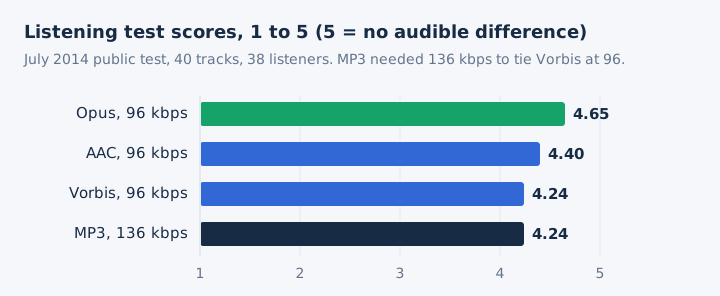
AAC reaches hi-fi transparency at about 128 kbps VBR in stereo, and Apple's podcast guide says AAC beats MP3 at the same bit rate. The Opus specification, RFC 6716, puts stereo music at 64 to 128 kbps. Across these sources, MP3 needs 1.4 to 2 times the AAC or Opus bitrate for equal quality.
Vorbis encodes at a variable rate by design, so you set a quality level and the kbps follows from it. The audio codec guide explains how each encoder spends its bits.
What Are the Types of Audio Bitrate: CBR, VBR and ABR?
Constant bitrate (CBR) keeps one rate for the whole file, variable bitrate (VBR) changes it frame by frame to hold a quality level, and average bitrate (ABR) varies around a target. At a given size VBR usually sounds best, ABR beats CBR, and only CBR gives an exact size.
- CBR
- A fixed number of kbps in every frame, so the file size is completely predictable.
- VBR
- A quality level, from 0 to 9 in LAME, that spends more bits on complex passages.
- ABR
- A target average between 8 and 320 kbps that still lets frames vary.
LAME, the open MP3 encoder whose presets Audacity also offers, maps each quality preset to an average bitrate.
| LAME setting | Average bitrate | Size per minute | LAME's verdict |
|---|---|---|---|
| -V0 | 245 kbps | 1.84 MB | Normally transparent |
| -V2 | 190 kbps | 1.43 MB | Normally transparent |
| -V4 | 160 kbps | 1.2 MB | Close to transparency |
| -V5 | 130 kbps | 0.98 MB | Portable listening |
| -V6 | 115 kbps | 0.86 MB | Acceptable quality |
| -b 320 (CBR) | 320 kbps | 2.4 MB | Largest file, no proven gain |
| --abr 56 -m m | 56 kbps mono | 0.42 MB | Voice and radio |
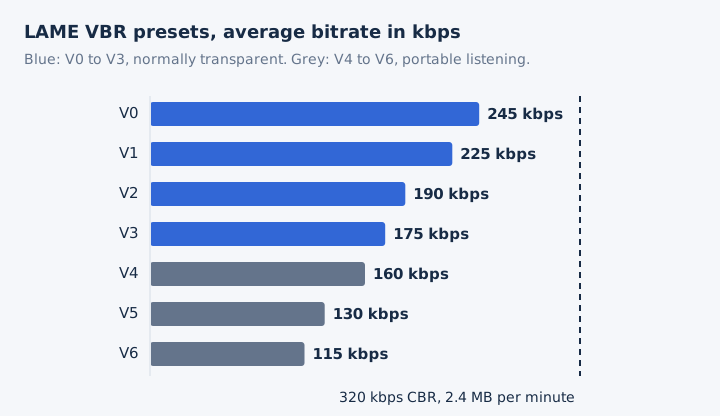
The -V0 preset makes a file 23% smaller than 320 kbps CBR. LAME's documentation adds that no ABX test has yet shown 320 kbps CBR sounding better than its top VBR presets.
How Much Storage Does Each Audio Bitrate Use?
File size equals bitrate times length divided by 8, so a minute of audio takes 0.96 MB at 128 kbps, 2.4 MB at 320 kbps and 10.6 MB as CD-quality WAV. One gigabyte holds about 260 four-minute songs at 128 kbps, or 104 at 320 kbps.
The size formula takes three steps.
- Multiply the kbps by the length in seconds.
- Divide by 8 to get kilobytes.
- Divide by 1,000 to get megabytes.
The same four-minute song fills very different amounts of phone storage.
| Bitrate | Per minute | Per hour | Songs per GB |
|---|---|---|---|
| 64 kbps | 0.48 MB | 28.8 MB | 520 |
| 96 kbps | 0.72 MB | 43.2 MB | 347 |
| 128 kbps | 0.96 MB | 57.6 MB | 260 |
| 192 kbps | 1.44 MB | 86.4 MB | 173 |
| 256 kbps | 1.92 MB | 115.2 MB | 130 |
| 320 kbps | 2.4 MB | 144 MB | 104 |
| FLAC (about 706 kbps) | About 5.3 MB | About 318 MB | 47 |
| CD-quality WAV (1,411.2 kbps) | 10.6 MB | 635 MB | 23 |
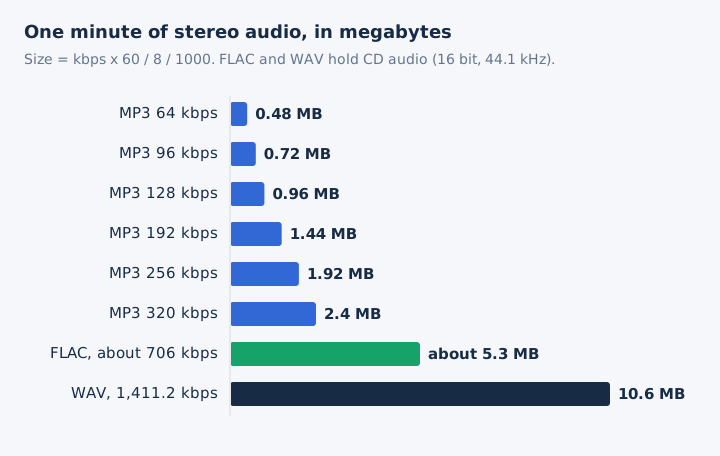
In hours, a gigabyte holds about 17.4 hours at 128 kbps and 6.9 hours at 320 kbps. Spotify notes that a higher download quality uses more space, and these megabytes per minute show by how much. To shrink files you already have, see how to compress audio.
How Do You Check the Audio Bitrate of a File?
Open the file in MediaInfo, run ffprobe, or divide the file size in bits by its length in seconds. All three give the audio bitrate in kbps.
Three methods work on Windows, Mac and Linux alike.
- MediaInfo: open the file in this media viewer, and its Audio section lists the format, sample rate, channels and bit rate in kbps.
- ffprobe: run
ffprobe -show_streams -select_streams a song.mp3in a terminal, then read the bit_rate value, given in bits per second. - Size formula: multiply the file size in bytes by 8, divide by the duration in seconds, then divide by 1,000 for kbps.
Here's a worked example. A 4-minute MP3 of 5,760,000 bytes runs at 5,760,000 × 8 / 240 = 192,000 bits per second, which is 192 kbps. Tags and cover art add bytes, so the formula reads slightly high, and a VBR file shows its VBR average rather than one fixed rate.
MediaInfo also has an online version that runs in the browser, so you can test a file without installing anything.
Which Audio Bitrate Gives the Highest Quality?
Lossless audio delivers the highest quality, at 1,411.2 kbps for CD-quality PCM and up to 9,216 kbps for 24-bit/192 kHz. Among lossy formats, the ceiling is 320 kbps for MP3, 512 kbps for AAC and 510 kbps for Opus.
Every format stops at its own ceiling, measured here against CD quality.
| Format | Highest bitrate | Share of CD rate |
|---|---|---|
| MP3 | 320 kbps | 23% |
| Opus | 510 kbps | 36% |
| AAC (stereo) | 512 kbps | 36% |
| CD-quality PCM or WAV | 1,411.2 kbps | 100% |
| 24-bit/96 kHz PCM | 4,608 kbps | 327% |
| 24-bit/192 kHz PCM | 9,216 kbps | 653% |
FLAC stores the same lossless audio at about half the PCM bitrate, so a FLAC copy of a CD averages near 706 kbps. Rates above CD quality belong to hi-res audio, where 24-bit files at 96 or 192 kHz live.
The lossy ceiling for MP3 is the 320 kbps setting, and whether it beats 128 kbps has its own page.
When Does a Higher Audio Bitrate Stop Sounding Better?
A higher bitrate stops sounding better once the encoder reaches transparency, which LAME places at its V0 to V3 presets (about 175 to 245 kbps) for MP3 and which AAC reaches at about 128 kbps in stereo. Above that point the file grows with no audible gain for most listeners.
Four published findings mark the point of diminishing returns.
- LAME: its documentation says no ABX test has shown 320 kbps CBR beating the top VBR presets.
- Audacity: its manual calls the 320 kbps Excessive preset overkill next to the smaller Extreme preset.
- AAC: MPEG tests found AAC transparent to ITU requirements at 128 kbps for stereo sound.
- Opus: at only 96 kbps, Opus scored 4.65 out of 5 in the public 2014 listening test.
The playback chain sets a second limit. AirPods and most Beats wireless headphones use Apple's AAC Bluetooth codec, and Apple says Bluetooth connections aren't lossless, so the headphones cap what you hear. The audio quality guide covers the rest of that chain.
A higher bitrate also can't repair a file that was encoded lower earlier.
How Do You Pick the Bitrate When You Convert Audio?
Pick the lowest bitrate that stays transparent for the job, never above the source bitrate of a lossy file, and keep a lossless master for editing. mp4tomp3.io writes MP3 at 128, 192, 256 or 320 kbps, and its MP3 compressor offers 64, 96, 128 or 192 kbps.
Use 192 kbps for most music, 256 or 320 kbps from a lossless source, and 64 or 96 kbps for voice. The compressor resamples to 32 kHz at 96 kbps and 24 kHz at 64 kbps. Re-encoding at a higher rate never restores lost detail.
Should the MP3 Bitrate Be at Least the Source File's Bitrate?
Yes, set the MP3 bitrate at least as high as the source's, because a lower setting throws away more data while a higher one only adds size. The mp4tomp3.io AAC to MP3 converter gives the same advice for a source file in AAC and calls 192 kbps right for most files.
Is 64 kbps a Good Bitrate for a Voice Recording?
Yes, 64 kbps mono gives reasonable voice quality, and 96 kbps mono gives excellent quality, according to the Audacity manual's podcast settings. Wikipedia's MP3 ladder also lists 64 kbps for voice and speech, and the MP3 compressor offers both 64 and 96 kbps.
Can You Measure the True Bitrate of a VBR File?
Yes, but only as an average: a VBR file changes its bitrate frame by frame, so MediaInfo or the size formula reports the mean rate. LAME's -V2 preset produces an average bitrate of about 190 kbps. A reading near 190 kbps is therefore normal for an MP3 made at that preset.
Does Stereo Audio Need a Higher Bitrate Than Mono?
Yes, stereo needs about twice the bitrate of mono for the same quality: Apple Podcasts recommends 64 to 128 kbps for mono and 128 to 256 kbps for stereo. YouTube's upload table follows the same logic, and switching to mono is one way to compress an audio file for speech.