320 kbps marks the ceiling of the MP3 format: the encoder spends 320 kilobits per second on the sound, and the standard allows nothing higher. That top setting costs 2.4 MB per minute of file size, and most listeners hear no difference from the source. LAME's documentation still reports no ABX test where its 320 kbps CBR mode beats the V0 preset, which makes files 23% smaller.
Against 128, 192 and 256 kbps, 320 wins on detail and loses on size. It carries 23% of the CD bit rate, so lossless formats still keep more. Spotify offers it on its Very high setting, while YouTube Music stops at 256. Home listening, DJ sets and editing justify it, and mp4tomp3.io makes one in your browser. The MP3 bitrate guide explains bitrate in general.
What Does 320 kbps Mean?
320 kbps means 320 kilobits per second: the audio stream spends 320,000 bits, or 40,000 bytes, on every second of sound. The unit counts kilobits, not kilobytes, and one byte holds 8 bits, so the kbps figure always reads 8 times larger than the bytes per second.
The MP3 standard tops out at this rate. A 320 kbps MP3 is normally a constant bitrate file, which means every frame uses the same 320 kbps.
The 44.1 kHz printed beside it on many files is a separate setting. The sample rate counts samples per second, and a 320 kbps MP3 runs at 32, 44.1 or 48 kHz. An AAC or Opus file at 320 kbps follows its own codec's rules, which the AAC vs MP3 comparison covers.
Why Does MP3 Stop at 320 kbps?
MP3 stops at 320 kbps because the MPEG-1 Layer III standard defines a fixed list of 14 bitrates, from 32 to 320 kbps, and the ISO standard only requires a decoder to play streams up to 320 kbps. MP3 was designed to carry the 1,411 kbps of CD audio at 320 kbps or less, so the bitrate table simply ends there.
Each MP3 mode sets its own sample rates and its own top rate.
| Mode | Sample rates | Allowed bitrates | Top rate |
|---|---|---|---|
| MPEG-1 Layer III | 32, 44.1 and 48 kHz | 32 to 320 kbps (14 rates) | 320 kbps |
| MPEG-2 Layer III | 16, 22.05 and 24 kHz | 8 to 160 kbps | 160 kbps |
| LAME free format | Not part of the table | 8 to 640 kbps | Outside the standard |
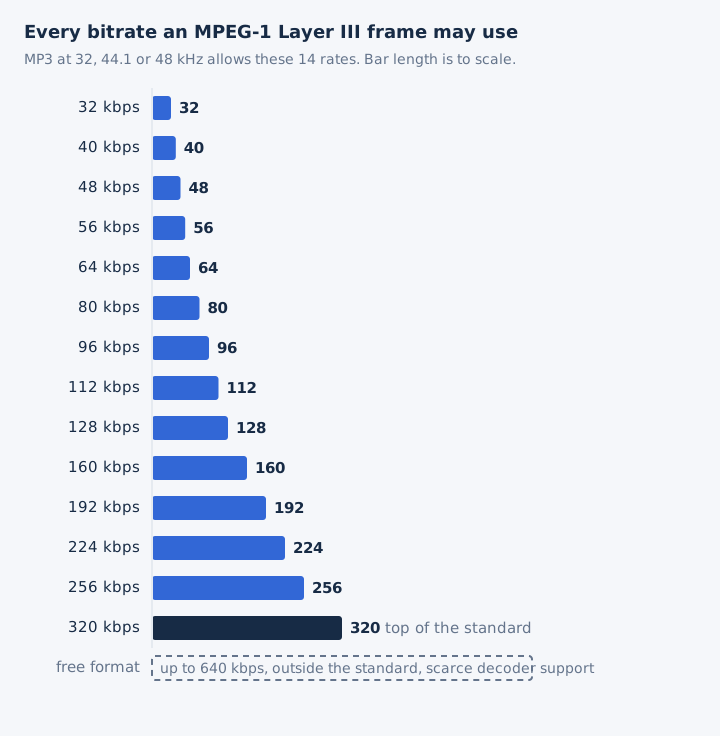
A 320 kbps MP3 therefore always uses 32, 44.1 or 48 kHz, because the lower MPEG-2 sample rates stop at 160 kbps.
How Many MB Is a 320 kbps MP3?
A 320 kbps MP3 takes 2.4 MB per minute, so a 3-minute song is 7.2 MB, a 4-minute song 9.6 MB and an hour of music 144 MB. Audacity's manual gives the same 2.4 megabytes per minute for its 320 kbps preset.
Every size below comes from one formula, with 128 kbps alongside for scale.
| Length | At 320 kbps | At 128 kbps |
|---|---|---|
| 1 minute | 2.4 MB | 0.96 MB |
| 3-minute song | 7.2 MB | 2.88 MB |
| 4-minute song | 9.6 MB | 3.84 MB |
| 60-minute album | 144 MB | 57.6 MB |
| Songs per GB | 104 | 260 |
| Hours per GB | 6.9 h | 17.4 h |
One gigabyte therefore holds 104 four-minute songs at 320 kbps. Three steps turn the bitrate into the size of a 4-minute song.
- Multiply 320 by 240 seconds to get 76,800 kilobits.
- Divide by 8 to get 9,600 kilobytes.
- Divide by 1,000 to get 9.6 MB.
Tags and cover art add a little on top, so a real file reads slightly larger than the formula.
Sizes for every other rate sit side by side in the audio bitrate guide.
Is 320 kbps Good Sound Quality?
Yes, 320 kbps is the best quality an MP3 can have, and it sounds transparent, identical to the source, to most listeners on most music. LAME's documentation adds that nobody has produced an ABX test showing it beating the top VBR presets such as V0.
Four statements from encoder documentation and the format's own design set its limits.
- LAME on -b 320: this mode maximizes file size, yet no ABX test shows it beating the top VBR presets.
- LAME on V0 to V3: these presets, averaging 175 to 245 kbps, normally give transparent results on music.
- Audacity on 320 kbps: its manual calls the Excessive preset overkill, with little if any difference from Extreme.
- MP3 by design: the format is lossy and uses auditory masking to drop the sounds the ear hears least.
A 320 kbps MP3 still carries only 23% of the CD bit rate, and only a lossless file keeps every bit of the source.
The playback chain sets a second limit. Apple says AirPods and most Beats headphones use the AAC Bluetooth codec and that Bluetooth connections are not lossless, so a 320 kbps file gets re-encoded before it reaches those headphones. The audio quality guide follows every link in that chain.
Which Is Better, 320 kbps or 128 kbps?
320 kbps is better: it gives the MP3 encoder 2.5 times the bits of 128 kbps, while 128 kbps is a mid-range rate that a public listening test rated good but not transparent. The 320 kbps file is also 2.5 times larger.
Side by side, the two settings differ on more than file size.
| Attribute | 320 kbps | 128 kbps |
|---|---|---|
| Data per second | 320,000 bits | 128,000 bits |
| Size per minute | 2.4 MB | 0.96 MB |
| 4-minute song | 9.6 MB | 3.84 MB |
| Songs per GB | 104 | 260 |
| LAME class | Maximum quality and size | Portable, V5 averages 130 |
| Good for | Music library, DJ sets, editing source | Speech, lectures, podcasts |
In a 2014 public listening test, LAME MP3 at its 128 kbps class, 136 kbps on average, scored 4.24 out of 5. A 4 on that scale means a difference you can perceive but that isn't annoying, so 128 kbps sounds good without being transparent. Audacity uses 128 kbps as its default constant rate, at about 1 MB per minute.
Is 320 kbps Better Than 192 or 256 kbps?
Rarely for listening. LAME's V0 and V2 presets average about 245 and 190 kbps and normally sound transparent, while a 320 kbps file is 25% larger than 256 kbps and 67% larger than 192 kbps. 320 kbps earns that extra size when a platform demands constant bitrate, or for what LAME calls very high quality HiFi, home or quiet listening.
Above 192 kbps the returns diminish: each step adds space faster than it adds audible detail.
| Setting | Average bitrate | MB per minute | LAME verdict |
|---|---|---|---|
| 320 kbps CBR | 320 kbps | 2.4 | Maximum size, no ABX gain shown |
| 256 kbps CBR | 256 kbps | 1.92 | No preset, plain CBR |
| V0 VBR | About 245 kbps | 1.84 | Normally transparent |
| 192 kbps CBR | 192 kbps | 1.44 | No preset, plain CBR |
| V2 VBR | About 190 kbps | 1.43 | Normally transparent |
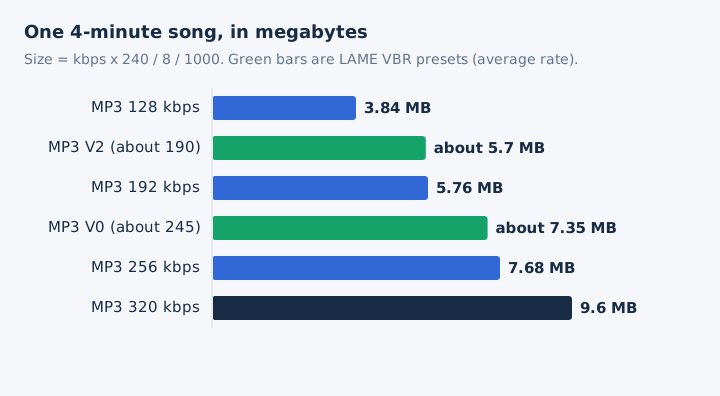
V0 makes files 23% smaller than 320 kbps CBR. It uses variable bitrate, so it spends more bits on dense passages and fewer on simple ones. That is diminishing returns in practice: the last 75 kbps of a 320 kbps file buy no proven audible gain.
256 kbps is also the ceiling of several services and stores, but they deliver AAC, and AAC at 256 kbps is a different codec from MP3 at 256 kbps.
How Close Is a 320 kbps MP3 to CD Quality?
A 320 kbps MP3 carries 23% of the 1,411.2 kbps CD bit rate and throws data away, so it isn't CD quality in data terms, yet most listeners hear no difference on most music. A FLAC of the same CD runs at about 706 kbps and keeps every bit.
Set against lossless formats, 320 kbps looks small.
| Format | Bitrate | Times a 320 kbps MP3 | Lossless |
|---|---|---|---|
| MP3 320 kbps | 320 kbps | 1x | No |
| FLAC of CD audio | About 706 kbps | 2.2x | Yes |
| CD audio or WAV | 1,411.2 kbps | 4.4x | Yes |
| 24-bit/96 kHz PCM | 4,608 kbps | 14.4x | Yes |
| 24-bit/192 kHz PCM | 9,216 kbps | 28.8x | Yes |
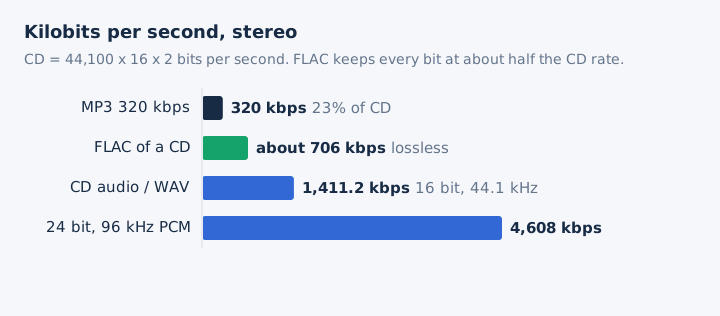
Against CD WAV the MP3 is 4.4 times smaller, a 77% cut that sits inside the 75 to 95% savings MP3 usually gives. The full FLAC vs MP3 comparison weighs the two formats for a music library, and the hi-res audio guide covers the 24-bit tiers.
Which Streaming Services Offer 320 kbps Audio?
Spotify streams at about 320 kbps on its Very high setting for Premium listeners on desktop, mobile and tablet. YouTube Music and Spotify's web player stop at 256 kbps, and iTunes Plus downloads are 256 kbps AAC.
Each service's own help page gives its top lossy setting.
| Service | Top lossy setting | Codec | Note |
|---|---|---|---|
| Spotify app (Premium) | Very high, about 320 kbps | Not stated on the help page | Lossless FLAC also offered |
| Spotify web player | 256 kbps on Premium | AAC | Free plan gets 128 kbps |
| YouTube Music | High or Always High, 256 kbps | AAC and Opus | Downloads also top out at 256 |
The iTunes Store's DRM-free iTunes Plus downloads have been 256 kbps AAC since 2007, so a bought track isn't a 320 kbps file either.
A 320 kbps stream lives only inside its app. A downloaded 320 kbps MP3 plays almost everywhere, since Android decodes MP3 up to 320 kbps and iPhone and Windows Media Player list MP3.
Deezer asks for CBR MP3 when you upload your own files, and Triton Digital's streaming platform accepts only CBR MP3. A 320 kbps CBR file meets both rules.
When Should You Use 320 kbps?
Use 320 kbps when you want the most an MP3 can hold and file size doesn't matter: a hi-fi music library, DJ sets, audio you'll edit again, and uploads that demand constant bitrate MP3. Phones, voice and podcasts get the same job done with less.
Seven common uses, each paired with the setting that fits it.
- Home and hi-fi listening: LAME names -b 320 for very high quality HiFi, home or quiet listening.
- DJ sets: every track sits at the top MP3 setting, with one constant bitrate from start to end.
- Audio for editing: a 320 kbps MP3 keeps the most data any MP3 holds, short of a lossless file.
- CBR-only platforms: Triton Digital streams and Deezer uploads both ask for constant bitrate MP3 files.
- Phones and noisy places: LAME's V4 to V6 presets, 115 to 160 kbps, save phone storage.
- Voice and podcasts: Audacity rates 64 kbps mono reasonable and 96 kbps mono excellent for speech.
- Archiving a CD: rip to lossless FLAC instead, because 320 kbps discards data that never returns.
For a master you'll edit many times, lossless still wins, and 320 kbps is the best fallback when the result has to be MP3.
How Do You Make a 320 kbps MP3?
To make one, open an MP3 converter that offers 320 kbps, pick 320 as the quality and convert. On mp4tomp3.io every MP3 converter page offers 128, 192, 256 and 320 kbps, with 192 selected by default, and the file never leaves your browser.
Four steps take a video or audio file to a 320 kbps MP3.
- Open the mp4tomp3.io converter page that matches your source, such as video to MP3 or FLAC to MP3.
- Drop or pick the file; the conversion runs in your browser and nothing goes to a server.
- Under MP3 Quality, choose 320 in place of the default 192 kbps, the highest option offered.
- Turn on trim if you only need part of the audio, then convert and save the MP3.
Desktop tools reach the same setting. Audacity writes 320 kbps CBR through its Excessive preset, and the LAME command line uses -b 320. A 320 kbps MP3 always ends up at 32, 44.1 or 48 kHz, since the standard allows no other sample rates at that bitrate.
Does Converting a 128 kbps MP3 to 320 kbps Improve the Sound?
No, re-encoding a 128 kbps MP3 at 320 kbps makes the file 2.5 times larger but cannot restore the data the first encode removed, and a second lossy pass can only lose more.
A file-info tool then reports 320 kbps, which tells you how the file was saved, not how good its source was. Apple confirms that lost data can't be retrieved by converting a compressed song. Re-encoding only changes the label; the MP3 bitrate guide explains the mechanism.
Is a Lossless File the Best Source for a 320 kbps MP3?
Yes, a WAV or FLAC source gives the encoder the full CD-quality signal, so a 320 kbps MP3 made from it passes through a single lossy step and loses only what that step removes. The WAV to MP3 converter and the FLAC to MP3 page on mp4tomp3.io both offer 320 kbps.
Can You Make a 320 kbps MP3 From a Video?
Yes, mp4tomp3.io extracts the soundtrack of an MP4, MOV, WebM or MKV video and saves it as a 320 kbps MP3 in the browser, through its video to MP3 converter. The MP3 inherits every limit of the video soundtrack it came from, so a low-bitrate audio track gains nothing from 320 kbps.
Will a 320 kbps MP3 Play on Every Device?
Yes, nearly every device plays a 320 kbps MP3, because the rate sits inside the MP3 standard. Android decodes MP3 up to 320 kbps, iPhone and Windows Media Player list MP3, and the ISO standard requires an MP3 decoder to handle streams up to 320 kbps. Only free-format files above 320 kbps run into players that refuse them. The MP3 format guide covers the format itself.