Video bitrate sets how many bits of picture data each second of a video gets, counted in Mbps. For a 1080p upload, YouTube recommends 8 Mbps at 30 fps, and the number climbs with resolution and frame rate. Every extra 1 Mbps adds 7.5 MB of file size per minute. Uploads use variable bitrate, while live streams on YouTube Live and Twitch use constant bitrate.
Quality, file size and the sound inside the video all follow from that one number. The general meaning of bitrate and the MP3 ladder sit in the bitrate guide, and this page belongs to the video file formats guide.
How Does Video Bitrate Work?
Video bitrate is the number of bits a video stream uses per second of playback, written in Mbps for video, where 1 Mbps equals 1,000 kbps. Some apps call the same measure the data rate.
The encoder does the work. H.264, H.265 or AV1 compresses each frame to fit that bit budget. More bits per second keep more detail in every frame, and fewer bits force harder compression.
The scale shows why compression always happens. Uncompressed 1080p at 30 frames per second needs about 1.49 Gbit/s. YouTube recommends 8 Mbps for the same picture, about 187 times less.
Any video file gives up its bitrate through one formula: file size in bytes, times 8, divided by the playback seconds. Units such as kbps against Mbps, and bitrate against bandwidth, are covered in the bitrate guide linked above.
What Video Bitrate Should You Use for Each Resolution and Frame Rate?
YouTube recommends 8 Mbps for 1080p at 24 to 30 fps and 12 Mbps at 48 to 60 fps, 5 Mbps for 720p, and 35 to 45 Mbps for 4K. Each step up in resolution asks for roughly double the bits, as the upload table from YouTube Help shows.
| Resolution | 24 to 30 fps | 48 to 60 fps | HDR, 24 to 30 fps |
|---|---|---|---|
| 8K | 80 to 160 Mbps | 120 to 240 Mbps | 100 to 200 Mbps |
| 2160p (4K) | 35 to 45 Mbps | 53 to 68 Mbps | 44 to 56 Mbps |
| 1440p (2K) | 16 Mbps | 24 Mbps | 20 Mbps |
| 1080p | 8 Mbps | 12 Mbps | 10 Mbps |
| 720p | 5 Mbps | 7.5 Mbps | 6.5 Mbps |
| 480p | 2.5 Mbps | 4 Mbps | Not supported |
| 360p | 1 Mbps | 1.5 Mbps | Not supported |
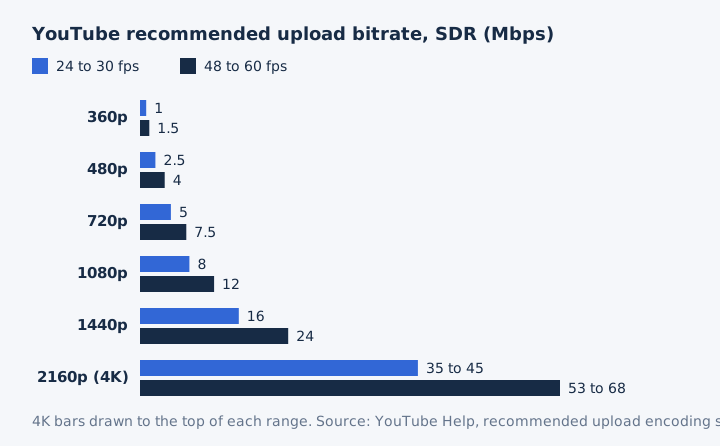
A high frame rate column applies to 48, 50 and 60 fps footage. The HDR column runs about 25% above SDR at 1080p (10 against 8 Mbps), and YouTube lists no HDR rate below 720p.
Three common questions have short answers. A 3,500 kbps stream sits below every 1080p figure the platforms publish: YouTube's 8 Mbps upload rate, the 4 Mbps YouTube Live minimum, and Twitch's 4,500 kbps. A 40 Mbps bitrate is generous: it matches the 1080p Blu-ray maximum and sits inside YouTube's 4K range. For 4K, aim for 35 to 45 Mbps in SDR or 44 to 56 Mbps in HDR.
YouTube calls these numbers recommendations for each upload and sets no upper bitrate limit.
What Bitrate Do Streaming Platforms Recommend?
Live platforms ask for less than upload files: YouTube Live recommends 14 Mbps for 1080p30 in H.264 (10 Mbps in H.265 or AV1), and Twitch recommends 6,000 kbps for 1080p60 and 4,500 kbps for 1080p30. Live streaming has to fit the broadcaster's connection in real time, so its ingest bitrate stays modest.
| Platform | 720p | 1080p | 4K |
|---|---|---|---|
| YouTube upload, H.264, 30 fps | 5 Mbps | 8 Mbps | 35 to 45 Mbps |
| YouTube Live, H.264, 30 fps | 8 Mbps | 14 Mbps | 42 Mbps |
| YouTube Live, H.265 or AV1, 30 fps | 6 Mbps | 10 Mbps | 30 Mbps |
| Twitch, 30 fps / 60 fps | 3,000 / 4,500 kbps | 4,500 / 6,000 kbps | Not listed |
| Netflix viewer connection | 3 Mbps | 5 Mbps | 15 Mbps |
Netflix publishes recommended connection speeds, not encode bitrates. Its Help Center asks for 15 Mbps or higher for 4K, which is the internet speed a viewer needs, not the bitrate of the 4K file itself.
Twitch puts stability first. Its broadcasting guidelines say a stable stream beats a higher bitrate that drops frames. YouTube Live and Twitch both set the keyframe interval at 2 seconds, and YouTube asks for no more than 4.
Should You Encode Video With CBR or VBR?
Use VBR for files you upload or store, and CBR for live streaming. YouTube asks for variable bitrate on uploads, while YouTube Live and Twitch both ask for constant bitrate. Each rate-control mode spends the same bit budget in its own way.
- Constant bitrate (CBR): the encoder sends the same number of bits every second, which keeps a live stream steady on the network.
- Variable bitrate (VBR): the encoder gives fast action more bits and still scenes fewer, the mode YouTube asks for on every upload.
- Average bitrate: this figure is the mean rate across a whole VBR file, while the peak bitrate is its highest short burst.
- Constant quality (CRF): the constant rate factor holds picture quality steady and lets the bitrate rise or fall with each scene.
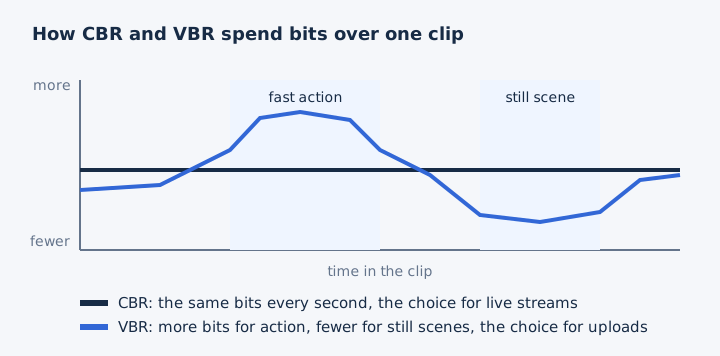
Twitch explains why it rejects VBR for live streaming. A VBR stream drops to a much lower bitrate during quiet moments such as a paused game, then spikes back up in fast action. That spike causes buffering and dropped frames for viewers, so Twitch calls VBR suboptimal for video over the internet.
Rate control is one setting in the encoder. In FFmpeg's VP9 encoder, a bitrate target on its own gives VBR, and an equal minimum and maximum give CBR. A CRF value puts the x264 encoder into constant quality mode. The general CBR, VBR and ABR table for audio files lives in the bitrate guide.
How Does Bitrate Affect Video Quality?
Bitrate caps how much detail survives compression. When the bitrate is too low for the picture, the encoder throws detail away and leaves compression artifacts. Once the bitrate is high enough for the scene, extra bits change little. The same four marks appear whenever an encoder runs short of bits.
- Blocking: square patches appear at block edges, because low bitrates make block-based codecs drop detail.
- Banding: smooth skies and gradients break into steps, the posterization that appears at low quality.
-
Smearing: in motion-predicted video, damage lingers across frames and moves with objects like grime.
-
Pixelation in action scenes: fast motion uses the most bits, so blocky artifacts show there first.
Low bitrate does affect video quality, and the gap between low bitrate and high bitrate shows most in motion and fine texture. The codec matters too: ITU designed H.265 to need only half the bit rate of H.264 for the same picture. Resolution and the amount of motion in the scene decide how many bits count as enough.
Is a Higher Bitrate Always Better for Video?
No, a higher bitrate improves a video only until the encoder has enough bits for the scene; past that point the file grows and the picture doesn't. Twitch says it plainly: raising the bitrate improves quality only up to a certain point.
More bitrate helps with fast motion and with higher resolution, as the platform tables above show. The costs are real.
Each extra 1 Mbps adds 7.5 MB of file size per minute, which means more storage and slower transfers. A stream above the uploader's connection causes buffering, and Twitch links that to streaming at a bitrate too high for your network, so check your upload speed first. YouTube sets no bitrate limit on uploads and lists recommended rates instead.
Re-encoding an already compressed video at a higher bitrate adds size but no detail. Lossy compression discarded that data for good, so diminishing returns turn into pure waste. A lower bitrate is better when the file has to stay small, and a high bitrate is good when the source is clean and the scene is busy.
How Do Resolution, Frame Rate and Codec Change the Bitrate You Need?
More pixels, more frames and an older codec each raise the bitrate a video needs. YouTube's 1080p goes from 8 to 12 Mbps at 60 fps, and YouTube Live asks for about 30% less with H.265 or AV1 than with H.264. Three settings move the number, each by a different amount.
| Factor | Change | Bitrate effect | Source |
|---|---|---|---|
| Resolution | 1080p to 4K at 30 fps | 8 to 35 to 45 Mbps | YouTube upload |
| Frame rate | 30 to 60 fps at 1080p | 8 to 12 Mbps (x1.5) | YouTube upload |
| Codec | H.264 to H.265 or AV1, 1080p30 live | 14 to 10 Mbps, about 29% less | YouTube Live |
| Codec design target | H.264 to H.265 | Half the bit rate | ITU |
Doubling the frames per second doesn't double the bitrate on YouTube's list. The 60 fps column asks for 1.5 times the bits, not 2 times.
Bits per pixel ties the three factors together: bitrate divided by width, height and frame rate. YouTube's 1080p30 upload rate gives 8,000,000 / (1,920 x 1,080 x 30) = 0.129 bits per pixel. Twitch's 1080p60 stream at 6,000 kbps gives 0.048, so a YouTube upload gets about 2.7 times as many bits for each pixel. The bitrate vs resolution comparison has its own page, and codecs such as H.264, H.265 and AV1 are explained in the video file formats guide.
How Big Is a Video File at Each Bitrate?
A video takes bitrate x seconds / 8 bytes, so each 1 Mbps costs 7.5 MB per minute: 1080p at 8 Mbps fills 60 MB a minute and 3.6 GB an hour. These sizes follow straight from YouTube's recommended rates.
| Video | Bitrate | Per minute | Per hour |
|---|---|---|---|
| 360p | 1 Mbps | 7.5 MB | 0.45 GB |
| 480p | 2.5 Mbps | 18.75 MB | 1.13 GB |
| 720p | 5 Mbps | 37.5 MB | 2.25 GB |
| 1080p | 8 Mbps | 60 MB | 3.6 GB |
| 1080p 60 fps | 12 Mbps | 90 MB | 5.4 GB |
| 1440p | 16 Mbps | 120 MB | 7.2 GB |
| 4K | 35 to 45 Mbps | 262.5 to 337.5 MB | 15.75 to 20.25 GB |
| Twitch 1080p60 | 6 Mbps | 45 MB | 2.7 GB |
The formula works the 1080p row like this: 8,000,000 bits x 60 seconds / 8 = 60,000,000 bytes, which is 60 MB. Megabytes per minute equal Mbps x 7.5, and gigabytes per hour equal Mbps x 0.45, so you can size any duration in your head.
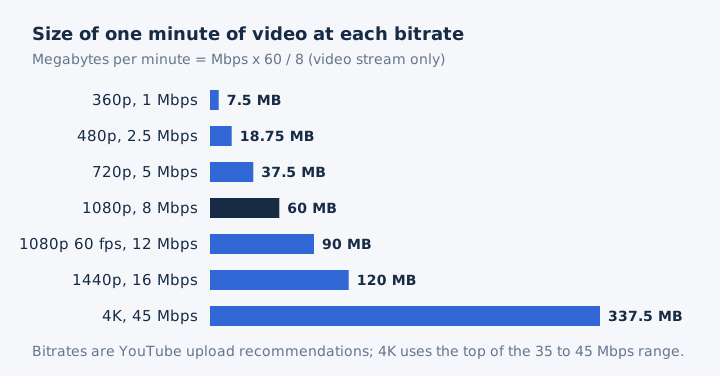
These figures cover the video stream only. Stereo audio at YouTube's 384 kbps adds 2.88 MB a minute, so plan storage with that small extra on top.
How Do You Find the Bitrate of a Video File?
Divide the file size by its length: size in bytes x 8 / seconds gives the bitrate, so a 1-minute, 60 MB clip runs at 8 Mbps. Three numbers and one division settle the question.
- Read the file size in bytes or MB from the file's properties.
- Read the duration, then convert minutes and hours into seconds.
- Multiply the size in bytes by 8, then divide by those seconds.
- Divide the result by 1,000,000 to turn bits per second into Mbps.
A second check: a 10-minute, 450 MB file gives 450,000,000 x 8 / 600 = 6 Mbps. That answer is the overall bitrate, because it includes the audio track as well as the picture. A media player's media info panel shows the stream bitrate directly, if you'd rather read it than work it out.
What Audio Bitrate Does a Video Carry?
The sound inside a video has its own, much smaller bitrate: YouTube recommends 384 kbps for stereo uploads, YouTube Live 128 kbps, and Twitch 96 kbps. The audio stream rides beside the picture at a small fraction of its rate.
| Where | Audio codec | Audio bitrate |
|---|---|---|
| YouTube upload | AAC-LC or Opus | 128 mono, 384 stereo, 512 kbps 5.1 |
| YouTube Live | AAC or MP3 | 128 kbps stereo, 384 kbps 5.1 |
| Twitch | AAC-LC | 96 kbps, 160 kbps maximum |
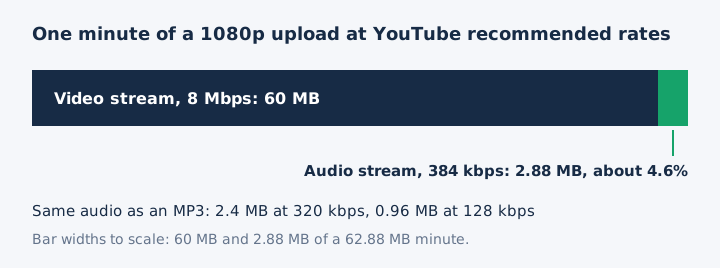
YouTube sets the audio apart from the picture. At 1080p the audio stream makes up about 4.6% of the file's bits: 2.88 MB of every 62.88 MB minute. At 4K and 45 Mbps the share falls to about 0.85%. YouTube states that audio bitrate is not tied to video resolution, which matters when you pull the sound out as an MP3.
Does a Higher Video Bitrate Mean Better Audio?
No, the audio stream has its own bitrate, and YouTube states that audio playback bitrate is not related to video resolution. YouTube sets the same 384 kbps stereo rate for a 4K upload and a 720p upload, so you can extract audio from video at either size and start from the same sound.
Does Converting a Video to MP3 Keep the Video Bitrate?
No, a video to MP3 conversion drops the picture stream and writes the sound at the MP3 bitrate you pick, 128 to 320 kbps on mp4tomp3.io. One minute of a 1080p upload weighs about 62.9 MB with its audio. The same minute as a 320 kbps MP3 is 2.4 MB, and at 128 kbps it is 0.96 MB. Our video to MP3 converter converts the sound in the browser, so the video never leaves your device.
Is a Higher Bitrate Better for Audio Extracted From a Video?
No, not above the source: a 320 kbps MP3 cannot add detail the video's own audio never had; a 96 kbps Twitch audio track stays 96 kbps quality in a bigger file.
Lossy compression already removed that data, and re-encoding raises the file size without bringing it back. Match or slightly exceed the source audio: a 384 kbps YouTube upload fits a 320 kbps MP3, and a 128 kbps live track fits 128 or 192 kbps. The MP3 bitrate ladder lists every step from 64 to 320 kbps.
Can You Make the Audio From a Video Smaller?
Yes, mp4tomp3.io writes the sound at 64 or 96 kbps on its MP3 compressor page, small enough for speech, lectures and voice notes. A 64 kbps MP3 takes 0.48 MB a minute, the rate generally recommended for speech. The MP3 compressor converts the file in your browser and never uploads it.