MP4 packs a video stream, an audio stream and optional subtitles into one .mp4 file. The name stands for MPEG-4 Part 14, a container format that holds codecs but compresses nothing itself. One MP4 carries both video and sound, and that sound, saved as a 320 kbps MP3, takes about 25 times less space than 1080p video. H.264 and AAC fill most files, while boxes called atoms organize the data inside.
Six extensions, from .mp4 to .m4v, share the same container. ISO and IEC first released it in October 2001. MP4 trades lossy compression for playback on almost any device, and its sound converts to MP3 or WAV in a browser. MP4 belongs to the video file formats family that mp4tomp3.io explains.
What Is MP4?
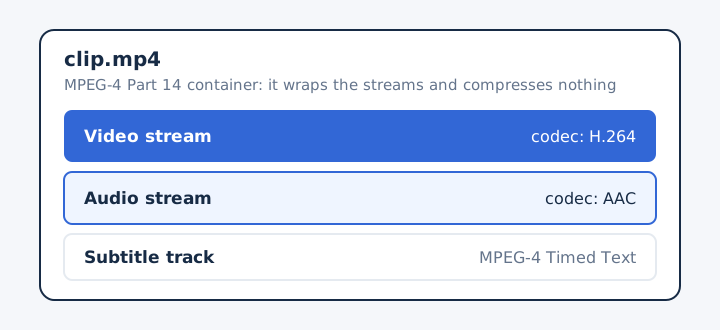
MP4 (MPEG-4 Part 14) is a digital multimedia container format that stores video and audio, and it can also hold subtitles and still images.
A container format wraps streams that a codec has already compressed. The MP4 wrapper itself compresses nothing: H.264 shrinks the picture, AAC shrinks the sound, and MP4 keeps both in sync.
The ISO/IEC 14496-14 standard defines MP4. That standard builds on the ISO Base Media File Format, the shared structure that several media file types also use.
On a computer, an MP4 is simply a file ending in .mp4 that the built-in media player opens. MP4 stores and shares everyday video, and every major web browser plays it without extra software. On a smart TV, MP4 playback depends on the codecs that the TV's media app supports.
What Does MP4 Stand For?
MP4 stands for MPEG-4 Part 14, the 14th part of the MPEG-4 standard, which the Moving Picture Experts Group created.
MP4 and MPEG-4 are not the same thing. MPEG-4 is the wider standard for compressing audio and visual data, while MPEG-4 Part 14 covers only the container that holds the result.
The old "MP4 player" label adds to the confusion. During the 2000s, sellers advertised portable players as an MP4 player even when the device played other formats such as AMV instead of real MP4 files.
Is MP4 Video or Audio?
MP4 is both video and audio: one .mp4 file usually holds a video track and an audio track side by side. An MP4 with no video track is an audio file, and that file normally carries the .m4a extension, known as M4A.
Most MP4 files carry their audio track as AAC. That audio track sits apart from the picture, so a converter can pull it out on its own without touching the video track.
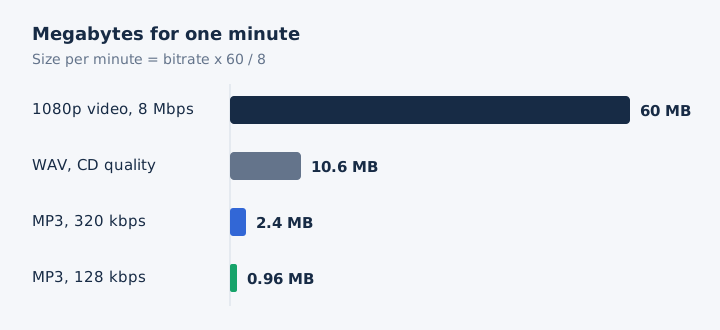
The size gap is large. YouTube recommends 8 Mbps for 1080p video, which uses about 60 MB per minute. The same minute of sound as a 320 kbps MP3 takes 2.4 MB, about 25 times smaller, and at 128 kbps it takes just 0.96 MB.
MP3 differs from MP4 at the root: MP3 is an audio-only coding format, while MP4 is a container for several kinds of media.
Which Codec Does an MP4 File Use?
An MP4 file uses H.264 or H.265 (HEVC) for video and AAC for audio in most cases, but the container accepts several other codecs. Each stream inside an MP4 carries its own codec, so the video and the sound can come from two different encoders.
| Stream | Common codecs | Less common codecs |
|---|---|---|
| Video | H.264/AVC and HEVC handle most phone and web video | AV1, plus the older MPEG-4 Part 2 video codec |
| Audio | AAC in most files, with MP3 also widely supported | FLAC and Opus since late 2018, plus Apple Lossless |
| Subtitles | MPEG-4 Timed Text stores captions as a separate track | Other subtitle formats get little player support inside MP4 |
FLAC and Opus joined the MP4 family in late 2018, so older players may refuse those files. A player needs the codec, not only the container. That gap explains most "MP4 won't play" errors: the .mp4 opens, but the device can't decode the HEVC or AV1 stream inside.
How Is an MP4 File Structured?
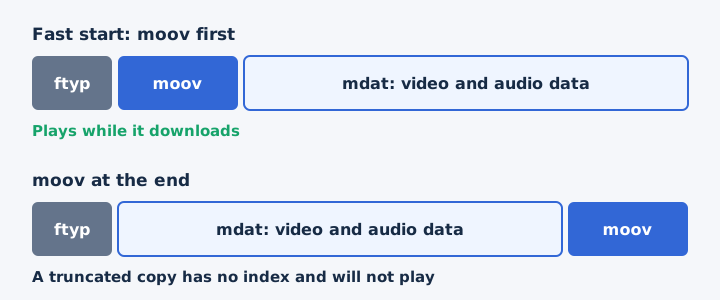
An MP4 file is built from boxes, also called atoms: a header box that names the file type, a moov box that describes the streams, and an mdat box that holds the media data. Three boxes do most of the work in a typical MP4 file.
- ftyp: the file type box opens the file and lists the brands a compatible player can read.
- moov: the moov atom records resolution, frame rate, duration and the track index for every stream.
- mdat: the media data box stores the compressed video and audio samples, usually most of the file.
The moov box can sit at the start or at the end of the file. With moov at the end, a half-downloaded MP4 will not play, because the index never arrived. Web video therefore puts moov first, a layout called fast start, so playback begins while the rest downloads.
What Are the MP4 File Extensions?
The MP4 standard defines only the .mp4 extension, but five more extensions use the same container: .m4a, .m4b, .m4r, .m4p and .m4v. The extension tells you what the MP4 container is carrying.
| Extension | Name | What it holds | Where you meet it |
|---|---|---|---|
| .mp4 | MP4 video | Video and audio streams, often with subtitles as well | Downloads, web video players and phone gallery apps |
| .m4a | M4A, MPEG-4 Audio | An audio track only, usually AAC or Apple Lossless | Music files and audio downloads on phones and computers |
| .m4b | M4B audiobook | Audiobooks and podcasts that carry chapter markers for skipping | Audiobook apps and podcast players that jump between chapters |
| .m4r | M4R ringtone | A short audio track that an iPhone uses as a ringtone | Custom ringtones made for and installed on an iPhone |
| .m4p | M4P protected audio | FairPlay-protected audio once sold through the iTunes Store | Older iTunes purchases that only authorized Apple software opens |
| .m4v | M4V video | Video with audio in the same container as .mp4 | Video files that some apps and stores save instead |
Servers label these files with a MIME type: video/mp4 for video and audio/mp4 for sound-only files. 3GP is a close sibling, built on the same base format and used by older mobile phones with the .3gp and .3g2 extensions. FairPlay DRM locks every M4P file, so mp4tomp3.io cannot read it.
When Was MP4 Created?
ISO and IEC first released MP4 in October 2001, and the latest edition is ISO/IEC 14496-14:2020. The 2001 version sat inside the MPEG-4 Systems standard rather than in a part of its own.
MP4 grew out of Apple's QuickTime File Format. QuickTime's structure became MPEG-4 Part 12, the ISO Base Media File Format, which sets the base layout that MP4 extends.
The 2003 edition, ISO/IEC 14496-14:2003, gave MP4 its own standard as version 2, and many references still cite that number.
What Are the Pros and Cons of MP4?
MP4 plays almost everywhere and keeps files small, but it relies on lossy compression, and some players lack newer codecs such as HEVC, AV1, FLAC or Opus. MP4's strengths and limits sit side by side in this table.
| Pros | Cons |
|---|---|
| Plays on phones, computers and every major browser | Video and audio are usually stored with lossy compression |
| Keeps HD video at a small file size | Newer codecs need newer players to decode them |
| Holds chapters, subtitles and metadata tags in one file | A truncated file may not play when moov sits last |
| Suits streaming when the moov box comes first | Can carry DRM, as protected .m4p files do |
Wide compatibility is the pro that matters most when you share a file, because the person receiving it can almost always open an MP4. Is MP4 better than HD? The two don't compete: MP4 is a container and HD is a resolution, so an MP4 file can be HD or lower.
How Do You Play an MP4 File?
You play an MP4 file in the default media player of almost any device, because Windows, Android and every major web browser open MP4 natively. Windows and Android accept the format at system level, so no extra software is needed.
- Windows: built-in players open MP4 through Media Foundation since Windows 7.
- Android: the default video app plays MP4, which Android supports natively.
- Mac and iPhone: Safari plays MP4, like every other major browser.
- Any device: a modern web browser plays MP4 files and web video.
When an MP4 will not play, the cause is usually codec support or a damaged file. The player may lack the HEVC or AV1 codec, or the file may be truncated with its moov atom missing. QuickTime Player and other Mac options belong to a separate guide on how to open an MP4 file on a Mac.
How Do You Get the Audio Out of an MP4 File?
You get the audio out of an MP4 by converting it to an audio format such as MP3 or WAV, which keeps the sound and drops the picture. Audio extraction converts the AAC track into a new audio file. Pick the output by what you'll do with the sound.
- MP3 at 128 kbps: suits speech and everyday listening, at about 0.96 MB per minute.
- MP3 at 320 kbps: suits music, the highest MP3 bitrate, at 2.4 MB per minute.
- WAV: suits editing, because the uncompressed file adds no further loss to the sound.
Converting can't improve the audio past what the MP4's AAC track holds, so a higher bitrate only adds size beyond that point. DRM-protected files can't be converted at all.
Is MP4 the Same as MP3?
No, MP4 is a container for video, audio and subtitles, while MP3 is an audio-only coding format. MP4 accepts many media types, while MP3 is an audio-only format that covers sound alone. An MP4's sound is usually an AAC track, not MP3. The full side-by-side comparison lives in the MP3 vs MP4 guide.
Can You Convert MP4 to MP3 Without Uploading the File?
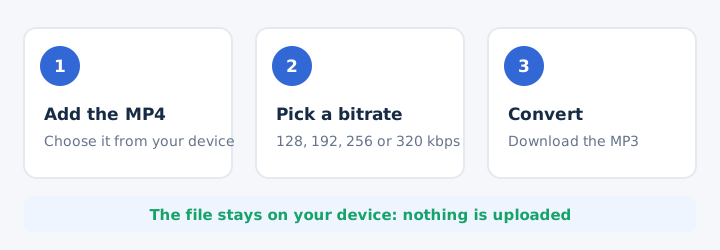
Yes, mp4tomp3.io converts MP4 to MP3 inside the browser, so the file never leaves your device. The browser does the conversion locally, which protects your privacy when a recording is personal. The MP4 to MP3 converter takes three steps.
- Add the MP4 file from your device to the converter page.
- Pick an MP3 bitrate of 128, 192, 256 or 320 kbps.
- Press convert, then download the finished MP3 file to your device.
Can You Extract WAV Audio From an MP4?
Yes, an MP4's audio track can be saved as WAV, which suits editing because WAV adds no further compression. WAV stores uncompressed audio, so audio editing software can cut and process it without another round of loss. The trade-off is size: CD-quality WAV takes about 10.6 MB per minute, compared with 2.4 MB for a 320 kbps MP3. Use the MP4 to WAV converter when you plan to edit.
Can You Extract Audio From an MP4 Without Losing Quality?
Yes, but only by saving to WAV or by keeping a high MP3 bitrate: WAV adds no new loss, while an MP3 re-encodes the AAC track. Pick 256 or 320 kbps for music, and never choose an MP3 bitrate above the source track. A higher bitrate raises the file size but adds no detail. Audio extraction to WAV keeps every detail the AAC track holds. Both routes work in the tool to extract audio from video.