WebM and MP4 both wrap compressed video and a sound track into one file. WebM keeps to four open codecs from the WebM Project, while MPEG-4 Part 14 takes a wider set led by H.264. Each works as a media container, so the video codec inside decides quality and size: a 10-minute 1080p clip at 8 Mbps fills 628.8 MB in either one.
The two differ in codecs, licensing and browser support. Safari 17.4 now plays WebM on iPhone and iPad, a web page can serve both, and YouTube asks for MP4 uploads. Editing apps prefer MP4, the sound tracks differ (Opus against AAC), and audio-only WebM is not M4A. The last section shows which one fits your job.
What Are WebM and MP4?
WebM is an open, royalty-free container that Google's WebM Project introduced in 2010 for web video, built on Matroska. MP4, short for MPEG-4 Part 14, is the ISO/IEC 14496-14 container, first published in 2001 and derived from Apple's QuickTime File Format. The two formats grew from different needs: one for HTML5 pages, one as an international standard for any device.
- WebM
- An open container from the WebM Project, released in 2010 as a narrow subset of Matroska made for HTML5 video in the browser.
- MP4
- An ISO standard container, MPEG-4 Part 14, published in 2001 and revised in 2003, extended from Apple's QuickTime File Format for wide device use.
You meet WebM when the Chromebook screen recorder saves a clip, since its Record video option writes a .webm file. YouTube and other video sites deploy WebM widely. MP4 is the container phones, editors and download pages usually hand you, most often with H.264 video and AAC sound.
WebM is a narrower cousin of MKV. Chrome plays any .webm file that follows the WebM rules, but it doesn't promise to decode an .mkv. The WebM file guide, the MP4 guide and the MKV file guide cover each format on its own.
How Does the Container Differ From the Codec in WebM and MP4?
WebM and MP4 are container formats that hold streams a codec has already compressed. A codec such as VP9 or H.264 compresses the video, and Opus or AAC compresses the sound. The file extension names the container, so it tells you nothing certain about the codec inside.
WebM fixes its codecs on purpose. A valid .webm holds only VP8 or VP9 video and Vorbis or Opus audio, so any WebM player can open any WebM file. MP4 accepts a wider set: it usually carries H.264 or H.265 with AAC, yet MDN lists AV1, VP9, Opus and FLAC for it as well.
What Are the Key Differences Between WebM and MP4?
WebM is a narrow, royalty-free web container with four open codecs, while MP4 is an ISO standard container with a wider codec range. More editors, upload sites and older devices accept MP4. This comparison table lines up nine attributes, from codecs and subtitles to licensing and the upload format YouTube recommends.
| Attribute | WebM | MP4 |
|---|---|---|
| Made by | WebM Project, 2010 | ISO and IEC, 2001 |
| Video codecs | VP8, VP9 (AV1 in browsers) | H.264, H.265, AV1, VP9 |
| Audio codecs | Vorbis, Opus | AAC, MP3, also Opus, FLAC |
| Subtitles | WebVTT tracks | MPEG-4 Timed Text |
| Licensing | Royalty-free codecs | H.264 under a patent pool |
| Browsers | All current browsers | All current browsers |
| iPhone Safari | Since Safari 17.4 | Yes |
| YouTube advice | Accepted | Recommended container |
| Adobe Premiere | Convert first | Supported target |
The rows on codecs, quality, size, device support and licensing raise the most questions, so the next five answers take them one at a time.
Which Codecs Can WebM and MP4 Hold?
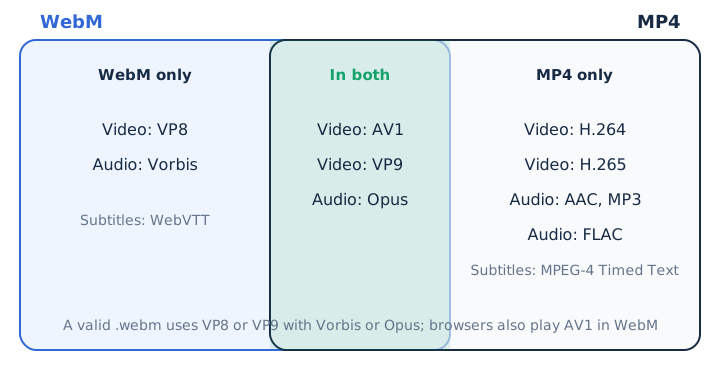
The codecs a valid WebM holds are VP8 or VP9 video with Vorbis or Opus sound, and browsers also play AV1 in WebM. MP4 accepts H.264, H.265, AV1 and VP9 video with AAC, MP3, Opus or FLAC sound. MDN's codec tables show the two lists overlap only in part, and the split looks like this.
- In both: each container accepts AV1 and VP9 video plus Opus audio in every major browser.
- WebM only: VP8 video and Vorbis audio, neither of which appears in MDN's MP4 codec table.
- MP4 only: H.264 and H.265 video with AAC and MP3 audio, the usual camera and phone mix.
- Subtitles: WebM stores WebVTT text tracks, while MP4 stores MPEG-4 Timed Text for captions.
Read the WebM file guide for the full codec rules behind the .webm extension.
Does WebM Look Better Than MP4 at the Same Bitrate?
No, the container doesn't decide the picture: quality comes from the codec, the encoder settings and the bitrate, so a WebM and an MP4 carrying the same stream look identical. The real contest is codec against codec, VP9 or AV1 against H.264 or H.265, and AV1 fits both containers.
WebM is a high-quality format in its own right. VP9 inside WebM handles frames up to 65536 x 65536 pixels and sets no limit on frame rate or data rate. No standards body publishes a fixed quality gap between the two formats, so compare your own encodes made from one source at one target. Our video bitrate guide shows how bitrate shapes what you see.
Is a WebM File Smaller Than an MP4?
No, not by itself: file size equals bitrate times duration, so the same streams make the same file size in either container. This table works the numbers for 10 minutes of 1080p video with a 384 kbps stereo track.
| File | Video bitrate | Size for 10 minutes |
|---|---|---|
| WebM, 1080p | 8 Mbps plus 384 kbps sound | 628.8 MB |
| MP4, 1080p | 8 Mbps plus 384 kbps sound | 628.8 MB |
| WebM, lower bitrate | 4 Mbps plus 384 kbps sound | 328.8 MB |
| MP4, lower bitrate | 4 Mbps plus 384 kbps sound | 328.8 MB |
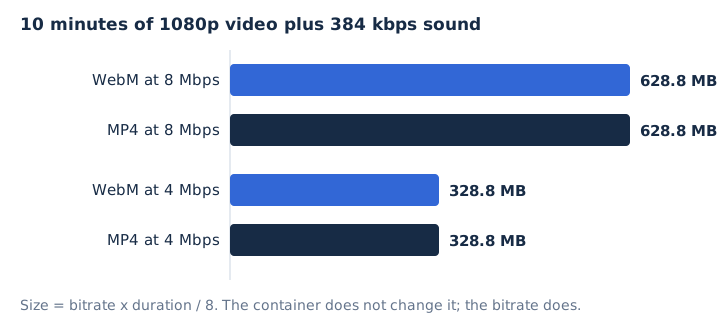
A codec with better compression efficiency reaches the look you want at a lower bitrate, and that lower bitrate gives the smaller file. That's why a VP9 or AV1 WebM often ends up smaller than an H.264 MP4. The percentage savings you see quoted come from individual encoder tests, not from a property of WebM. The MKV vs MP4 comparison works the same size rule for another container pair.
Which Browsers and Devices Play WebM and MP4?
All current browsers play both containers, while MP4 covers more devices and apps outside the browser. Support splits by platform rather than by browser.
- Browsers: MDN lists WebM and MP4 as supported in all browsers, for the container itself.
- Android: VP8 WebM plays since Android 2.3.3 and VP9 since 4.4; MP4 carries H.264, H.265, VP9 and AV1.
- Windows: Media Foundation plays MP4 natively since Windows 7, while Windows Media Player 12 needed extra WebM components.
- Apple: Safari 14.1 brought WebM to the Mac, and Safari 17.4 brought it to iPhone and iPad.
VLC media player, a free desktop player, opens WebM files. Browser playback still depends on the codec inside, not only the container. The MP4 format guide lists the devices that open MP4.
How Do WebM and MP4 Differ in Licensing?
WebM's codecs come royalty-free from Google under a BSD-style license, while H.264, the usual MP4 codec, is licensed through the Via Licensing Alliance AVC/H.264 patent pool. That pool covers set-top boxes, player software and mobile devices.
The WebM Project adds an honest caveat: third-party patent pools such as Sisvel's can still ask for fees on royalty-free codecs. MP4 can also carry royalty-free AV1, VP9 and Opus, so the codec, not the container, sets the licensing question. Opus is one such codec, as the Opus audio format guide explains.
Can iPhones and Macs Play WebM Files?
Yes, in Safari: Safari 14.1 brought WebM with VP8 and VP9 video to the Mac, Safari 15 added Opus sound, and Safari 17.4 added full WebM support on iPhone and iPad. WebKit, the engine behind Safari, describes WebM as fully supported everywhere from that release.
Before 17.4, iOS and iPadOS used VP8 only for WebRTC calls. People on older iPhones therefore get a safer result from MP4. Safari 17.4 also added Vorbis sound on iOS and iPadOS.
Can a Website Serve Both WebM and MP4?
Yes, one HTML video element can list a WebM source and an MP4 source, and the browser plays the first one it can display. A common setup offers the open format first.
- WebM source first: VP9 or AV1 video with Opus sound, marked with the type video/webm.
- MP4 source second: H.264 with AAC as the fallback, marked with the type video/mp4.
- Fallback text last: a short line for any browser that plays neither file.
Each line goes in its own source element inside the video tag, and the browser skips any source it can't decode. WebM is built to start and seek from a plain HTTP server. HTTP Live Streaming works differently: its segments must be MPEG-2 Transport Stream or fragmented MP4, so adaptive streaming leans on MP4.
Should You Upload WebM or MP4 to YouTube?
Upload MP4 when you can. YouTube accepts both WebM and MP4, yet its recommended upload encoding names MP4 as the container, with H.264 video and AAC-LC or Opus sound. YouTube does accept WebM, because WebM sits on its supported formats list.
YouTube also asks for the moov atom at the front of the MP4, a setting called Fast Start. An MP4 whose moov atom sits at the end can't play if the YouTube upload is cut short.
Can You Edit a WebM File in a Video Editor?
Not in every video editor. Adobe says a WebM file must be converted before Adobe Premiere can edit it, and Adobe names MP4 as the format to convert to. A Chromebook screen recording is the most common WebM file to hit this wall at import.
A change of container keeps full quality only when the streams are copied rather than re-encoded. Copying moves the same packets into the new file, while re-encoding compresses them again.
How Does WebM Audio Compare With MP4 Audio?
WebM sound is Opus or Vorbis, and MP4 sound is usually AAC. All three are lossy audio, so the audio bitrate matters more than the container. Each container leans on its own sound codecs, as this table shows.
| Codec | Container | Bitrate range | Type |
|---|---|---|---|
| Opus | WebM, also MP4 | 6 to 510 kbps | Lossy |
| Vorbis | WebM | 32 to 512 kbps | Lossy |
| AAC | MP4 | Up to 512 kbps stereo | Lossy |
| FLAC | MP4, not WebM | Below 1,411.2 kbps for CD audio | Lossless |
YouTube accepts AAC-LC or Opus in its recommended MP4 upload, so Opus is no longer a WebM-only codec. The AAC audio guide explains the codec most MP4 files use.
Is WebM Audio the Same as M4A?
No, an audio-only WebM carries Opus or Vorbis, while an M4A is an audio-only MP4 that carries AAC or Apple Lossless. The audio-only WebM uses the MIME type audio/webm, and the M4A uses audio/mp4.
Both files are lossy when the codec is Opus or AAC. An M4A turns lossless when it holds Apple Lossless (ALAC). mp4tomp3.io can save the sound of a video as a WebM audio file in Opus, as an MP3 or as a WAV. The M4A file guide covers that format in depth.
Which Should You Choose, WebM or MP4?
Choose WebM for video you host on your own web pages, with an MP4 fallback, and choose MP4 for files you send, upload, edit or play on older devices. Pick by where the file is going.
- Your own website: WebM first for web hosting, with MP4 as the fallback source.
- YouTube upload: MP4 with H.264 video and AAC-LC or Opus sound.
- Premiere editing: MP4, because Premiere needs a WebM converted first.
- Sharing with older devices: MP4, because iPhones need Safari 17.4 for WebM.
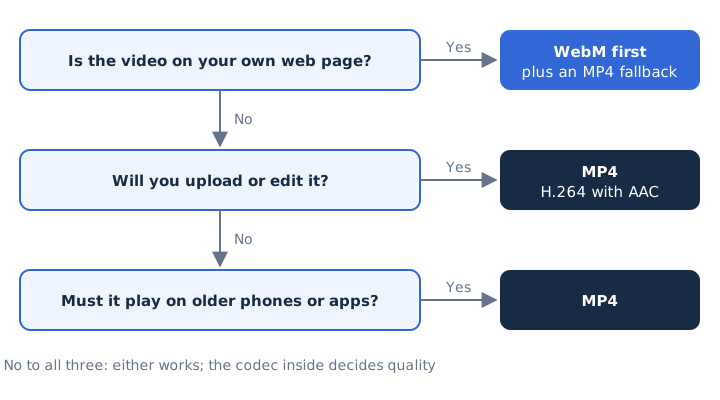
Is WebM better than MP4? Neither wins everywhere, because the codec sets quality and size, while the container sets where the file plays. For sharing, MP4 is the safe default.
Can You Convert WebM to MP4 Without Losing Quality?
Yes, when the streams are copied: a WebM with VP9 or AV1 video and Opus sound can be remuxed into MP4 without re-encoding, because MP4 accepts those codecs. FFmpeg calls this streamcopy, and it moves the packets without touching them.
VP8 video or Vorbis sound isn't in MDN's MP4 table, so that WebM needs re-encoding, which in most cases lowers quality.
Can Both WebM and MP4 Carry AV1 Video?
Yes, AV1 fits both containers: MDN lists AV1 in its WebM table and in its MP4 table. The Alliance for Open Media developed AV1, and its founding members include Google, Microsoft, Mozilla and Netflix. AV1 therefore closes the codec gap for both containers and leaves compatibility as the main difference, as the video file formats overview shows.
Is MP4 the Better Choice for a Downloaded Video?
Yes, for native playback outside the browser: Windows has played MP4 with H.264 and AAC natively since Windows 7, while Windows Media Player 12 needed extra components for WebM. Android plays both, and VLC media player opens a WebM on a desktop computer.
A downloaded video keeps the same quality as WebM or MP4 when the stream is the same, so pick by the player you'll use.
Is WebM vs MP3 a Fair Comparison?
No, MP3 is an audio-only format, while WebM is a video container whose sound track is Opus or Vorbis. mp4tomp3.io converts the sound of a WebM in your browser and saves it as MP3 at 128 to 320 kbps, as WAV or as WebM audio, without uploading the file. Try the WebM to MP3 converter for that job.
A 320 kbps MP3 takes 2.4 MB per minute and a WAV about 10.6 MB, against 60 MB per minute for 1080p video at 8 Mbps. Opus or Vorbis to MP3 is a second lossy step, so pick 256 or 320 kbps, or choose WAV to add no new loss.