A WebM file packs VP8 or VP9 video and Vorbis or Opus sound into one .webm file that a browser plays without plug-ins. The name means Web Media, and the WebM Project, an open-source effort that Google sponsors, introduced it in 2010.
Only four codecs may sit inside, and the container is a trimmed Matroska, the format behind MKV. That strict rule lets HTML5 video start fast from a plain web server, and it explains why Chrome plays any valid .webm but not every .mkv.
YouTube, WebRTC video calls and Chromebook screen recordings all use WebM. The format costs nothing, carries no attached files and opens in every major browser. Its sound is always Opus or Vorbis, so the audio converts to MP3 or WAV right in the browser. WebM belongs to the video file formats family.
What Is a WebM File?
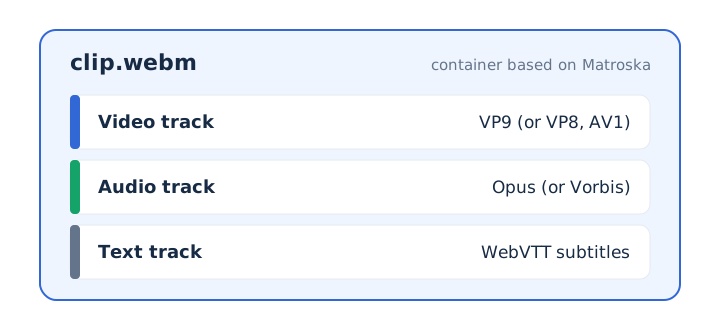
A WebM file is an open, royalty-free media file for the web that holds VP8 or VP9 video, Vorbis or Opus audio and WebVTT text tracks in a container based on Matroska. WebM defines both the container and the codecs allowed inside it. Most containers accept almost any codec, so this fixed list sets WebM apart.
Two signs mark a WebM file: the .webm extension and the media type video/webm. An audio-only WebM, such as a voice clip from a browser recorder, uses audio/webm instead.
What Does WebM Stand For?
WebM stands for Web Media, a name that says the format was built for video on a web page. HTML5 video and audio elements play a WebM file directly, and a modern browser needs no plug-in for it. A Chromebook gives a handy example: its screen recorder saves every video recording with the .webm file extension.
Who Developed WebM and When Was It Released?
Google sponsors WebM as an open-source project, and WebM was first introduced in 2010. The WebM Project developed the VP8 and VP9 video codecs, while the Xiph Foundation developed the Vorbis and Opus audio codecs. The WebM Project offers its code under a BSD license, and Google requires no royalty payments for any of the four codecs.
Four steps take WebM from its first release to the codecs it carries now.
- 2010: WebM arrives with VP8 video and Vorbis audio as its first two codecs.
- Later: VP9 video and Opus audio join the short list a WebM file may hold.
- WebVTT: subtitles and captions gain their own track, missing from the first WebM release.
- AV1: Google moves new codec work to the Alliance for Open Media, with no VP10 planned.
The WebM container can gain features, but never in a way that breaks older players. The VP8 and VP9 bitstreams are final.
Which Codecs Does a WebM File Use?
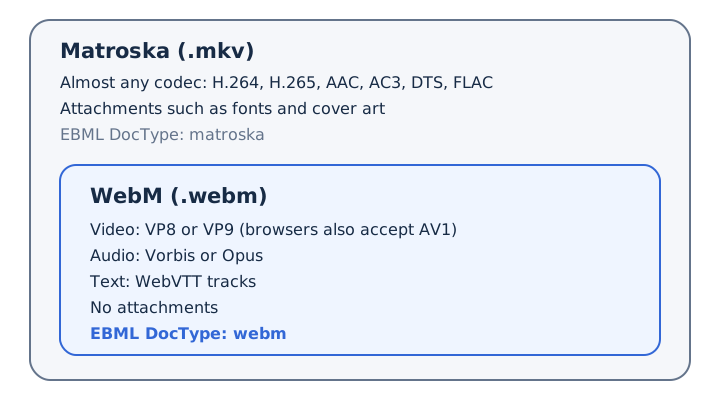
A valid WebM file uses VP8 or VP9 for video and Vorbis or Opus for audio, and browsers also accept AV1 video inside WebM. Neither VP8 nor VP9 limits frame rate or data rate.
The WebM rules allow four codecs, browsers add AV1, and WebVTT carries the words on screen.
| Track | Codec | Made by | Notes |
|---|---|---|---|
| Video | VP8 | WebM Project | Up to 16383 x 16383 pixels |
| Video | VP9 | WebM Project | Up to 65536 x 65536 pixels |
| Video | AV1 | Alliance for Open Media | Accepted by browsers inside WebM files |
| Audio | Vorbis | Xiph Foundation | The original WebM sound codec |
| Audio | Opus | Xiph Foundation | Runs from 6 to 510 kbps |
| Text | WebVTT | Text format, not a codec | Subtitles, captions and descriptions |
WebM leaves out AAC, MP3 and H.264 on purpose, so any valid .webm plays in any WebM player. Vorbis sound also turns up in OGG files, and Opus does too.
How Is WebM Related to Matroska and MKV?
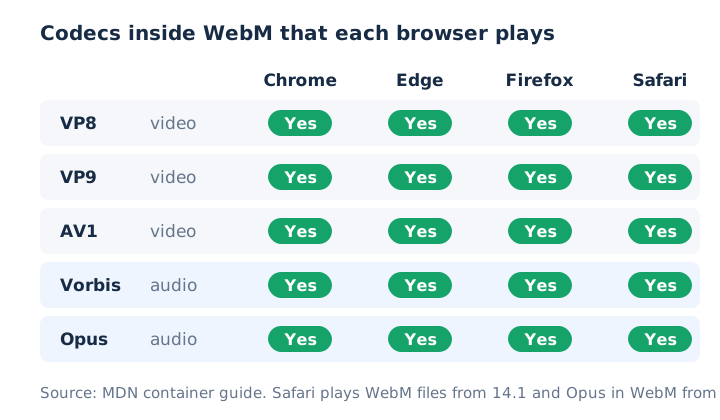
WebM is a restricted subset of the Matroska container, the same family as the .mkv file, with fewer allowed codecs, stream types and features. Both formats store their data as EBML elements. A WebM file declares the EBML DocType "webm", and a WebM reader must open only files that carry that DocType.
WebM got its own extension for a practical reason. Chrome plays a .webm that follows the WebM guidelines, but it may or may not decode an .mkv. One Matroska feature is missing on purpose: WebM doesn't support attachments.
An MKV with AAC sound or H.264 video breaks the WebM codec rules, so it can't simply be renamed. The MKV file guide covers the full Matroska format.
How Does WebM Stream Video Over the Web?
WebM streams by placing a seek index near the start of the file, so a player can start fast and jump ahead using only an ordinary HTTP server. The WebM guidelines set fast seeking and fast start as goals, and they ask muxers to treat these rules as requirements.
Four container rules make that quick start possible.
- SeekHead: an index element that tells the player whether the file has Cues and where.
- Keyframe-only Cues: a small seek index that lists video key frames and nothing else.
- Cues before Clusters: one seek reaches media the browser hasn't downloaded yet.
- Rising timestamps: every block and cluster time increases in order through the file.
VP8 and VP9 also handle real-time, low-latency video, such as video calls. WebRTC, the browser standard for live calls, supports WebM as well.
Where Is WebM Used?
WebM shows up in web video in HTML5 players, video sites such as YouTube, real-time video through WebRTC and screen recordings saved by ChromeOS. Most WebM files you meet come from one of five places.
- Web pages: HTML5 video and audio elements play WebM with no plug-in.
- Video sites: YouTube and other video websites deploy WebM widely for playback.
- Video calls: WebRTC supports WebM, and VP8 and VP9 handle low-latency video.
- Screen recording: the ChromeOS recorder saves each video recording as a .webm file.
- Archives: the Library of Congress held over 4,300 .webm files by May 2023.
FFmpeg converts video into WebM, if you want to make one yourself. You can also save just a video's sound as WebM audio, with Opus inside, on mp4tomp3.io.
What Are the Pros and Cons of WebM?
WebM is free, open and playable in every major browser, but some editors and older players need a converted copy. The table puts each strength beside a matching limit.
| Pros | Cons |
|---|---|
| Royalty-free under a BSD-style license | No AAC, MP3 or H.264 tracks |
| Plays in Chrome, Edge, Firefox and Safari | Some video editors need a converted copy |
| Fixed codec list means fewer playback surprises | Safari before 14.1 skipped WebM files |
| Built for fast start over plain HTTP | Older Windows Media Player needs extra components |
| No attached files inside the container | Sound is always lossy Vorbis or Opus |
Compatibility is the main trade-off. Some video editors ask you to convert a WebM before you edit it, and Windows Media Player 12 on Windows 7 or 8 needs the WebM Media Foundation Components.
MP4 usually carries H.264 video and AAC sound, while WebM carries VP8 or VP9 with Opus or Vorbis. The full WebM vs MP4 comparison covers the rest as its own guide.
Can a WebM File Contain a Virus?
A WebM file cannot carry an attached program, because WebM drops the attachments that Matroska allows. That leaves two real risks: a damaged or deliberately crafted file aimed at an outdated media player, and fake codec downloads that hide malware. RFC 9559, the Matroska specification, tells every reader to cope with malicious data, which is why updates matter.
These habits keep WebM playback safe.
- Keep your browser or media player updated so known bugs get fixed.
- Play a WebM in your browser instead of installing an unknown player.
- Never run a codec pack or file that a video asks you to install.
A .webm downloaded from a trusted site holds media only, with no program inside.
Which Browsers and Players Open a WebM File?
Chrome, Edge, Firefox, Opera and Safari open WebM right in the browser, VLC media player opens it too, and Android plays it natively. Support depends on the app and, for older software, on its version.
| App or device | Opens WebM | Since |
|---|---|---|
| Google Chrome | Yes | Chrome 6 |
| Mozilla Firefox | Yes | Firefox 4 |
| Opera | Yes | Opera 10.60 |
| Safari on Mac | Yes | Safari 14.1, Opus from Safari 15 |
| Android | Yes | VP8 from 2.3.3, VP9 from 4.4 |
| VLC media player | Yes | Listed by the WebM Project |
| Windows Media Player 12 | With an add-on | WebM Media Foundation Components installed |
Safari counts among the browsers that MDN marks as WebM-ready, on phones as well as computers. Since Safari 15, WebKit accepts Opus sound inside WebM, so a current iPhone plays a WebM in Safari. To play any WebM, drag the file into a Chrome or Firefox tab, or open it in VLC.
How Do You Turn a WebM Recording Into an Audio File?
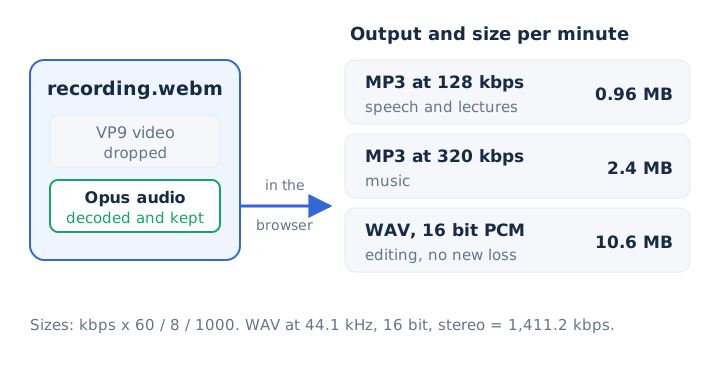
You turn a WebM recording into an audio file by converting its Opus or Vorbis sound track to MP3 or WAV, which keeps the voice or music and drops the video. This audio extraction works in the browser for every valid WebM with a sound track, because Chrome, Edge, Firefox and Safari all decode both of its audio codecs. MKV is less predictable, since its AC-3 or DTS tracks usually don't convert in a browser.
Choose the output and bitrate by what you'll do next with the sound.
- MP3 at 128 kbps: suits narration and lectures, at 0.96 MB per minute.
- MP3 at 320 kbps: suits music, at about 2.4 MB per minute.
- WAV: suits editing because it adds no new loss, about 10.6 MB per minute.
- WebM audio: keeps the sound as Opus for use in browsers and web apps.
Can a Browser Convert WebM to MP3 on Your Own Device?
Yes, mp4tomp3.io converts a WebM to MP3 inside the browser at 128, 192, 256 or 320 kbps, so the recording never leaves your device. The WebM to MP3 converter works in three steps.
- Choose the WebM file from your recordings or downloads folder.
- Pick an MP3 bitrate, and trim the clip if you need one part.
- Press convert, check the preview, then download the finished MP3.
Is the Sound in a WebM File Lossless?
No, the sound in a WebM file is lossy, because both allowed audio codecs, Vorbis and Opus, discard data to save space. Opus runs from 6 kbps for speech up to 510 kbps for stereo music, and every one of those rates uses lossy compression. A bit-for-bit copy needs a format such as FLAC or WAV, as the lossless audio guide explains.
Does Converting WebM Opus Audio to MP3 Lose Quality?
Yes, a little, because the Opus or Vorbis track is already lossy and MP3 adds a second lossy step. MP3 is lossy compression too, so it can't add back detail the first encode removed. Pick 192 kbps or more for music, 128 kbps for speech, and 320 kbps when you want the most detail MP3 allows. The Opus audio format guide explains how the codec spends its bits.
Can a WebM File Have No Audio Track?
Yes, a WebM screen recording made without a microphone or system sound has no audio track, and mp4tomp3.io says so instead of making a silent MP3. If a WebM plays with no sound, check whether the recorder captured audio before you convert it. The extract audio from video tool then pulls the sound from any WebM that has a track.
Is WAV Better Than MP3 for WebM Audio You Will Edit?
Yes, WAV is better for editing, because mp4tomp3.io converts the track to 16-bit PCM, which adds no further compression to the WebM sound. The cost is size: about 10.6 MB per minute at CD quality, against 2.4 MB for a 320 kbps MP3. Save the track with the video to WAV converter before audio editing starts.