MKV and MP4 both wrap video, sound and subtitles into one file, and the codecs inside decide how good it looks. Matroska, the open project behind MKV, and MPEG-4 Part 14, the ISO standard behind MP4, each work as a multimedia container rather than a video codec. A 2-hour 1080p film at 8 Mbps fills 7,200 MB in either one, and the file size grows only when you add another audio track, at 345.6 MB per 384 kbps stereo track.
MKV accepts more codecs and more tracks, yet its audio sounds the same as MP4's when the codec matches. MP4 wins for streaming and for video editing. MKV wins for recording and for a movie library. The advantages and disadvantages at the end settle which one is better for your job.
Are MKV and MP4 Containers or Codecs?
MKV and MP4 are both containers, not codecs. A container format holds the video stream, the audio and every subtitle stream in one file. A codec such as H.264 for video or AAC for sound compresses each stream, and the container uses that output as it is. Matroska's own technical guide states that Matroska isn't a video or audio compression format.
Moving the same streams from one container to the other leaves the picture and sound untouched, because the encoded bits don't change. The MKV file guide and the MP4 file guide explain each container on its own.
What Do the Names MKV and MP4 Mean?
MKV is short for Matroska Video, and MP4 is short for MPEG-4 Part 14, published as ISO/IEC 14496-14. Matroska uses the name of matryoshka, the Russian nesting dolls, while MP4 carries the name of the Moving Picture Experts Group. One name comes from an open project and the other from an international standard.
- MKV
- Matroska Video, an open project announced on 6 December 2002, built on EBML and published as IETF RFC 9559 in October 2024.
- MP4
- MPEG-4 Part 14, an ISO/IEC standard first released in October 2001, revised in 2003 and extended from Apple's QuickTime File Format.
EBML stands for Extensible Binary Meta Language. Matroska also defines .mka for audio only, .mks for subtitles only and .mk3d for 3D video. The MP4 family adds .m4a for audio, .m4v for video and .m4b for audiobooks.
What Is the Difference Between MKV and MP4?
MKV is an open container that accepts almost any codec and any number of tracks. MP4 is an ISO standard container with fewer widely supported codecs, and it plays on far more devices, browsers and upload sites. Matroska favors flexibility, and MPEG-4 Part 14 favors reach. This comparison table lines up eight attributes, from the standard and subtitle format to chapters and error resilience.
| Attribute | MKV | MP4 |
|---|---|---|
| Standard | Matroska, IETF RFC 9559 | ISO/IEC 14496-14 |
| Video codecs | H.264, H.265, AV1, VP9 and more | H.264, H.265, AV1 |
| Audio codecs | Almost any, including DTS, TrueHD, FLAC | Usually AAC; also MP3, ALAC, FLAC, Opus |
| Subtitles | SRT, ASS, PGS, VobSub | MPEG-4 Timed Text |
| Tracks | No fixed limit | Grouped alternate tracks, QuickTime style |
| Chapters | Yes, plus DVD-style menus | Yes, in .m4b files |
| Damaged file | Playback can recover | Cut-off file may not play |
| Browsers | Not in MDN's container list | All browsers |
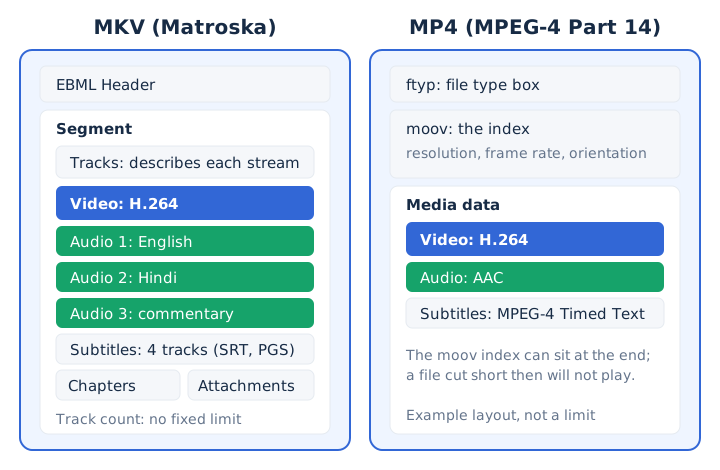
The six answers below go deeper on the attributes that decide most choices.
Is MKV Better Quality Than MP4?
No, MKV is not better quality than MP4: the same H.264 or H.265 video at the same bitrate looks identical in either container, because the container only stores the encoded stream. Picture quality comes from the codec, the bitrate and the encoder settings.
FFmpeg's documentation describes copying a stream from one file to another without decoding or encoding it, so a container change keeps every packet. When an MKV looks sharper than an MP4 of the same film, the MKV holds a higher bitrate or a different encode. The video bitrate guide shows how bitrate shapes the picture. So MKV doesn't reduce quality, and it doesn't raise it either.
Why Is an MKV File So Big?
An MKV file is big because of what it carries, a high video bitrate and often several audio and subtitle tracks, not because Matroska adds weight. File size equals bitrate times duration, so the same streams weigh the same in both containers.
The four files below share one 2-hour 1080p video stream at YouTube's recommended 8 Mbps.
| File | What is inside | Size |
|---|---|---|
| Video track only | 1080p at 8 Mbps for 2 hours | 7,200 MB |
| MP4, 1 audio track | Same video plus 384 kbps stereo | 7,545.6 MB |
| MKV, 1 audio track | The same two streams | 7,545.6 MB |
| MKV, 3 audio tracks | Two extra language tracks added | 8,236.8 MB |
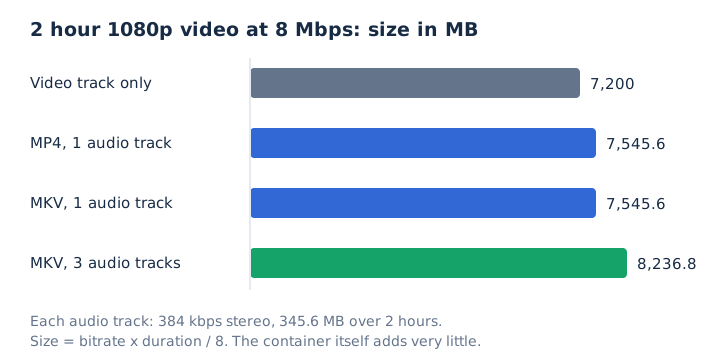
Each audio track at 384 kbps adds 2.88 MB per minute. The two extra tracks make that MKV about 9% bigger than the MP4. Muxing overhead, the control data a container adds around the streams, stays small at high bitrates, and Matroska generally needs the least of the common containers.
Which Video and Audio Codecs Fit in MKV and MP4?
MKV accepts nearly every codec in use, while MP4 favors a smaller set that players widely support. The two codec lists overlap more than their reputations suggest.
- Video in both: H.264, H.265 (HEVC), AV1 and VP9 fit in an MKV and in an MP4.
- Audio in both: AAC, MP3, FLAC, Opus and Apple Lossless can sit inside either container.
- Common in MKV: Matroska maps DTS, Dolby TrueHD, Vorbis, PCM, Theora and FFV1 to its own codec IDs.
- Subtitles: MKV takes SRT, ASS and PGS, while MP4 stores MPEG-4 Timed Text.
The MP4 Registration Authority does register codes for AC-3, Enhanced AC-3, DTS and FLAC inside MP4. Most registered codecs aren't widely supported by MP4 players, though, so an MP4 with DTS sound may not play where an AAC one does. The MKV file guide's codec list names every Matroska codec ID.
How Do MKV and MP4 Handle Subtitles and Extra Audio Tracks?
MKV is built for many tracks: Matroska allows an unlimited number of audio and subtitle streams in one file, and a FlagDefault marker tells the player which ones to pick first. Each language track sits beside the others, and you switch between them in the player.
MKV keeps soft subtitles in SRT text, ASS styled text or PGS images from Blu-ray discs. MP4 stores subtitles as MPEG-4 Timed Text. MP4 grew out of Apple's QuickTime File Format, which groups alternate tracks, such as the same sound in different languages, and plays one of them.
Chapters work in both. Matroska supports chapter entries and DVD-style menus, and MP4 audiobooks in .m4b files carry chapter markers.
Which Format Survives a Damaged File Better, MKV or MP4?
MKV survives damage better: Matroska is designed to recover playback even when part of the stream is damaged. An MP4 whose moov atom sits at the end can't play if the file is cut short. MP4 uses the moov atom as its index for resolution and frame rate.
A recording that stops without a clean finish, after a crash or a power cut, leaves a truncated file. A truncated MKV still plays up to the break, but a truncated MP4 with its index missing won't open. Matroska's error resilience improves the odds; it doesn't promise that every damaged file plays.
Which Plays on More Devices, MKV or MP4?
MP4 plays on more devices: every major browser supports the MP4 container, YouTube lists MP4 as an upload format, and Android plays MP4 for H.264, H.265 and AV1 video. MKV support is narrower but real.
VLC media player opens MKV on Windows, Mac and Linux, and Android lists Matroska for H.264, H.265, VP8, VP9 and AV1 video.
A hardware player such as a smart TV or a car screen may need a transcoded copy, because many hardware players don't play MKV directly. In a web browser and on Android, support also depends on the codec inside, not only on the container. Separate guides on opening an MKV on a Mac and on an iPhone cover Apple devices.
See what an MP4 file is for the codecs most players expect.
Is MKV Audio Better Than MP4 Audio?
No, MKV audio is not better by itself: sound quality depends on the audio codec and its bitrate, so a FLAC or AAC track sounds the same in an MKV as in an MP4. The real difference is which audio codec each file tends to carry.
MKV maps surround formats such as DTS, Dolby TrueHD and AC-3 directly, while an MP4 usually carries AAC. Both containers can carry lossless FLAC and Apple Lossless. The lossless audio guide explains what those formats keep.
That difference matters when you only want the sound. A browser converter reads AAC, Opus, Vorbis, MP3 or FLAC tracks, while MKV files with AC-3 or DTS sound usually don't convert in the browser.
Which Is Better for Streaming, MKV or MP4?
MP4 is better for streaming. HTTP Live Streaming accepts media segments in four formats only: MPEG-2 Transport Stream, fragmented MP4, packed audio and WebVTT, per RFC 8216. Matroska isn't among them.
MDN lists MP4 and WebM as containers that every web browser supports, and it names Matroska only as the base of WebM. WebM is the web form of Matroska, so browsers do play that subset. YouTube's list of supported upload formats includes MP4 and WebM but not MKV. Matroska can still stream over HTTP and local networks, which suits a home media server more than a public website.
Should You Record Video in MKV or MP4?
Record in MKV when a crash could cut the recording short. OBS Studio recommends MKV because an MKV doesn't corrupt the whole file when recording stops without a graceful finish. An MP4 can write its moov atom at the end, so an interrupted screen recording in MP4 may never open.
OBS also has a built-in Remux Recordings command. It converts the finished MKV into an MP4 for editing or uploading, and a remux copies the streams without re-encoding them.
Is MKV or MP4 Better for Video Editing?
MP4 is better for video editing in most apps. Adobe states that an MKV file must be converted to MP4 or another supported format before Adobe Premiere can edit it. OBS describes its MP4 remux as a way to make recordings easy to use in the video editor of your choice.
A remux copies the video and audio streams as they are, so the MP4 you import starts at the same quality as the MKV.
Which Is Better for a Movie Library, MKV or MP4?
MKV is better for a master copy that keeps every language and subtitle track, while MP4 is better for the copies you watch on phones, tablets and TVs. A home media server can hold both, one for keeping and one for playing. Pick each copy by the job it has to do.
- Master copy with every track: MKV allows unlimited audio and subtitle tracks, plus chapters and menus.
- Copy for phones and tablets: MP4 is the container that most devices and every major browser read.
- Lossless surround sound: MKV maps DTS and Dolby TrueHD soundtracks, which MP4 players don't widely support.
- Long-term openness: MKV follows an open specification published by the IETF as RFC 9559.
What Are the Advantages and Disadvantages of MKV and MP4?
MKV wins on flexibility and error resilience, and MP4 wins on compatibility and streaming. Each container offers one strength at the cost of another.
| Format | Advantage | Disadvantage |
|---|---|---|
| MKV | Takes almost any video, audio or subtitle codec | Missing from MDN's browser list and YouTube's upload list |
| MKV | Unlimited tracks, chapters, menus and an open specification | Many hardware players and Premiere need a converted copy |
| MP4 | Plays in all browsers, on Android and on Windows | Fewer codecs work widely across MP4 players |
| MP4 | Native HLS segments and a listed YouTube upload format | A cut-off file with its index at the end won't play |
Windows has played MP4 natively since Windows 7 through Media Foundation, with H.264 and AAC decoders built in.
Which Is Better, MKV or MP4?
Neither is better in every case: choose MP4 to play, share, stream or edit a video, and choose MKV to record safely or to archive a film with every audio and subtitle track. The decision starts with playback.
If the file must open in a browser, on a phone or on an upload site, MP4 is the answer. For live recording, MKV protects the file, and an MP4 copy handles the sharing. For an archive with several languages or lossless surround, MKV holds it all.
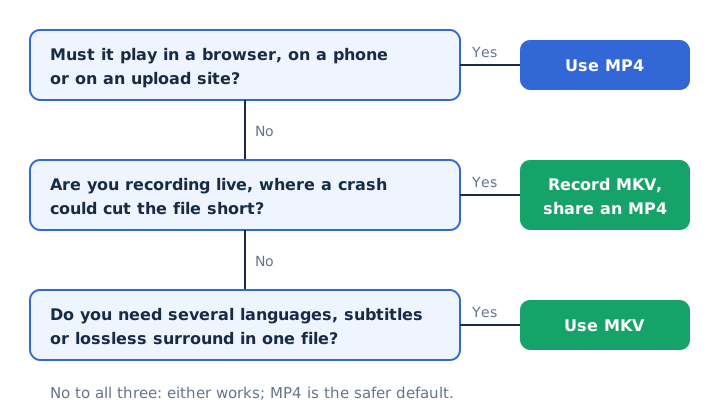
Quality doesn't decide it, because the codecs set the quality in both containers.
Do You Lose Quality When Converting MKV to MP4?
No, a remux from MKV to MP4 keeps the quality identical, because changing the container copies the video and audio packets without re-encoding them. FFmpeg calls this streamcopy.
Re-encoding is different: it decodes and compresses the stream again, which in most cases lowers quality. A remux also needs codec support in MP4 for every stream in the MKV, so a DTS or PGS track may block it. mp4tomp3.io doesn't convert video to video; it saves audio only.
Is MKV Better Than MP4 for 4K Video?
No, both containers carry H.265 (HEVC) and AV1 video, so the same 4K stream looks the same in either one. MKV only helps when the 4K file also needs many audio or subtitle tracks. A 4K file's size comes from its bitrate, exactly as in the 1080p example above. The video file formats guide compares the other common containers.
Is MOV Closer to MP4 Than MKV Is?
Yes, MOV is closer to MP4: MP4 was extended from Apple's QuickTime File Format, the format behind MOV, while MKV comes from the separate Matroska project. MP4 builds on the ISO Base Media File Format, itself derived from QuickTime. The MOV file guide covers Apple's format, and a separate MOV vs MP4 comparison weighs the two side by side.
Does It Matter Which Format You Pick If You Only Need the Audio?
No, mp4tomp3.io pulls the sound out of an MKV or an MP4 in the browser and saves it as MP3 at 128 to 320 kbps or as WAV, without sending the file to a server. The MKV to MP3 converter handles Matroska files, and MP4 files work the same way.
One catch applies to MKV: AC-3 or DTS sound usually won't convert in the browser, and with several audio languages the default audio track is the one converted. A 320 kbps MP3 takes 2.4 MB per minute and a WAV about 10.6 MB, against about 60 MB per minute for 1080p video. AAC, Opus or Vorbis to MP3 is a second lossy step, so pick 256 or 320 kbps.