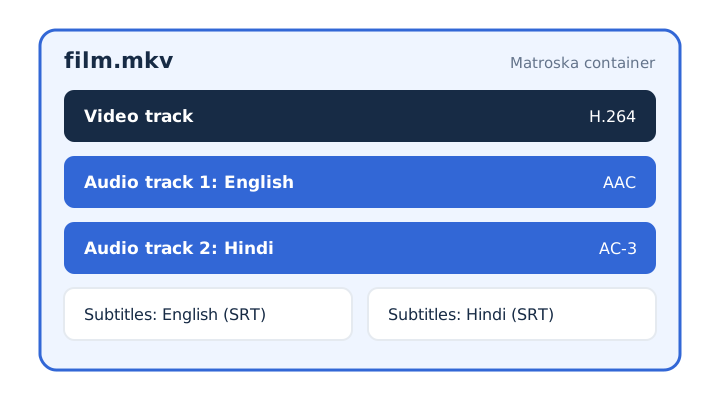
An MKV file packs a video track, several audio tracks and subtitles into one .mkv file. Matroska, the open container format behind it, takes its name from Russian nesting dolls and dates from December 2002. One MKV can hold many tracks, each with its own codec, inside a Segment of named elements. Four extensions share the format, from .mkv to .mka.
MKV wins on openness and crash safety but loses on device support. A file from a known source is safe to open in an updated player. Its audio track converts in a browser when it uses AAC, Opus, Vorbis, MP3 or FLAC, while AC-3 and DTS usually don't. MKV belongs to the video file formats family.
What Is an MKV File?
An MKV file is a Matroska video file, an open container that holds video, audio and subtitle tracks in one file. Matroska lets one file carry a complete movie with every language and subtitle it needs.
Matroska compresses nothing itself. A codec shrinks each stream first, and the container then wraps the finished streams and keeps them in step. Because Matroska isn't a codec, two MKV files can hold different video and audio codecs.
The Matroska specification is an open standard. Anyone can read it and use it for free, companies included.
Films and TV episodes use MKV to carry several languages in one file. OBS Studio recommends MKV for recordings, because a recording that stops abruptly doesn't corrupt the whole file.
What Does MKV Stand For?
MKV stands for Matroska Video. The name Matroska comes from matryoshka, the Russian nesting dolls that open to show a smaller doll inside. The picture fits the format: one file opens to show the tracks packed inside it.
On a computer, the .mkv file extension tells the system to open the file in a player that reads Matroska. VLC accepts Matroska among its input formats.
Who Created the MKV Format and When?
Steve Lhomme announced the Matroska project on 6 December 2002 as a fork of the Multimedia Container Format (MCF). The IETF later published Matroska as RFC 9559 in October 2024.
Matroska builds on EBML (Extensible Binary Meta Language), a binary relative of XML. EBML lets the format add new elements without breaking older players. WebM, the open web video container from the WebM Project, uses a subset of Matroska.
Three milestones trace the format from a fork to a formal internet standard.
- 2002: Steve Lhomme announces Matroska on 6 December as a fork of MCF.
- WebM: the WebM Project builds its web video container on a Matroska subset.
- 2024: the IETF publishes Matroska as RFC 9559, a Standards Track document, in October.
What Can an MKV File Hold?
An MKV file can hold any number of video, audio and subtitle tracks, plus chapters, tags and attached files. Matroska supports selectable streams, so a player lets you switch the audio language or the subtitle track while a film plays.
Six kinds of content can sit side by side inside a single MKV.
- Video tracks: one or more picture streams, and a stereoscopic 3D version uses the .mk3d extension instead.
- Audio tracks: several streams side by side, such as a second audio language or a commentary track.
- Subtitle tracks: text or image subtitles in formats such as SRT, ASS, WebVTT, PGS or VobSub.
- Chapters and menus: named jump points that let you skip to a scene, like the menu on a DVD.
- Tags: metadata such as a title, describing the whole file or one track, chapter or attachment.
- Attachments: extra files stored inside the MKV itself, which a careful player checks before using attachments.
Which Codecs Can an MKV File Contain?
An MKV file can contain almost any codec: H.264, H.265 (HEVC), AV1 or VP9 video, AAC, Opus, FLAC, AC-3 or DTS audio, and text or image subtitles.
Each track inside an MKV names its own codec, and the Matroska codec list groups them by track type.
| Track type | Common codecs | Also allowed |
|---|---|---|
| Video | H.264, H.265 (HEVC), AV1, VP9 | VP8, MPEG-2, Theora, FFV1 (lossless video) |
| Audio | AAC, AC-3 (Dolby Digital), E-AC-3, DTS, Opus | FLAC, Vorbis, MP3, ALAC, TrueHD, PCM |
| Subtitles | SRT (UTF-8 text), ASS | WebVTT, PGS, VobSub |
A player needs the codec as well as the container. That explains why one MKV plays on a device and another doesn't. MKV also stores lossless formats: FLAC keeps every bit of the audio, and FFV1 does the same for video.
How Is the MKV File Format Structured?
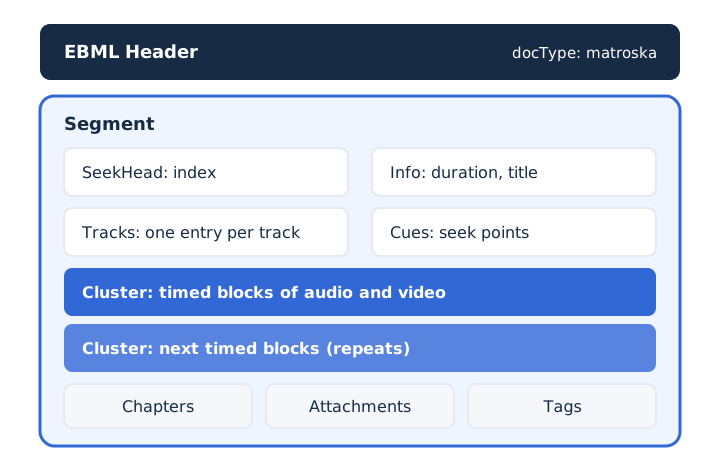
An MKV file starts with an EBML header that names the document type "matroska", followed by one Segment that holds every other element. The Segment groups the data into named elements, and the file uses many Cluster elements to store the media itself.
Six parts of the Segment do most of the work.
- SeekHead: an index that tells a player where each of the other top-level elements sits.
- Info: general details about the Segment, such as its duration, title and the app that wrote it.
- Tracks: the Tracks element, with one entry describing each video, audio or subtitle track in the file.
- Cluster: the compressed audio and video data, stored as timed blocks that repeat through the file.
- Cues: a table of seek points that lets a player jump to any moment quickly.
- Chapters, Attachments, Tags: menus and partitions, attached files, and metadata for tracks or the whole file.
Matroska lists error resilience among its design features: a player can recover playback even when the stream is damaged. OBS Studio relies on that trait when it recommends MKV for recordings.
What Are the MKV File Extensions?
Matroska uses four extensions: .mkv for video, .mka for audio only, .mks for subtitles only and .mk3d for 3D video. The .mkv extension is the most common of the four.
Each extension signals which tracks you can expect inside the file, and WebM adds a fifth, restricted form.
| Extension | What it holds | Media type |
|---|---|---|
| .mkv | At least one video track, usually with audio and subtitles | video/matroska |
| .mka | Audio only, such as MP3, AAC, AC3, DTS or PCM | audio/matroska |
| .mks | Subtitles only, with no video or audio tracks | None registered |
| .mk3d | Stereoscopic 3D video, a special case of .mkv | video/matroska-3d |
| .webm | The WebM subset with VP8 or VP9 video and Vorbis or Opus audio | video/webm |
An MKA file is the audio-only member of the family, an MKS file carries only subtitles, and an MK3D file holds 3D video. Older servers still send the deprecated media type video/x-matroska, which RFC 9559 keeps as an alias. A .webm file is a restricted Matroska file, and the WebM file guide covers that format on its own.
What Are the Pros and Cons of MKV?
MKV is open, holds unlimited tracks and survives recording crashes, but many hardware players don't play it directly. Compatibility is the price of all that flexibility.
The trade-offs of the open format line up side by side.
| Pros | Cons |
|---|---|
| Open and free specification | Many hardware players skip MKV |
| Unlimited audio and subtitle tracks | Film audio (AC-3, DTS) needs codec support |
| Chapters, menus and tags | Some video editors need a converted copy |
| Recording survives a crash | Some Windows players need a codec pack |
| Lossless audio and video allowed | Browsers usually skip AC-3 and DTS sound |
FLAC gives MKV real lossless audio, so a backup copy keeps the original sound. Is MKV better than MP4? The choice comes down to tracks and codecs against device support, and the MKV vs MP4 comparison covers it in full.
Is an MKV File Safe to Open?
Yes, an MKV file from a known source is safe to open in an up-to-date media player. The container holds media, and the real risks sit in malformed data and in attachments.
Can an MKV file contain a virus? RFC 9559 warns that the attachments element can store any file, including executable data, so a player should check attachments before it uses them. The same specification requires players to cope with malicious data, which is why updates matter. MKV playback stays safe with a few simple habits.
- Keep your media player updated, since players must cope with malicious data in files.
- Download players such as VLC only from the developer's own official website.
- Never install a program or codec pack that a downloaded video asks you to run.
RFC 9559 puts the duty to check attachments and reject malicious data on the player, so the player is where malware gets stopped.
Which Devices and Apps Support MKV?
Computer players such as VLC media player open MKV on Windows, Mac and Linux, while many TVs and other hardware players need a converted copy or an extra player.
Support for MKV splits by the kind of device you use.
- Computers: VLC media player and other free players open MKV on Windows, Mac and Linux.
- Screen recording: OBS Studio recommends MKV as its recording format, because an abrupt stop spares the file.
- TVs and hardware players: many skip MKV, so a smart TV may need a converted copy.
- Phones: support depends on the player app, so check the app before you copy a film.
Playback on Apple devices has its own step-by-step guides: opening an MKV file on a Mac and playing an MKV file on an iPhone.
How Do You Get the Audio Out of an MKV File?
You get the audio out of an MKV by converting its sound track to MP3 or WAV, which keeps the audio and drops the video and subtitles. The codec of that sound track decides whether audio extraction works in a browser, not the .mkv extension.
The right output depends on what you plan to do with the sound.
- MP3 at 128 kbps: suits speech and lectures, and uses about 0.96 MB per minute.
- MP3 at 320 kbps: suits music, and uses about 2.4 MB of space per minute.
- WAV: suits editing because it adds no new loss, at about 10.6 MB per minute.
A higher bitrate keeps more detail, while a lower bitrate saves space.
Can You Convert an MKV to MP3 Without Uploading It?
Yes, mp4tomp3.io converts an MKV to MP3 inside the browser at 128, 192, 256 or 320 kbps, so the file never leaves your device. The MKV to MP3 converter works in three steps.
- Choose the MKV file on the page, or drop it anywhere on the converter.
- Pick an MP3 bitrate from 128 to 320 kbps, and trim the clip if needed.
- Convert the file, then download the finished MP3 straight from your browser.
Does Every MKV Audio Track Convert in a Browser?
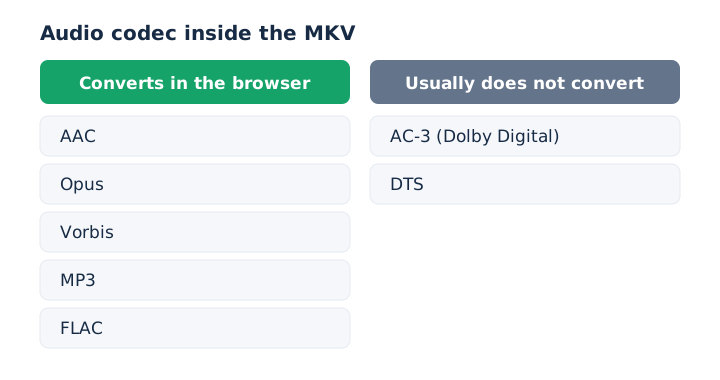
No, an MKV converts in the browser when its sound is AAC, Opus, Vorbis, MP3 or FLAC, while AC-3 (Dolby Digital) and DTS tracks usually do not. When the browser can't read a track, the page shows a message right away instead of a stuck conversion.
Matroska files in the WebM style carry Opus or Vorbis, and both convert. Movie files with AC-3 or DTS sound usually fail, so the tool to extract audio from video works best with clips in the WebM style.
Does Converting MKV Audio to MP3 Lose Quality?
Yes, a little, because MP3 is lossy and the MKV track is usually lossy already, so the conversion is a second lossy step. MP3 uses lossy compression, and so do AAC, Opus and Vorbis. Pick 256 or 320 kbps for music, and save to WAV when you plan to edit the sound. The MP3 bitrate guide explains how each MP3 bitrate trades size for detail.
Can You Save MKV Audio as WAV?
Yes, mp4tomp3.io saves the MKV sound track as a 16-bit PCM WAV file in the browser, which adds no further compression. WAV suits audio editing, but it takes about 10.6 MB per minute, against 2.4 MB for a 320 kbps MP3. The video to WAV converter converts MKV files the same way.
Does an MKV With Several Audio Languages Convert Every Track?
No, when an MKV has more than one audio language, the converter takes the default track. Each track carries a default flag, and a player uses that flag to pick a track automatically among the selectable streams. The result is a single audio file in the format explained in what MP3 is.