A MOV file wraps a video track, an audio track and often text into one file built on Apple's QuickTime File Format. The name comes from "movie", and the format dates from 1991. Nested atoms describe each track inside. The codec in each track, such as H.264 or Apple ProRes, sets picture quality and file size. One minute of ProRes 422 HQ takes about 1,650 MB, while the same minute as a 320 kbps MP3 takes 2.4 MB.
iPhone recordings, Mac screen recordings and video editors all produce this container format. It suits Apple devices best, and a crafted file can attack an outdated player. Windows and Android open it with the right app, and a browser can pull out its sound as MP3 or WAV. MOV is one entry in our guide to video file formats.
What Is a MOV File?
A MOV file is a QuickTime movie, a container file from Apple that holds video, sound, text and other tracks in one .mov file. Apple's QuickTime media framework uses the format natively, and a QuickTime movie can also carry still images and 3D models.
MOV is a container, not a codec. A codec such as H.264 compresses the picture, and a codec such as AAC compresses the sound. The container stores both tracks and keeps them in step.
Apple's QuickTime format became the basis of the MPEG-4 file format, so a MOV and an MP4 file look much alike inside. Apple still treats them as distinct file types. The full MOV vs MP4 comparison has its own page in this guide.
What Does MOV Stand For?
MOV is short for movie. Apple first used the format for movies, so the files took the name "QuickTime movie" and the .mov extension.
The official name is the QuickTime File Format, shortened to QTFF or QT. Its media type is video/quicktime, even when the movie holds only sound. The format also accepts the .qt extension, and a Mac tags the file internally with the type code MooV.
When Did Apple Create the MOV Format?
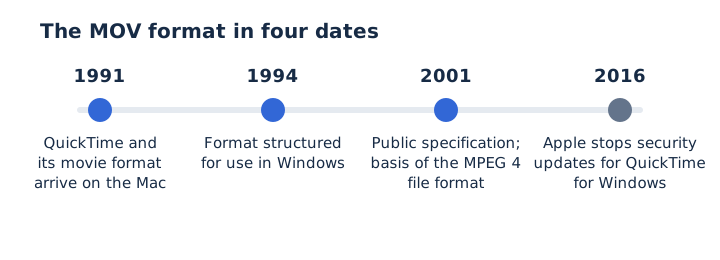
Apple introduced QuickTime and its MOV file format in 1991, then published the format specification in 2001. The Library of Congress records that the format was structured for Windows in 1994 and that it shaped MPEG-4 in the late 1990s.
Four dates trace the format from Mac software to the base of an ISO standard.
- 1991: QuickTime and its movie format arrive on the Mac as Apple's media framework.
- 1994: Apple structures the QuickTime format so Windows computers can use the same files.
- 2001: Apple publishes the specification, and ISO bases the MPEG-4 file format on QTFF.
- 2016: Apple stops security updates for QuickTime for Windows, and CISA advises uninstalling it.
The QuickTime framework itself is gone from macOS Catalina (version 10.15) onward. The file format lives on, because macOS still saves every screen recording as a .mov file.
How Does a MOV File Work?
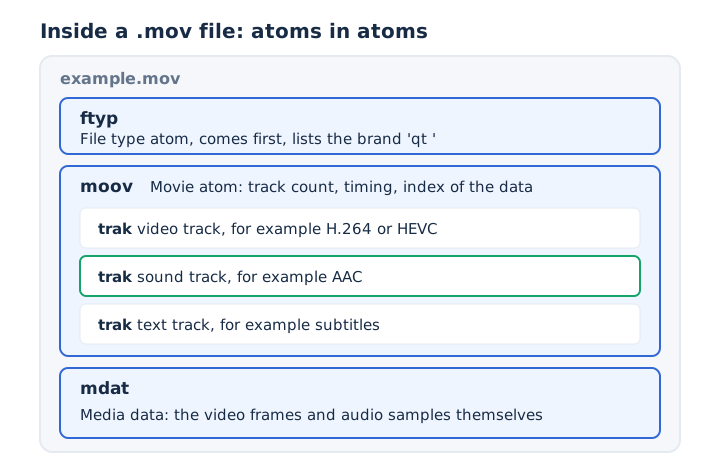
A MOV file stores everything in atoms, small blocks that each start with a size and a four-letter type, and an atom can hold other atoms. Apple's specification calls the nested ones container atoms and the innermost ones leaf atoms.
Three top-level atoms, plus the track atoms nested in one of them, carry the whole movie.
- ftyp: the file type atom comes first and names the format brand the file follows.
- moov: the movie atom holds the track count, the timing and an index of the data.
- trak: each track atom describes one video, sound or text track inside the movie atom.
- mdat: the media data atom stores the actual video frames and groups of audio samples.
A genuine MOV lists the brand qt (qt plus two spaces) in its ftyp atom. Apple notes that an MPEG-4 file renamed with the .mov extension is a common cause of open errors in QuickTime.
Apple's specification sets one fixed rule: the ftyp atom, when present, comes before every other significant atom. The moov atom keeps only the description, and a player needs it to make sense of the samples in mdat. An atom works like a box in the MP4 standard, which is why the two formats look so alike from the inside.
Which Codecs Can a MOV File Contain?
A MOV file can contain H.264, HEVC, ProRes or MPEG-4 video, and AAC, MP3, AC-3 or uncompressed PCM sound, among other codecs. Each track names its codec in a sample description, a record Apple's specification defines for every track.
The codecs a track can declare fall into three groups by track type.
| Track type | Common codecs | Also allowed |
|---|---|---|
| Video | H.264, HEVC (H.265), Apple ProRes 422 and 4444 | MPEG-4 video, Motion JPEG, DV, PNG frames |
| Sound | AAC, uncompressed PCM at 16, 24 or 32 bits | MP3, AC-3, E-AC-3, IMA 4:1 |
| Text | Subtitles and other text tracks | Timecode tracks and timed metadata tracks |
An iPhone 7 or later records HEVC video unless you choose Most Compatible in the Camera settings, which switches new videos to H.264. Apple's recording framework writes those streams into a QuickTime movie file. A player needs the codec as well as the container, so an older device can open a MOV yet stall on its HEVC track.
Is MOV Video Higher Quality?
No, not by itself: a MOV container compresses nothing, so the codec and its bitrate set the video quality. An H.264 track at the same bitrate looks the same in a MOV as in an MP4.
MOV got its high-quality name from editing suites. Editors save Apple ProRes inside MOV, and Apple describes ProRes 422 HQ as visually lossless. The Library of Congress prefers ProRes 422 HQ or ProRes 4444 in a QuickTime wrapper for archived video.
A MOV looks better than another file only when it carries a heavier codec at a higher data rate. Which of MOV and MP4 suits your project is the question the MOV vs MP4 page answers.
Why Are MOV Files So Large?
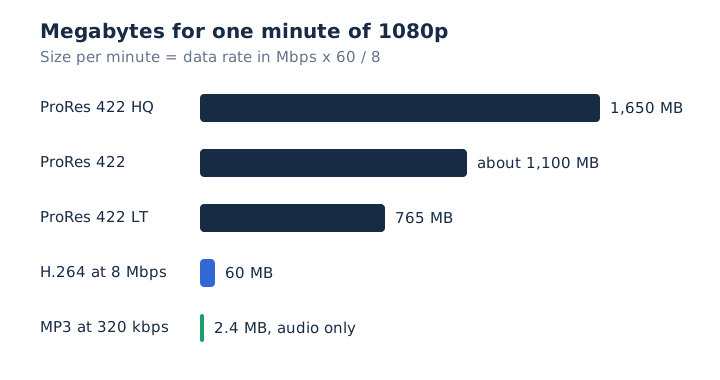
MOV files grow large when they hold an editing codec such as ProRes: one minute of 1080p ProRes 422 HQ fills about 1,650 MB, while the same minute of 1080p H.264 at 8 Mbps fills about 60 MB. The codec sets the data rate, and the data rate sets the file size: one minute equals the Mbps figure times 60, divided by 8.
Apple's published ProRes rates and the 8 Mbps rate YouTube recommends for 1080p give these sizes for one minute.
| Track | Data rate | Size per minute |
|---|---|---|
| ProRes 422 HQ | 220 Mbps | About 1,650 MB |
| ProRes 422 | 147 Mbps | About 1,100 MB |
| ProRes 422 LT | 102 Mbps | About 765 MB |
| H.264 1080p | 8 Mbps | About 60 MB |
| MP3 audio | 320 kbps | About 2.4 MB |
ProRes 422 HQ runs at 27.5 times the data rate of the 8 Mbps file. An iPhone keeps its MOV files smaller with HEVC, which Apple says compresses better than H.264. The sound track is a tiny share of any MOV: as a 320 kbps MP3, one minute of it takes 2.4 MB.
What Are MOV Files Used For?
MOV files hold phone and Mac recordings, professional edits in ProRes, and archived video masters. Apple's apps and frameworks write the format by default in several places.
Four everyday jobs keep the format in use.
- iPhone video: Apple's recording API on iPhone writes video and sound into QuickTime movie files.
- Screen recording: macOS saves every screenshot as PNG and every screen recording as a .mov file.
- Video editing: ProRes inside MOV keeps picture quality steady through many rounds of re-encoding.
- Archiving: the Library of Congress prefers ProRes in a QuickTime wrapper for file-based video.
A .mov file on an iPhone holds HEVC video from iPhone 7 onward, or H.264 when Most Compatible is on. For archiving and video editing, the heavier ProRes codec is the usual reason to keep MOV as the master copy.
What Are the Pros and Cons of MOV Files?
MOV holds many track types and pro codecs and fits Apple devices natively, but ProRes files are huge, browser support is thin and Android leaves the format off its list.
The strengths and limits line up side by side in this table.
| Pros | Cons |
|---|---|
| Video, sound, text and 3D tracks in one file | ProRes files fill storage fast |
| Pro codecs such as Apple ProRes | Limited browser support, per MDN |
| Native to Apple devices and apps | Missing from Android's supported formats list |
| Documented by Apple, basis of MPEG-4 | Proprietary format owned by Apple |
MOV offers editing strength at the cost of compatibility. MOV suits capture and editing on a Mac or iPhone, and a format with wider device support suits sharing.
Can a MOV File Contain a Virus?
A MOV file carries media, not a program, but a crafted MOV can attack an old, unpatched media player. In April 2016, CISA warned that QuickTime for Windows had a moov atom flaw that could let remote attackers take control of a PC, and Apple no longer patched it.
CISA's only fix was to uninstall QuickTime for Windows. Apple's own page adds that recent Windows media programs no longer use QuickTime. Three habits keep a MOV file from turning into a malware carrier.
- Keep your media player and operating system on the latest security update.
- Uninstall QuickTime 7 for Windows; Windows and VLC already read MOV files.
- Open MOV files only from senders and sites you know and trust.
Which Apps and Devices Open a MOV File?
Apple devices open MOV in QuickTime Player, Windows reads it through built-in MPEG-4 support and VLC, and Android needs a third-party player. MOV isn't Apple-only, even though Apple created it.
Support depends on the device in your hand.
- Mac: QuickTime Player opens MOV files and records the screen straight to .mov.
- Windows: Media Foundation reads .mov files since Windows 7, and VLC media player plays them.
- Android: Android's supported formats list leaves MOV out, so you need a player app.
- Browser: MDN lists MOV playback only for older Safari versions and the QuickTime plugin.
When a MOV refuses to open, check the codec first. An older Apple device may struggle with HEVC video recorded at a high resolution or frame rate. The Export As option in QuickTime Player re-saves such a video as H.264. Opening a MOV on Android step by step has its own guide in this series.
How Do You Get the Audio Out of a MOV File?
You get the audio out of a MOV by converting its sound track to MP3 or WAV, which keeps the sound and drops the video and text tracks. Audio extraction depends on the codec of that sound track, so a MOV file converter uses the audio codec, not the .mov extension, to decide.
Pick the output by what the sound is for.
- MP3 at 128 kbps: voice notes and talks, about 0.96 MB per minute.
- MP3 at 320 kbps: music, the top MP3 bitrate, 2.4 MB per minute.
- WAV: editing with no new loss, about 10.6 MB per minute.
Can You Convert a MOV to MP3 on an iPhone or Mac?
Yes, mp4tomp3.io converts a MOV to MP3 at 128, 192, 256 or 320 kbps inside Safari or any browser on an iPhone or Mac, and the file never leaves the device. The MOV to MP3 converter works in three steps.
- Choose the MOV from Photos or Files, or drag it onto the page.
- Keep 192 kbps or pick another MP3 bitrate, and trim if needed.
- Press Convert to MP3, preview the audio and download the file.
Does Every MOV Sound Track Convert in a Browser?
No, a MOV converts in the browser when its sound is AAC, MP3, Opus, Vorbis or FLAC, so a MOV with another codec such as AC-3 may not. The browser decoder does the reading, and the QuickTime format allows more than one audio codec that the converter doesn't read.
When a track is unreadable, the page shows a message right away instead of a stuck conversion. The same rule applies when you extract audio from video of any type.
Does a MOV to MP3 Conversion Reduce Sound Quality?
Yes, slightly, because the MOV sound is usually lossy AAC and MP3 is lossy too, so the conversion is a second lossy step. Lossy compression can't restore detail the first encoder removed. Pick 256 or 320 kbps for music, since the MP3 standard sets 320 kbps as its highest rate, and choose WAV when you plan to edit. The AAC audio format guide explains how the original track was compressed.
Can You Save the Audio From a MOV as WAV?
Yes, mp4tomp3.io saves the MOV sound track as a 16-bit PCM WAV file in the browser, which adds no further compression. That WAV takes about 10.6 MB per minute, against 2.4 MB for a 320 kbps MP3. It suits audio editing, where every pass should start from clean samples. The video to WAV converter converts a MOV the same way it converts an MP4.
Does Renaming a .mov File to .mp3 Convert It?
No, changing the extension only renames the file; the video and AAC sound inside stay as they are, so a player may refuse it. Microsoft notes that a new file extension doesn't convert a file to another format. A real MP3 file needs the sound decoded and put through MP3 encoding, which a converter does. Read what an MP3 is to see what that encoding produces.