MOV and MP4 both wrap video, sound and metadata in the same kind of box structure. Apple's QuickTime File Format defines MOV, and MPEG-4 Part 14, an ISO standard, defines MP4. Each one works as a video container, and the codec inside sets quality and file size: an 8 Mbps H.264 minute takes 60 MB in either file, while a ProRes 422 HQ minute in a MOV takes 1,650 MB.
The two formats aren't identical, though they share one design and four codecs. MOV is not lower or higher quality by itself, and it is not Apple only. MOV suits ProRes editing, while MP4 wins on YouTube, social media and streaming. A pros and cons table and a verdict close the comparison.
Are MOV and MP4 the Same Format?
No. MOV and MP4 are two distinct container formats with nearly the same structure. Apple's QuickTime File Format became the basis of the MPEG-4 file format, yet Apple's own specification calls them distinct file types. MDN adds that the two are not quite interchangeable.
Both files are containers, not codecs. A container format stores the streams, and a codec such as H.264 for video or AAC for sound does the compressing. That's why one distinct file type can hold the same encoded stream as the other. The MOV file guide and the MP4 file guide cover each format on its own.
How Do the MOV and MP4 File Formats Work?
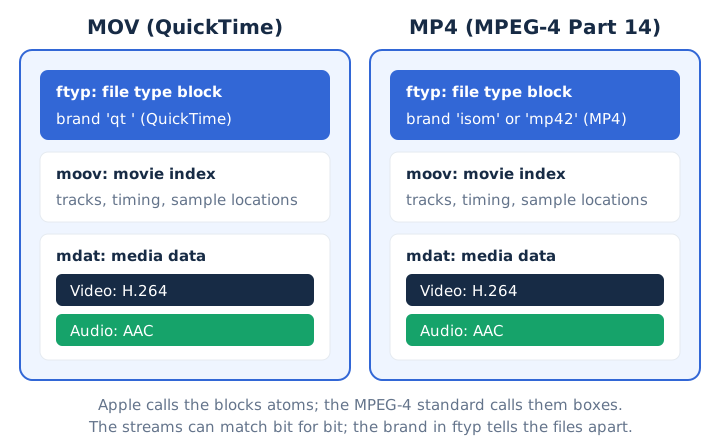
Both formats store media in nested blocks that Apple calls atoms and the MPEG-4 standard calls boxes. A file type block (ftyp) comes first, the moov atom indexes the tracks, and a media data block (mdat) holds the frames and sound samples. Apple states that an atom is functionally identical to a box in the ISO specifications, and its spec requires ftyp to be the first significant atom when present. Three blocks do the same job in both files, and one label tells them apart.
- ftyp
- The first block in the file. It names the brand: 'qt ' marks a QuickTime movie, and 'isom' or 'mp42' marks an MP4 file.
- moov
- The movie atom indexes every track, its timing and its sample locations. A player can't read the media data without this index.
- mdat
- The media data itself. It stores the video frames and the groups of audio samples that the moov index points to.
QuickTime arrived in 1991. MP4 version 1 followed in 2001, and version 2, ISO/IEC 14496-14:2003, replaced it in 2003. A MOV carries the .mov extension and the MIME type video/quicktime, while an MP4 carries .mp4 and video/mp4.
What Is the Difference Between MOV and MP4?
MOV is Apple's proprietary format for QuickTime movies, and it also stores editing codecs such as Apple ProRes and uncompressed PCM sound. MP4 is the ISO/IEC 14496-14 standard container built around H.264, HEVC and AAC, and it plays in every major web browser. ISO/IEC 14496-14 sets the MP4 rules, while Apple sets the MOV rules. Seven attributes split the files, from the owner to the MIME type.
| Attribute | MOV | MP4 |
|---|---|---|
| Owner | Apple, proprietary but documented | ISO/IEC 14496-14 standard |
| First release | 1991 | 2001 |
| Brand in ftyp | 'qt ' | 'isom', 'mp41' or 'mp42' |
| MIME type | video/quicktime | video/mp4 |
| Typical video | HEVC or H.264; ProRes from editors | H.264, HEVC or AV1 |
| Typical audio | AAC, or uncompressed PCM | AAC |
| Browsers (MDN) | Older Safari only | All browsers |
Quality, size, codecs and devices are the four attributes that decide most choices, and each one gets its own answer next.
Is MOV Higher Quality Than MP4?
No, MOV is not higher quality by itself. The same H.264 or HEVC stream at the same bitrate looks identical in a MOV or an MP4, because the container only stores the encoded video.
Editing exports create the "MOV looks better" idea. Editors save MOV files with Apple ProRes, which Apple describes as visually lossless through many generations of re-encoding. ProRes 422 runs at about 147 Mbps for 1080p, and ProRes 422 HQ at about 220 Mbps. An iPhone MOV holds HEVC or H.264 instead, and both codecs are lossy. The codec and the video bitrate set quality, not the extension.
Which File Format Is Smaller, MOV or MP4?
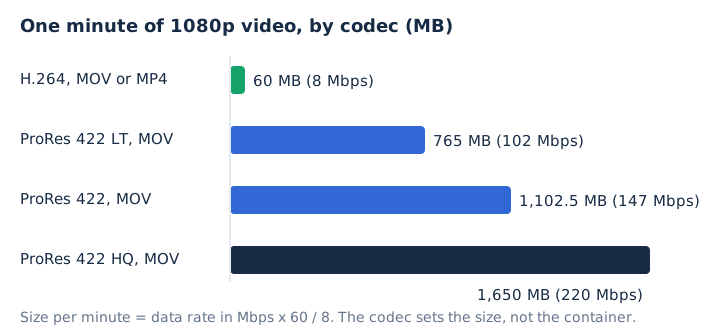
Neither container is smaller on its own. File size comes from the codec's data rate multiplied by the running time, so a 1080p H.264 minute at 8 Mbps fills 60 MB as a MOV or as an MP4. Four common 1080p encodes show the gap the codec creates.
| Video | Data rate | Size per minute |
|---|---|---|
| H.264 1080p, MOV or MP4 | 8 Mbps | 60 MB |
| ProRes 422 LT MOV | 102 Mbps | 765 MB |
| ProRes 422 MOV | 147 Mbps | 1,102.5 MB |
| ProRes 422 HQ MOV | 220 Mbps | 1,650 MB |
Each minute's size in MB equals megabits per second x 60 / 8. ProRes 422 HQ uses 27.5 times the data of the 8 Mbps file, so the codec, not the container, sets the size.
What Video and Audio Codecs Do MOV and MP4 Support?
The codec lists overlap: both containers carry H.264 and HEVC video with AAC or MP3 sound. MOV accepts Apple's editing codecs as well, and MP4 adds AV1. Four groups mark where the two lists meet and part.
- Video in both: H.264 and HEVC (H.265) play from a MOV or an MP4.
- Audio in both: AAC and MP3 sound tracks fit inside either container.
- Mostly MOV: Apple ProRes, Motion JPEG, DV, uncompressed PCM sound and timecode track data.
- Mostly MP4: AV1 video and MPEG-4 Timed Text subtitles belong to the MP4 side.
The MP4 Registration Authority lists the ProRes codes ap4h, apch and apcn under the QuickTime specification, which is why ProRes files are MOV files. AAC is the sound codec MP4 players support most widely, and the AAC audio guide explains how it works.
Which Format Is More Compatible, MOV or MP4?
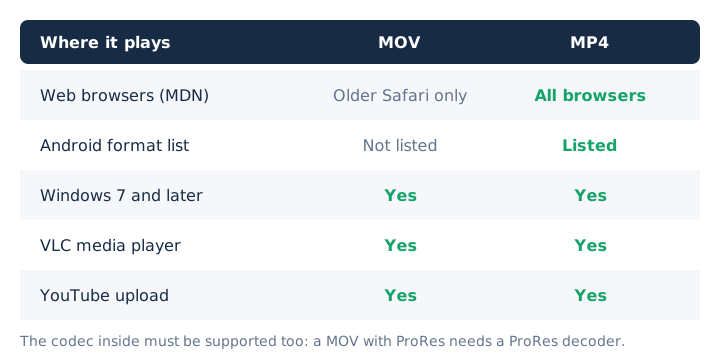
MP4 is more compatible. MDN lists MP4 as supported by all browsers and MOV only by older Safari, and Android's media format list names MP4 but not MOV.
MOV still reaches past Apple. Windows reads .mov files through Media Foundation since Windows 7, and VLC media player plays MOV on Windows, Mac and Linux. Support also depends on the codec inside: a MOV holding ProRes needs software that decodes ProRes. The MP4 file guide lists the devices that read MP4.
Is MOV Only for Apple Devices?
No, MOV is Apple's format but not Apple only. Windows has read .mov files natively since Windows 7, and VLC media player plays them on Windows, Mac and Linux.
MOV stays tied to Apple because Apple's recording API writes QuickTime movie files, so iPhone and Mac recordings arrive as MOV. The gaps sit outside Apple and Windows. Android's supported format list doesn't include MOV, and MDN lists MOV only for older Safari among browsers. The guide to opening a MOV file on Android covers that case step by step.
Which Format Is Better for Professional Video Editing?
MOV is better for professional editing when it carries Apple ProRes 422 HQ, a codec that stays visually lossless through many generations of decoding and re-encoding. The Library of Congress prefers ProRes in a QuickTime wrapper for file-based video. Post-production work such as colour grading benefits from that low generation loss.
ProRes requires far more storage: a 1080p ProRes 422 HQ minute is about 1,650 MB, against 60 MB for an 8 Mbps H.264 minute. An H.264 or HEVC MOV straight from an iPhone has no editing advantage over the same video in an MP4.
Is MOV or MP4 Better for YouTube and Social Media?
Both formats upload to YouTube, which lists .MOV and .MP4 among its supported file formats. An H.264 MP4 is the lighter upload: YouTube recommends 8 Mbps for 1080p, while a ProRes MOV of the same minute is 27.5 times larger.
YouTube accepts an iPhone MOV in HEVC or H.264 as it is. For social media apps beyond YouTube, an H.264 MP4 with AAC sound is the safe default, because every major browser and Android read it.
Which Is Better for Video Streaming, MP4 or MOV?
MP4 is better for video streaming. HTTP Live Streaming accepts MPEG-2 Transport Stream or fragmented MPEG-4 segments, and MDN lists the MP4 container as supported in every web browser, while MOV appears only for older Safari.
On a website, an MP4 plays in an HTML video element across browsers, and a MOV may not. One catch applies to MP4 too: a file whose moov atom sits at the end won't play if the download is cut short. The MKV vs MP4 comparison covers the other common container choice.
What Are the Pros and Cons of MOV vs MP4?
MOV offers native capture on Apple devices and Apple ProRes editing. MP4 wins for playback in browsers, on Android and through HTTP Live Streaming. Each format trades its strength for a weakness somewhere else.
| Format | Pros | Cons |
|---|---|---|
| MOV | Native to iPhone and Mac recording; holds ProRes and uncompressed PCM; documented by Apple | Proprietary format; older Safari only in MDN; missing from Android's list; ProRes files grow very large |
| MP4 | ISO standard; plays in all browsers, Android and Windows; works as HLS fragments; YouTube upload format | No ProRes support in common players; a cut-off file with the index at the end won't play |
The MOV cons column answers the usual question about its disadvantages: limited browser and Android support, plus very large ProRes files.
Is MOV or MP4 Better?
Neither wins every job. Keep MOV for footage you'll edit, especially ProRes, and use MP4 to share, upload, stream or play on Android and in browsers. For editing a master file or an archive you plan to re-edit, MOV with ProRes keeps the most detail.
For sharing and uploading, an H.264 or HEVC MP4 travels lighter. For playback on Windows or in VLC, either file works. Picture quality doesn't decide the choice, because the codec and bitrate set the quality, not the container.
Does Converting MOV to MP4 Reduce Quality?
No, not when the conversion only changes the container. Copying the H.264 or HEVC stream from a MOV into an MP4 moves the packets without re-encoding, so the picture stays identical. FFmpeg's documentation calls this a stream copy, which is a remux.
Re-encoding is the exception: it decodes and compresses the video again, and that lossy compression lowers quality in most cases. A ProRes MOV needs re-encoding for MP4, because MP4 players rarely read ProRes. The MOV file guide explains what each MOV holds.
Can You Change a .mov File to .mp4 by Renaming It?
No, renaming changes only the label. Microsoft states that changing a file name extension doesn't convert the file, and the file keeps its 'qt ' brand inside the ftyp block.
Apple documents the reverse case: an MPEG-4 file wrongly named .mov is a common source of file type errors. Some players open a renamed file anyway, because they read the contents rather than the name. The video file formats hub lists the other containers and their extensions.
Do MOV and MP4 Files Sound Different?
No, not when both carry the same AAC track, because the audio codec sets the sound, not the container.
Uncompressed PCM marks the one real difference. A MOV from editing software may hold uncompressed PCM sound, while an MP4 almost always holds AAC. Converting AAC to MP3 adds a second lossy step, so 256 or 320 kbps keeps the most detail, as the MP3 bitrate guide explains.
Can You Get MP3 Audio From Both MOV and MP4 Files?
Yes, mp4tomp3.io pulls the sound out of a MOV or an MP4 in the browser and saves it as MP3 at 128 to 320 kbps or as WAV, without sending the file to a server. Use the MOV to MP3 converter for MOV files and the MP4 to MP3 converter for MP4 files.
The tool reads AAC, Opus, Vorbis, MP3 or FLAC sound, and it can't open DRM-protected files. A 320 kbps MP3 fills 2.4 MB per minute and a WAV about 10.6 MB, far below the 60 MB per minute of 1080p video.