MP3 stores sound alone, while MP4 packs video, sound and subtitles into one multimedia container. Both names come from MPEG, and an MP4 can even carry MP3 audio inside it, which makes MP3 the audio-only format of the pair.
The file size gap is large: one minute takes 2.4 MB as a 320 kbps MP3 and about 60 MB as a 1080p MP4. Audio quality depends on the codec and bitrate, not the extension. The sections below check each difference against the standards, cover songs and cover art, correct four myths, and end with a chart for choosing a format.
Is MP3 Audio or Video?
MP3 is audio only: an MP3 file holds compressed sound in MPEG Audio Layer III frames and carries no video track. MP3 is the lossy audio coding format that shrinks a song to a fraction of its CD size, and its files use the audio/mpeg type.
An .mp3 file never contains an audio track next to a picture, because the format has no slot for one. The name of the MP3 player came from the format itself. In the 2000s, some devices sold as an MP4 player played other formats such as AMV, which added to the confusion.
Why Is It Called MP3 and MP4?
Both names come from the Moving Picture Experts Group (MPEG), but they point to two different standards. The two names break down this way.
- MP3
- MPEG-1 Audio Layer III, defined in ISO/IEC 11172-3, an audio coding format for compressed sound.
- MP4
- MPEG-4 Part 14, defined in ISO/IEC 14496-14, a multimedia container that holds video, audio and subtitles.
MP4 is not a newer version of MP3, and it uses a different standard. MP4 also does not mean "MPEG-4 AVC": AVC, also called H.264, is a video codec that an MP4 often carries. MP4 is the container format behind most phone videos and online clips.
What Is the Difference Between MP3 and MP4?
MP3 is an audio coding format that stores only sound, while MP4 is a container format that can hold video, audio, subtitles and images, so an MP4 is usually far larger. The comparison table below sets seven attributes side by side.
| Attribute | MP3 | MP4 |
|---|---|---|
| Type | Audio coding format | Multimedia container |
| Holds | Audio only | Video, audio, subtitles, images |
| Audio codec | MP3 | Usually AAC, can be MP3 or ALAC |
| Size per minute | 2.4 MB at 320 kbps | About 60 MB at 1080p |
| File extension | .mp3 | .mp4, .m4a, .m4v |
| MIME type | audio/mpeg | video/mp4, audio/mp4 |
| Standard | ISO/IEC 11172-3 | ISO/IEC 14496-14 |
How Do MP3 and MP4 Differ in What They Can Hold?
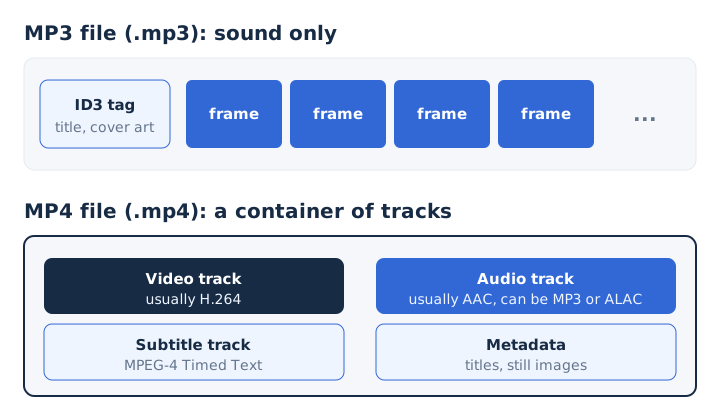
An MP3 holds one thing, compressed sound, while an MP4 can hold several synchronized tracks at once. Five kinds of content fit inside one MP4.
- Video track: the moving picture, most often compressed with the H.264 codec.
- Audio track: one or more sound streams, usually AAC, sometimes MP3 or ALAC.
- Subtitles: text captions stored as MPEG-4 Timed Text alongside the picture.
- Still images: cover pictures and thumbnails stored inside the same file.
- Metadata: titles, dates and other details that describe the file.
An MP4 can even carry MP3 audio as its sound track. An MP4 with no video track usually takes the .m4a extension. An MP3 carries tags such as title, artist and cover art, but no video. The MP4 format guide explains the container in full.
How Do MP3 and MP4 Differ in File Size?
An MP4 video is about 25 times larger than the same minute saved as a 320 kbps MP3. Size follows bitrate, and the four common cases compare like this.
| File | Bitrate | Size per minute |
|---|---|---|
| MP3 | 128 kbps | 0.96 MB |
| MP3 | 320 kbps | 2.4 MB |
| CD-quality WAV | 1,411.2 kbps | 10.6 MB |
| MP4 1080p | 8 Mbps | About 60 MB |
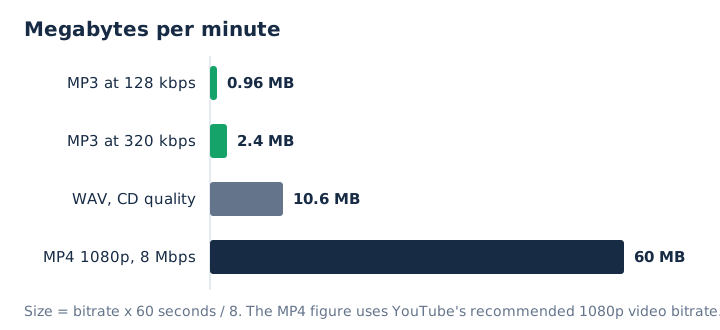
Work it through with two real cases. A 5-minute music video at 1080p fills about 300 MB as an MP4 and 12 MB as a 320 kbps MP3. A library of 100 four-minute songs needs 24 GB of storage as 1080p MP4 and 960 MB as 320 kbps MP3, which is 96% less.
The megabytes per minute come from bitrate, not from the extension. The bitrate guide shows the maths behind every figure in the table.
How Do MP3 and MP4 Differ in Compression?
MP3 is itself a lossy compression method, while MP4 compresses nothing by itself and relies on the codecs stored inside it. MP3 uses perceptual coding, which drops sounds the ear barely hears. A 128 kbps MP3 ends up about one eleventh the size of CD audio, according to the Library of Congress format description.
An MP4 hands compression to its codecs. Its sound is usually AAC, a lossy codec, but it can be Apple Lossless (ALAC), which keeps every bit. Its picture is usually H.264. The lossless audio guide explains what lossy compression removes and what lossless keeps.
How Do MP3 and MP4 Differ in Compatibility?
Both formats play almost everywhere today. MDN lists MP3 as supported by every major web browser, and it lists the MP4 container as supported by all browsers. Codec support is a separate question: a browser that opens the MP4 container still needs the codec inside it.
YouTube recommends MP4 as the upload container, so MP4 is the default for online video. Check the manual of an older car stereo or MP3 player before copying an MP4 to it. The device must list MP4 or AAC among its supported formats.
When Were MP3 and MP4 Released?
MP3 came first: its codec was introduced in 1991, while the MP4 file format first appeared in 2001 and its own standard, ISO/IEC 14496-14, was published in 2003. The .mp3 extension was chosen on 14 July 1995.
MP4 uses a structure that grew out of Apple's QuickTime file format. The ISO Base Media File Format took its structure from QuickTime, and MP4 builds on that base. Some pages give 1994 for MP3, but 7 July 1994 marks l3enc, the first software encoder, not the standard.
Can an MP3 File Have Video?
No, an MP3 file cannot hold video; it can hold only a still picture, such as album cover art, inside its ID3v2 tag. The ID3v2 tag stores that image in an APIC frame, short for "attached picture", with types such as front cover and back cover.
That picture is why a music app shows album artwork for an MP3. The artwork is an image in the tag, not a video track. A video with MP3 sound is an MP4, MKV or AVI file that carries an MP3 audio track.
Are Songs MP3 or MP4?
Songs come in both formats, and the extension tells you which. An .mp3 song holds only audio. An M4A song is an audio-only MP4, usually with AAC sound. A music video is an .mp4 with a video track next to the sound.
YouTube's upload settings name MP4 as the container, with AAC-LC or Opus audio and H.264 video. A YouTube music video is therefore an MP4, not an MP3. The M4A file guide covers how M4A compares with MP3.
When Should You Use MP3 Instead of MP4?
Use MP3 when you only need the sound and want the smallest file, because a 320 kbps MP3 is about 25 times smaller than 1080p video. Five everyday jobs suit MP3 better than video.
- Music library: fit 100 four-minute songs into 960 MB on a phone or player.
- Podcast and audiobook files: keep long spoken content small and easy to play anywhere.
- Voice recording: save lectures, interviews and meetings as sound without any wasted video.
- Ringtone: cut a short clip of a song into a small file.
- Sharing: send a song by email or chat without hitting size limits.
When Should You Use MP4 Instead of MP3?
Keep or choose MP4 when the picture matters, because only a container like MP4 keeps video, sound and subtitles in sync. These five jobs need the video track.
- Music video, film and TV: keep the visuals that go with the soundtrack.
- Screen recording: keep tutorials and presentations where viewers follow what happens on screen.
- Phone camera clips: keep family videos and events exactly as you filmed them.
- YouTube uploads: send MP4, the container that YouTube recommends for uploads.
- Original file: keep the source MP4 for later edits or new exports.
Is MP3 Outdated Now?
No, MP3 is not outdated: every major browser still plays it, and its patents expired, so MP3 has been patent-free in the United States since 16 April 2017. Technicolor's MP3 licensing programme with Fraunhofer IIS ended a week later, on 23 April 2017.
Newer codecs offer better efficiency. AAC, designed as the successor to MP3, generally sounds better at the same bitrate, and Opus is another modern option. That efficiency is why most MP4 files carry AAC. Wide browser support keeps MP3 the safest choice for sound that must play anywhere.
What Are the Common Myths About MP3 and MP4?
Four myths about MP3 and MP4 keep spreading, and each one fails against the published standards. Each misconception below sits next to its correction.
| Myth | Fact |
|---|---|
| MP4 is simply a newer, better version of MP3. | They are different standards: MP3 is an audio format, MP4 a container. |
| MP3 compresses audio without losing any quality at all. | MP3 is lossy: perceptual coding throws away sound the ear barely hears. |
| MP3 always sounds worse than the audio inside MP4. | The audio codec and bitrate decide quality: a 320 kbps MP3 holds up well. |
| MP4 stands for MPEG-4 AVC, the video standard. | AVC (H.264) is a video codec that an MP4 carries; MP4 is MPEG-4 Part 14. |
Which Is Better, MP3 or MP4?
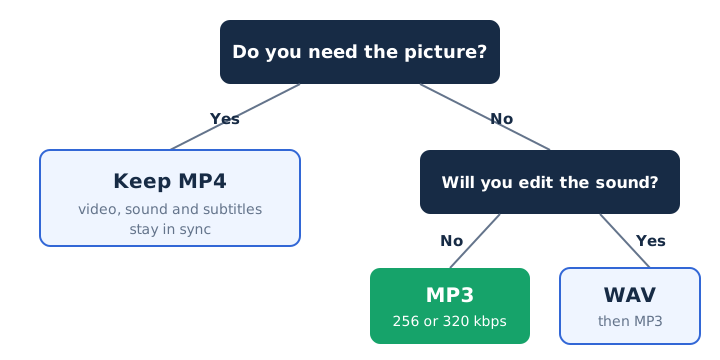
Neither wins in general: MP3 is better for sound alone and MP4 is better whenever you need the picture. The decision comes down to three questions about your file.
The first question is video content: if you will watch the file, keep the MP4. The second is storage space: MP3 saves about 96% against 1080p video. The third is audio editing: save WAV first if you will cut or mix the sound, then export MP3 at the end.
Should You Convert MP4 to MP3 to Save Space?
Yes, convert to MP3 if you only need the sound: a 320 kbps MP3 keeps the audio and cuts the size of a 1080p MP4 by about 96%. The MP4 to MP3 converter on mp4tomp3.io works inside the browser, so the file is never sent to a server. It lets you set the MP3 bitrate from 128 to 320 kbps and trim the clip first. Pick 256 or 320 kbps for music.
Is MP4 Better Than MP3 for Audio Quality?
No, an MP4 is not better by itself: its audio quality depends on the codec and bitrate inside it, and the container sets neither. An MP4 usually carries AAC, which beats MP3 at the same bitrate. A 320 kbps MP3 is the highest MP3 bitrate and suits music, and an MP4 with ALAC sound is lossless. The AAC guide explains how that codec compares.
Should You Save WAV Instead of MP3 If You Will Edit the Audio?
Yes, save the sound as WAV when you plan to edit it, because each new MP3 export loses more data, then export to MP3 at the end. The MP4 to WAV converter converts the sound to 16-bit PCM WAV that any audio editor opens. WAV costs space: CD-quality WAV takes about 10.6 MB per minute against 2.4 MB for a 320 kbps MP3.
Can You Turn an MP3 Into an MP4?
Yes, a video editor can wrap an MP3 in an MP4 with a still image, but this adds no real video and no audio quality. The MP4 container simply holds the MP3 or AAC sound plus a picture. The usual reason is uploading a song to a video platform that accepts only video files.