An AVI file interleaves small chunks of picture and sound inside one .avi file, so a video stream and an audio stream play in sync. Microsoft released the Audio Video Interleave container format in 1992 for Windows 3.1, and capture tools, editors and DV camcorders kept it alive. Inside, a RIFF structure labels every chunk: 00wb carries sound and 01dc carries compressed picture.
The codec sets the size, from 216 MB to 11.2 GB per minute. A 2 GB cap holds only about 10 minutes of DV, which marks AVI as a legacy format, yet Windows still opens it. VLC or FFmpeg pulls the sound out, because mp4tomp3.io does not read AVI today. AVI is one of the video file formats in our guide.
What Is an AVI File?
An AVI file is an Audio Video Interleave file, a Microsoft container built on RIFF that stores audio and video streams together for capture, editing and playback. Microsoft's AVI RIFF reference says most AVI files carry both an audio stream and a video stream, while a simple variant carries video alone.
AVI is a container, not a codec. The wrapper itself is plain, but the picture and sound inside use a codec such as DivX or PCM, and your player needs that codec to decode them. The word interleave describes the layout: the file alternates short chunks of sound and picture, so synchronized playback needs no long wait for data.
On a computer, the .avi extension tells Windows to hand the file to a video player that reads the AVI format.
How Are AVI Files Used?
People use AVI files for video capture, video editing and playback on Windows, for DV camcorder footage, and for master copies of a project. Microsoft wrote the format for applications that capture, edit and play back audio-video sequences.
Four jobs still keep AVI files around.
- Video capture and editing: Windows capture tools and editing apps write AVI, the job Microsoft designed it for.
- DV camcorder footage: Microsoft defines how a DV camcorder's picture and sound are stored inside an AVI file.
- Master and middle-stage copies: the Library of Congress lists AVI as a master file format kept before a final export.
- Older downloads and CD-ROM video: AVI's rec lists group chunks so a file reads well from a CD-ROM drive.
An .AVI file still works as a YouTube upload: YouTube accepts it and re-encodes it, though AVI is not its preferred format.
What Is the History of the AVI Format?
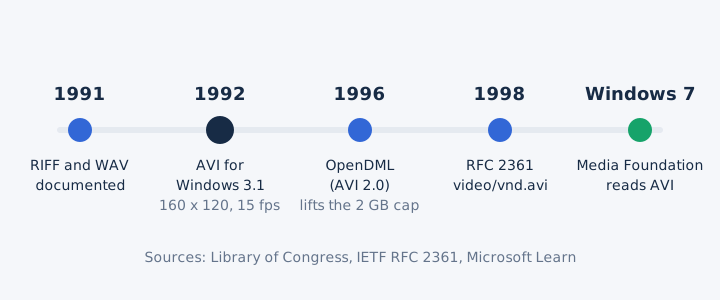
Microsoft introduced AVI in 1992 with Windows 3.1 and Video for Windows, and the 1996 OpenDML extensions, unofficially called AVI 2.0, lifted its early limits. The first version played just 160 x 120 pixels at 15 frames per second, according to the Library of Congress.
Five dates trace AVI from a Windows 3.1 feature to a legacy format.
- 1991: Microsoft and IBM document RIFF, the chunk structure behind both WAV and AVI.
- 1992: Microsoft specifies AVI for Windows 3.1 and its Video for Windows software.
- 1996: OpenDML extensions, unofficially AVI 2.0, add bigger files and a new index.
- 1998: RFC 2361 registers video/vnd.avi for naming the codec inside an AVI.
- Windows 7: Media Foundation reads AVI natively; Microsoft later marks DirectShow as legacy.
How Is an AVI File Structured?
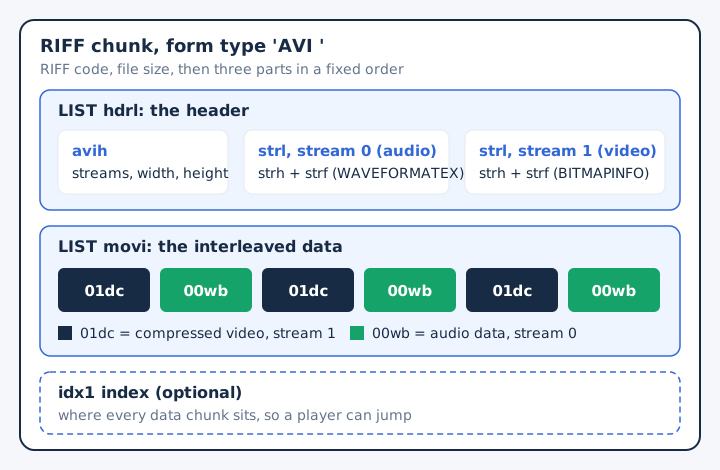
An AVI file is one RIFF chunk tagged 'AVI ' that holds an hdrl header list, a movi data list and an optional idx1 index, always in that order. Every tag is a FOURCC, four ASCII characters stored as one 32-bit number.
Each part of the file carries its own four-letter name.
- RIFF header: the RIFF header holds the 'RIFF' code, the file size and the form type 'AVI '.
- hdrl list: the main avih header records how many streams the file has, plus picture width and height.
- strl lists: each stream gets one strl list with a stream header (strh) and a format chunk (strf).
- movi list: the movi list carries the actual video frames and audio samples, interleaved chunk by chunk.
- idx1 index: the optional idx1 index records where every data chunk sits in the file.
The chunk names inside movi show the interleaving at work. Microsoft labels audio data from stream 0 as 00wb and compressed video from stream 1 as 01dc, so an interleaved file alternates 01dc and 00wb chunks. Two more codes exist: db marks an uncompressed frame and pc marks a palette change.
Each audio stream describes itself with a WAVEFORMATEX block. That block records the same details a WAV file's fmt chunk records, such as format code, channels and sample rate, because both formats grew from RIFF.
What Codecs Are Used With AVI Files?
AVI files use DivX, Xvid, Cinepak, Indeo, Motion JPEG, DV or no compression for video, and PCM or MP3 for audio. Each stream names its codec with a FOURCC tag in its stream header, so one AVI can differ completely from the next.
Five codec groups turn up in AVI files, split by stream type.
| Stream | Common codecs | Note |
|---|---|---|
| Video | DivX and Xvid (MPEG-4 ASP), Cinepak, Indeo | Your player needs the matching codec installed |
| Video | Motion JPEG, DV | DV comes from camcorders; Motion JPEG stores JPEG frames |
| Video | Uncompressed | Huge files, but no codec needed to decode |
| Audio | PCM (WAVE) | Uncompressed sound, the same coding as CD audio |
| Audio | MP3 at a constant bit rate | Compressed sound, far smaller than PCM audio |
When an AVI plays sound with no picture, check the video codec first. The Library of Congress notes that the AVI wrapper is easy to read, while the bitstream inside needs a decoder.
What Is DV AVI?
DV AVI is an AVI file that carries digital video (DV) from a camcorder, and Microsoft defines two kinds of it, Type-1 and Type-2. Microsoft's example DV file runs 720 x 480 pixels at 29.97 frames per second, with 120,000 bytes per frame.
Type-1 and Type-2 split on one question: where the sound is stored.
| Type | How audio is stored | Trade-off |
|---|---|---|
| Type-1 | Inside one interleaved DV stream with the picture | Smallest file, but Video for Windows cannot read it |
| Type-2 | In one to four separate audio streams beside the video | Works with Video for Windows, but sound is stored twice |
A Type-2 file suits older editing software, because each audio stream sits where a standard AVI reader expects it.
Which File Extension and MIME Type Does AVI Use?
AVI uses the .avi file extension and the registered media type video/vnd.avi, and every AVI file starts with the bytes RIFF....AVI LIST. The Library of Congress lists those identifiers, and RFC 2361 defines how video/vnd.avi names a codec.
Software checks these five identifiers to recognize the AVI file type.
| Identifier | Value |
|---|---|
| File extension | .avi |
| Registered media type | video/vnd.avi (RFC 2361) |
| Older media types | video/avi, video/msvideo, video/x-msvideo |
| File signature | RIFF....AVI LIST (hex 52 49 46 46, then 41 56 49 20) |
| PRONOM ID | fmt/5 |
Renaming a file to .avi does not convert it. Windows uses the extension only to pick an app, while the file signature and the bytes after it decide the real format.
How Large Are AVI Files?
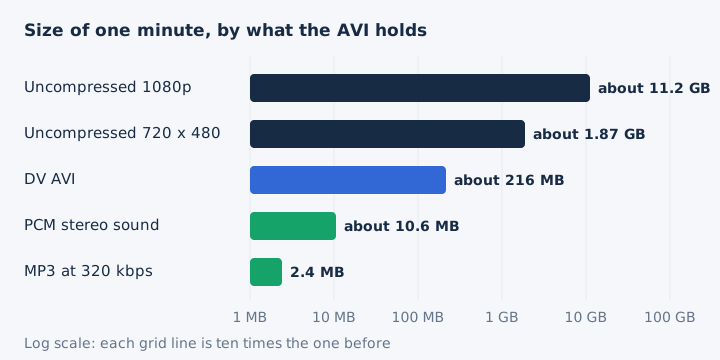
AVI file size depends on the codec inside: one minute of uncompressed 1080p video runs about 11.2 GB, DV AVI about 216 MB, and the same minute's sound as a 320 kbps MP3 takes 2.4 MB.
One minute of footage weighs very different amounts by codec, worked out here from frame size and bitrate.
| Content | Size per minute | How it is worked out |
|---|---|---|
| Uncompressed 1080p, 30 fps | About 11.2 GB | 1,920 x 1,080 x 24 bits x 30 frames |
| Uncompressed 720 x 480, 30 fps | About 1.87 GB | 720 x 480 x 24 bits x 30 frames |
| DV AVI | About 216 MB | 120,000 bytes x 29.97 frames x 60 |
| PCM stereo sound only | About 10.6 MB | 1,411.2 kbps at CD quality |
| MP3 at 320 kbps | 2.4 MB | 320 kbps x 60 / 8 |
Figures of about 2 GB per minute fit uncompressed video at standard definition; uncompressed HD needs roughly six times more. PCM audio adds about 10.6 MB per minute to any of these, and the MP3 bitrate decides how small an extracted soundtrack gets.
What Are the Limitations of the AVI Format?
The original AVI format caps a file at 2 GB, has no standard aspect ratio or time code field, and copes poorly with B-frame codecs and some variable bitrate audio. At the DV rate of about 3.6 MB per second, 2 GB holds about 10 minutes of footage, and OpenDML lifted that cap in 1996.
Six limits trace back to choices made in 1992.
- 2 GB file cap: one original AVI file stops at 2 GB, about 10 minutes of DV footage.
- No standard aspect ratio: players cannot read the frame shape, so video can look stretched or squeezed.
- Competing time code methods: several ways to store a time code make AVI awkward for film editing.
- B-frame codecs: AVI never planned for B-frames, so some players stumble on MPEG-4 video.
- Variable bitrate MP3 below 32 kHz: AVI cannot store this variable bitrate audio reliably.
- No standard subtitle track: text streams use arbitrary chunk codes, so players cannot rely on subtitles.
AVI keeps one real strength. Its transparent wrapper holds uncompressed or lossless video untouched, which is why the Library of Congress lists it as a master format.
How Do You Open an AVI File?
You open an AVI file on Windows by double-clicking it, because Windows reads AVI natively, and on a Mac, Linux or Android phone with a player such as VLC media player. An AVI that plays sound but no picture needs a codec your player lacks.
Each system takes a slightly different route to play AVI.
- Windows: Windows Media Foundation has read AVI since Windows 7, provided the codec is installed.
- Mac (macOS): QuickTime Player may refuse older formats; Apple suggests finding another app, and VLC is free.
- Linux: VLC media player lists AVI among its input formats and runs on Linux.
- Android phones: VideoLAN also ships VLC for Android, and it plays AVI files there.
Pick a player that carries many codecs, since the codec, not the .avi extension, decides whether the picture appears.
Is AVI Still Used Today?
Yes, AVI is still used for capture, editing and old archives, but newer containers have replaced it for web delivery. The Library of Congress prefers MPEG-4 AVC for web access, and it retired its own early AVI files in 1994 and 1995. On Windows, AVI has become a legacy format: Microsoft marks DirectShow, the API whose documentation describes AVI, as a legacy feature. YouTube still takes an AVI upload and re-encodes it.
AVI fell behind because it lacks a standard aspect ratio, reliable B-frame support and a subtitle track. MP4 is a newer, different container, and every browser plays it as web video. The full MP4 vs AVI comparison has its own page.
How Do You Get the Audio Out of an AVI File?
You get the audio out of an AVI with a desktop tool such as VLC or FFmpeg, which drops the video stream and saves the sound as MP3 or WAV. mp4tomp3.io does not read AVI files today, so the browser converter is not the route for this format. The Library of Congress lists PCM (WAVE) and MP3 as the AVI sound options, and that choice decides whether you need a new encode.
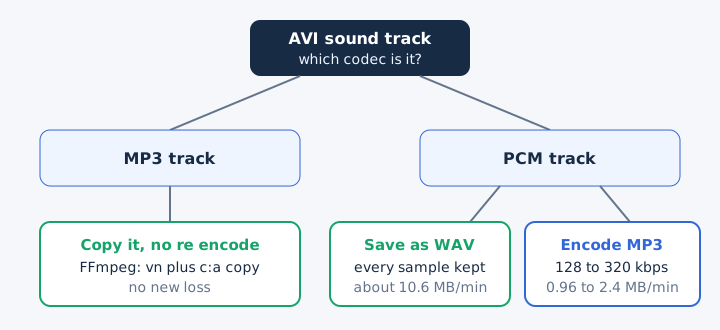
The right route depends on the sound track the AVI already carries.
- VLC: opens the AVI, discards the video and converts the sound to MP3, WAV or FLAC.
- FFmpeg with -vn: the -vn option blocks the video stream, so only sound reaches the output.
- FFmpeg stream copy: -c:a copy keeps an MP3 track exactly as it is, with no re-encode.
- PCM sound saved as WAV: stays uncompressed at about 10.6 MB per minute of stereo.
Audio extraction with VLC media player or FFmpeg runs on your own computer, so the file never leaves it.
Does mp4tomp3.io Convert AVI Files Today?
No, mp4tomp3.io does not read AVI files today; it converts MP4, MOV, M4V, WebM and MKV video to MP3 or WAV in the browser. The converter never uploads a file, so it opens only formats it can decode inside the browser, and AVI is not on that list yet. MP4, the first format it reads, is covered in our MP4 file guide.
Can VLC Extract the Audio From an AVI File?
Yes, VLC opens AVI files and can save just their sound, discarding the video and writing MP3, WAV or FLAC. VLC media player is free, and it writes the new audio file on your own computer, with no upload. Choose MP3 for a small file; our guide to what MP3 is explains how the format shrinks sound.
Can FFmpeg Copy an AVI Sound Track Without Re-Encoding?
Yes, FFmpeg copies the sound track untouched when you combine -vn, which drops the video, with -c:a copy, which skips re-encoding. The command ffmpeg -i clip.avi -vn -c:a copy clip.mp3 works when the AVI's sound is already an MP3 track. Stream copy moves the original audio packets without decoding them, so the output adds no new loss, the same idea that keeps lossless audio bit for bit intact.
Can PCM Audio From an AVI Be Saved as WAV Without Loss?
Yes, PCM sound from an AVI saved as a WAV file keeps every sample, because both formats come from RIFF and WAV stores PCM uncompressed. The cost is size: CD-quality stereo takes about 10.6 MB per minute. That uncompressed audio suits editing, and our WAV file guide covers the format in full.
Does Converting AVI Audio to MP3 Lose Quality?
Yes, encoding AVI sound to MP3 is a lossy step, so pick 256 or 320 kbps for music and keep the PCM or WAV copy for editing. A 320 kbps MP3 takes 2.4 MB per minute against about 10.6 MB for PCM, so lossy compression saves about three quarters of the space. Our MP3 bitrate guide shows how each MP3 bitrate trades size for sound.